"Our web app is already running, so we just want to release it on the app store as well."
To clients requesting estimates, this sounds like a very minor request. The reasoning goes that since the contents are identical, wrapping the outside into an app shell should be all it takes. In fact, that assumption holds right after development kicks off. Things that ran smoothly in desktop browsers generally work fine in simulators as well.
Breakages happen the moment it runs on physical hardware. Layouts clip into bottom screen bars. Offline support is silently disabled. Tapping an input field causes the entire screen to jump. Worse, none of these are "bugs"; they are intended specifications not mentioned in standard web documentation. This experience is chronicled straightforwardly in Putting Web on iOS Gets You Battered by Undocumented WebKit Quirks (Zenn), which details issues encountered during real-world projects by a lean development team.
"Working in Safari" does not mean "working in WKWebView"
This is the most common misconception. While the component that displays web content inside iOS apps (WKWebView) uses the same WebKit as Safari, sharing the same engine does not mean the same features are enabled.
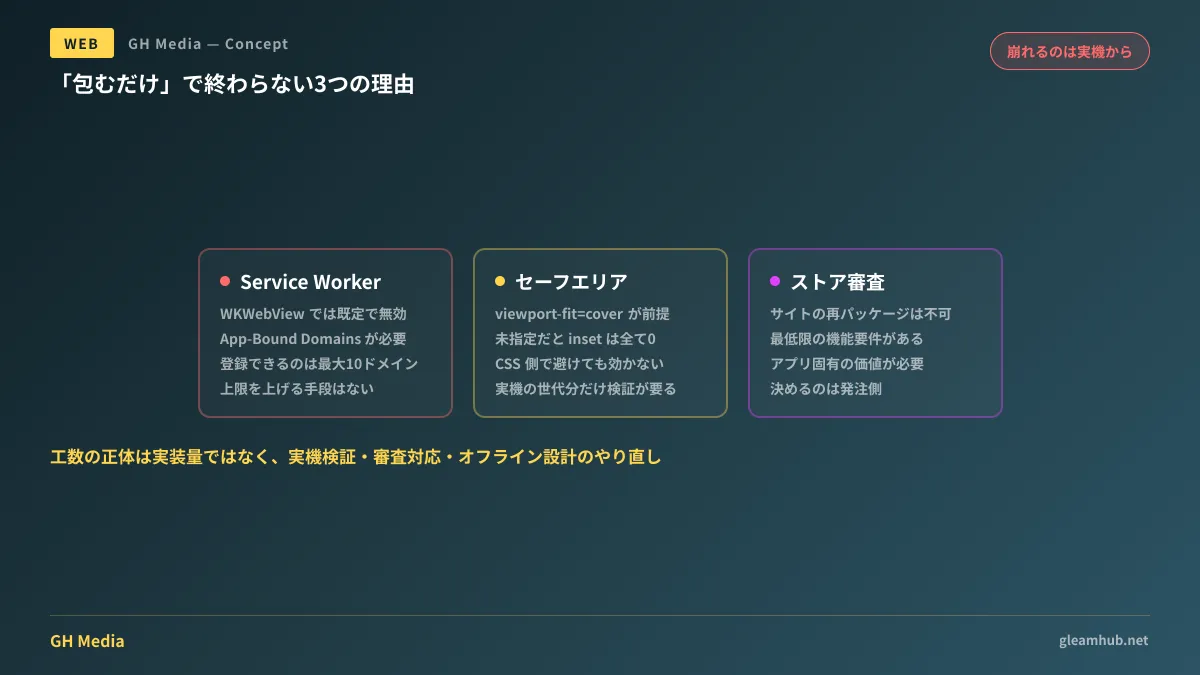
A prime example is Service Workers. While they form the foundation for offline support and cache management, Service Workers do not run by default in WKWebView for web content embedded in apps. Enabling them requires using App-Bound Domains, listing target domains in Info.plist, and turning on limitsNavigationsToAppBoundDomains on the WebView side.
Moreover, App-Bound Domains comes with a strict limit of up to 10 listed domains. Between external checkout pages, authentication providers, CDNs, and tracking tags, those 10 slots fill up faster than expected. On top of that, there is no official mechanism provided to increase this limit.
In short, the requirement to "make it work offline" carries a vastly different level of difficulty when implemented for the web versus WKWebView. For offline architectures designed to run entirely within browsers, see Local-First Web Architecture.
Visual breakages usually start from the screen edges
What developers typically notice first on physical devices is the layout. On devices with notches or the Dynamic Island, content slips beneath unsafe areas at the top and bottom. Alternatively, black bars linger at the edges of the display.
The cause is simple: without viewport-fit=cover specified, env(safe-area-inset-*) always returns 0. Even if safe area insets are accounted for in CSS, a value of 0 avoids nothing. Adding it also shifts WKWebView's behavior, sometimes introducing secondary issues like "adding a single line of meta tag broke scroll positions."
The crucial takeaway is that this type of fine-tuning is not a "design fix," but "verification effort on physical devices." Deciding which iPhone generations to support, whether to allow landscape orientation, and how deeply to adjust layouts when the software keyboard appears might seem mundane, but device inventory and testing cycles consume the vast majority of engineering hours.
"Simply wrapping a website" gets rejected during review
Even if everything works technically, one final hurdle remains. Apple's App Review Guidelines include minimum functionality criteria; apps that merely repackage an existing website will not be approved if deemed to lack sufficient standalone value or utility.
This is not a matter of engineering skill, but an established platform policy. Consequently, you must decide during planning what unique app-only experience to offer—whether push notifications, camera integration, offline reading, or biometric authentication. At least one capability must be present that cannot be achieved on the open web.
Only the commissioning client can make this call. If the agency adds features unprompted, estimates balloon; if omitted, the app gets rejected during review. This makes it the single most valuable item to lock down before work starts.
Four items to decide before estimation to prevent disputes
Addressing the following four points during requirements definition significantly cuts down unexpected additional costs and rework later on.
| Decision Item | What happens if left undecided |
|---|---|
| Supported iOS versions and device generations | Device testing scope expands indefinitely, surfacing right before release |
| What needs to be possible offline | Service Worker-dependent architectures fail on WKWebView, forcing complete rewrites |
| List of external domains opened within the app | Running into the 10-domain cap on App-Bound Domains after the fact |
| Features exclusive to the app version | App gets rejected in review, incurring extra development costs and delays |
The third item is particularly easy to forget. Adding payments or external authentication later can backfire by suddenly disabling working offline capabilities.
It is also worth evaluating beforehand whether releasing to an app store is genuinely necessary. Often, an installable home screen web app with push notifications meets every operational need; criteria for this choice are outlined in PWA Guide for Small and Medium Businesses. For precautions when migrating domains or origins of existing web apps, refer to Origin Migration for PWAs.
If you plan to start
Estimates built on the assumption of "simply wrapping a web app" will almost certainly miss the mark. What drives the discrepancy is not core coding volume, but three less visible cost categories: physical device testing, app store review prep, and re-architecting offline support.
The first thing to clarify is boiling down your app's core objective to a single goal: sending push notifications, enabling offline use, or securing a presence in app stores. Once established, the four items above almost resolve themselves.
GleamHub provides consultations on custom development, AI, and automation to help assess how far an existing web app should be packaged or whether an app shell is optimal. Because optimal setups depend on requirements, we provide customized estimates. Please reach out via our Contact Us page.