The moment a modal closes, a red warning appears in the console: "Blocked aria-hidden on an element because its descendant retained focus." Visually, nothing is broken, and operations work fine with both mouse and keyboard. Therefore, its priority drops, and it is left as is.
What makes this warning insidious is that applying workarounds found via search silences the warning while worsening the underlying problem. Furthermore, that regression is completely undetectable as long as you verify behavior with a mouse. This is why this issue continues to be reopened repeatedly across UI component repositories.
The browser is telling the truth
First, this warning is neither a library bug nor browser overreaction. It accurately points out a sequencing bug.
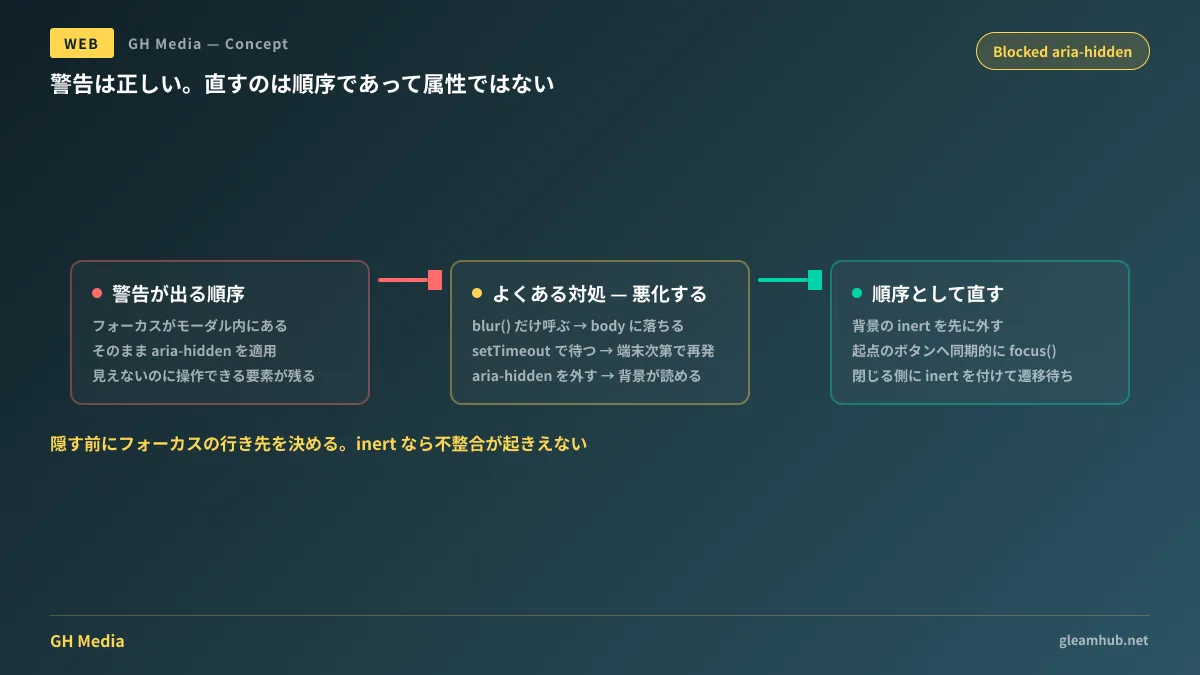
Here is what is happening: Focus is inside the modal. In that state, aria-hidden="true" is applied to the modal (or its ancestor). Consequently, the focused element is stranded inside a region hidden from assistive technologies.
From the perspective of screen reader users, focus certainly exists somewhere, but what is there cannot be announced. An element that can be operated yet does not exist is created. The browser judges this as an inconsistency, refuses the application of aria-hidden itself, and surfaces that fact as a warning. In other words, while the warning is displayed, aria-hidden is not taking effect.
The root cause is solely the sequence between the "hiding" operation and the "unfocusing" operation. If focus is moved outside before hiding, this state never occurs.
Why all commonly found fixes are wrong
Circulating workarounds fall into four categories. All of them make the warning disappear.
Calling document.activeElement.blur(). Because focus is removed without being transferred anywhere, focus drops back to body. Screen reader users are thrown back to the top of the page, losing the context of why they opened the modal in the first place. Keyboard users also find that pressing Tab no longer resumes from their previous position.
Delaying the application of aria-hidden using setTimeout. While the idea is to wait until focus moves, what is actually being waited on is merely an estimate: "it should probably finish within this duration." On slower devices, the delay will fall short and the warning will recur. This merely converts an ordering defect into a probability issue.
Removing aria-hidden. Because background content becomes readable by assistive technologies again, screen reader announcements leak outside the modal. The semantic signal indicating that the modal is "in the foreground" is completely lost, meaning the feature is discarded alongside the cause of the warning.
Disables the focus trap (equivalent to modal={false}). Similarly, pressing Tab will escape outside the modal. Users end up wandering through the background without ever being able to reach the close button.
What they share in common is that they force visual consistency without determining where focus should actually go. Setting aside legal discussions on how far accessibility compliance is mandated, this remains as a functional defect. Baseline considerations are summarized in Misconceptions about mandatory web accessibility.
Fixing it as a matter of sequence
The fix is simply rearranging the order of operations when closing.
- First, remove
inertattached to the background. If the target element where focus should return remains inert,focus()will not work. - Synchronously call
focus()on the triggering element that originally opened the modal. Store it astriggerRefupon opening. This is the part that determines where focus goes. - Apply
inertandpointer-events: noneto the closing modal. Useinertinstead ofaria-hidden - Unmount only after
transitionendortransitioncancelhas fired. Wait for an event, not an arbitrary amount of time.
function closeModal() {
  backdrop.removeAttribute('inert');   // 1. 戻す先を先に活かす
  triggerRef.focus();                  // 2. 起点へ同期的に戻す
  panel.setAttribute('inert', '');     // 3. 閉じる側を不活性にする
  panel.style.pointerEvents = 'none';
  panel.addEventListener('transitionend', unmount, { once: true });
  panel.addEventListener('transitioncancel', unmount, { once: true });
}
The reason for choosing inert in step three is that while aria-hidden merely "hides from assistive technologies," inert stops receiving focus altogether. Because aria-hidden hides the element while still allowing focus, this inconsistency can structurally arise. With inert, that combination cannot happen. Rather than handling a warning, the reality is that inert should have been used from the start.
Furthermore, if the modal is implemented with <dialog> + showModal(), background inertness and focus trapping are handled natively by the browser. Because this allows dropping custom focus management code entirely, it is worth considering replacing existing implementations with this approach. Details are covered in The dialog element and closedby attribute.
Because mice cannot detect it, change your verification procedure
This type of bug is 100% missed when testing with a mouse. Verification procedures must be segregated.
- Open the modal using only the keyboard, close it with Esc, and press Tab once. If focus lands on the element immediately following the button that opened it, it is correct
- If focus jumps to the top of the page after closing, or if you lose track of where focus is, a
blur()-style workaround has been implemented - Open and close rapidly during animations to see if the warning recurs.
setTimeout-style fixes will expose themselves here
In many cases, screens that should not be modals in the first place are forced into modals; in such situations, splitting the screen into separate pages is faster than over-engineering focus management. Decision criteria are summarized in Choosing between modals and separate pages.
What to do next
If this warning appears in the console, first look for "fixes" already put in place. A standalone call to blur(), setTimeout inside close handlers, or overrides that negate aria-hidden passed to components. If any of these are present, removing them is your starting point. It is entirely possible that the warning disappeared only because things were made worse.
Once that is done, rearrange the close handler sequence to: "reactivate background → return focus to origin → apply inert to closing element." Existing animations can be kept as is.
If you wish to consult on accessibility retrofits for existing sites or standardizing modal-related components, GleamHub offers custom development, AI, and automation consultations. Because the scope of modification varies based on implementation architecture, please consult us individually. Reach out through Contact Us.
Sources
- Blocked aria-hidden: The Warning is Right, and Every Fix You’ve Found is Wrong — CSS-Tricks
- aria-hidden — MDN Web Docs
- inert — MDN Web Docs
- bug(MatDialog): Blocked aria-hidden on an element because its descendant retained focus — angular/components #31927
- Blocked aria-hidden on an element because its descendant retained focus — uikit/uikit #5104