A website redesign proposal states: "We will leverage the latest CSS specifications to deliver a lightweight implementation with reduced dependence on JavaScript." Because nothing in that statement sounds negative, it typically gets approved as is.
From the client's perspective, however, you cannot determine a single thing from that sentence alone. Does "latest" refer to something running stably across all major browsers, or something implemented in only a handful? Even when writers use the exact same words, the scope of what they mean can be entirely different. And this discrepancy only surfaces after launch—weeks after release, reports trickle in that "the layout breaks in certain environments."
Results from the 2026 State of CSS survey (an annual poll of developers writing CSS) provide useful material for making this judgment. That is because they show what developers are actually using, and what they say they "want to use but avoid." Rather than debating theoretical merits of technologies, it reveals the reality of adoption, making it well worth reading for clients.
"What is used" and "what is admired" are two different things
What first catches the eye in the survey results is that these two categories do not align.
The features cited as most used and most loved were :has(), aspect-ratio, and CSS nesting. All of these have had time to mature since their introduction and are now supported across major browsers. That is precisely what it means to be used in production.
On the other hand, the feature ranked number one when asked about "favorite new features" was Anchor Positioning. The survey authors commented on how notable it was for it to rank first despite limited browser support. And in another question—"features avoided due to browser support"—Anchor Positioning and the View Transition API also placed near the top.
The exact same feature ranks near the top both for "most loved" and "least usable." This reflects developers' honest reality. The desire to experiment and the viability for client projects are treated as completely separate matters.
Features singled out as unused included Gap Decorations and if(), with browser support cited as the reason in both cases. In short, adoption is determined by support status, not the intrinsic quality of a feature—a consistent trend throughout the entire survey.
Just ask "which Baseline stage is it in?"
It is unrealistic to expect clients to evaluate technical specifications. However, there is a single shared yardstick: Baseline.
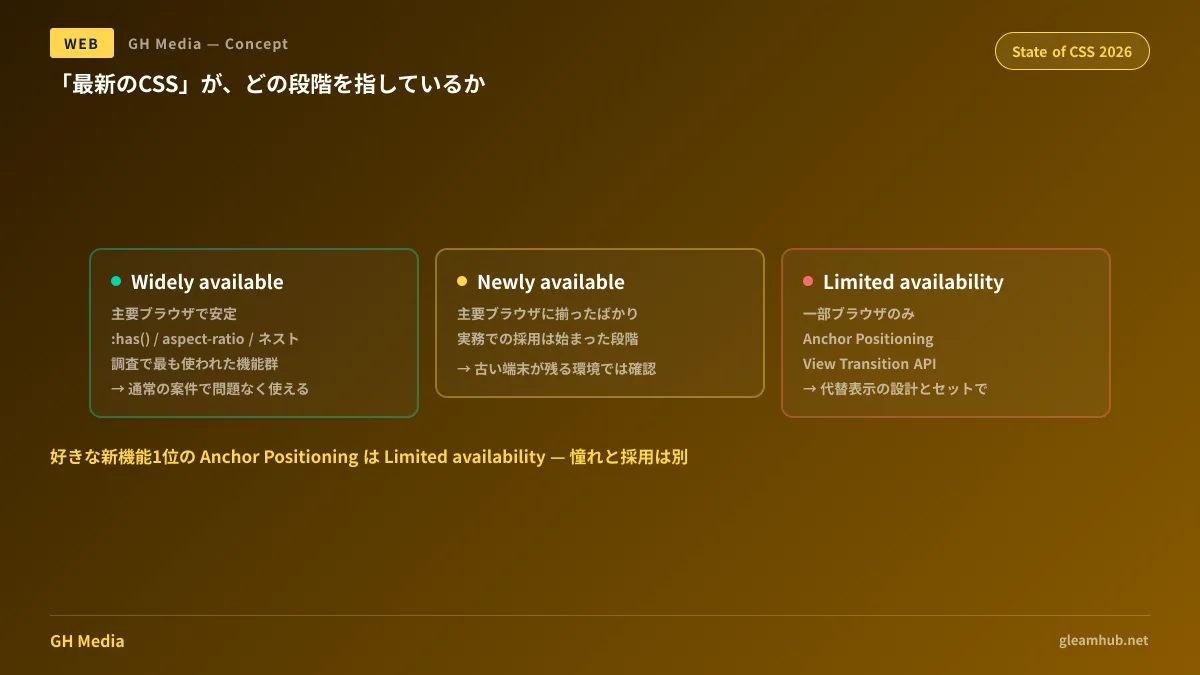
Baseline is an indicator that expresses support status across major browsers in stages, broadly divided as follows:
| Stage | Meaning | Handling from a client perspective |
|---|---|---|
| Widely available | Can be used stably across major browsers | Safe to use in standard projects without issue |
| Newly available | Only recently supported across all major browsers | Usable, but verification is required in environments where older devices linger |
| Limited availability | Supported in only some browsers | If used, should be explained alongside a fallback design |
The survey finding that Anchor Positioning remains popular among developers while sitting at the Limited availability stage is a prime example of how "what developers want to use" can diverge from "what is safe for current projects."
Extending this mindset to site-wide technology selection is covered in Web Platform Baseline 2026 and corporate site implementation standards. What Anchor Positioning itself actually solves is explored in Building JavaScript-free UIs with CSS Anchor Positioning.
Three questions to direct at a proposal
Even without understanding the underlying technology, asking these three questions will reveal the true character of a proposal.
1. "Which Baseline stage does that implementation fall under?"
If you receive no clear answer or get brushed off with "it's modern, so don't worry," the proposing party may not understand the stages either. If the answer is Widely available, that immediately eases concerns. If the answer comes back as Limited availability, proceed to the next question.
2. "How does it appear in unsupported browsers?"
CSS has the property of ignoring unsupported properties while continuing to execute. Consequently, it is possible to design so that unsupported browsers simply "lack decorations" rather than "break completely." Whether someone can explain this difference serves as a test of whether the implementer is conscious of support realities. A partner who can immediately answer, "In unsupported environments, only this decorative styling will be absent while the content remains fully legible," has thought it through.
3. "Can another company take over this implementation?"
While this point does not emerge directly from the survey findings, it is the single heaviest question for a client. A site built on idiosyncratic, proprietary implementations causes costs to skyrocket when handed over to another agency later. The more standard CSS is used, the smoother handovers become. A proposal to "use the latest CSS" often actually works in favor of handoff ease; look to see whether they can explain that advantage.
Clear insights into AI generation usage as well
The survey also included a question on how much AI generation developers use when writing CSS. Respondents reporting 0–50% generation usage totaled 3,031, while those reporting over 50% totaled 721. At present, developers having AI write their code entirely remain a minority.
This is not to say "it is trustworthy because AI wasn't used." Rather, what clients should take away is that caring about whether support status was verified is far more substantive than worrying about whether code was generated by AI. If written by hand without checking browser support, the same issues arise; if written with AI and properly verified, problems do not occur.
Overall satisfaction with CSS across the survey averaged 4.0 out of 5. Implementation options are expanding, creating a situation where multiple approaches exist to produce the exact same appearance. That is precisely why the explanation for which approach was chosen defines the quality of a proposal.
What to do next
If you are currently evaluating a proposal or will be in the near future, try asking the three questions above as they are. Rather than the exact words in the answer, their ability to respond immediately will give you clear visibility into the implementation.
For sites that are already live, start by verifying whether reports of broken layouts are skewed toward specific browsers or devices. If a pattern emerges, there is a high likelihood that implementations introduced without verifying support status are the cause. Reviewing rendering speed alongside How to read Core Web Vitals makes prioritizing fixes much easier.
If you are planning a new website build or a redesign and want to consult on implementation soundess, we handle inquiries through GleamHub's Website Production & Redesign Consultation. Because optimal configurations depend on requirements, we provide customized quotes. Inquire via Contact Us.