

There is an issue raised during site acceptance reviews almost without fail: "The Media tab in the global navigation is highlighted on category index pages, but the highlight disappears once you open an article detail page."
While it looks like a trivial cosmetic bug, fixing it often drags on unexpectedly. On many websites, the logic determining this active state is scattered across templates, JavaScript, and CSS. Fixing it in one place breaks it on another page, starting a frustrating cycle of regressions.
A proposal to solve this declaratively in CSS has begun moving forward at the W3C. However, it cannot be used on websites you are building today. Until it becomes available, it remains an architectural question of where to place that evaluation logic.
Four scenarios where URL matching consistently breaks
The requirement can be stated in a single sentence—"highlight links that match the current page URL"—but implementation inevitably runs into the following edge cases:
1. Trailing slashes. Comparing /media and /media/ as plain strings will not match. Even if site settings normalize toward one format, matching fails if link hrefs are not written consistently.
2. Nested pages. When viewing /media/0123-example/, you want the "Media" navigation link highlighted. Exact matching fails to highlight it. But if you switch to prefix matching, it ends up catching unintended paths like /service/ and /services-list/.
3. Pagination. Should category navigation links remain highlighted on paginated paths like /media/tech/2/? If this is not defined in specifications, it fluctuates based on developer whim.
4. Query parameters and hash fragments. Do URLs match when parameters like ?page=2 or #section are appended? On sites with search results or faceted filtering, this causes indicator flickering.
Across all four cases, there is no single "correct" answer; these are specifications that each website must decide for itself. Yet because they are rarely written into requirements specifications, developers make ad-hoc decisions on the fly, scattering matching logic across the codebase.
Proposals for CSS-only solutions are not ready yet
This pain point has long been recognized, and CSS actually includes the :local-link pseudo-class designed specifically for this purpose. It targets links matching the current document URL, was reintroduced in Selectors Level 4, and remains part of the current specification.
However, no browser has implemented it yet.
Looking further ahead, Chrome is exploring declarative route and navigation matching. The approach involves defining named routes with @navigation and selecting them on corresponding links via :link-to(--detail). Route patterns can also leverage url-pattern(). It was introduced to the CSS Working Group in January 2026, gathered feedback at CSS Day in June, and is currently slated for discussion at the Berlin F2F meeting.
The ultimate goal is allowing the four scenarios mentioned above to be expressed declaratively via pattern matching. Prefix matching and parameterized routes could then be handled without writing custom JavaScript.
On the other hand, parameter matching—such as selecting only links pointing to routes with a specific ID—remains under exploration, with both specification and implementation still in their infancy. You cannot base architectural decisions for websites being built today on this proposal.
The approach to take today: consolidating matching into a single place
If building with production-ready methods today, the strategy is straightforward: evaluate matching once on the server or in templates, output the result as an aria-current attribute, and let CSS simply handle styling based on that attribute.
---
// 判定ロジックはここ1か所に置く
const path = Astro.url.pathname.replace(/\/?$/, "/"); // 末尾スラッシュを揃える

// そのページ自身か
const isPage = (href: string) => path === href;
// その配下にいるか(/service/ と /services-list/ を取り違えないよう区切りまで見る)
const isSection = (href: string) => path === href || path.startsWith(href);
---
<a href="/media/" aria-current={isPage("/media/") ? "page" : undefined}
   data-section={isSection("/media/") ? "" : undefined}>
  メディア
</a>
nav a[aria-current="page"] {
color: var(--color-accent);
border-bottom: 2px solid currentColor;
}
/* 配下ページでは、意味づけを伴わない弱い装飾にとどめる */
nav a[data-section] {
color: var(--color-accent);
}Normalizing trailing slashes on href ensures that checking startsWith will not mistakenly match /service/ against /services-list/. Whether prefix matching remains reliable hinges on including a single line of preprocessing to standardize trailing slashes.
This structure provides three distinct advantages:
Logic is centralized in a single location. When specifications change—such as deciding that paginated pages should also be highlighted—there is only one place to modify. When logic is scattered, scoping the impact of such change requests becomes nearly impossible.
Active page context is communicated to screen readers. Relying solely on color changes or underlines only communicates the active state to sighted users. The aria-current="page" attribute conveys the semantic meaning that "this is the current page." Separating presentation from semantics follows the exact same model discussed in Adding highlights with the Custom Highlight API.
No JavaScript is required. It eliminates the need to load client-side scripts purely for current-page highlighting. How unnecessary JavaScript slows down sites was covered in Root causes of slow websites.
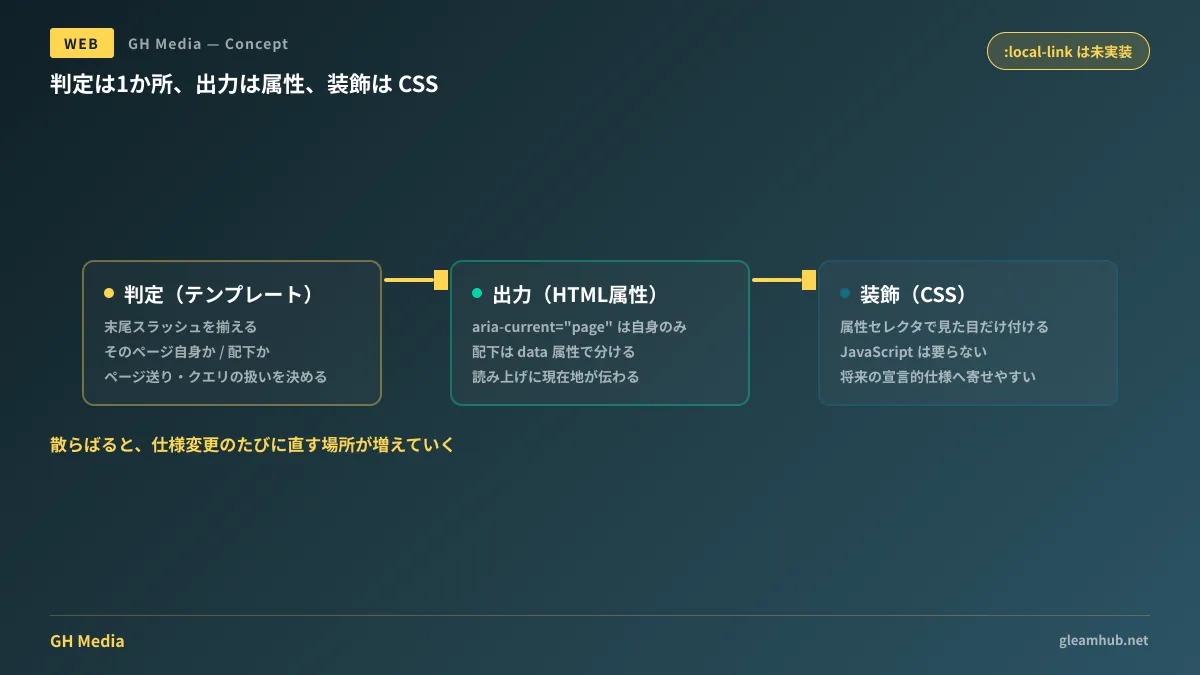
Note that aria-current="page" should only be applied to a link pointing directly to the current page itself. When highlighting a parent category link on an article detail page, that link is not the current page. It is best handled separately via styling classes or the data- attribute. Mixing these up causes screen reader environments to announce two different items as "current page."
A single line to document in requirements
Adding the following line to your requirements document during the ordering or specification finalization phase will reduce back-and-forth after implementation.
Define how the current-page indicator in the global navigation behaves, including on detail pages, during pagination, and when filtering.
With this single line, the four branches above are settled before implementation. Without it, they are only decided after issues are flagged during acceptance testing. We also discussed how far clients and web agencies should align on implementation standards in How Clients Can Interpret the State of CSS 2026.
What to do next
If you have a site currently in operation, open one article detail page and verify whether the current-page indicator in the global navigation behaves as intended. If it disappears, the logic is likely checking for an exact match, and the fix itself will be minor.
If you are building a new site or planning a redesign, decide upfront on a policy of consolidating current-page matching into a single template function and standardizing its output to aria-current. When CSS provides a declarative mechanism in the future, that single function will be the only thing you need to replace.
GleamHub offers consultations for development, AI, and automation to assist with establishing site implementation standards, accessibility remediation for existing sites, and frontend architecture reviews. Because the scope of work varies depending on your existing implementation, please reach out for an individual consultation via Contact Us.


