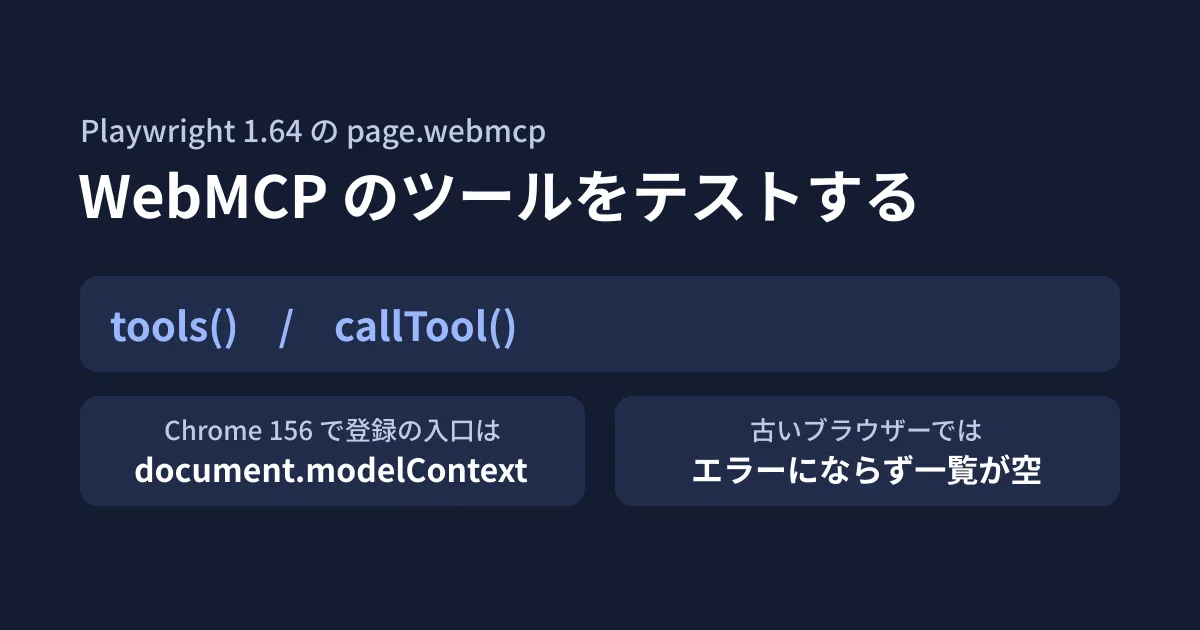
Supporting WebMCP (an experimental browser API through which a page registers tools), which lets AI agents call operations such as bookings or quotes directly from a page, adds one more thing to check. In addition to how screens display and how buttons behave, you need to check "whether the tools for agents are registered" and "whether they return correct results". Because tools are not shown on screen, visual checks will miss them.
Playwright 1.64, released on October 7, 2026 (UTC), added page.webmcp.tools(), which lists the tools a page has registered, and page.webmcp.callTool(), which calls a tool. The release notes say "so you can test them like any other part of your app".
In this article, after reviewing the Playwright repository and the draft WebMCP specification, we used @playwright/test 1.64.1 in the editorial team's test environment to actually test tools registered on a test page. The Chromium version targeted by Playwright 1.64 is 156.0.8078.4, and Playwright's configuration file (browsers.json) also labels this browser "Chrome for Testing". Because we could not obtain it from Playwright's distribution source in this environment, we used Chrome for Testing with the same version number distributed by Google.
It does not work unless enabled
WebMCP is an experimental feature; in Chromium it is enabled with the launch argument --enable-features=WebMCP (according to the Playwright documentation, Firefox uses a preference setting and WebKit is not supported). Calling tools() without the argument produced the following error.
webMCP.tools: WebMCP is not enabled. Launch the browser with the "--enable-features=WebMCP" argument.In the test configuration, put the argument in launchOptions.args.
The registration entry point was document.modelContext
The first thing we stumbled on in testing was the entry point for registering tools. Playwright's API documentation describes the WebMCP API as navigator.modelContext. However, on a page opened with the argument in Chrome for Testing 156, navigator.modelContext was undefined, and only document.modelContext existed. On a page written to register via navigator.modelContext, tools() returned an empty array, and callTool() failed with "No WebMCP tool named “estimate_price”."
The draft WebMCP specification (webmachinelearning/webmcp) also defines the API as modelContext of Document, limited to secure contexts (HTTPS, or pages treated like localhost). Playwright 1.64's implementation looks for document.modelContext first and falls back to navigator.modelContext if it is not found.
If earlier explanations or sample implementations use navigator.modelContext, writing the code to check both, as shown below, ensures tools are registered in either environment. We cover the concepts behind WebMCP in What is WebMCP and how to implement it in our article on implementing WebMCP (article 0445 was written using navigator.modelContext, so we corrected it to document.modelContext on October 19, 2026).
<script>
  // 仕様の原稿は document.modelContext。古い解説の navigator.modelContext も見ておく
  const mc = document.modelContext ?? navigator.modelContext;
  mc?.registerTool({
    name: 'estimate_price',
    description: 'ページ数から概算を返す(検証用の架空の計算)',
    inputSchema: { type: 'object', properties: { pages: { type: 'number' } }, required: ['pages'] },
    annotations: { readOnlyHint: true }, // 仕様の原稿のキー名。tools() の結果では readOnly になる
    async execute({ pages }) {
      if (!(pages > 0)) return { content: [{ type: 'text', text: 'pages must be positive' }], isError: true };
      return { content: [{ type: 'text', text: String(pages * 2) }] };
    },
  });
</script>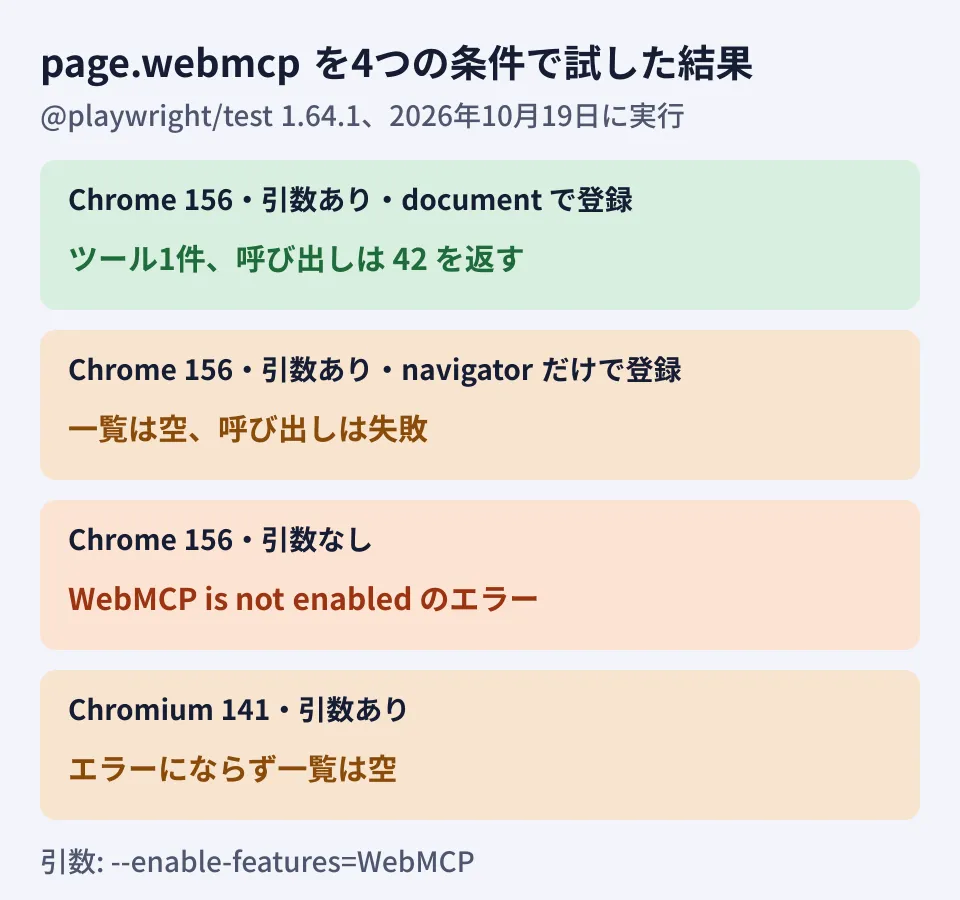
The test code
This is the test we ran against the test page. On Chrome for Testing 156 it resulted in "1 passed".
// playwright.config.ts
import { defineConfig } from '@playwright/test';

export default defineConfig({
  testDir: './tests',
  use: {
    baseURL: 'http://127.0.0.1:8790',
    launchOptions: {
      args: ['--enable-features=WebMCP'],
      executablePath: process.env.CHROME_PATH, // 検証環境では Chrome for Testing 156 を指定
    },
  },
});
// tests/webmcp.spec.ts
import { test, expect } from '@playwright/test';
test('見積もりツールが登録され、正しく計算する', async ({ page }) => {
await page.goto('/page2.html');
// ツールが0件でもループは素通りするため、件数と名前を先に確かめる
const tools = await page.webmcp.tools();
expect(tools.map(t => t.name)).toContain('estimate_price');
const ok = await page.webmcp.callTool('estimate_price', { pages: 21 });
expect(ok).toEqual({ content: [{ type: 'text', text: '42' }] });
// 不正な入力はツール側で isError を返す設計にしておく
const ng = await page.webmcp.callTool('estimate_price', { pages: 0 });
expect(ng).toMatchObject({ isError: true });
});executablePath is unnecessary if your environment can use the browsers distributed by Playwright.
Three pitfalls we found by running it
The first is that on older browsers it returns empty results instead of failing. When we ran the same arguments on Chromium 141, which was already installed in this environment (older than the version Playwright 1.64 targets), tools() did not raise an error and returned an empty array. The documentation says "Throws if the browser was launched without WebMCP support", but with this combination no exception was thrown. A test that only loops over "call every registered tool and check it" will pass with zero tools. Reading the Playwright 1.64.1 implementation, the check for whether the feature is enabled only looks at the launch arguments, not at whether the browser actually supports WebMCP. Always include a line that checks for a tool's existence by name, as in the test above. When we actually ran it on Chromium 141, it failed at this line (Received array: []).
The second is that the browser does not check input types. Passing a string 'abc' to a tool that defines pages as a number did not cause callTool() to throw, and the value reached the tool's execute. The Playwright documentation also says to "treat them as untrusted input" regarding a tool's name, description, input definition and results. Validate input inside the tool, design it to return isError: true for invalid values, and test that branch as well. The isError result came back as-is, as the documentation describes.
The third is the key names in annotations. In our test, we wrote annotations: { readOnly: true } at registration, and the tools() result did not include annotations. When we later checked the draft specification, the keys at registration are readOnlyHint, untrustedContentHint and consequentialHint, and readOnly was a name not in the specification. Meanwhile, the return value fields listed in the Playwright documentation are readOnly, untrustedContent and consequential. The Playwright 1.64.1 implementation maps readOnlyHint and the like received from the browser to these names, and does not return annotations itself unless at least one of them is true. The editorial team believes it is likely that it was not returned because of the wrong key name on the test page. Note that the names differ: readOnlyHint on the registering page, and readOnly in the results you check in tests. The HTML example above has been corrected to readOnlyHint, but we have not run the corrected page.
Building it into pre-delivery checks (editorial team's proposal)
- Pin the browser version: The entry points and behavior of experimental features change between versions. Record the version of the browser that runs the tests, and review the WebMCP tests whenever you upgrade it
- Check the tool list against the specification: Preparing one test that compares the tool names and input definitions agreed at the time of the order with the result of
tools()lets you notice tools that were added or removed by mistake - Make calls with test data:
callTool()really executes the tool's processing. Call tools that perform hard-to-undo operations, such as bookings or orders, in a test environment and with test accounts
To start, write one test that confirms a single tool is registered on a page that supports WebMCP (or is planned to), and check locally that the result changes depending on whether --enable-features=WebMCP is present; this helps you catch configuration gaps early.
On October 19, 2026, we reviewed
docs/src/api/class-webmcp.md,class-page.mdandpackages/playwright-core/browsers.jsonat the v1.64.1 tag of microsoft/playwright and the draft release notes, the release notes and WebMCP API documentation on playwright.dev, the GitHub release, the npm publication date and time, the playwright-core 1.64.1 implementation, andindex.bsandREADME.mdin webmachinelearning/webmcp (documentation review). In the editorial team's test environment (Linux, Node.js v22.22.0, @playwright/test 1.64.1), we used Chrome for Testing 156.0.8078.4 and Chromium 141.0.7390.37 to list and call tools registered on a test page and to run the test in this article (hands-on testing). In the HTML example in this article, only theannotationskey names were corrected toreadOnlyHintduring fact-checking, and it has not been run since the correction. We have not verified Playwright's own distributed Chromium, Firefox, the stable release of regular Chrome, or calls from Playwright MCP or real AI agents.
GleamHub's development, AI and automation consultations cover developing WebMCP-enabled websites and business systems and setting up pre-delivery testing. Since the approach depends on the operations you support and how widely they are exposed, please reach out via our contact form.
References
- Playwright release notes(microsoft/playwright, docs/src/release-notes-js.md)
- class: WebMCP(microsoft/playwright v1.64.1, docs/src/api/class-webmcp.md)
- microsoft/playwright v1.64.1 — packages/playwright-core/browsers.json
- webmachinelearning/webmcp — index.bs
- webmachinelearning/webmcp — README.md
- npm registry — @playwright/test