

Immediately after introducing on-site search, reports sometimes surface that "searching breaks parts of the page." The search process itself is correct, and target text is properly highlighted in yellow. Yet accordions nearby stop opening, and form inputs disappear.
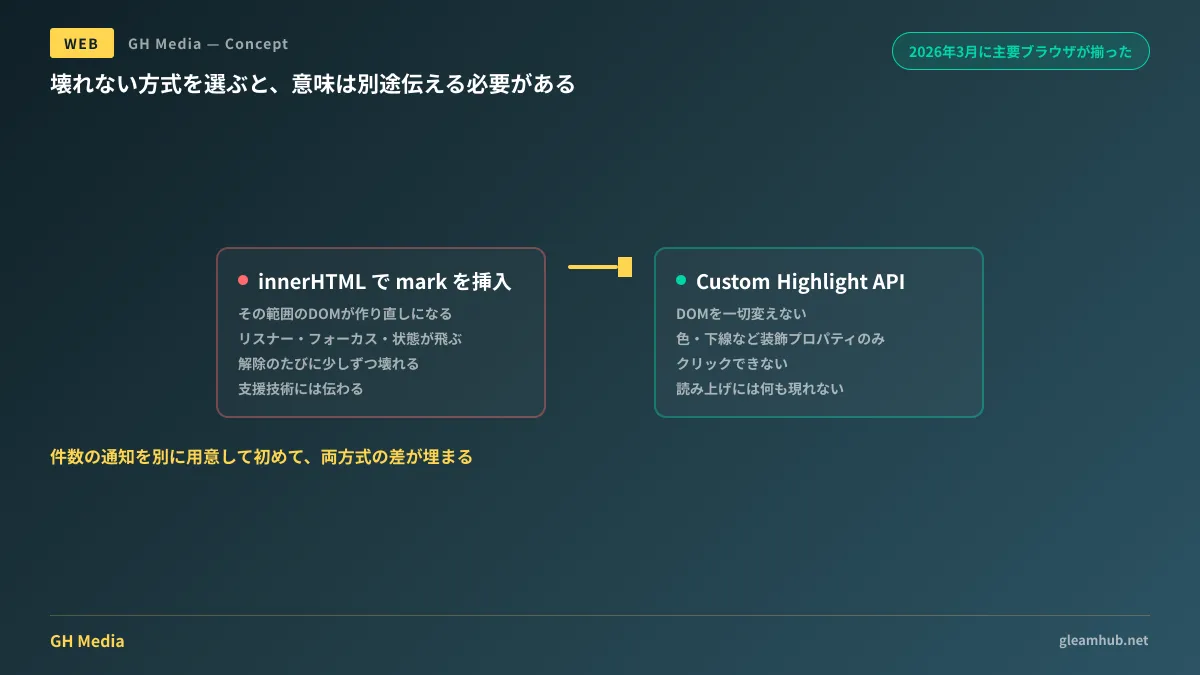
The culprit is usually not the search logic, but how the highlighting is inserted. Rewriting innerHTML to wrap matched strings in <mark> forces the DOM in that range to be rebuilt from scratch. Attached event listeners vanish, focus is lost, and state tracked by React or Vue is wiped out.
A way to avoid this side effect became available across major browsers in March 2026.
Applying color without touching the DOM
The CSS Custom Highlight API is a mechanism where text ranges are designated as JavaScript Range instances and styled from CSS. It leaves HTML structure completely untouched.
const range = new Range();
range.setStart(textNode, 12);
range.setEnd(textNode, 18);

CSS.highlights.set("search-hit", new Highlight(range));::highlight(search-hit) {
background-color: #fff3a3;
color: #1a1a1a;
}What it does is open up the mechanism browsers have long used for ::selection (the color seen during text selection) to arbitrary text ranges. Similar mechanisms include ::spelling-error and ::target-text, which share the characteristic of rendering outside the DOM.
Because the DOM remains unchanged, event listeners, focus, and component states are all preserved. Clearing highlights simply requires calling CSS.highlights.delete("search-hit"), without any process needed to restore original HTML. This structurally eliminates the issue where implementations restoring innerHTML gradually break pages upon each unhighlighting.
Browser support reached Chrome and Edge at version 105 (August 2022), Safari at 17.2 (December 2023), and Firefox at 149 (March 2026). The final piece fell into place in March 2026, which is also when it joined Baseline.
Limitations provide better decision criteria
When considering adoption, it is actually the constraints that matter most.
1. Available CSS properties are restricted. You can only specify color, background-color, text-decoration and its related properties, text-shadow, and a select few like -webkit-text-stroke-color. Properties like background-image are ignored if specified. Styling such as enclosing highlights with padding or borders, or adding rounded corners, is not possible.
2. They cannot be clicked. Highlights are purely visual and do not receive pointer events. A UI where "clicking a highlighted snippet jumps to the next match" cannot be built using this API alone. Capturing position requires separate logic to compute coordinates from the underlying Range.
3. Assistive technologies are not notified. This is the most frequently overlooked point. Because nothing is added to the DOM, the document remains entirely identical before and after highlighting from the perspective of a screen reader. Even if it is visually apparent that three matches were found, nothing changes in screen reader announcements.
The third point is not a flaw of the API, but a consequence of its design. It was created strictly for presentation rather than semantics. Consequently, information like match counts or "match X of Y" must be presented as separate text alongside the highlights. Using an aria-live region to announce counts is standard practice.
Conversely, meaningful emphasis should continue using <mark> elements as before. Key phrases in copy or emphasis intended for search engines have no semantic value unless present in the DOM.
What to decide during procurement and implementation
The requirement to "highlight search results" can be written in a single line, but what can be achieved depends on the implementation approach. Clarifying this during requirement definition prevents rework.
Whether users interact with the highlighted areas. If requirements include interactions such as clicking to navigate or hovering for tooltips, the Custom Highlight API alone is insufficient. The presence or absence of this single line changes the implementation approach.
Whether the highlight design includes underlines or borders. Background color, text color, and underlines are supported without issue. If designs specify rounded borders or accompanying icons, they collide with styling property limits. This should be confirmed prior to finalizing designs.
Whether there are screen reader requirements. In projects with accessibility requirements, such as public-sector or enterprise systems, estimates must account for implementing match count announcements separately. "Seeing the highlight is enough" is an assumption that only works for sighted users.
The issue of breaking assistive technology behavior through post-load DOM mutations was discussed in Blocked aria-hidden Warnings and How to Fix Them. This highlight issue shares the same root: visual manipulation interfering with the semantic layer. For aligning on implementation standards when commissioning agencies, see Interpreting State of CSS 2026 for Clients.
What to do next
If you maintain on-site search or document viewers, check whether your highlighting is implemented by rewriting innerHTML. If so, simply testing whether surrounding controls remain interactive after searching can uncover latent bugs.
When building anew, adding notes on whether highlighted items require interactivity and whether screen reader announcements are needed to the search highlighting line in your requirements sheet allows the implementation method to be selected immediately.
GleamHub provides support for on-site search implementations, accessibility remediation for existing websites, and front-end development standards through our Development, AI, and Automation Consultation. Because the scope of work varies depending on existing implementations, please reach out individually via Contact Us.


