An employee spends 30 minutes hunting through free stock photo websites for illustrations to put into a proposal. They avoid images requiring attribution licenses, download a few similar photos, and end up using the safest, most generic one. This is a familiar scene in document creation across small and medium-sized businesses.
Starting next week, this entire workflow can be completed directly within documents. Google Pics, an image generation and editing tool, has been introduced to Google Workspace and can be called directly from Docs and Slides. Crucially for administrators, this arrives not as a new optional service to deliberate adopting, but as a core service enabled by default.
What has become available
Google Pics is an image creation and editing tool powered by the Nano Banana image generation model. Its general availability was announced on September 1, 2026 (US time), rolling out gradually over several weeks to Google AI Pro / Ultra subscribers and users on many paid Google Workspace plans.
Its defining feature is handling both creation and editing within the same interface. Reported editing capabilities include:
- Replacing specific objects in an image without altering the rest
- Selecting an area and instructing edits via natural language
- Modifying and translating text within images while preserving design and typography
In day-to-day work, this "translation" and "partial replacement" are especially impactful. Requests like updating text inside an existing diagram or changing only the date on last year's campaign image happen daily in creative production. What once had to be sent back to designers can now be finished on the spot by employees.
Virtually no time to deliberate whether to adopt it
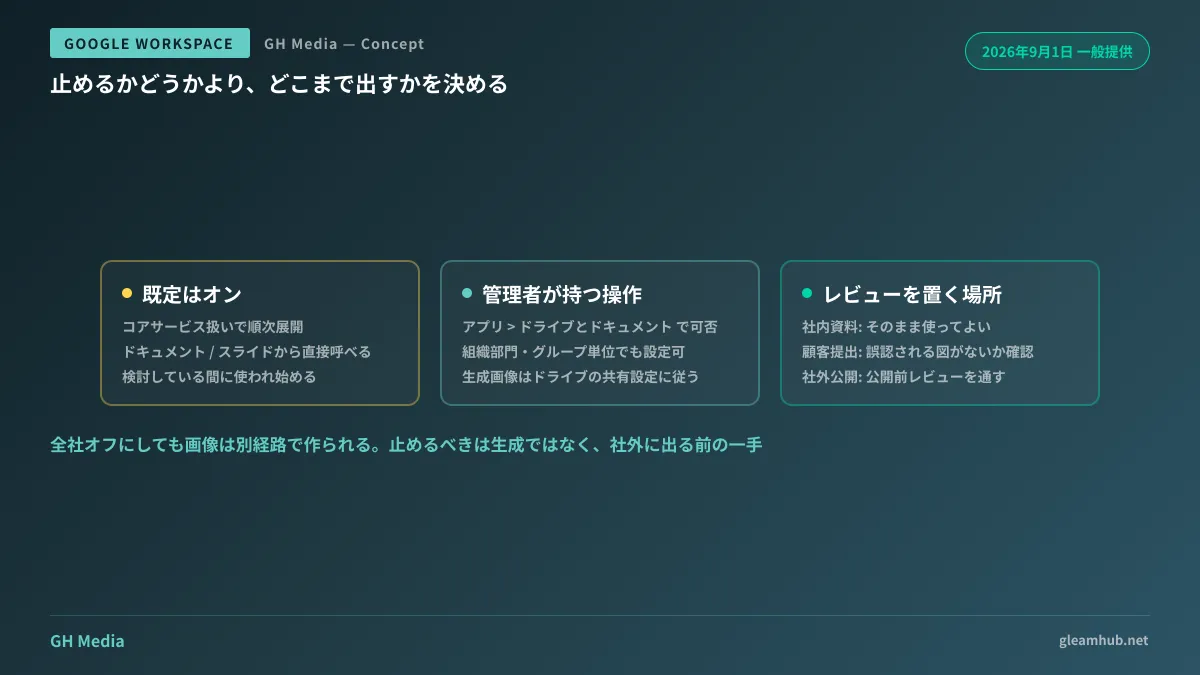
When a new AI feature arrives, an administrator's standard procedure is "evaluate → pilot with select users → deploy company-wide." However, because Google Pics is treated as a core service and is on by default, if you take no action, employees will start using it as soon as the rollout reaches them.
If you wish to turn it off, you can disable it in the Admin console under Apps > Google Workspace > Drive and Docs. It can also be configured per organizational unit (OU) or group, allowing approaches like "turn it on only for the IT team and PR first, leaving others on hold."
However, shutting it off company-wide is not practically advisable. Even if disabled, employees who need images will simply turn to generative AI through other channels. Having images created on personal accounts end up in company documents without anyone knowing what tool was used is far worse for governance. It is the mirror image of the problem where Gemini is deployed but never used.
Draw the line at external output, not tool availability
What needs to be decided is not "whether to let them create images," but how far created assets are allowed to travel externally. Drawing clear boundaries here prevents confusion among frontline staff.
| Application | Decision-Making |
|---|---|
| Illustrations for internal documents and meeting notes; exploratory rough drafts | Safe to use as-is |
| Proposals and quote attachments submitted to clients | Verify they do not contain graphics that could be mistaken for facts (graphs, mock screenshots, etc.) |
| External publications including websites, social media, and print materials | Require pre-publication review. Pay particular attention to depictions of people, logos, and real-world entities |
Use cases that frequently prompt consultations are recruitment pages and store introductions. Issues surface when generated images are used as "illustrative photos," leading applicants or store visitors to notice discrepancies with reality. This is a classic example of an innocent image replacement turning into a trust issue. What is entirely harmless in an internal presentation takes on an entirely different meaning once it crosses an external boundary.
With externally published images, the primary concern is less about artistic quality and more about cases where images appear to depict real entities. Generated graphics that look like actual store photos, non-existent award badges, or convincing UI screenshots can stray uncomfortably close to deceptive representation under misleading advertising laws, even without malicious intent. It is safest to maintain separate rules for public materials, including how provenance markers and watermarks are handled.
Who can use it depends on your contracted plan
Another point to verify before issuing internal announcements is license eligibility. While the rollout targets Google AI Pro / Ultra subscribers and many paid Workspace plans, it is common for license assignments to vary across employees within the same organization.
In companies where the sales department is on higher-tier plans while others are on standard plans, inquiries like "my colleague can use it, but it doesn't appear on my screen" are inevitable. Given the gradual rollout, only administrators can tell whether an unavailable feature is due to pending rollout or an ineligible plan. When communicating internally, including one line each for eligible plans and rollout timelines will cut down on inquiries.
Generated images accumulate in Drive
There is another operational aspect often overlooked: generated images remain as files in Drive and are subject to sharing permissions.
Even images created inside Docs or Slides exist as assets on Drive. This means existing policies—such as external sharing controls, governance via labels and DLP, and offboarding handovers for departing employees—apply directly to these images. While you do not need dedicated rules solely for images, allowing a high volume of experimental images to scatter across folders increases the surface area for accidental sharing.
Designating a single working folder and keeping unused images there without sharing them externally is a simple policy that reduces both future search effort and accidental sharing risks.
What to do next
First, verify whether your company's plan qualifies for Google Pics and whether the service appears in your Admin console. The rollout is proceeding over several weeks, so even if it is not visible today, it may appear next week.
Next, define in a single sentence who must review externally published materials. Guidelines like "PR gives final sign-off on images posted to the web and social media" or "client-facing materials are reviewed alongside proposal reviews" work fine. Rules not established upfront cannot easily be created once usage is already underway.
At GleamHub, we offer free IT and Google Workspace consultations covering Workspace admin configuration reviews, usage scopes and external publication rule development for generative AI, and Drive sharing and label design. Appropriate boundaries differ based on organizational size and external publishing frequency, so please reach out for personalized advice via our Contact Us page.
Sources
- Try Google Pics: Easy image creation and editing in Google Workspace — Google
- Google Pics image generation and editing tool released, powered by Nano Banana — Impress Watch
- What is Google Pics? Features and eligible plans for the Nano Banana-based AI image generation and editing tool — AI Revolution
- Google Workspace Admin Help: See what's new in Google Workspace