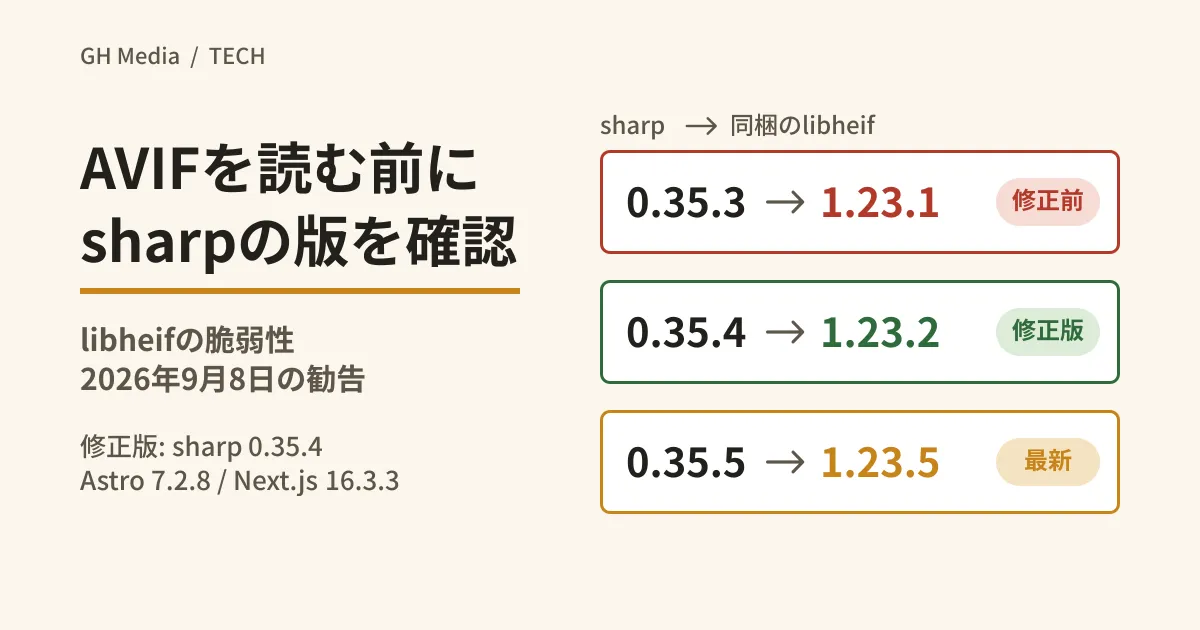
Members upload profile pictures, photos are pasted into a CMS, and images from external URLs are shrunk into thumbnails. sharp is one of the typical choices when writing this kind of processing in Node.js, and Astro and Next.js also use sharp for image optimization. According to an advisory published on September 8, 2026, the part of sharp that reads AVIF images had a vulnerability that could lead to remote code execution (RCE) via a crafted image.
The tricky part is that sharp can be installed as a framework dependency even if you do not remember adding it to package.json, and an old sharp can remain even after you upgrade the framework to the fixed version. We checked the advisories against primary sources, and show how to confirm the version that actually runs and how to block the issue when you cannot upgrade right away, together with results from running it in our test environment.
AVIF decoding lives in libheif inside sharp
sharp is a package that lets Node.js use the libvips image processing library, and the prebuilt binaries installed from npm bundle libvips and its dependencies. libheif is the component responsible for reading and writing AVIF and HEIF.
According to sharp's advisory (GHSA-rgj7-g3m4-5g8c), several vulnerabilities were fixed in upstream libheif (GHSA-g89c-p67h-r497 / CVE-2026-84383, GHSA-2jg2-4ch7-h545). Two of them are rated "Critical" under CVSSv3 and could lead to RCE on glibc-based Linux under certain conditions. The advisory lowers the severity to "High" under CVSSv4 on the grounds that sharp itself has no network functionality, while calling attention to the impact on downstream systems. It applies to "sharp before 0.35.4 that processes untrusted input." On the same day, frameworks that use sharp also issued advisories.
| Package | Advisory | Fixed version | What the fix does |
|---|---|---|---|
| sharp | GHSA-rgj7-g3m4-5g8c | 0.35.4 | Bundles libheif 1.23.2 |
| astro | GHSA-26w7-cxv4-gfx2 | 7.2.8 | Requires sharp 0.35.4 or later |
| next | GHSA-2xp9-vwfh-vxw4 | 15.5.24 / 16.3.3 | Disables AVIF optimization |
The change in Astro 7.2.8 raises the sharp range in optionalDependencies from ^0.34.0 || ^0.35.0 to ^0.35.4. The Next.js advisory says it will "disable AVIF optimization until the fix has propagated," and the relevant commits in 15.5.24 and 16.3.3 remove sharp's AVIF loading (VipsForeignLoadHeif) from the allowlist in the image optimization API and return AVIF source images as is without converting them. Meanwhile, the sharp range in Next.js is ^0.35.3 in 16.3.3 and ^0.34.3 || ^0.35.3 in 15.5.24, so it does not require 0.35.4 or later.
On npm, sharp 0.35.4 and Astro 7.2.8 were published on August 26, and Next.js 15.5.24 and 16.3.3 on August 25 (all UTC), which is before the advisories.
Does this apply to your system?
sharp's advisory targets "untrusted input," and Astro's advisory targets cases "where an attacker can make Astro process an untrusted AVIF image." Applying this wording, our editorial team groups cases as follows.
- Address first. APIs that convert uploaded images with sharp, thumbnail generation that shrinks images from external URLs, setups that allow external images in Next.js image optimization, and setups that run Astro with server output and optimize external images
- Check before deciding. Sites that optimize images imported from a CMS at build time. Considering who can add images and the risk of account takeover, whether you can say "only our own images" depends on how you operate. The same applies to sources allowed through Astro's
image.domainsorimage.remotePatterns - Impact is likely small. Static sites that convert only images you prepared yourselves, at build time locally or in CI
None of the three advisories explicitly excludes the third case. "Impact is likely small" is our editorial team's judgment and is not a reason to skip upgrading. In every category, upgrading sharp is the safe choice. We covered dependency update workflows in Dependabot waits three days by default: rebuilding your dependency update workflow.
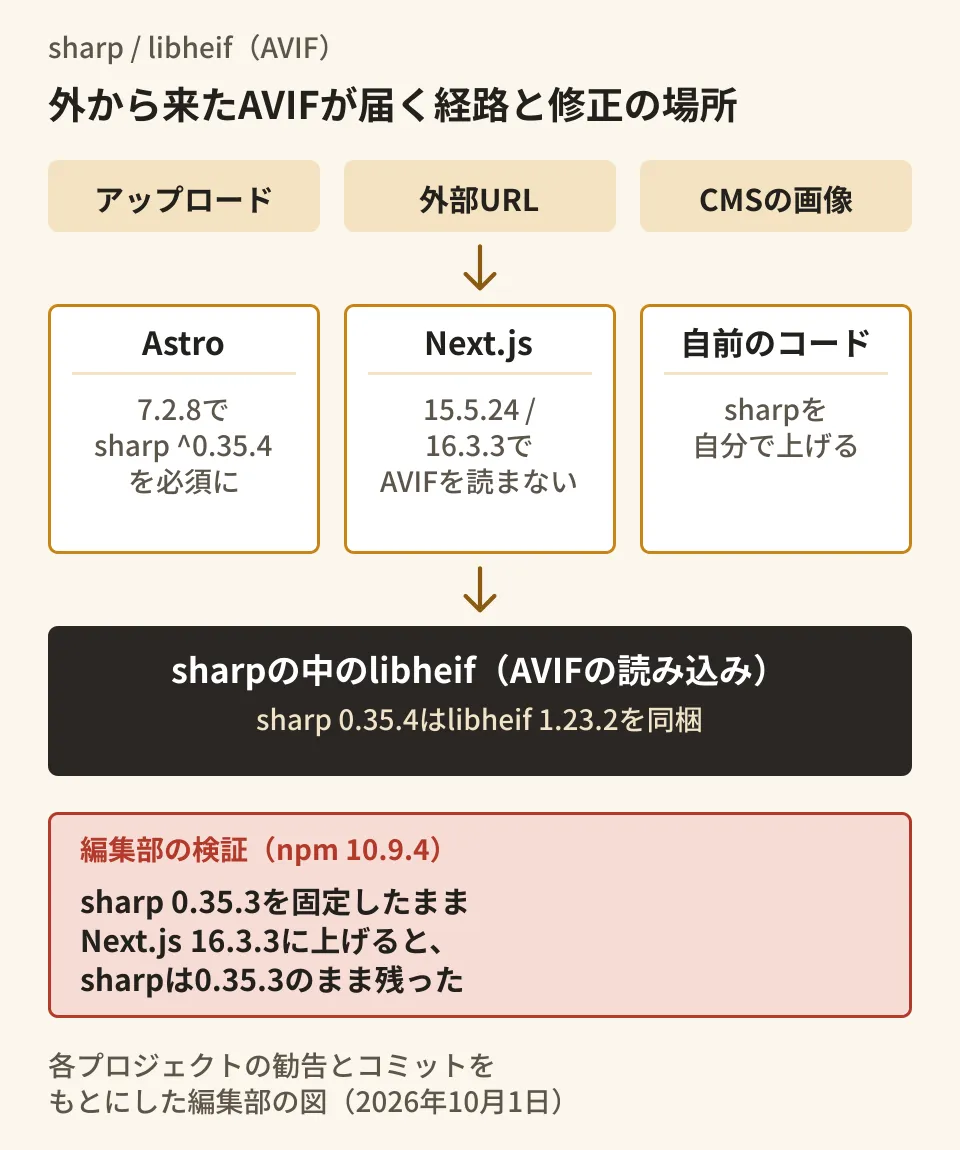
Astro fixes the issue by raising the sharp version, and Next.js by not reading AVIF. If your Next.js project also calls sharp from your own code, you need to check the sharp version separately.
Check the version of sharp that actually runs
What to look at is not package.json but the installed dependency tree and the version loaded at runtime. We ran this on October 1, 2026 in our test environment (Linux x86_64, glibc 2.39, official Node.js v22.22.0 binary, npm 10.9.4).
npm ls sharp        # どのパッケージが、どの版のsharpを入れているか
npm explain sharp   # 依存の種類と要求している範囲
node -p "require('sharp').versions.sharp + ' / libheif ' + require('sharp').versions.heif"
sharp.versions is a property that returns the versions of sharp and libvips, and of their dependencies when using prebuilt binaries. heif was 1.23.1 in sharp 0.35.3 and 1.23.2 in 0.35.4.
Next, to reproduce an old lockfile, we created a minimal project pinned to sharp 0.35.3 and upgraded only the framework.
| What we tried | sharp in npm ls | npm audit findings |
|---|---|---|
| Fresh install of astro@7.2.7 | 0.35.5 | astro only |
| Upgrade astro@7.2.7 with sharp pinned to 0.35.3 to astro@7.2.8 | 0.35.3 → 0.35.5 | astro and sharp → none |
| Upgrade next@16.3.2 with sharp pinned to 0.35.3 to next@16.3.3 | Stays at 0.35.3 | sharp remains |
Then npm update sharp | 0.35.5 | sharp is cleared |
In npm explain sharp, sharp was installed as optional for both Astro and Next.js. Because 0.35.3 satisfies the ranges of Astro 7.2.7 and Next.js 16.3.3, npm leaves it in place. Astro 7.2.8's range is ^0.35.4, so sharp was replaced as well.
Because npm audit judges by version, it flagged astro 7.2.7 even when sharp was new, and flagged sharp 0.35.3 even after Next.js was upgraded. The findings do not clear until both the framework and sharp are upgraded. next@16.3.3 also triggered a separate advisory, GHSA-vcvr-r3jv-pc5j (ImageResponse in next/og), which we cover in Next.js next/og and Windows RCE (September 2026).
The latest sharp is 0.35.5 (published September 27), which bundles libheif 1.23.5. Fix commits with GHSA numbers have continued in the libheif repository after 1.23.2, so our editorial team's proposal is to upgrade to the latest version rather than stopping at 0.35.4.
If you cannot upgrade right away, stop reading AVIF
As a workaround, sharp's advisory gives the following one line that stops AVIF decoding.
const sharp = require('sharp');
sharp.block({ operation: ['VipsForeignLoadHeif'] });
sharp.block() is a function that blocks libvips operations at runtime (available since 0.32.4). In our test environment, we converted 64×64 pixel AVIF, JPEG and PNG images created with sharp to WebP before and after adding this line. The results were the same with sharp 0.35.3 and 0.35.4.
- Before adding it, all three formats converted successfully
- After adding it, AVIF produced a
unsupported image formaterror whether the input was a Buffer, a file or a stream.metadata()also errored - JPEG and PNG could be converted, and writing out AVIF from JPEG also succeeded
Only reading is blocked, so you can keep serving AVIF. However, the setting only applies within the process that loaded sharp, so separate processes such as workers must each call it. You will also need to tell users that AVIF uploads are no longer accepted. Whether to use AVIF as a delivery format is covered in WebP, AVIF or JPEG XL: which format should your site serve images in for 2026?.
The advisory makes one more recommendation, to use a node built as a position-independent executable (PIE), noting that many Linux package managers build it as PIE but the "official" Node.js binaries are not.
readelf -h "$(command -v node)" | grep Type # DYN ならPIE、EXEC ならPIEではないThe v22.22.0 linux-x64 build downloaded from nodejs.org (hash matched SHASUMS256.txt) was EXEC. This supplements the workaround and is not a substitute for updating sharp.
Pitfalls that remain when you think you have upgraded
Based on the checks so far, our editorial team lists the points that are easy to overlook.
- Upgrading only the framework and stopping there. The fixed version of Next.js still allows sharp 0.35.3. If your own code calls sharp outside next/image, the exposure remains, so upgrade sharp itself with
npm update sharpor similar - Looking only at package.json. sharp installed as an optionalDependency does not appear by name. Use
npm ls sharpto also check that multiple versions are not installed - An outdated production image. Even if you reinstall on your development machine, nothing changes if the production container image still has the previous lockfile. Confirm by outputting
sharp.versions.heifin production - Using the system libheif. The advisory says that if you use a globally installed libheif, you should move to 1.23.2. In setups that do not use prebuilt binaries, check the version on the OS side
On October 1, 2026, we checked the sharp, Astro and Next.js advisories against the contents of github/advisory-database (commit 3113af4), and cross-referenced them with the tags, changelogs and commits in the sharp, sharp-libvips, libheif, Astro and Next.js repositories. The libheif version, the effect of
sharp.block(), and the dependency resolution and npm audit results come from runs on Linux x86_64, Node.js v22.22.0 and npm 10.9.4. We did not reproduce the vulnerability itself. Windows, macOS, musl (Alpine), pnpm, yarn, image optimization in real Astro and Next.js apps, and handling of HEIC images are unverified. We could not view the advisory page on the libheif side and have not confirmed the technical details of the vulnerabilities.
For help reviewing dependency updates or upload handling in Node.js systems that process images, contact GleamHub.
Sources
- sharp: Vulnerabilities in libheif: GHSA-g89c-p67h-r497 and GHSA-2jg2-4ch7-h545 (GHSA-rgj7-g3m4-5g8c)
- Astro: Remote code execution through AVIF image optimization (GHSA-26w7-cxv4-gfx2)
- Next.js: Unauthenticated Remote Code Execution in Image Optimization API when AVIF files are used (GHSA-2xp9-vwfh-vxw4)
- GitHub Advisory Database (data for the three advisories above)
- sharp v0.35.4 changelog
- sharp API: Utilities (block / unblock / versions)
- sharp-libvips versions.properties (v1.3.3)
- libheif v1.23.2
- Astro: Update Sharp to 0.35.4 (ecb4082)
- Next.js: [16.3.x] [next/image]: disable avif image optimization (3a15b4a)