You want to upgrade your business system's database from MySQL 8.0 to 8.4. But a version upgrade is work done late at night on a holiday with downtime set aside, and if a problem arises, the only option is to restore from backup. Google Cloud's blog post also says that major version upgrades involve weeks of cross-department coordination, narrow maintenance windows, and hours of downtime, and points out that putting them off leads to delays in addressing vulnerabilities.
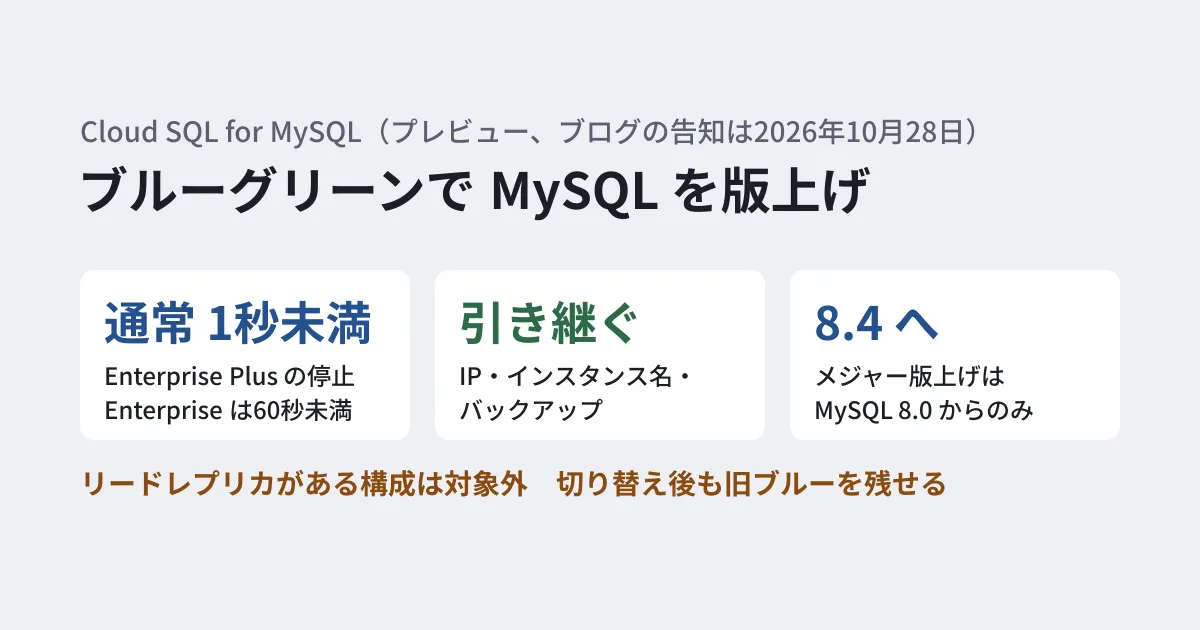
In a blog post on October 28, 2026, Google Cloud announced "blue-green deployment" for Cloud SQL for MySQL as a preview. It appears in the October 8 entry of the release notes. It works by upgrading a copy (green) of the production database (blue) to a new version, keeping it in sync, and switching over with a short outage when ready. Drawing on the official blog and documentation, this article sorts out what becomes automatic and what to check before the switchover.
What gets automated with blue and green
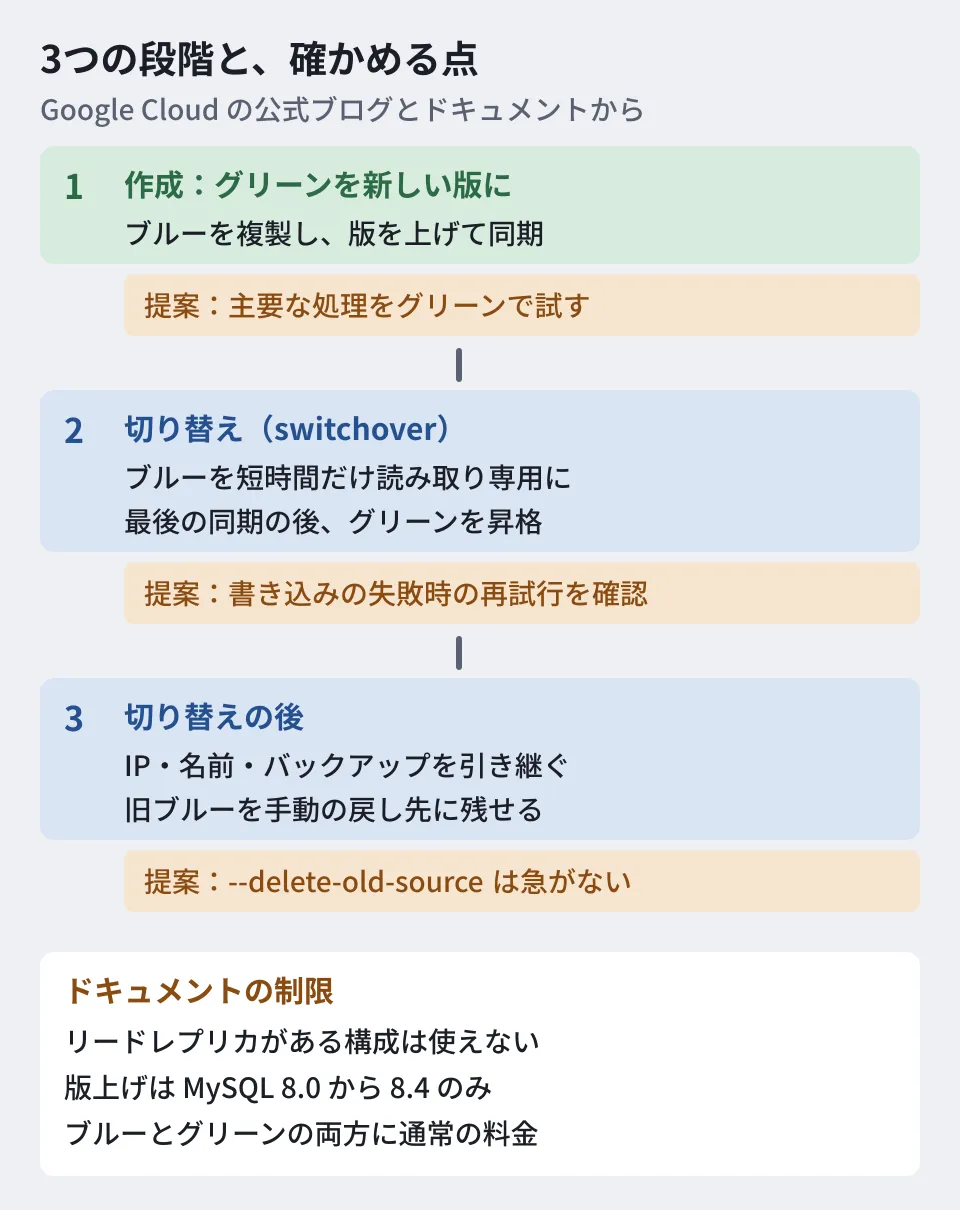
According to the blog post, Cloud SQL blue-green deployment works in the following three stages.
- Blue (production): The current primary instance. It continues to accept application traffic as usual until the switchover
- Green (staging): A temporary clone of blue. Cloud SQL upgrades it to the specified version and keeps it in sync with blue through continuous replication
- Switchover: Cloud SQL makes blue read-only for a short time, completes the final sync, and then promotes green to be the new primary
The blog post names three features.
- Short switchover downtime: According to the documentation, switchover downtime is typically under 1 second on Cloud SQL Enterprise Plus and typically under 60 seconds on Enterprise edition. The Enterprise edition time varies with workload and replication lag
- No application changes needed: At the switchover, Cloud SQL moves the existing IP address, instance name, and backups to the new database. It is said that there is no need to rewrite connection strings or configuration files
- You can test with production data: Before the switchover, you can run actual application workloads and queries against green to check performance. If there is a problem, deleting the deployment before the switchover leaves the production database untouched
Even after the switchover, you can keep the old blue as a manual fallback. According to the documentation, the old blue remains as an independent read-write instance, and it continues to incur costs.
Eligibility and conditions
Here are the conditions stated in the documentation and the blog post, in the order you should check them before use.
- Release stage: Preview. Pre-GA terms apply, and support may be limited
- Eligible: Standalone primary instances of Cloud SQL for MySQL (including high-availability configurations)
- Versions: Major version upgrades are limited to MySQL 8.0 to 8.4. Configuration or hardware changes that do not change the version are available on MySQL 5.7 and later. MySQL 8.0.18 is not supported
- Prerequisites: Automated backups and binary logging are enabled, the instance is running the latest maintenance version, and the instance uses the new network architecture
- Unsupported configurations: Instances with read replicas, Private Service Connect outbound configurations, and IAM group authentication
- Pricing: There is no additional charge for the feature itself. However, while both blue and green exist, regular charges apply to both. Even after the switchover, charges for two instances continue until you delete the old blue
- Other engines: The blog says PostgreSQL support is "coming soon." As currently documented, PostgreSQL and SQL Server are not covered
- Operations: Performed through the Google Cloud console,
gcloud, or the Cloud SQL Admin API
To use it on an instance that has read replicas, you first need to review the configuration. The switchover is a mechanism for planned work, and the green instance does not serve as a failover target. The documentation we opened does not include a list of available regions. It says only that instance creation may be affected by the availability of compute resources in a region or zone.
CLI workflow
Here is a CLI example that follows the documented steps. The deployment name, instance name, and region are example values.
# 同期した、新しい版のグリーンを作る
gcloud beta sql blue-green-deployments create my-upgrade \
    --source-instance=prod-mysql-db \
    --target-database-version=MYSQL_8_4 \
    --region=us-central1

# 状態とグリーンの接続先を確かめる
gcloud beta sql blue-green-deployments describe my-upgrade \
    --region=us-central1

# グリーンに接続して試す
gcloud sql connect TARGET_INSTANCE_NAME --user=DB_USER

# 本番の処理をグリーンへ切り替える
gcloud beta sql blue-green-deployments switchover my-upgrade \
    --region=us-central1

# 準備ができたら古いデータベースを片付ける
gcloud beta sql blue-green-deployments delete my-upgrade \
    --region=us-central1 \
    --delete-old-source
The blog's example is written as gcloud sql blue-green-deployments, without beta, but the documentation and the CLI reference use gcloud beta sql blue-green-deployments. Running gcloud sql blue-green-deployments --help on gcloud 588.0.0 on this PC (the latest as of November 6, 2026 is 592.0.0) produced an Invalid choice error. We did not run the commands with beta, because the beta component was not installed.
During creation, if the deployment is a version upgrade, Cloud SQL automatically runs pre-checks, and creation stops if there is a problem. The documentation also recommends running the pre-checks on their own beforehand to surface problems. Adding --show-config-diff to describe shows the configuration differences between blue and green. However, during the preview, differences in database flags are not displayed.
The final delete behaves differently before and after the switchover. Before the switchover, the green instance is removed and the blue instance stays as is. After the switchover, both instances remain by default, and the old blue instance is fully deleted only when you add --delete-old-source. What follows is the editorial team's suggestion: if you want to take advantage of being able to keep the old blue instance for a while after the switchover as a fallback, it is safer not to run this command in succession as part of the same work as the switchover. The documentation also advises keeping blue until the post-switchover checks are complete.
What to check before the switchover
The blue-green mechanism automates data synchronization and the switchover, but it does not guarantee that your application will work correctly on the new version. We list the items to check below: 1 and 3 are based on the documentation's guidance, and 2, 4, and 5 are the editorial team's suggestions.
- Run your application's main processes: Run the processes your business cannot afford to have stop, such as login, search, report output, and nightly aggregation, against the green instance. The documentation lists integration tests, deprecated-syntax warnings in the error log, and checks of CPU, memory, and I/O
- Confirm how writes are handled: Neither the blog nor the documentation states clearly whether writes are allowed in tests against the green instance or how they would affect synchronization. Since the documentation describes green as a "special read replica," focus your tests on read operations until this can be confirmed
- Set up the conditions for the switchover: Even when the status is
SWITCHOVER_READY, replication lag is not part of that determination. If the lag is large, the switchover fails.describedoes not show lag, so check it withreplica_lagin Cloud Monitoring or a similar metric. Also finish long-running DDL and batch writes first. The documentation recommends switching over during a period with few writes. If the switchover fails, processing stays on blue - Prepare for a short outage: During the switchover, blue becomes read-only for a short time, and connections are also briefly dropped. Confirm in advance whether your application retries writes that fail during that window or shows users an error. Also check whether your processes can tolerate the guideline of under 60 seconds for the Enterprise edition
- Decide the rollback procedure in advance: Before the switchover, deleting the deployment leaves production as is. For the period after the switchover, decide before the work how long to keep the old blue instance and what criteria to use when deciding to roll back. Replication from blue to green ends at the point of the switchover. The documentation we opened does not describe a mechanism for bringing data written to the new primary after the switchover back to the old blue instance
In newer versions of MySQL, the same SQL can produce different results. We covered how to think about acceptance checks for version upgrades in Behavioral change of DATE in MySQL 9.7 — an update where only the numbers quietly change. For how to think about isolation when letting other uses read a production database, Letting AI agents read your production DB — AlloyDB's new preview is also a useful reference.
Scope of verification
On November 6, 2026, we directly opened and checked the Google Cloud official blog post "Near-zero downtime upgrades: Announcing Cloud SQL for MySQL blue-green deployments" (October 28, 2026), the Cloud SQL for MySQL release notes, the blue-green deployment documentation (overview, creation, verification, switchover, and deletion), and the
gcloud beta sql blue-green-deploymentsreference (document research). We did not test by creating a Cloud SQL instance. The only thing we ran in the CLI was the--helpcheck on gcloud 588.0.0 on this PC. We could not confirm how writes to green are handled, the list of available regions, or the specific procedure for returning to the old blue instance after the switchover. The cleanup caution and the pre-switchover checks labeled as suggestions are the editorial team's suggestions.
For planning database version upgrades for business systems and designing pre-switchover checks, please contact us through development, AI, and automation consulting.
References
- Near-zero downtime upgrades: Announcing Cloud SQL for MySQL blue-green deployments (Google Cloud Blog, October 28, 2026)
- Cloud SQL for MySQL release notes(Google Cloud Documentation)
- About blue-green deployments in Cloud SQL(Google Cloud Documentation)
- Create and stage a blue-green deployment(Google Cloud Documentation)
- Perform a blue-green deployment switchover(Google Cloud Documentation)
- Delete a blue-green deployment(Google Cloud Documentation)
- gcloud beta sql blue-green-deployments(Google Cloud SDK)