When a project is won or an inquiry comes in through a form, you create a dedicated Google Chat space and add the people in charge. Automating this with Apps Script or an internal tool is convenient, but when the connection drops midway and the process is retried, problems can occur: two spaces with the same name are created, or the second attempt fails with ALREADY_EXISTS and stops subsequent processing.
Space creation in the Google Chat API has requestId to make these retries safe. In the API definition published in early October, the limit for the space description (description) has expanded from 150 to 4,096 characters. This lets you put the project overview and contact details together in the description field.
This article is based on the publicly available Chat API definition (Discovery document) and the type definitions of googleapis, Google's published Node.js client, as checked on October 12, 2026. We did not make any actual API calls. On October 16, 2026, we also checked the developer release notes and guides, but found no entries covering the changes to requestId or the description limit, so the availability timing is described only to the extent it can be inferred from changes in the API definition. Note that the guides list a Business or Enterprise Google Workspace account with access to Google Chat as a prerequisite for creating and updating spaces.
Use requestId so that "the same request yields the same space"
There are two ways to create a space: spaces.create, which creates only the space, and spaces.setup, which creates it with initial members. You can specify requestId for both.
The API definition describes it as follows.
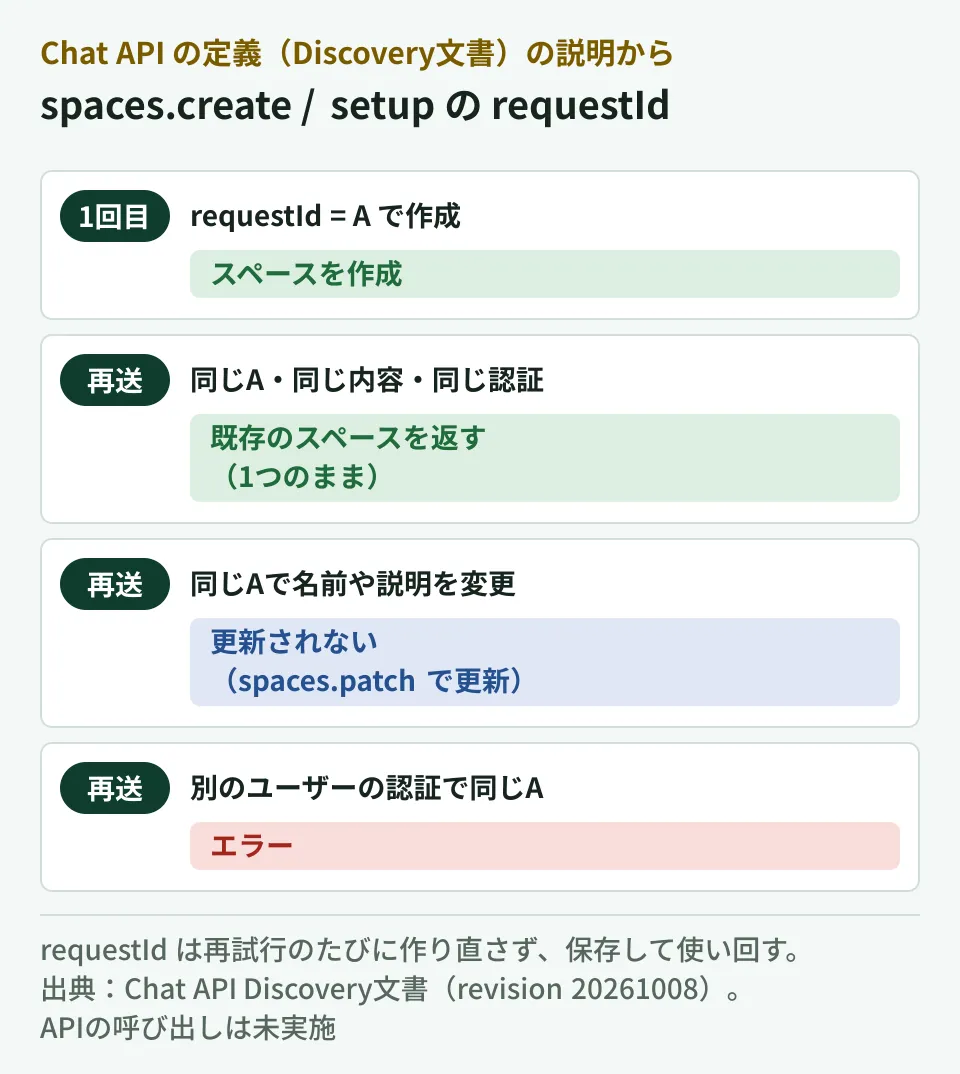
Specifying a request ID makes the request idempotent, which ensures that multiple identical requests with the same request ID result in only a single space being created. Subsequent requests with the same request ID return the existing space and do not update the space, even if the requested details differ from the current state.
No matter how many times you send with the same requestId, only one space is created, and from the second time on, the existing space is returned. The recommendation is "A random UUID."
However, there are conditions for it to take effect. Here is a summary of the caveats in the description.
- Send the same content with the same credentials on the second and subsequent attempts. Using the same
requestIdwith a different user's authentication results in an error - Changing the content on the second attempt does not update the space. If you want to fix the name or description, update it separately with
spaces.patch - The returned space may not be fully populated. The description says "the API echoes the space in your request with the system-assigned resource name populated," and advises retrieving the latest state again with
spaces.get
What matters in implementation is not regenerating requestId on each retry. For example, issue one UUID per inquiry ID or project number, save it in a spreadsheet or database, and reuse that value on retries. If you generate a UUID each time inside the retry logic, each attempt is treated as a different request, and duplicate creation cannot be prevented.
Looking at the googleapis type definitions by version, this requestId is absent in 178.0.0, published on August 31, 2026, and present from 180.0.0, published on September 10. It was likely added to the API during this period as well, but we have not been able to confirm this in any official Google announcement (the release notes as of October 16, 2026 contain no corresponding entry).
Descriptions up to 4,096 characters, guidelines up to 5,000 characters
The space description and guidelines (rules) go in spaceDetails. The limits in the API definition are as follows.
| Item | Limit | Notes |
|---|---|---|
Display name displayName | 128 characters | Required when the type is SPACE. ALREADY_EXISTS if the same name already exists in the organization |
Description spaceDetails.description | 4,096 characters | 150 characters in the type definitions of googleapis 182.0.0, published on September 24, 2026 |
Guidelines spaceDetails.guidelines | 5,000 characters | Unchanged |
Starting with 183.0.0, published on October 3, the description limit changed to "Supports up to 4,096 characters." With 150 characters, you could write little more than the project name and the person in charge, but with 4,096 characters you can include the project overview, related Drive folders, due dates, and information about the inquirer (to the extent it may be shared internally).
There is also a caveat when rewriting the description later. The description of updateMask in spaces.patch says "You must pass both description and guidelines in the update request as SpaceDetails," followed by "If you only want to update one of the fields, pass the existing value for the other field." Even when rewriting only the description, you must also send the current value of the guidelines. It is safer to set up the flow so that you first read the current values with spaces.get and then update.
Failures due to duplicate display names are also something to think about in advance for automatic creation. Deciding on a naming scheme that will not collide within the organization, such as including the project number in the display name, reduces occurrences of ALREADY_EXISTS.
Up to 49 initial members; groups are specified by ID
In memberships of spaces.setup, you can specify up to 49 entries in addition to the creator ("The set currently allows up to 49 memberships (in addition to the caller)"). The creator is added automatically, so do not include them.
There are rules for how to specify them.
- Users in your organization: Can be specified with
users/メールアドレス. User IDs from the People API or Directory API can also be used - External users: Gmail users and users of other companies' Workspace must be specified by email address
- Google Groups: Specify with
groups/グループID. The description says "Group email is not supported," so you cannot specify a group by its email address. It advises obtaining the ID with a lookup in the Cloud Identity Groups API. Groups can be added only when the type isSPACE
If you manage teams in charge with groups, looking up the group IDs in advance and saving them in your settings removes the need to list members for each project.
When adding external users, also check externalUserAllowed at creation time. The description marks it as "Optional. Immutable." and it cannot be changed after creation. If you plan to share the same space with external partner companies, you need to decide this at creation time.
Points to note when creating spaces as a Chat app
When creating spaces as a Chat app (service account) rather than as the user, there are more conditions. Here are the key points from the description of spaces.create.
- Administrator approval is required, and the scope must be
chat.app.spaces.createorchat.app.spaces - When the type is
SPACE,space.customermust be specified - The app is added as a member but does not become a space manager. By default, any member can remove the app. To restrict this to managers only, set
permission_settings.manage_appstomanagers_allowed
If the automation app is removed, subsequent notifications and updates stop. For spaces used as part of a business process, it is safer to include the manage_apps setting at creation time.
What to decide before implementation
Based on the API definition covered so far, here is the editorial team's proposal.
- Decide what triggers creation and where to store
requestId. Store inquiry IDs or project numbers and UUIDs one-to-one, and use the same value on retries - Decide on a naming scheme for display names. Include numbers or dates so names do not collide within the organization
- Decide what to include in the description and what to leave out. All members of the space can read the description. Especially when adding external users, do not write personal information or quoted amounts as is
- Pass members as groups. Look up the group IDs in advance
- If creating as a Chat app, check administrator approval and
manage_apps
How to search and pin messages via the API is covered in Message search and pinning with the Chat API, the conditions for obtaining the sender's email address in The Chat API can now return sender email addresses, and the basics of using spaces in Google Chat usage guide.
Scope of verification
On October 12, 2026, we checked the Google Chat API Discovery document (chat.googleapis.com, revision 20261008) and the Chat API type definitions in googleapis 178.0.0 and 180.0.0 through 185.0.0 as published on npm (document research). On October 16, 2026, we confirmed that the quoted text had not changed in the Discovery document (revision 20261013), and that the developer release notes and guides (creating spaces, creating with initial members, and updating) contain no entries covering
requestIdor the change to the description limit. We have not tried calling the Chat API, using it from Apps Script, or how it appears in the Chat interface. We have not found a corresponding announcement on Google Workspace Updates.
For automating business processes with Google Chat or Apps Script, contact us through free IT and Google Workspace consultations.
References
- Google Chat API - Discovery document (spaces.create, spaces.setup, spaces.patch, SpaceDetails)
- googleapis/google-api-nodejs-client - CHANGELOG.md (183.0.0: chat updates)
- npm registry - googleapis (publication timestamps for each version)
- Google Chat API — Release notes
- Google Chat API — Create a space