Suppose you have built a system with Apps Script or an internal tool that aggregates Google Chat messages into daily reports or an inquiry log. Until now, the sender you could get by calling the Chat API with user authentication was only an ID such as users/1234567890, so to show who posted what in a table, you had to look up the name or email again through a separate API. The definition behind this "look up the person from the ID" step changed in September 2026.
On October 5, 2026, we directly opened and read the change to the Chat API definition files that Google publishes (googleapis/googleapis), the Chat API Discovery document (v1, revision 20260928), the developer release notes and the guide on identifying users. They state that when messages or members are retrieved with user authentication, the display name, email address and avatar URL are returned for people who meet certain conditions. This article is based on document research and the editorial team's suggestions. Because we had no credentials, we did not actually call the API.
What changed: two new fields on User
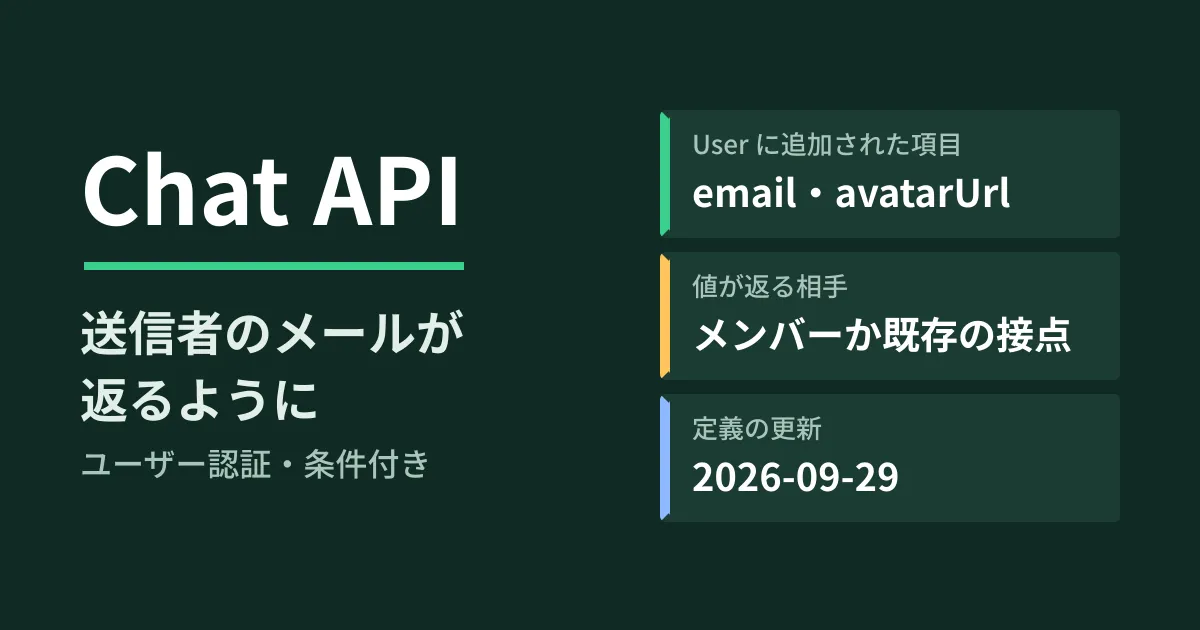
In a commit dated September 29, 2026 (d6ec9a5, "feat: Expose avatar_url and email fields on User"), two fields, email and avatarUrl, were added to the User resource that represents people in the Chat API. The description of when values are populated was also rewritten. The Chat API developer release notes announced the change as Generally Available on September 28.
Before the change, the description of User was the following single sentence.
When returned as an output from a request, if your Chat app authenticates as a user, the output for a
Userresource only populates the user’snameandtype.
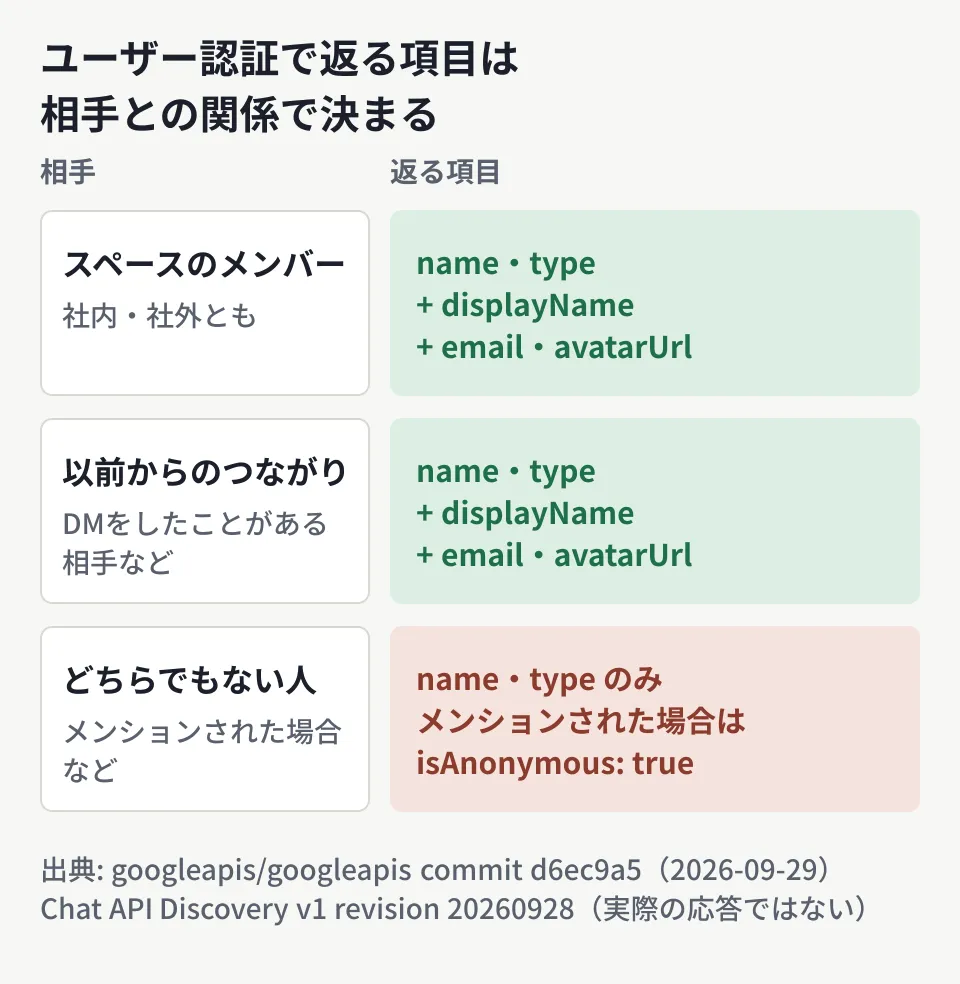
This means that with user authentication (calling the API as a user), only the resource name (users/{user}) and the type (human or app) were returned. After the change, it became conditional: "unless the user is a member of the space or has prior affinity with the calling user." When the condition is met, the display name, email and avatar URL are returned.
| Item | Conditions for populated values with user authentication (summary of the original text) | Before |
|---|---|---|
displayName | For senders, mentions and members, both internal and external users if the condition is met | Not returned |
email | Same as above | No field |
avatarUrl | Same as above | No field |
isAnonymous | true for mentioned users and others who do not meet the condition | Description changed only |
As an example of "prior affinity," the member description says "like a direct message (DM) conversation," which covers people who have exchanged direct messages with the calling user. On the other hand, a new example was added: when someone who is neither a space member nor has prior affinity is mentioned, isAnonymous becomes true.
For app authentication (calling as the Chat app itself), displayName is described as "always populated." The descriptions of email and avatarUrl only cover user authentication, and we could not determine from the documents we checked, including the developer guides, whether they are returned with app authentication.
Values are populated in three places: sender, mentions and members
The description limits where values are populated to three places.
- Message
sender(the sender) - Message
annotations(mentioned users and others) Membershipresource (the list of space members)
According to the Discovery document, retrieving messages (spaces.messages.list, get) can be called with scopes such as chat.messages or chat.messages.readonly, and retrieving members (spaces.members.list, get) with scopes such as chat.memberships or chat.memberships.readonly. If spaces.members.list is called with user authentication, the member in the response should, according to the definition, look like the following (this is an example assembled from the fields in the Discovery document, not the result of an actual call).
{
  "name": "spaces/AAAA1234/members/1234567890",
  "member": {
    "name": "users/1234567890",
    "displayName": "山田 太郎",
    "email": "taro.yamada@example.co.jp",
    "avatarUrl": "https://…",
    "type": "HUMAN"
  },
  "role": "ROLE_MEMBER"
}
For the Node.js client library @googleapis/chat, we confirmed that the type definitions in version 51.2.0, published on October 3, include email? and avatarUrl?. We have not checked support in the Apps Script Advanced Chat Service or in libraries for other languages.
How building automations changes (the editorial team's analysis)
Until now, to turn the sender of a message retrieved with user authentication into a person's name or email, you had to use the users/{user} ID to look it up again through another API such as the People API (under the previous description, only the name and type were returned). The Chat API's User.name description also states that {user} is the same as the ID of a Person in the People API.
If values are returned as defined, there will be more cases where you can receive the display names and emails of senders and members in a single Chat API response. Examples include the following.
- Copying posts in an inquiry space to a spreadsheet along with the sender's email
- Matching the list of space members against an internal directory by email address
- Sending a summary of unhandled posts to the email of the mentioned person in charge
However, for people who do not meet the condition, only the name and type are returned, as before. It is safest to keep the logic that looks up the person again when email is empty and that treats people with isAnonymous as "unknown." A setup that uses a spreadsheet as a log can follow the same approach as the basics of automation with GAS.
What admins should check first: external users' emails also reach apps
The description says values are populated for "both internal and external users." When an app using user authentication reads messages or members in a space where business partners have been invited, the email addresses of external contacts are also passed to the app.
What deserves attention here is the relationship with settings that restrict member list visibility. Chat has a feature that limits who can see a space's member list (our article on hiding member lists), and in the same September update, this setting (viewSpaceMembership) also became changeable through the API. The documents we could obtain do not say how this restriction affects the email received by apps using user authentication. In spaces that include external users, do not assume that "if it is restricted, the app cannot see it either" until you have verified it in a test space.
The editorial team recommends checking in the following order.
- List the apps that read Chat with user authentication. This covers apps that have been granted scopes in the
chat.messages,chat.messages.readonlyorchat.membershipsfamilies. We cover how to allow and block Chat apps in our article on Chat app allowlists and blocking - Check where the apps store data. If retrieved emails are kept in a spreadsheet or an external database, you will be storing personal information of external people. Decide the purpose and retention period for storing it
- Look at actual responses in a test space. In a space that mixes internal users, external users and people who have never exchanged DMs, check whose
emailis returned and whose is not
Pitfalls to know before building it in
- Building on the assumption that everyone's email is returned. It is returned only for people who meet the condition. When someone who is neither a member nor has prior affinity is mentioned,
isAnonymousbecomestrue - Assuming app authentication works the same way. With app authentication,
displayNameis described as always returned, but there is no description ofemailoravatarUrl - Assuming which editions are covered. The developer release notes announce general availability as of September 28, but do not state which editions are covered. We have not checked Workspace Updates
- Storing avatar URLs long term. The documents do not state how long
avatarUrlremains valid. It is safer to assume you will fetch it again each time you display it
First, check whether the internal tools that currently read Chat use "user authentication or app authentication," and "where they store the people information they retrieve." Then it is safest to call spaces.members.list once in a test space, check which fields are returned, and only then decide whether to reduce the lookup logic.
On October 5, 2026, we directly retrieved and cross-checked the Chat API definition files in googleapis/googleapis (
google/chat/v1/user.proto,message.proto,membership.proto, commit d6ec9a5 and the one just before it), the Chat API Discovery document (v1, revision 20260928), the Chat API release notes and the "Identify and specify Google Chat users" guide, the history of google-api-go-client, and the type definitions of@googleapis/chat51.2.0 on npm (document research). The automation analysis and the checking steps are the editorial team's suggestions. Because we had no credentials, we did not call the API, and we have not confirmed the actual responses, the handling of
GleamHub's free IT & Google Workspace consultation can help with automating work using Google Chat and reviewing Chat app permissions. The approach depends on the information you handle and how much you communicate with external parties, so please reach out via our contact form.
References
- googleapis/googleapis — commit d6ec9a5(Expose avatar_url and email fields on User)
- googleapis/googleapis — google/chat/v1/user.proto(d6ec9a5)
- googleapis/googleapis — commit f822db2(view space membership permission settings)
- Google Chat API — Release notes (September 28, 2026)
- Google Chat — Identify and specify Google Chat users
- Google Chat API Discovery document (v1)
- googleapis/google-api-go-client — chat/v1/chat-api.json(2d9e29d)
- npm registry — @googleapis/chat