"Everything is recorded in Teams chats—the background of specifications and communications with clients." Many companies considering replacing their groupware stall at this point. Even when they know emails and files can be moved, deciding what to do with three years of chat history stalls. Without a decision, the default becomes "let's just keep Teams around," leaving two chat tools running in parallel.
On August 25, 2026, large-scale migration of Microsoft Teams chat data became generally available via Google Workspace Admin Console Data Import. However, this feature does not move Teams in its entirety. Knowing what does not migrate beforehand changes how you prioritize decisions.
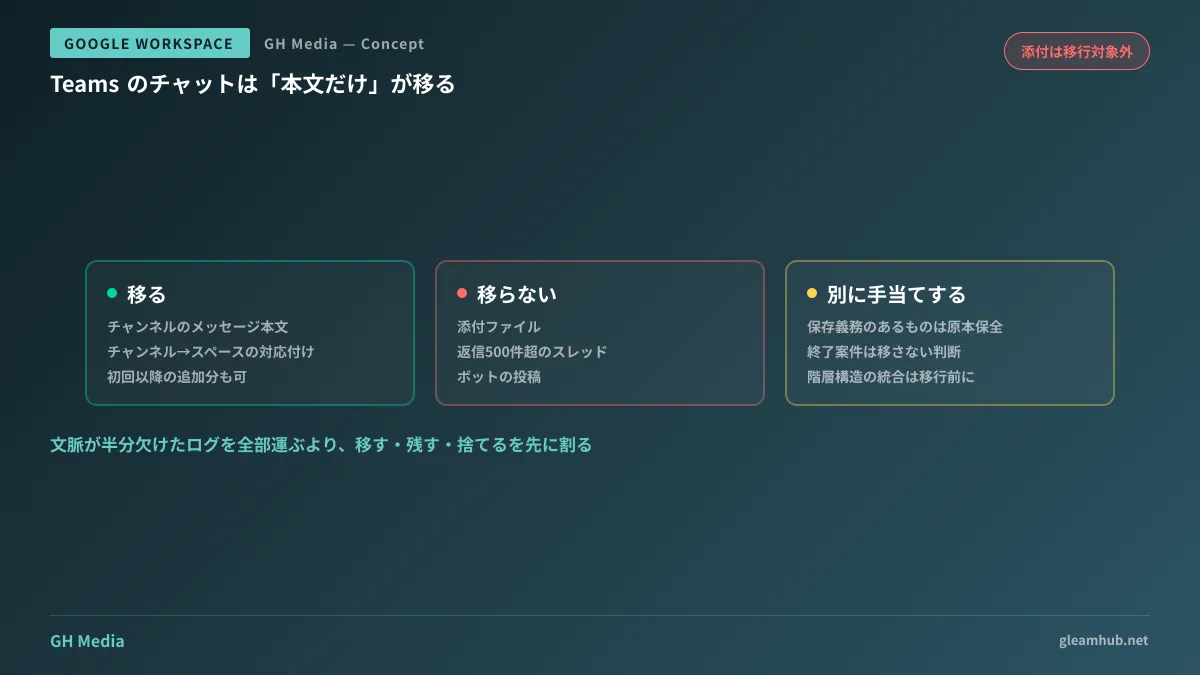
What migrates is channel message text
Migration from Teams to Google Chat is a feature that moves messages in Teams channels over to Google Chat spaces. How source channels correspond to destination spaces is specified by administrators as a mapping. Existing Google Chat spaces and messages are neither deleted nor modified.
According to published details, items not eligible for migration include:
- Attachments (items stored in OneDrive or SharePoint, as well as files uploaded from user devices)
- Threads with more than 500 replies
- Messages posted by bots
Once migration finishes, a report is generated showing skipped items, failures, and warnings. Messages posted to Teams channels after the initial migration can also be transferred incrementally later.
In short, what can be moved is the conversation written as text, not the reference materials attached to it.
The practical implications of excluding attachments
This is the core decision point.
The value of chat logs often lies not in the conversation itself, but in which file the conversation was about. A comment like "I think the unit price on page 3 of this quote is wrong" is only meaningful when the quote can be viewed alongside it. If moved without attachments, Google Chat will accumulate a massive volume of logs stripped of half their context.
This also gets in the way of searching. After migration, someone searching Chat will find "relevant-looking conversations" but cannot proceed any further. "Finding something you cannot use" is sometimes worse than "not finding it at all," because it prevents people from deciding to stop searching.
Furthermore, the exclusion of threads exceeding 500 replies has real consequences. The longer a thread continues, the more likely it contains key decisions, meaning what gets left behind frequently overlaps with what holds high value.
Dividing content into migrate, retain, and discard
Trying to migrate everything is why decisions stall. In reality, content divides into three categories.
Migrate: active project and team channels. These are places where the same members will continue ongoing conversations after migration. Because the premise is continuous conversation, "being able to converse in the same place starting tomorrow" takes precedence over log completeness. Even without attachments, original files can simply be placed in shared drives if needed.
Retain: content subject to legal or contractual retention obligations, or potential litigation. This is not about making them readable in the new destination; it is about preserving original records as evidence. Duplicating copies into Google Chat does not constitute preservation. It requires separate arrangements, such as retaining the Microsoft tenant for a set period or exporting and archiving data. This follows the same logic as email retention and e-discovery policies for former employees.
Discard: casual chat channels for completed projects and announcement-only channels. This is the single biggest lever for narrowing migration scope. Without an explicit decision not to migrate them, teams default to "migrating everything just in case."
Carrying out this three-way division beforehand cuts the volume fed into migration tools by more than half in practice. The migration runtime and the effort needed to review reports decrease proportionally.
Mapping is an organizational exercise, not a migration task
Mapping channels to spaces may seem like simply filling out a single spreadsheet, but in substance it is pure information architecture.
Teams channels typically follow a two-tier hierarchy of "Team > Channel," where teams are established for departments or projects, each containing purpose-specific channels. Because Google Chat spaces are flat, this two-tier structure must be mapped into a single tier. Mechanically translating every channel into a space will leave you with hundreds of spaces lined up.
If there are too many spaces, users end up not knowing which space to follow to keep up with conversations. Consolidating channels that can be merged prior to migration is far cheaper than cleaning them up afterward. If you treat migration as merely "moving things as they are," this step will not even make it onto your schedule.
What to verify before deciding to migrate
First, pull the date of the latest post across each Teams channel. If the majority have been inactive for over six months, the actual scope of migration will be far smaller than imagined. As long as you talk about "three years of history" without looking at this data, the perceived volume will remain inflated.
Next, open several channels and check how many conversations remain functional without attachments. Development and creative channels tend to be heavily dependent on attachments, whereas sales and administrative announcement channels tend to have lower reliance. This ratio is the direct answer to whether migration is worth the effort.
In addition, OneDrive file migration can now be handled within the same data import, so you can include files and chats in the same plan. However, attachments are simply "files stored on OneDrive that were linked in Teams chat"; even after they move to Google Drive via file migration, links will not be automatically updated from chat messages. Even if you migrate both, the two will not be linked.
At GleamHub, we offer free IT and Google Workspace consultations covering migration decisions from Microsoft 365 to Google Workspace, Chat space design, and scoping what to migrate. The best approach varies depending on your channel count and the nature of your operations, so please reach out for personalized advice via our Contact Us page.
Sources
- Google Workspace Weekly Recap - August 28, 2026 — Google Workspace Updates
- Available in open beta: Migrate messages from Microsoft Teams to Google Chat — Google Workspace Updates JA
- Data migrated during chat migration — Google Workspace Admin Help
- Set up chat migration — Google Workspace Admin Help
- Run a chat migration — Google Workspace Admin Help
- Google Workspace "Data Import" adds support for Microsoft OneDrive and Teams — HelenTech