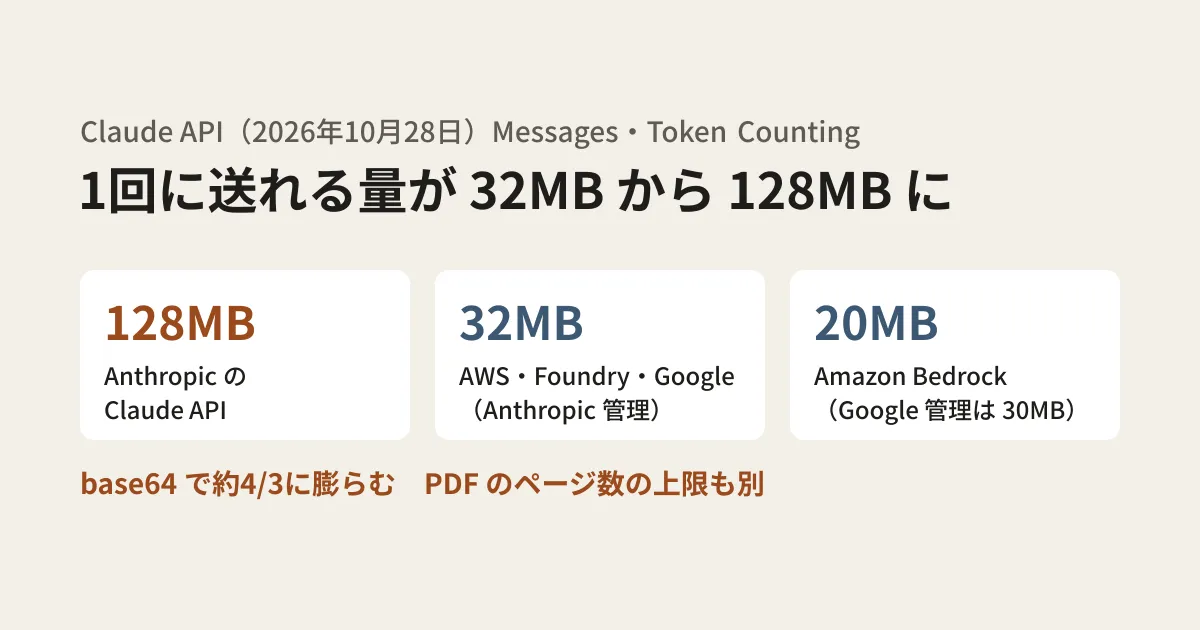
An internal system that has Claude read batches of invoice and contract PDFs returns 413 request_too_large only when the files are large. Until now, one cause of this was the 32MB limit on how much data could be sent at once (the request size). In the Claude API provided directly by Anthropic (hereafter, the first-party API), this limit was raised to 128MB on October 28, 2026.
However, this increase applies only to the first-party API; when you use the same Claude through Amazon Bedrock or Google Cloud, the limits are smaller. Also, even within 128MB, requests can be stopped by limits on PDF page counts or image counts. Drawing on the Claude Platform release notes and documentation, this article sorts out the full picture of these limits and the design options for systems that handle large files.
What changed on October 28
The October 28, 2026 entry in the release notes says the maximum request size for the Messages API and Token Counting API on the first-party API was raised from 32MB to 128MB. The "Request size limits" table on the API overview page is as follows (the table on the errors page has the same values, except that it lacks rows such as Sessions).
| Endpoint | Per-request limit |
|---|---|
| Messages API・Token Counting API | 128MB |
| Message Batches API | 256MB |
| Files API | 500MB |
| Sessions・Agents・Environments(Managed Agents) | 32MB |
Exceeding the limit results in a 413 request_too_large error. The errors page says that on the first-party API, Cloudflare returns this error before the request reaches the API servers. For that reason, a 413 with no Anthropic request ID in your logs may have been stopped at this stage (this is the editorial team's inference, and we have not checked an actual response).
Note that Managed Agents sessions and the like remain at 32MB. Sending large data to a session with the same expectations as the Messages API will fail, so systems that use both should manage the limits separately.
Limits differ by 4x or more depending on the platform you use Claude on
The API overview page states that partner-operated platforms have their own limits and lists the following values.
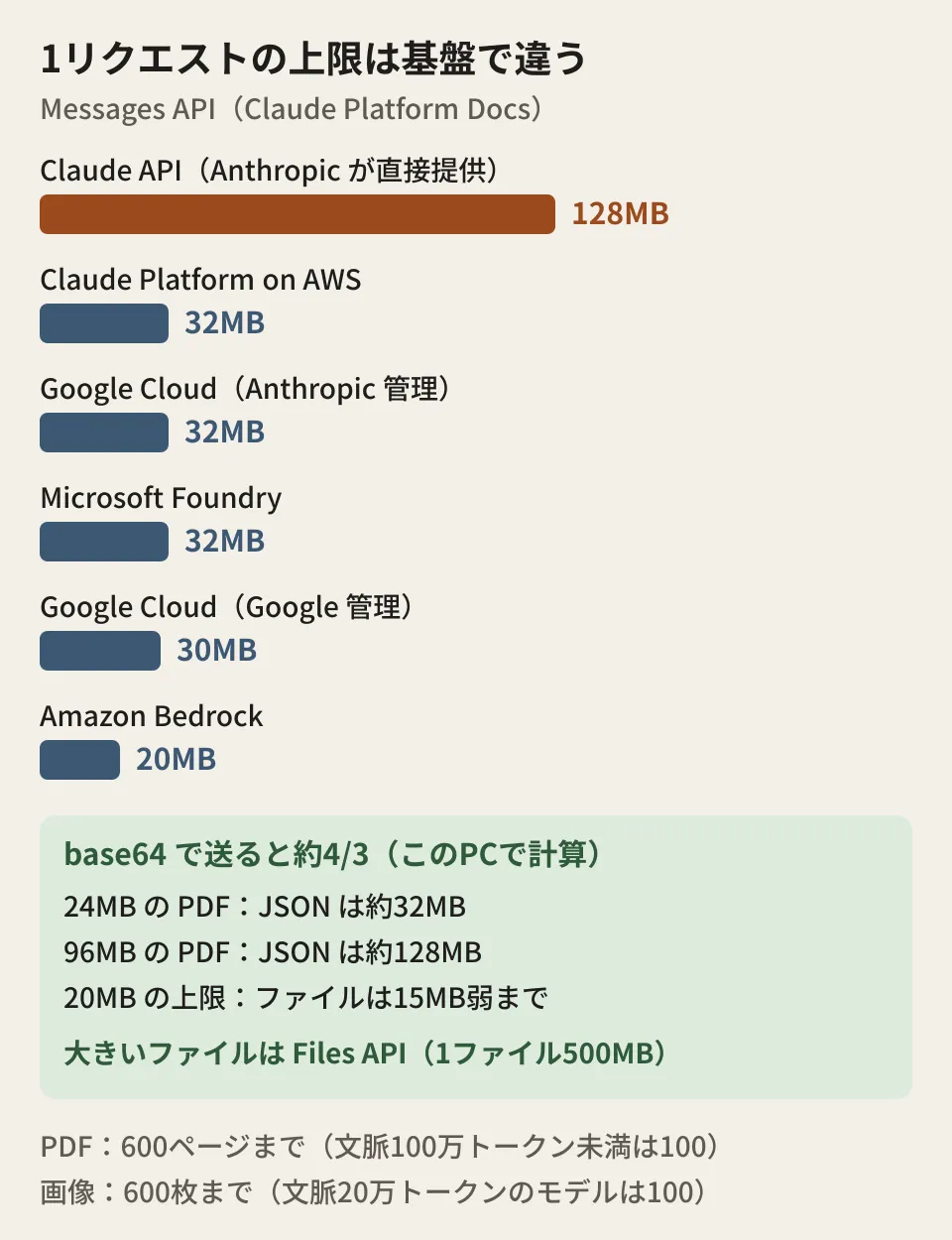
- Amazon Bedrock: 20MB
- Claude Models on Google Cloud (Google-managed): 30MB
- Claude Platform on AWS, Claude Models on Google Cloud (Anthropic-managed), Microsoft Foundry: 32MB for the Messages API and Token Counting API
The same page also says to "check each platform's documentation for the latest values." The change in the release notes covers only the first-party API. In a setup where you test on the first-party API during development and run on Bedrock or Google Cloud in production, a file that passed in the development environment can hit a 413 in production.
The differences between the two Google Cloud offerings are covered in Claude on Google Cloud: how the two offerings differ and how to choose. To be safe, also add the limit values to your comparison items when choosing an offering.
Sending via base64 inflates files to about 4/3 of their size
When you include a PDF or image directly in the request body, you convert it to a string in a format called base64. Because base64 represents 3 bytes with 4 characters, the amount sent is about 4/3 of the original file.
On this PC, we encoded random data as a PDF in base64, placed it in JSON in the Messages API format, and measured the size (Python 3.15.0, macOS 26.5.1; nothing was sent to the API).
| Original file | Total JSON bytes |
|---|---|
| 15,000,000 bytes (15MB) | 20,000,267 |
| 24,000,000 bytes (24MB) | 32,000,267 |
| 96,000,000 bytes (96MB) | 128,000,267 |
In other words, the JSON reaches about 32MB with a 24MB PDF and about 128MB with a 96MB PDF. The documentation does not say whether "MB" means 10 to the 6th power bytes or 2 to the 20th power bytes, so avoid designing right at the boundary and leave some margin.
Limits that can stop you even within 128MB
Apart from request size, there are limits on content. From the PDF and image documentation, here are the values integrators should keep in mind.
- PDF page count: Up to 600 pages per request, or up to 100 pages when the request's context window is under 1 million tokens. This limit applies to the entire request, including non-PDF content
- Image count: Up to 600 images per request in the API, or up to 100 for models with a 200,000-token context window
- Size per image: 10MB in base64 on the first-party API, 5MB on Bedrock. For Google Cloud (Google-managed), the body of the Vision page says 10MB while the support table at the end of the same page says 5MB, so designing for 5MB is the safe choice. Dimensions are limited to 8000×8000 pixels
- When exceeding 20 images: If a request contains more than 20 images, a stricter dimension limit applies to all images. Images resent from past turns and images in tool results also count. On Google Cloud (Google-managed) and Bedrock, document blocks such as PDFs also count. The documentation advises keeping each image's height and width within 3,000 pixels, or keeping the combined total of image and document blocks to 20 or fewer
The PDF documentation also says that for PDFs with a lot of small text or complex tables, the context window can fill up before the page limit is reached. It says large PDF requests can fail before reaching the page limit even when using the Files API, and recommends splitting documents into sections. Because pages are also processed as images, reducing the resolution of embedded images is also described as effective for large files.
Options for handling large files
What the documentation repeatedly recommends is uploading files first with the Files API and referencing them in requests with file_id. The Files API can store up to 500MB per file and 1TB across the organization, and it has exited beta and can be used without a beta header. However, the following points need checking before you choose it.
- Available platforms: The platforms listed as "Available" in the table on the Files API page are the first-party API, Claude Platform on AWS, Google Cloud (Anthropic-managed), and Microsoft Foundry (Anthropic-hosted). Bedrock and Google Cloud (Google-managed) are not in the table
- Data handling: The same table lists the Files API as "Not ZDR eligible" and "Not HIPAA eligible." For systems that assume a contract under which data is not retained (ZDR), confirm before switching to the Files API that this assumption will still hold
- File scope: Uploaded files can be referenced from any request in the same workspace. The documentation cautions against accepting file IDs received from untrusted sources
If you cannot or do not use the Files API, there are two options: split the PDF by page range and send it over multiple requests, or shrink images before sending. On the first-party API and some others, you can also pass PDFs and images by specifying an online URL, but on Bedrock and Google Cloud (Google-managed) only base64 is available. From here on is the editorial team's suggestion: whichever method you choose, counting "the JSON size after base64 encoding," "the number of PDF pages," and "the number of images" on the application side before sending, and keeping each platform's limits as configuration values, reduces the effort of hunting for the cause after a 413 or 400 appears.
If you are reviewing error handling along with API version or SDK updates, see also the article on Claude API 2026-10-21 and the new major SDK versions.
Scope of verification
On November 6, 2026, we directly opened and checked the Claude Platform release notes (the October 28, 2026 entry) and the documentation pages "API overview," "Errors," "PDF support," "Vision," and "Files API" on platform.claude.com (document research). The base64 sizes are results calculated with Python on this PC; we did not send anything to the API or reproduce a 413. The Bedrock and Google Cloud limits are as stated in the Claude Platform documentation. The pages we opened in the official AWS and Google Cloud documentation did not list these values, so we have not been able to verify them. The design suggestions are the editorial team's own synthesis.
For the design of business systems that ingest PDFs and images, or for reviews of existing AI integrations, please contact us through consultation on development, AI, and automation.