When a search report says “impressions increased,” the meaning differs greatly depending on whether those are searches for the company name (branded searches) or searches by people who do not yet know the company. Excluding search terms containing the company name with regular expressions takes effort, and variant spellings slip through.
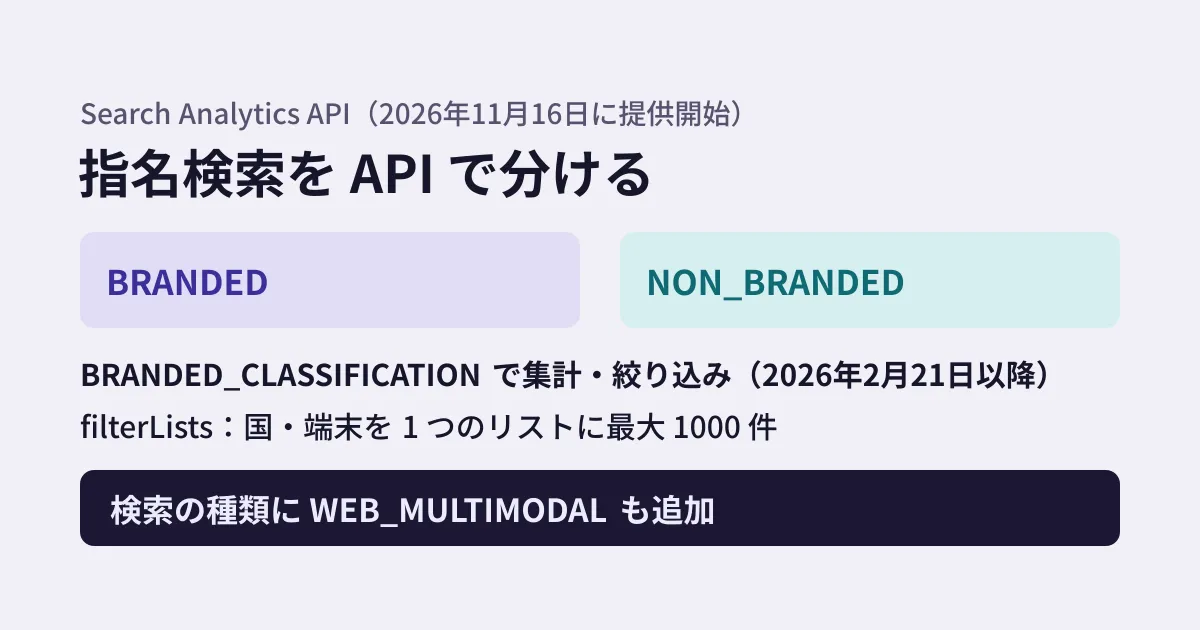
In the Search Console interface, the branded queries filter became available starting in November 2025, and figures for searches using images (web multimodal) starting in September 2026. On November 16, 2026, Google announced on the Search Central blog that these, along with specifying multiple countries and devices, are now also available in the Search Analytics API. In this article, based on the announcement, the API reference, and the Discovery document (the machine-readable definition of the API), we outline the new fields and what to rewrite in automated reports.
Three new fields
In the Discovery document, a change merged into the googleapis/google-api-nodejs-client repository on November 17, 2026 bumped the revision from 20260805 to 20261115 and added these three. The reference writes them in lower camel case (brandedClassification, webMultimodal), while the Discovery document writes them in uppercase (BRANDED_CLASSIFICATION, WEB_MULTIMODAL).
| Item | Where it is used | Description in the documentation |
|---|---|---|
BRANDED_CLASSIFICATION | dimensions (the dimension to aggregate by) and filter dimension | Split or filter by whether a search is branded (BRANDED, NON_BRANDED). The only filter operator is “equals” |
filterLists | Inside dimensionFilterGroups | Specify multiple values for one dimension with OR (any of them). Only COUNTRY and DEVICE, with up to 1,000 values (Discovery document) |
WEB_MULTIMODAL | type (formerly searchType) | Search results from Google Lens, Circle to Search on Android, and image uploads to Google Search |
The operation is the same searchanalytics.query (POST webmasters/v3/sites/{siteUrl}/searchAnalytics/query) as before, and the scopes also remain webmasters and webmasters.readonly.
Separating branded and non-branded searches
If you put BRANDED_CLASSIFICATION in dimensions, rows are returned split into BRANDED and NON_BRANDED. To see monthly trends, combine it with DATE.
{
  "startDate": "2026-10-01",
  "endDate": "2026-10-31",
  "dimensions": ["BRANDED_CLASSIFICATION"],
  "type": "WEB"
}
When you want per-page figures for non-branded searches only, narrow them down with a filter.
{
  "startDate": "2026-10-01",
  "endDate": "2026-10-31",
  "dimensions": ["PAGE"],
  "dimensionFilterGroups": [{
    "filters": [{
      "dimension": "BRANDED_CLASSIFICATION",
      "operator": "EQUALS",
      "expression": "NON_BRANDED"
    }]
  }],
  "rowLimit": 1000
}
The reference and the announcement describe conditions worth knowing before you use it.
- Data starts on February 21, 2026. Earlier periods cannot be split.
- Eligible properties are limited. Only top-level properties (not URL-prefix properties like
https://example.com/pathor subdomain properties) for sites with enough queries and impressions. For ineligible properties, no rows are returned at all. - It cannot be used together with query filters. A request that splits or filters by
BRANDED_CLASSIFICATIONcannot be combined with aQUERYfilter in the same request. The only filter operator is “equals” (EQUALS).
According to the November 2025 announcement of the interface feature, classification is done not with regular expressions but with Google's “AI-assisted internal system.” It is said to include as branded searches the company name written in any language, typos, and queries that refer to the site's own products or services even without the company name, and it may occasionally misclassify. Assume it will not match the figures you previously split with your own regular expressions, and in the month you switch, put both side by side to check the difference.
Specifying multiple countries and devices at once
Existing filters (filters) allow only one value per condition. Moreover, the only way to join conditions within a group (groupType) is AND (the reference says “or” is “not yet supported”). To get figures for “Japan or the United States,” you had to work around it, for example by querying each country and adding the results together. With filterLists, you pass a list of values for one dimension and get all rows that exactly match any of them at once.
"dimensionFilterGroups": [{
  "filterLists": [{
    "dimension": "COUNTRY",
    "expressions": ["jpn", "usa"]
  }]
}]
Countries use three-letter country codes (ISO 3166-1 alpha-3), and devices are DESKTOP, MOBILE and TABLET. filterLists can be used only with COUNTRY and DEVICE, not with queries or pages. You also cannot specify the same dimension (for example, country) in both filters and filterLists within one request. Filter groups are still combined with AND as before, so you can write conditions such as “non-branded” and “Japan or the United States.” The announcement also explains that these filters can be used in combination.
WEB_MULTIMODAL is search using images
WEB_MULTIMODAL has been added to the search type (type). The reference describes it as “search results from Google Lens, Circle to Search on Android, and image uploads to Google Search.” In the Search Console interface, figures for the same type became available with the September 24, 2026 announcement (the interface feature announcement and the help page say it also includes Chrome image search). According to the announcement, for properties using bulk data export to BigQuery, this data is also included in the export. How these figures overlap with or are separated from the existing WEB (the “All” tab) figures could not be determined from the documentation. We covered searches made with images in our article on multimodal search.
The order for rebuilding reports (editorial suggestion)
- Check whether your property is eligible. Aggregate by
BRANDED_CLASSIFICATIONon the top-level property and see whether rows are returned. If not, keep using your existing approach. - Keep your current approach. If you split with regular expressions for company and product names, save those expressions and their output for the months before the switch. Because they cannot be combined with query filters in the same request, keep the regular expression aggregation as a separate request.
- Compare the same period side by side. Also aggregate the same month on or after February 21, 2026 by
BRANDED_CLASSIFICATION, and check the difference in branded impressions and clicks. For queries with large differences, investigate by addingQUERYtodimensionsin the second example above (what the reference prohibits is combining with query filters; we have not verified through calls whether aggregation split by query works). - Decide on the wording for reports. If you make “non-branded impressions” your new benchmark figure, note in the report where the baseline changed.
- Consolidate country and device queries. Processing that queried each country or device separately and added up the results can be consolidated into a single call with
filterLists. Check that the consolidated totals match the summed figures.
For another example of Search Console expanding what it can measure, see also our article on social posts.
What we have not verified
- Actual calls. We have not made calls against a test Search Console property. We have also not verified whether values work when sent in either uppercase or lowercase, or whether
BRANDED_CLASSIFICATIONandQUERYcan be aggregated together. - Whether the figures split via the API match the figures from the branded queries filter in the Search Console interface.
On November 18, 2026, we checked the Search Console API Discovery document (searchconsole.googleapis.com, revision 20261116) and the change in googleapis/google-api-nodejs-client (commit 03c13e6, November 17, 2026). On November 20, we checked the Search Central blog announcement (November 16, 2026), the Search Analytics API reference (last updated 2026-11-16), the announcements of the branded queries filter and web multimodal interface features, the Search Console help, and the Discovery document (revision 20261118) (document research). We have not made any API calls.
GleamHub can help with automating reports using Search Console data and reviewing customer acquisition from search. Please reach out via our contact form.
References
- Google Search Central Blog — New filtering and reporting capabilities in the Search Analytics API (November 16, 2026)
- Google for Developers — Search Console API: Search Analytics query
- Google Search Central Blog — Introducing the branded queries filter in Search Console (November 20, 2025)
- Google Search Central Blog — Announcing web multimodal Search performance reporting in Search Console (September 24, 2026)
- Search Console Help — Performance report (Search results)
- Search Console API Discovery document (v1)
- GitHub — googleapis/google-api-nodejs-client「feat(searchconsole): update the API」(03c13e6)