
Why "prompts" change results
Google Gemini is a capable AI, but output quality varies greatly depending on how you structure instructions (prompts). Rather than vaguely instructing "Write an email," stating "Draft an apology email to a client regarding a delivery delay in a polite tone within three paragraphs" yields far more practical results.
The four elements of prompt design recommended by Google are as follows:
| Element | Description | Examples |
|---|---|---|
| Role | Give Gemini the stance of an expert | "You are a marketing expert" |
| Task | Clearly state what you want it to do | "Create 5 social media post ideas" |
| Context | Provide background information | "We are a web production agency whose primary clients are small and medium-sized businesses" |
| Format | Specify the shape of the output | "In bullet points, under 200 characters each" |
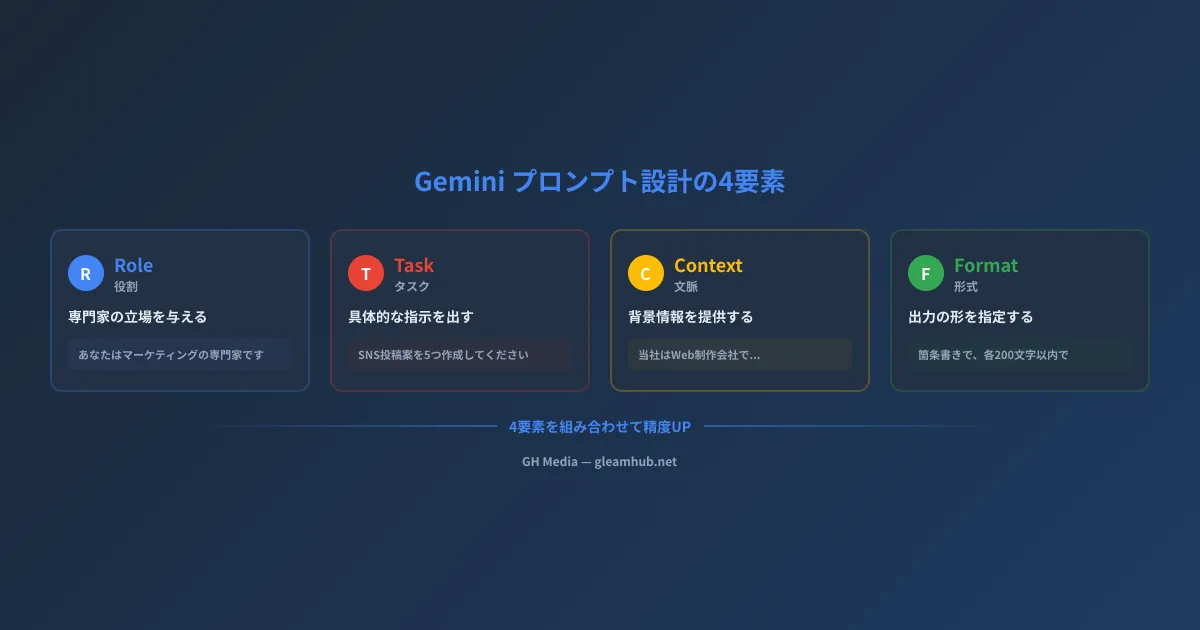
Simply keeping these four elements in mind significantly enhances Gemini's output accuracy. Below, we introduce 20 practical prompts by business scenario based on these principles.
Gmail — Prompts to accelerate email workflows
1. Drafting an apology email
あなたはビジネスマナーに精通した秘書です。
以下の状況でお詫びメールを作成してください。

状況: 納品物の提出が3日遅延した
相手: 株式会社〇〇 △△様(既存クライアント)
トーン: 丁寧かつ誠実、言い訳をしない
構成: 謝罪→原因の簡潔な説明→対応策→今後の再発防止
文字数: 300文字以内
2. Summarizing long email threads
以下のメールスレッドを要約してください。

出力形式:
- 要点(3行以内)
- 決定事項(箇条書き)
- 未解決の課題(あれば)
- 次のアクション(担当者と期限)

[メールスレッドをここに貼り付け]
3. Sales follow-up email
あなたはBtoBの営業担当です。
先週の商談後のフォローアップメールを作成してください。

商談内容: Webサイトリニューアルの提案(見積もり300万円)
相手の反応: 興味はあるが社内稟議が必要
目的: 検討を前に進めてもらう(押し売りにならない)
含める要素: 商談のお礼、提案のポイント3つ、参考事例1つ、次回MTGの打診
Google Docs — Prompts to speed up document creation
4. Outline draft for a project proposal
あなたは企画のプロフェッショナルです。
以下のテーマで企画書の構成案を作成してください。

テーマ: 〇〇(例: 社内DX推進プロジェクト)
対象読者: 経営陣(決裁者)
目的: プロジェクト承認を得る
構成: 表紙→背景と課題→提案内容→スケジュール→予算→期待効果
各セクションの要点を3行で記述してください。
5. Organizing meeting minutes
以下の会議メモを正式な議事録に整理してください。

出力形式:
- 会議名・日時・参加者
- アジェンダ
- 各議題の討議内容(要約)
- 決定事項(具体的なアクションと担当者・期限付き)
- 次回会議の予定

トーン: 客観的・簡潔
[会議メモをここに貼り付け]
6. Summarizing reports
以下の報告書を、経営層向けのエグゼクティブサマリーに変換してください。

要件:
- 400文字以内
- 最初に結論を記載
- 数値データは必ず含める
- 専門用語は平易な表現に置き換え
- 次のアクション提案を最後に追加

[報告書をここに貼り付け]
Google Sheets — Data analysis prompts
For Google Sheets automation techniques, please also refer to the "Google Sheets Automation Guide."
7. Sales data analysis
以下のスプレッドシートの売上データを分析してください。

分析してほしい内容:
1. 月別売上の推移とトレンド
2. 売上上位5商品と全体に占める割合
3. 前年同月比の増減
4. 季節要因の有無

出力形式: 各項目を見出し付きで、重要な数値はボールドで表示
最後に「改善提案」を3つ挙げてください。
8. Creating spreadsheet formulas
Googleスプレッドシートの関数を作成してください。

やりたいこと: A列の日付が今月の行だけを対象に、B列(売上)の合計を計算
条件: 空白セルは無視する
データ範囲: A2:B500
関数だけでなく、動作の解説も簡潔に付けてください。
9. Data cleaning steps
あなたはデータアナリストです。
以下のスプレッドシートデータのクリーニング手順を教えてください。

問題点:
- 氏名欄に全角/半角スペースが混在
- 電話番号のフォーマットが統一されていない(ハイフンあり/なし)
- 重複行がある可能性がある

出力形式: 手順を番号付きリストで、使用するGoogleスプレッドシートの関数を含めて説明
Google Slides — Prompts for creating presentation decks
10. Designing presentation structure
以下のテーマで10枚のプレゼン資料の構成を設計してください。

テーマ: 〇〇(例: 来期のマーケティング戦略)
発表時間: 15分
対象: 経営会議メンバー
目的: 予算承認

各スライドについて:
- タイトル
- 掲載する内容(箇条書き3つ)
- 推奨するビジュアル(グラフ/図/画像の種類)
11. Slide speaker notes
以下のスライド内容に対するスピーカーノートを作成してください。

要件:
- 各スライド90秒で話せる分量(200〜250文字)
- 口語体で自然な話し方
- スライドに書いていない補足情報を含める
- 聴衆への問いかけを1箇所以上入れる

[スライド内容をここに貼り付け]
Google Meet — Prompts for meeting efficiency
12. Creating agendas
以下の目的で60分の会議のアジェンダを作成してください。

会議の目的: 〇〇(例: Q2のマーケティング施策レビュー)
参加者: マーケチーム5名+営業マネージャー1名
必須議題: 施策の進捗確認、KPIレビュー、Q3の計画
出力形式: 議題・担当者・所要時間・期待するアウトプットの表形式
最後に「準備事項」を参加者別に記載してください。
13. Post-meeting follow-ups
以下の会議メモからフォローアップメールを作成してください。

含める要素:
- 会議のお礼(1文)
- 決定事項のリスト
- 各タスクの担当者と期限
- 次回会議の日程

トーン: カジュアルすぎず、親しみやすい
[会議メモをここに貼り付け]
Cross-functional — General-purpose prompts
14. Competitive analysis
あなたは市場調査の専門家です。
以下の企業の競合分析を行ってください。

自社: 〇〇(事業内容を簡潔に記載)
分析対象: 競合A、競合B、競合C

分析項目:
- 各社の強み・弱み
- 価格帯の比較
- ターゲット顧客の違い
- 差別化ポイント

出力形式: 比較表+まとめ(300文字以内)
15. Creating social media posts
あなたはSNSマーケターです。
以下の内容でLinkedInの投稿を作成してください。

テーマ: 〇〇(例: 当社の新サービスリリース)
ターゲット: BtoBの経営者・マネージャー層
トーン: プロフェッショナルだが親しみやすい
構成: フック(1行)→ 本文(3〜4段落)→ CTA
文字数: 500文字以内
ハッシュタグ: 3〜5個提案
16. Drafting FAQ documents
以下のサービスについて、よくある質問(FAQ)を作成してください。

サービス: 〇〇
想定する質問者: 初めてサービスを検討する中小企業の担当者
カテゴリ: 料金・機能・導入手順・サポート体制
各カテゴリ3問ずつ、計12問を作成
回答は100文字以内で簡潔に
17. SWOT analysis
あなたは経営コンサルタントです。
以下の情報をもとにSWOT分析を行ってください。

会社概要: [事業内容・規模・業界を記載]
現状の課題: [認識している課題を記載]

出力形式: SWOT(強み・弱み・機会・脅威)の表+
各象限から導かれる戦略案を1つずつ
18. Translation and localization
以下の日本語テキストを英語に翻訳してください。

要件:
- 直訳ではなく、英語圏のビジネスパーソンに自然に伝わる表現
- 日本特有の概念は簡潔な説明を括弧内に追加
- フォーマルなビジネストーン
- 元の構成(見出し・箇条書き)は維持

[日本語テキストをここに貼り付け]
19. Creating training materials
あなたは人材育成の専門家です。
以下のテーマで新入社員向け研修資料のアウトラインを作成してください。

テーマ: 〇〇(例: ビジネスメールの基本)
研修時間: 90分
対象: 新卒入社1年目
構成: 導入→知識インプット→ワーク→まとめ
各セクションに所要時間と具体的なコンテンツを記載してください。
20. Weekly report template
以下の情報をもとに、マネージャー向けの週次レポートを作成してください。

含める項目:
1. 今週の成果(定量的な数値を含む)
2. 進行中のタスクと進捗率
3. 課題・リスク(影響度と対応策付き)
4. 来週の計画(優先度順)
5. チームメンバーの稼働状況

トーン: 簡潔で要点が一目でわかる形式
[今週の活動メモをここに貼り付け]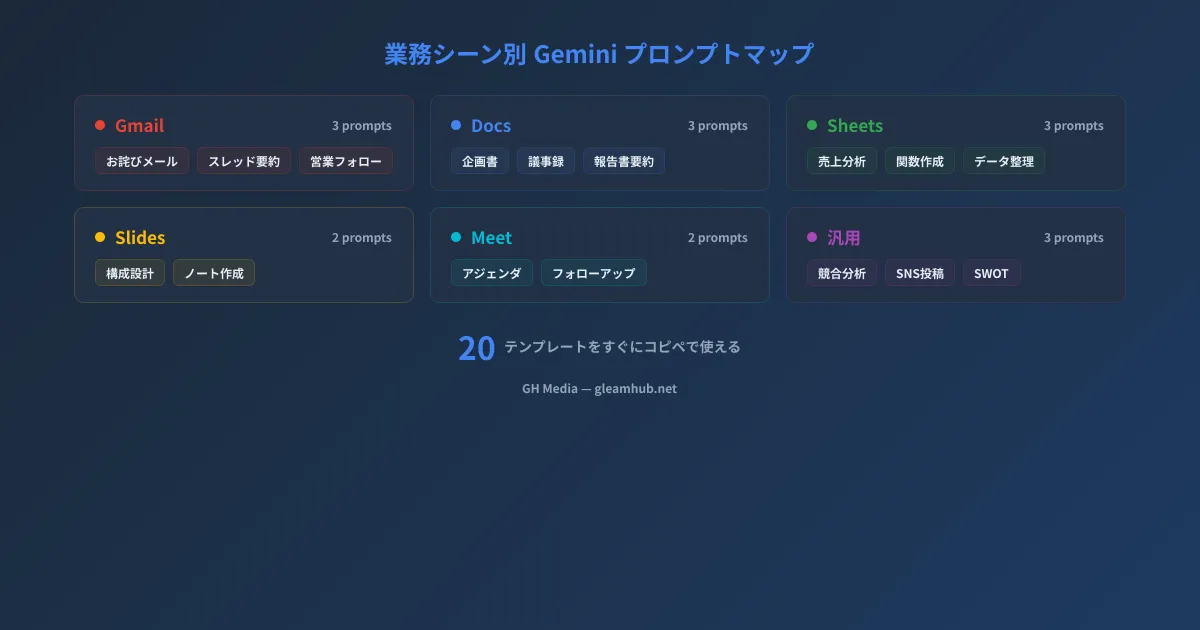
3 tips to refine your prompts even further
Here are key techniques to keep in mind to master prompt templates.
Provide instructions step by step
Rather than asking for everything at once, breaking instructions into steps improves accuracy. Proceed conversationally: "First create an outline" → review → "Flesh out the second section in detail."
Provide output examples
By attaching concrete examples such as "Please output in a format like the following," Gemini can accurately understand the expected format. This is particularly effective when tables or specific formatting are required.
Refine accuracy through feedback
Even if the initial output isn't perfect, providing iterative feedback—such as "Make it more concise," "Add numerical data," or "Make the tone slightly more casual"—gradually improves quality.
Conclusion
The 20 prompt templates introduced in this article are designed so that you can copy and paste them directly. Simply replace the placeholder brackets with your company's specifics to apply them to your work immediately.
For basic features and setup methods to leverage Gemini across Google Workspace apps, please also see the "Google Workspace Gemini AI Implementation Guide."
If you wish to leverage AI tools beyond Gemini in your work, please also see the "ChatGPT Business Playbook."
Prompts do not have a single "correct answer." Starting with templates and customizing them to fit your own workflows is the first step in making the most of Gemini.


