

A staff member having Gemini draft informational emails to business partners once consulted us with this: "It outputs a decent draft every time. But one day it's overly formal, the next day it's casual, and the signature format is different. In the end, we adjust it ourselves, so it feels no different from writing it from scratch."
The outputs lack consistency even though the same person uses the same tool for the same purpose. The cause is not Gemini's performance, but that instructions vanish with every conversation. As long as conditions like "use polite but not overly formal language" or "do not use bullet points" are added verbally each time, the output will change in format on days you forget to add them.
The setting designed to stop this constant repetition is custom instructions, which previously could only be used within Google Docs. On September 2, 2026, supported coverage expanded to Drive, Chat, Slides, Sheets, and Gmail.
Write it once, and the same conditions apply across other apps
Custom instructions are a mechanism for registering preferences regarding response tone and formatting. Once registered, they are automatically reflected in subsequent interactions.
What is practically effective about this expansion is that you can register them from any app, and the registered content applies consistently across supported apps. If you specify "do not use informal plain style for external documents" in Docs, the same condition applies when drafting in Gmail. There is no need to reconfigure them for each app.
Rollout begins on September 2, 2026, proceeding gradually over up to 15 days for both Rapid Release and Scheduled Release domains. If you cannot find the settings screen, it may simply be that your turn has not yet arrived.
What works when written, and what does not work even if written
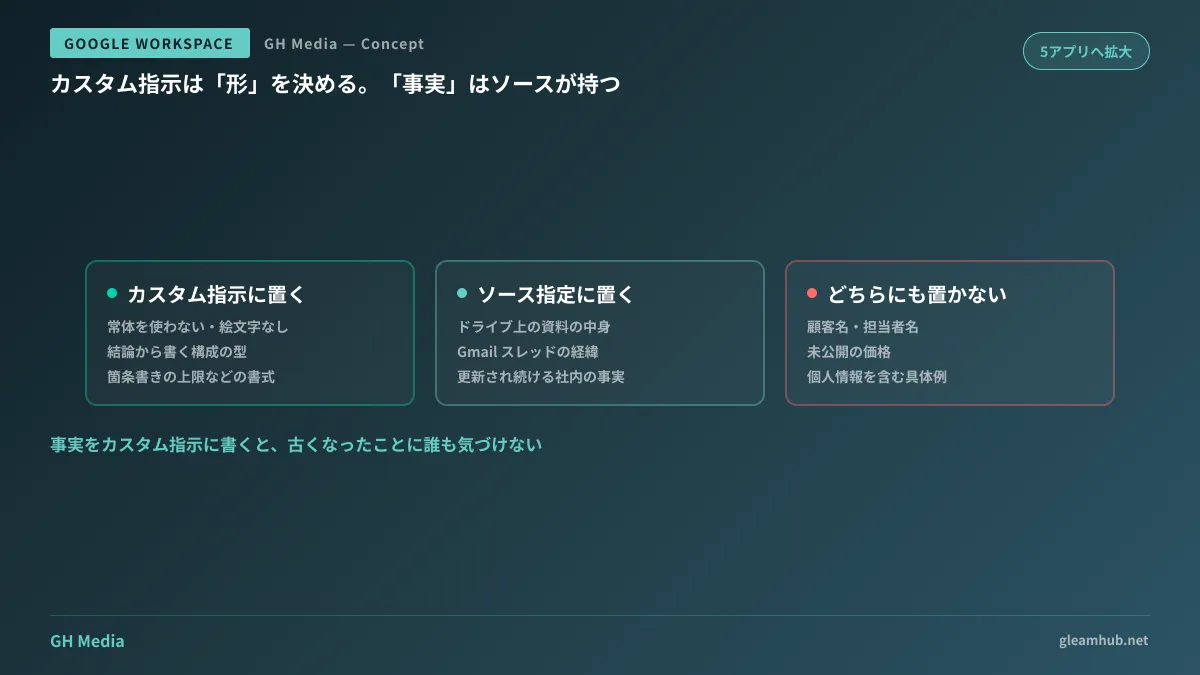
If you misunderstand this distinction, you will conclude that "nothing changed even though I configured it." Custom instructions manage the form of the output, not the factual correctness of the content.
| Content to write | Effective? | Details |
|---|---|---|
| "Do not use informal style" / "Do not include emoji" | Effective | Tone and style constraints |
| "State the conclusion first, followed by the reasons" | Effective | Structural templates |
| "Up to three bullet points" | Effective | Volume and format constraints |
| "Our company's pricing is XX" | Should not be applied | Keep facts on the source side |
| "The contact person at Company A is Mr./Ms. XX" | Do not write | Do not place personal data in settings |
Supplying facts is a domain handled by specifying sources, not through custom instructions. Dedicated features exist to reference files in Drive or threads in Gmail, and specifying sources via "Ask Gemini" in Drive ultimately results in fewer mistakes. If you write internal company facts into custom instructions, no one will notice when those facts become outdated.
This is an individual setting, not an internal company rule
This is where misunderstandings occur most frequently when evaluating adoption. Custom instructions are user-specific settings. If you want 10 people in sales to output text in the same format, all 10 individuals must register them separately.
In other words, as they are, they are not suited for "defining departmental document rules in one place and distributing them to everyone." When you want alignment across the organization, mechanisms that allow sharing instructions themselves—sharing Workspace Studio skills as team assets—better fit the objective.
The practical sweet spot is this two-tier approach:
- Keep personal preferences (avoiding informal style, signature format) in custom instructions
- Keep department-wide standards (report structure, estimate disclaimers) in shareable mechanisms
If you try to handle everything with item 1 alone, you will revert to communicating instructions verbally every time headcount grows.
What administrators must decide beforehand
Even though these are user-side settings, there are two points the IT team should verify in advance.
One is verifying eligible editions. Available Gemini in Workspace features vary depending on the subscription plan. Checking what is included in your contract beforehand saves effort before inquiries arrive asking why only certain people lack the settings screen.
The second is communicating what not to write in the settings. Because custom instructions are a field users can fill freely, there is a risk that information such as customer names, contact persons, or unreleased pricing will be placed there directly. Rather than trying to block this purely with technology, establishing rules for handling data when using AI takes effect more quickly.
If you are in a state where Gemini was introduced but is not being used in the first place, discussing custom instructions is premature. The reason it goes unused is not the feature set, but that what to use it for has not been decided.
What to do next
Write down the conditions you repeated two or more times among instructions given to Gemini over the past month. If there are three or more, those are precisely what should go into your custom instructions.
Then, simply confirm that the conditions you wrote down do not contain company names, personal names, or pricing. If they do, that information belongs on the source side, not in the settings.
At GleamHub, we offer free IT and Google Workspace consultations regarding how far to open Google Workspace AI features, how to establish usage rules by department, and how to align with existing documentation practices. Available configurations depend on your subscribed edition and current operations, so please contact us via Contact Us.






