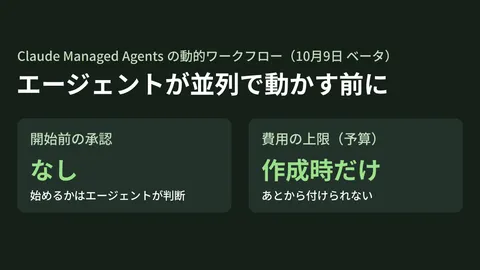
On May 28, 2026, Anthropic released Claude Opus 4.8, and on May 29, gihyo.jp reported that Claude Opus 4.8 Has Arrived, Claude Code's "Dynamic Workflow" Feature Also Released. What warrants attention is not merely the model update, but the "Dynamic Workflow" feature added to Claude Code, marking a turning point away from traditional automation that merely executed a pre-written sequence of steps toward operations where "the agent autonomously reorganizes subsequent steps based on information gathered during execution."
We have summarized the Opus 4.8 release itself from the standpoint of model lifecycle management—addressing "how to operate enterprise LLMs that update rapidly from 4.5 to 4.8 within six months (prompt regression testing, cost tracking, and upgrade qualification)"—in Claude Opus 4.8 Released: Managing Enterprise LLM Model Lifecycles for Clients. As its companion piece, this article focuses specifically on operational architecture: "how to integrate Opus 4.8 into business operations and orchestrate it dynamically."
For custom development firms supporting the operational adoption of AI agents at mid-market enterprises, this represents the first standard feature capable of head-on handling the realities of real-world workflows, where "goals change mid-flight" or "data requiring reference expands mid-process." Connecting with the prompt governance covered in Anthropic XML Prompt Structure Engagements, the approval gates in Claude Code Auto Mode Engagements, and the multi-tenant fault-tolerant workflows in Cloudflare Dynamic Workflows Engagements, we package "Opus 4.8 × Dynamic Workflows × custom development governance" as a new core service offering.
Why Dynamic Workflows are a turning point
| Dimension | Static workflows (traditional) | Dynamic workflows (Opus 4.8) |
|---|---|---|
| Step determination | Fixed in advance via YAML or code | Assembled dynamically by the agent at runtime |
| Branching | Explicitly defined with conditional branching nodes | Added dynamically based on situational assessment |
| Introducing new tools | Redeployment required | Immediate via prompt adjustments and permission grants |
| Behavior on failure | Predefined retry / rollback | Interprets failure causes and searches for alternative paths |
| Leveraging metadata | Limited | References the entire context |
| Approval gate | Fixed steps | Dynamically inserted based on risk assessment |
| Audit Logging | Step-by-step basis | Records rationale + selected paths |
| Applicable operations | Routine processing | Semi-structured / unstructured operations |
In other words, Dynamic Workflows represent a structural shift from "automation running strictly according to human-drawn flowcharts" to "automation where the agent understands the business objective and selects the optimal path."
Three structural changes beneficial to custom development projects
Structure 1: From "flow design" to "defining objectives, constraints, and tools"
In traditional custom development, substantial effort was dedicated to drawing operational flowcharts and translating them into workflow engines. With Opus 4.8 dynamic workflows, if you define "goal definition + available tools + prohibited actions (guardrails)," the agent assembles the flow itself. The deliverable of custom development shifts from "workflow definitions" to "specifications for objectives, tool suites, and guardrails."
Structure 2: From "re-deployment-driven improvements" to "guardrail-driven evolution"
Traditional operations, which required rewriting YAML and re-deploying whenever business processes changed, often led to weekly or monthly improvement cycles. In dynamic workflows, simply by updating guardrails and available tools, the agent immediately learns new paths. This shortens the improvement cycle to daily or faster. Combining this with the Approval Gates design covered in our Claude Code Auto Mode custom development allows companies to achieve the best of both worlds: "accelerating improvement velocity while preserving human review."
Structure 3: From "workflow audits" to "decision audits"
Traditional audits confirmed "whether things ran as expected," but with dynamic workflows, audits must target "why that decision was made." Extending the concept of prompt structuring from our Anthropic XML prompt structuring custom development to the audit log format makes it possible, for the first time, to establish governance explainable to executive management and compliance.
5 phases of the "dynamic workflow infrastructure" provided in custom development
Phase 1: Operational analysis and scope definition (2–3 weeks)
- Inventory of target operations (ratio of routine, semi-structured, and unstructured tasks)
- Current utilization of workflow tools (Zapier / n8n / Step Functions / Temporal)
- Risk classification (Red / Yellow / Green: impact on human life, finances, PII)
- Listing application candidates and priority mapping
- KPI definition (processing time, accuracy, cost)
- Selection of 3 pilot operations
Phase 2: Guardrail and tool inventory (2–3 weeks)
- Definition of available tools (APIs / MCP / internal systems)
- Guardrail specifications (prohibited actions, required approvals, threshold limits)
- Access perimeters by sensitivity level
- Incident escalation workflows
- Audit log requirements
- Contractor / third-party access policies
Phase 3: Technical foundation setup (4–6 weeks)
- Claude Opus 4.8 integration (Anthropic API / Bedrock / Vertex AI)
- MCP server suite deployment (internal systems / external APIs)
- Approval Gate infrastructure (Slack / Teams integration)
- Decision log storage (BigQuery / Snowflake / dedicated SIEM)
- Dashboard (visualization of selected paths)
- A/B testing infrastructure
Phase 4: Pilot to staged rollout (4–6 weeks)
- Launch operations across 3 pilot tasks
- Decision review sessions every 1–2 weeks
- Guardrail tuning
- Formulation of horizontal expansion plan
- Department-specific training content
- Help desk FAQs
Phase 5: Monthly operations + improvement loop (continuous)
- Analysis of selected paths and improvement recommendations
- Review of new tool additions
- Trend analysis of guardrail violations
- Monthly executive management reporting
- Semi-annual redesign of prompts + guardrails
Standard technology stack set for custom development
| Layer | Recommended technology | Alternative |
|---|---|---|
| Model | Claude Opus 4.8(Anthropic API / Bedrock) | GPT-5.5 / Gemini 3.5 |
| Workflow execution | Claude Code Dynamic Workflow | n8n / Temporal + proprietary integration |
| Tool connectivity | MCP server | Direct OpenAPI / in-house wrapper |
| Approval gate | Slack / Teams Bot | Webhooks + in-house UI |
| Decision logs | BigQuery / Snowflake | Elasticsearch / Loki |
| Visualization | Looker Studio / Superset | Grafana |
| IdP | Entra ID / Okta / Google Workspace | Auth0 |
| Incidents | PagerDuty / Opsgenie | Slack notifications + on-call schedule |
Which projects need this and which do not
| Projects requiring this | Projects not requiring this |
|---|---|
| Semi-structured operations (customer support / credit checks / vendor assessments) | Fully routine processing (CSV ingestion / aggregation) |
| Operations with high accountability requirements for decision rationales | Automations fully contained internally |
| Work environments where procedures change frequently | Operations fixed for years at a time |
| Spanning multiple systems (core systems + SaaS + in-house systems) | Processing within a single system |
| Audit / compliance requirements exist (financial, medical, public sector) | Not subject to auditing |
Six clauses to include in client contracts
| Clause | Details | What the client should verify |
|---|---|---|
| Division of responsibility for goal definitions | Responsibility for documenting operational objectives | Consensus process for revisions |
| Guardrail modification authority | Scope modifiable by the contractor side | Approvers by risk classification |
| Decision log retention | Retention period + encryption + access control | Audit and legal requirements |
| Model modification authority | Decisions on migrating from Opus 4.8 to successor models | Quality standards and cost criteria |
| Handover Upon Project Completion | Guardrail specifications + logging foundation | Internal operational continuity |
| Incident operations | Emergency shutdown + escalation SLAs | 24/7 / business hours |
Client-side ROI estimate (assuming 500 employees / 20 semi-structured operations)
| Item | Existing (static workflows + manual labor) | After dynamic workflow adoption | Difference |
|---|---|---|---|
| Monthly task processing time | 1,200 hours | 280 hours | -920 hours |
| Monthly workflow modification effort | 80 hours | 12 hours | -68 hours |
| Exception handling escalations | 220 cases/month | 35 cases/month | -185 cases |
| Effort to explain decision rationales | 60 hours / month | 8 hours / month | -52 hours |
| Lead time to add new operations | 4–6 weeks | 3–5 days | -90% |
| Annual benefit | — | — | Equivalent to approximately 28 million yen + accelerated business speed |
Calculated at an hourly rate of 8,000 yen, this represents an annual effort reduction of over 24 million yen. Because implementation and operational costs vary significantly depending on the number of target operations and risk classifications, projecting returns by applying these estimates to your organization's specific operational volume is the most reliable approach. Furthermore, dramatically faster deployment of new workflows directly drives revenue growth beyond simple labor savings.
Five common pitfalls
Pitfall 1: Excessive expectations that it will assemble flows automatically
If guardrails are lenient, incidents occur where agents choose unintended paths. Strictly enforce least privilege + phased access.
Pitfall 2: Not preserving decision logs
If you slim down decision logs to reduce storage costs, root cause analysis becomes impossible during incidents. Ensure legally sound long-term retention using compression + tiered storage.
Pitfall 3: Hardcoding tool definitions directly into prompts
Hardcoding tool definitions directly into prompts without using an MCP server requires modifying prompts whenever tools change, neutralizing the benefits of dynamic workflows. Designing with tool abstraction centralized in MCP is a core prerequisite.
Pitfall 4: Company-wide rollout without a pilot
Attempting to roll out 20 workflows simultaneously from the start causes frequent failures because guardrail tuning cannot keep pace. Strictly adhere to running a 3-task pilot before phased expansion.
Pitfall 5: Omitting AI decision clauses from contractor agreements
If contractors or dispatched team members have permission to alter agent decisions, the chain of decision audits breaks. Include contract revisions in initial infrastructure setup.
90-day action plan
| Week | Action |
|---|---|
| Week 1〜3 | Operational inventory + risk classification + selection of 3 pilot tasks |
| Week 4〜5 | Guardrail specifications + contractor agreement revision policy |
| Week 6〜9 | MCP + Approval Gate + decision logging foundation setup |
| Week 10〜11 | Launch of 3 pilot operations + weekly reviews |
| Week 12 | Departmental rollout plan + help desk FAQs |
| Week 13 | First monthly operational review + KPI dashboard activation |
Conclusion — from "flow design" to "designing objectives and guardrails"
Claude Opus 4.8 dynamic workflows mark a watershed moment transforming "automation following human-drawn flowcharts" into "automation that understands business objectives and selects optimal paths." For providers supporting mid-sized enterprise AI agent adoption through custom development, "enterprise agent orchestration" that seamlessly unifies goal definition, guardrails, and decision auditing becomes the new flagship service offering.
Whether you want to embed Opus 4.8 into your operations but find decision logging and guardrail design challenging, or are looking to migrate from an existing workflow engine, we provide tailored estimates based on your operational scope and risk classifications. Please feel free to reach out via our inquiry form.
Sources
- Claude Opus 4.8(Hacker News 2026-05-28)
- Claude Opus 4.8 Debuts; Claude Code "Dynamic Workflows" Feature Also Released (gihyo.jp 2026-05-29)
- Custom development for Anthropic XML prompt architecture (GH Media)
- Claude Code Auto Mode Custom Development (GH Media)
- Cloudflare Dynamic Workflows Client Services (GH Media)