Logging in every morning to an old business system with no API and copying down numbers. Downloading invoices from a business partner's portal and putting them in a designated folder. Claude's browser use is a feature that directly answers requests to hand this kind of screen work to AI.
On October 7, 2026, the Claude Platform release notes announced that classes for integrating browser use and computer use had been added in beta to the Python and TypeScript SDKs. Developers only need to write the part that operates the browser (the driver), while the SDK handles the back-and-forth loop with Claude, URL checks and calls for human approval.
However, the checks the SDK handles have limits. In this article, based on the official documentation (Browser and computer use with the SDK toolsets and Browser use tool) and the results of running the TypeScript SDK in our test environment, we lay out what to decide before using it for business automation.
What the SDK provides and what it does not
The first item under "Limitations" in the documentation is "The SDK doesn’t include a browser, a desktop, a ready-made driver, or a URL policy." What the SDK includes is a framework for plugging in the following three things.
- URL policy (
url_policy/urlPolicy): A function called before Claude opens a page withnavigate. To reject, it throwsToolError - File policy (
file_policy/filePolicy): The locations of files that can be used for uploads, and whether to show Claude the download destination path - Approval function (
confirm): Called every time before an action is executed; if it returnsfalse, the action is not executed
You provide the browser itself and the driver that operates it. You can use a driver provided by a partner or build your own with Playwright or similar tools. The browser use tool is available on the Claude API and Google Cloud.
What the URL check does not cover
The documentation warns as follows about URL policies.
Without a URL policy, the SDK checks no URL, and the API doesn’t filter the URLs Claude opens.
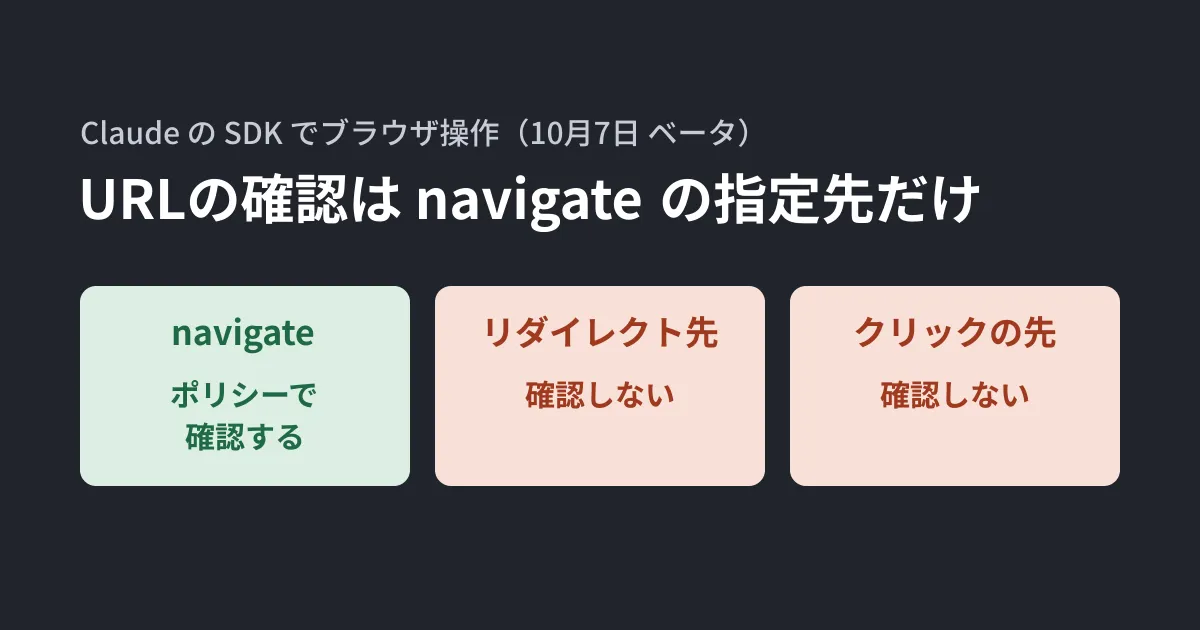
If you do not pass a URL policy, no URLs are checked. Furthermore, even if you pass a policy, it checks only the URL written in navigate. Destinations reached when Claude clicks a link, page redirect targets and requests a page loads in the background are not covered. The description in the SDK's type definitions also says, "This is a hook for your own policy, not a security boundary" (a place to plug in your own policy, not a security boundary).
In our test environment, we created a browserless test driver that extends the browser use class in TypeScript SDK 0.134.0 and checked its behavior by passing data shaped like instructions from Claude directly to it. The URL policy was one that "allows only subdomains of example.com over https:."
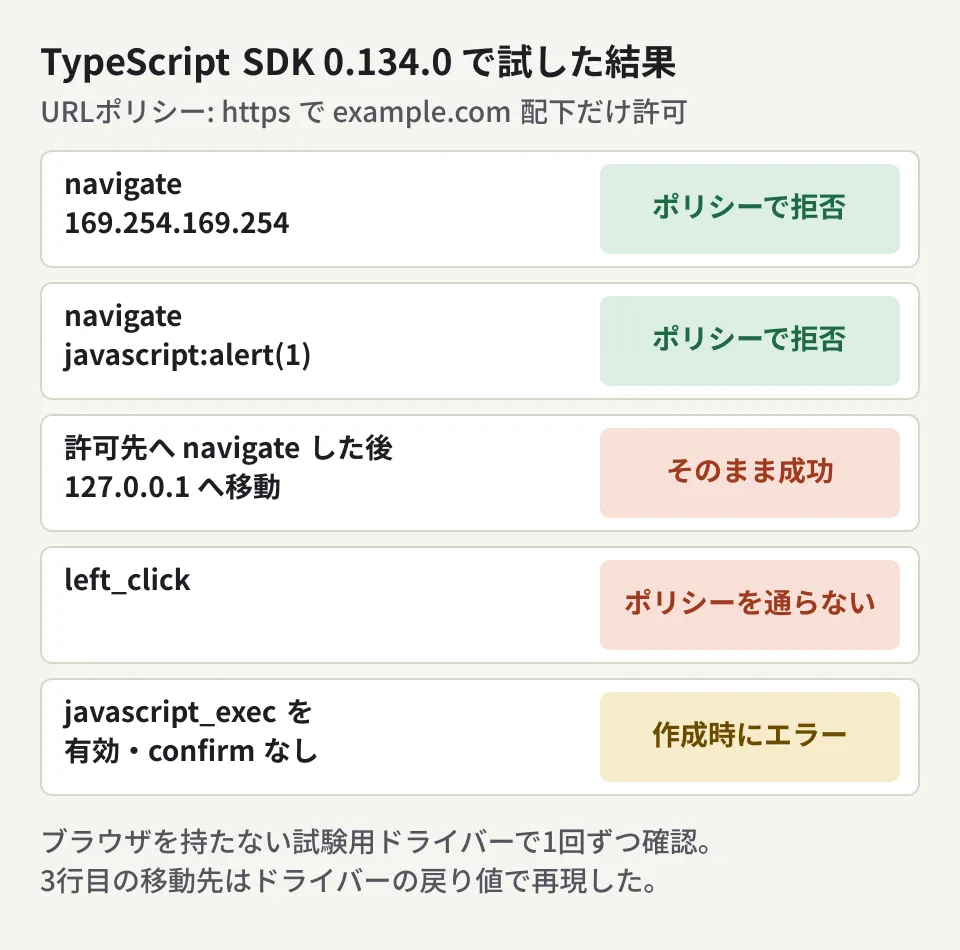
The results were as follows.
- Specifying
http://169.254.169.254/...(the cloud metadata address) orjavascript:alert(1)withnavigatecaused the policy to be called and reject it, and the request did not reach the driver - For a
navigateto the allowedhttps://www.example.com/form, when the driver returned a result saying it "moved tohttp://127.0.0.1:8080/admin," this was included as a success in the result to Claude as is. The policy does not check redirect targets left_clickreached the driver without passing through the policy
Item 2 was reproduced by constructing the driver's return value; we did not trigger a redirect in an actual browser. Even so, the fact that redirect targets must be checked on the driver side is consistent with the documentation.
The documentation lists six countermeasures. It states that the SDK handles 1, 4 and 5, while 2, 3 and 6 are done in the driver and the execution environment.
- Write a URL policy that rejects unnecessary URLs
- Intercept browser requests in the driver and check them against the same rules
- Restrict the container's outbound traffic
- Narrow the scope of uploads and downloads (leave uploads disabled)
- Apply
confirmto high-impact actions - Run the browser in a dedicated container or virtual machine for each session
Regarding item 3, the documentation adds a caution. Restricting traffic outside the container cannot stop requests to localhost or 127.0.0.1. Also, because the SDK does not check URL schemes, file: and javascript: must be rejected on the driver side. It states that allowing file: lets the browser read files on the machine it runs on, and that javascript: can run scripts on the page even if javascript_exec is disabled.
There are cases where the approval function becomes "required"
javascript_exec, which runs arbitrary JavaScript on the page, and file_upload, which sends files, are disabled by default. The documentation states that if you enable either one without passing confirm, an error occurs when the class is created.
In our test as well, creating the class with javascript_exec enabled and without confirm displayed "["javascript_exec"] requires a confirm callable" as a ToolsetConfigError. When Claude sent a javascript_exec instruction while it was not enabled, the instruction did not reach the driver, and an error saying it was unavailable was returned to Claude.
The documentation lists the following points to note when using confirm.
- When asking a person for approval, show the type of action, the page URL and the input. Since any of these may contain text originating from the page, escape everything other than printable ASCII characters before display
- Approval decisions are based on the browser state reported just before. Even if the page changes afterward, the SDK does not recheck before execution
- In computer use, only the action and input are passed to
confirm, not the screen. From that alone, you cannot tell what will happen when a given coordinate is clicked
The browser use tool page asks that a person confirm actions that are hard to undo or that require the user's own consent, such as purchases, account changes, sending messages and agreeing to terms.
What to decide before using it for business automation
From here on are our suggestions based on the documentation above and our test results.
- Start with tasks where you can list the sites that may be opened. Choose tasks where you can write out the allowed hosts, such as one business partner portal and one internal system. Use the same list in three places: the URL policy, request checks in the driver, and outbound traffic restrictions
- If login is required, use a dedicated low-privilege account. The documentation also says to use a dedicated low-privilege account when a logged-in session cannot be avoided. Do not use the staff member's own account as is
- Separate "read only" from "change." For each task, draw a line such as: retrieving numbers and downloads run automatically, while pressing submit, register or delete buttons is confirmed by a person with
confirm - Rebuild the browser environment every time. Run it with a fresh profile that holds no credentials, in a location that cannot access the internal network
Regarding the risk of Claude following instructions written in page text (prompt injection), the documentation acknowledges that "Claude sometimes follows instructions found in page content even when they conflict with yours," and states that a classifier that inspects page content runs automatically. However, it says the countermeasures above remain important even with that classifier. We cover the overall approach in our article on indirect prompt injection, designs that keep human approval from becoming a formality in AI agent approvals are not safety catches, and the cost differences between screen operation and APIs in our article on the cost of Computer Use. If a task has an API, consider using the API before screen operation.
Scope of verification
On October 15, 2026, we directly retrieved and reviewed the Claude Platform release notes (the October 7, 2026 entry) and the documentation pages Browser and computer use with the SDK toolsets and Browser use tool (document research). On October 16, 2026, before publication, we retrieved the same materials again and cross-checked the text. In addition, in our test environment (Linux, Node.js v22.22.0,
@anthropic-ai/sdk0.134.0), we passed data shaped like Claude instructions to a browserless test driver and checked the URL policy, whetherconfirmis required, and the handling of disabled actions once each (hands-on testing; we did not check communication with the Claude API, operation of an actual browser, partner drivers, the Python SDK, or the computer use class).
For building systems that hand work in screen-only business systems to AI, or designing the permissions and network access that underpin them, please contact us through consultation on development, AI, and automation.