"Our frontline teams have started building AI agents on their own, and we can no longer track who is running what." Recently, this kind of consultation has surged from mid-sized companies using Google Workspace. The trigger is that Google Workspace Studio, which enables building workflow automation agents without code, has become accessible to everyone. While convenient, it can easily lead to the mass proliferation of automations like "an agent that independently sorts incoming emails and forwards them externally" beyond the visibility of the IT team. They run, but no one can explain how to stop them or what they actually do inside. The same problem that shadow macros and shadow GAS once posed is now returning in the form of agents.
Workspace Studio is a platform that lets users build agents that operate across everyday applications like Gmail, Drive, Sheets, and Google Chat without programming. Since its general availability began in December 2025, powered by Gemini 3, simply specifying requirements in natural language—such as "label emails containing questions addressed to me for reply and notify me in Chat"—will automatically configure the necessary steps. From small two-step automations to complex workflows spanning 20 steps, they can be built and distributed using the same mechanism. That is precisely why, now that the number of people who can build has surged, the role of custom development has shifted from "building on their behalf" to "establishing the foundation to build and operate safely." In this article, we examine where accidents happen when introducing Workspace Studio into operations and how to design governance through custom development.
Why "building in natural language" complicates operations
The appeal of Workspace Studio lies in how easily agents can be built simply by writing requirements in everyday words. However, this ease of use has the opposite effect when it comes to operations.
First, only the creator knows the intent. Because Gemini automatically designs steps based on natural language instructions, even the creator often does not accurately understand the agent's inner workings—what data it reads, where it writes, and what it sends outside. Accidents where an agent "created because it was convenient" was actually forwarding email attachments to external domains can easily occur.
Second is the danger that permissions are inherited by the agent. An agent runs using the permissions of its creator or user. In other words, an agent casually built by someone with elevated privileges will have access to the exact same scope of files and emails as that person. Depending on who created it, the reach of visually identical agents will differ completely.
Third, as their numbers grow, inventory audits become impossible. When a single person manages multiple agents and departmental variations of similar automations proliferate, within six months it becomes impossible to even compile a list of "who is running what and for what purpose." This stems from the exact same root cause as the issue where "visual inventory audits fail due to low frequency," which we covered in our article on automating IT team operations with the Google Workspace CLI.
What changes when a custom development partner steps in
This is where custom development comes into play. What we do is not flashy development, but rather providing an unshakeable framework around frontline teams while maintaining their ability to build on their own.
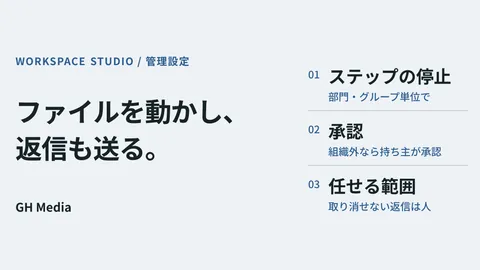
One aspect is defining the boundaries of permissible agents upfront. Agents that involve external transmission, read personal or billing information, or process financial transactions should not be deployed directly to production by frontline teams alone; they must pass an IT team review. Conversely, self-contained automations, such as simply organizing labels within one's own inbox, can be freely created by the frontline. Merely mapping out this "safe-to-freely-create zone" and "approval-required zone" upfront prevents the vast majority of incidents. The overall picture of where to enforce agent governance ties directly into the concepts covered in our article on the Google Workspace AI Control Center.
Another aspect is designing agents to run with dedicated least privilege rather than creator permissions. Rather than leaving agents tied to individuals with elevated permissions, mission-critical workflow agents should be migrated to dedicated service accounts that can only access necessary data. This prevents them from stopping due to employee departures or transfers and limits the blast radius in the event of a leak. For use cases handling internal knowledge across systems, as discussed in our article on building internal RAG with NotebookLM and Workspace Studio, it is essential to design boundaries around what data is permissible to learn and reference.
| Dimension | When built by frontline teams alone | When structured with custom development |
|---|---|---|
| Understanding of internals | Vague even to the creator | Purpose and data scope tracked in a registry |
| Permission | Runs with creator's permissions | Least privilege isolated by use case |
| External transmission and billing processing | Executes without safeguards | Approval workflow made mandatory |
| Resignations and transfers | Active automations abruptly stop | Continuity maintained via dedicated accounts |
| Audit | Unmanageable within six months | Inventory and shutdown procedures established |
As shown in the table, what custom development adds is not functionality, but visibility and mechanisms to stop processes. The presence or absence of these elements completely transforms operational manageability six months down the road.
Our case study: When "convenient automation" was flagged in an audit
Here is a concrete example. We received an inquiry from a mid-sized staffing firm (company name withheld), who told us: "An automation built by our frontline team using Workspace Studio was so convenient that it spread company-wide, but now we're in trouble because a client is requesting a security audit." The agent in question automatically read email attachments sent by job applicants, extracted key details, transcribed them into a spreadsheet, and notified the recruiter in Chat. To the frontline team, it was an indispensable time-saver.
However, when we inspected the internals together, several concerning issues came to light. The data being parsed directly contained applicant personal information, yet the destination spreadsheet remained shared with "Anyone with the link." The agent ran under the permissions of a single recruiter, meaning it technically had access to every email that person could view. Furthermore, there was no record anywhere showing who created the agent, when, or what data it handled. Because it ran so conveniently, it had spread company-wide without anyone inspecting its inner workings.
What we did was not shut down the automation. We restricted the destination spreadsheet's sharing settings to only necessary personnel, uncoupled the agent from personal credentials by moving it to a least-privilege account dedicated to applicant management, established an inventory listing which agent was proposed by whom and what data it writes where, and inserted an IT team approval step solely for processes involving external transmission. We redesigned it into a state that could be explained during an audit while fully preserving usability for the frontline team. In other words, we turned something created simply "because it's convenient" into something that can be used with confidence "because it is fully accountable."
What this case illustrates is that the primary hurdle with Workspace Studio is not building agents, but rather determining who governs the created agents and keeping them in a state where they can be stopped. As the barrier to creation has lowered, the weight of governance has grown proportionally.
Key alignments to make before considering adoption
If you are planning to adopt Workspace Studio in earnest, deciding on just two things upfront will make life much easier later.
First, clearly document the scope of what can be freely built. Leave self-contained personal automations to frontline staff, but require approvals for anything touching external transmission, personal data, or billing. Simply sharing this boundary upfront dramatically reduces rogue agents running amok. Second, ensure critical agents do not depend on individual personal permissions. Migrating them to dedicated least-privilege accounts prevents disruptions when staff leave or transfer, making audits far easier to address.
If frontline automations have spread conveniently but governance has lagged, if you need to inventory and secure agents ahead of a client audit, or if you want to establish an unshakeable foundation before rolling out Workspace Studio enterprise-wide, please reach out via GleamHub's contact page. We will review your existing agents and sharing settings, work with you to triage what should be stopped, fixed, or left to frontline teams, and redesign your setup into a safe, sustainable operation that preserves frontline usability.