"An approval flow created by an accounting staff member was sending approval notifications to an external chat tool." This is a typical issue that emerges about six months after an organization adopts no-code business automation. The creator had no malicious intent; in fact, work was getting done faster. The only problem was that no one realized the flow was routing data outside the organization.
When this happens, the response many organizations take is to ban no-code automation altogether. Frontline teams can no longer build workflows, requests bounce back to the IT team, and everyone ends up reverting to manual spreadsheet tasks. Because the granularity of restriction is too coarse, it shuts down effective automations along with the risky ones.
Changes are being introduced to Workspace Studio admin settings to make this granularity finer.
What Is Being Added: More Granular Controls
Google has announced the addition of enterprise security controls for Workspace Studio. The controls that administrators will be able to configure include the following:
- Individually disable types of steps that can be used in flows
- Disable data access by Gemini
- Enforce end-user confirmation before execution for steps that share data externally
- Disable webhook integrations
These exist on a separate layer from organizational-unit-level toggles that determine whether to allow Workspace Studio altogether. The essence of this change is that you can allow its use while selectively closing off outbound actions.
The rollout begins on August 20, 2026, for Rapid Release domains (taking up to 3 days for feature visibility), and on September 1, 2026, for Scheduled Release domains (taking up to 15 days). Depending on which track your tenant is on, the timing for when you can verify this will differ by more than two weeks.
Check Webhooks First
There is a rationale behind the order of tightening controls. Whether data leaves the organization determines whether an incident can be recovered from.
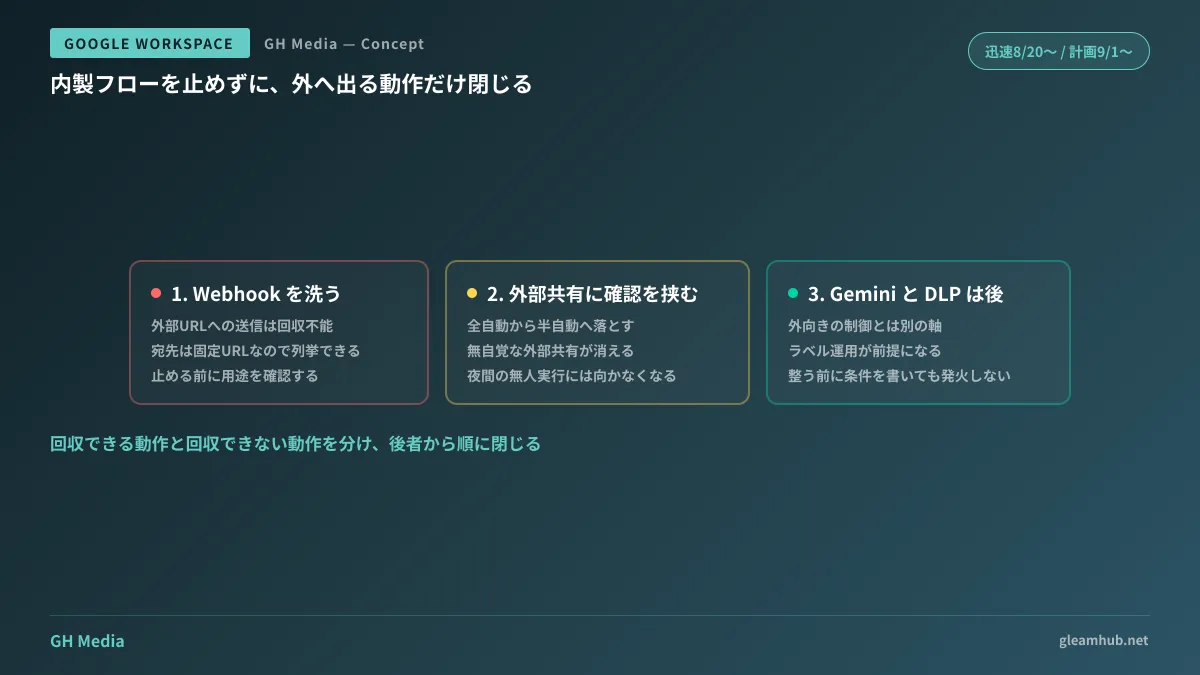
Creating a file on an internal Drive, updating a spreadsheet row, or sending a chat to an internal team member—if these contain errors, they can be recovered internally. On the other hand, posting to an external URL via a webhook or sharing files with external users cannot be retracted once transmitted.
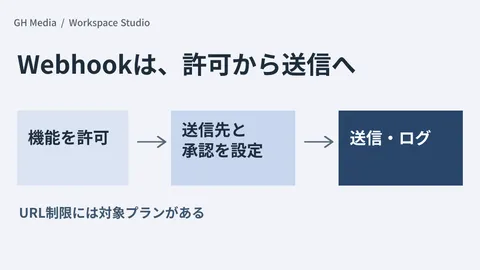
For this reason, start your audit with webhooks. In Workspace Studio, webhooks require a complete destination URL containing http:// or https://. For security reasons, dynamic URLs using variables cannot be specified, and destinations are stored as static URLs. In other words, from an administrator's perspective, the destinations of flows using webhooks should be fully enumerable.
The recommended order is as follows:
- Audit whether any flows currently containing webhooks exist
- Verify whether the destination URL domains match known vendors and approved services
- If there is an unexplainable destination, confirm its intended purpose with the flow's creator
- If deemed unnecessary for business operations, disable webhook integrations at the organizational unit level
The reason you should not skip straight to step four is that business operations may already rely on webhooks. Disabling them abruptly often triggers complaints the next day about missing notifications, forcing a hasty rollback.
The Purpose of Inserting End-User Confirmation into External Sharing Steps
Even after disabling webhooks, external file sharing steps remain. This is where you can leverage the setting that enforces end-user confirmation for steps that share data externally.
What this setting changes is downgrading the flow's nature from "fully automated" to "semi-automated." It creates a middle ground between an outright ban and complete laissez-faire.
The operational effect is clear: external sharing never happens unnoticed. The flow creator sees on screen that data is being sent externally each time it runs. Because most incidents stem from lack of awareness rather than malice, settings that eliminate unconscious actions are often more cost-effective than prohibitions.
On the other hand, adding confirmation naturally reduces the value of automation accordingly. It cannot be used for flows intended to run unattended overnight. It is practical to use this as material for building organizational consensus around the premise that flows involving external sharing are unsuitable for automated execution.
Gemini Data Access and DLP Are Separate Layers
Disabling Gemini data access can also be configured from the same admin interface, but it lies along a different axis from outbound controls. It concerns what Gemini is allowed to read within a flow, not what is sent outside.
Furthermore, Data Loss Prevention (DLP) controls are also provided. DLP on the Gemini side restricts access to Drive data based on content criteria and labels. DLP on the flow side is slated to expand toward blocking flow execution altogether or enforcing end-user confirmation based on criteria such as referenced data, utilized data, and output visibility.
At this level, the available configuration options become quite granular. Conversely, they are so granular that trying to lock down everything during initial configuration will stall progress indefinitely. We recommend first closing off outbound paths, and tackling DLP conditional controls only after label operations are actively running. If you write rules before labels are properly organized, the conditions simply will not trigger.
High-level architectural design on how to position Workspace Studio within an organization is covered in Before No-Code AI Agents Proliferate. In addition, how to restrict external communication on the Apps Script side shares core concepts with Approaches to URL Allowlisting.
What to do next
Open the Workspace Studio settings in the Admin Console and check whether the webhook integration setting is displayed. This item should appear by late August for Rapid Release domains, and by mid-September for Scheduled Release domains. If it is not shown, it is awaiting rollout, so verify your release settings and wait.
If it is displayed, complete an inventory of existing flows before disabling it. Know what exists before shutting things down, rather than disabling first and searching later. Reversing this order means conducting investigations while business operations are disrupted.
GleamHub offers free IT and Google Workspace consultations covering no-code automation inventories, scoping permissions per organizational unit, and isolating business operations that require external integrations. Because the best approach varies depending on the number of existing flows and how deeply they are integrated into operations, please contact us individually via our contact page.
Sources
- New enterprise security controls for Workspace Studio enable expanded collaboration use cases — Google Workspace Updates
- Manage access to steps and starters in Workspace Studio — Google Workspace Admin Help
- Connect flows to other services using webhooks — Workspace Studio Help
- Control Gemini sources for Workspace Studio flows — Google Workspace Help
- Get started: Administrator guide to Workspace Studio settings — Google Workspace Help