"We built an automation, but since it only runs on one item at a time, we ultimately open up the spreadsheet and run it manually row by row from top to bottom"—we occasionally receive such reports from companies experimenting with no-code automation tools. A workflow intended to reduce manual tasks ends up becoming the trigger for manual labor.
This was not due to poor tool usage. Rather, automations formatted around taking one input to perform one action simply lacked the concept of iteration in the first place. While teams could build one-to-one trigger-and-action flows—such as sending a notification when a form is submitted or applying a label when a file is added—they could not build flows that perform the same action across every row of a 30-line list.
Google Workspace Studio has introduced a feature to fill this gap.
Automation that stalled at single-item processing
Workspace Studio is a tool that allows users to build no-code automations and AI agents within Google Workspace. It supports Japanese and lets you construct business workflows in a manner close to natural language. While consultations regarding its adoption are increasing, the aforementioned hurdle was the very first wall encountered by companies that began building with it.
When you list out tasks you want to automate in practical operations, most of them involve performing the same processing on multiple items.
- Registering action items extracted from meeting minutes as tasks for each respective assignee
- Drafting personalized email messages tailored to the status of each row in a sales lead list
- Generating and distributing department-specific reports from a departmental aggregation sheet at the start of the month
All of these are tasks where doing them one by one feels no different from manual work. They are tedious precisely because the volume is high; if there were only one item, a human could just do it. In other words, automations incapable of looping failed to reach the very areas that most needed automation.
What was added is less a feature and more an entry point
The "Repeat for each" step, which entered general availability on June 2, 2026, accepts list-formatted data and executes subsequent actions for each individual item in that list (Introducing the ability to loop over a list of items in Workspace Studio — Google Workspace Updates).
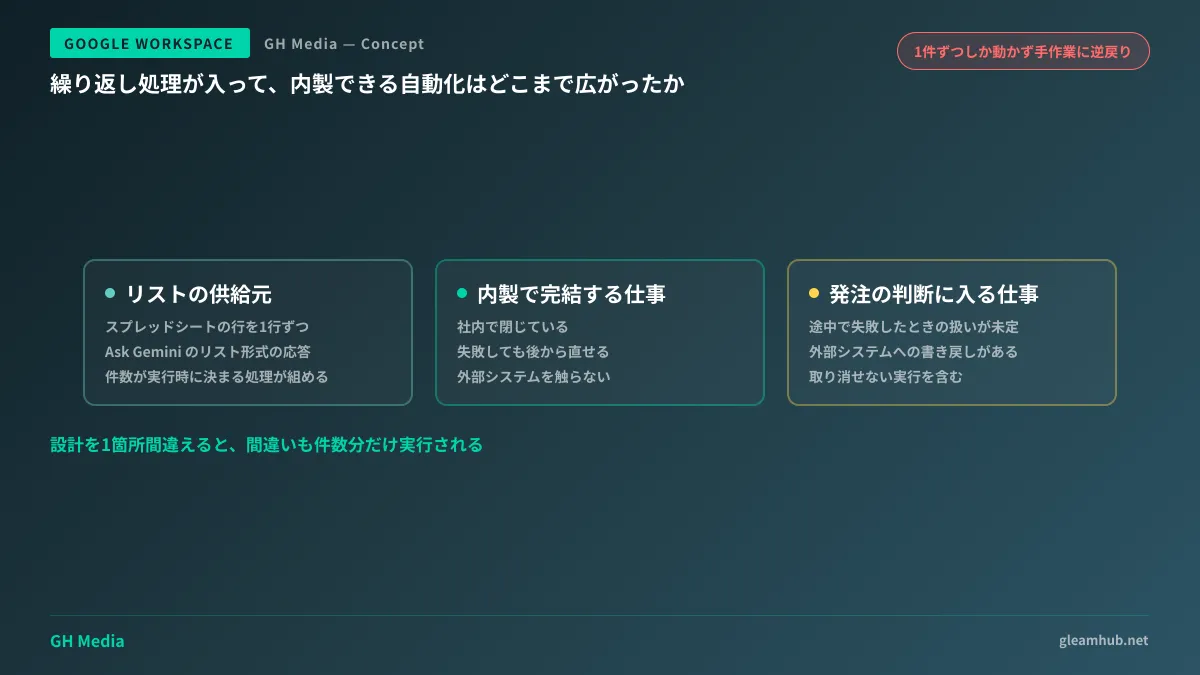
What deserves particular attention is where the source list for iteration can be obtained. Currently, two types are supported.
| List source | Specific example | Suitable operations |
|---|---|---|
| Google Sheets rows | Sales pipeline lists, equipment ledgers, employee directories | Tasks already managed in tabular form |
| List-formatted responses from Ask Gemini | Decisions extracted from meeting minutes, request items parsed from inquiry emails | Tasks where the item count is determined dynamically from unstructured text |
The former is straightforward: if you have a table, you simply iterate through its row count. What proves truly impactful in practical business operations is the latter.
Having Gemini extract items from unstructured text, such as meeting minutes or inquiry emails, and running actions for that specific number of items. You do not know how many items there will be until execution. Traditional automations operated on the premise of fixed input formats, making this structure impossible to build. By opening this up, the scope of addressable operations has expanded far beyond mere volume handling.
Work patterns that still cannot be completed in-house
When asked, "Does this mean all automation can now be handled entirely in-house?", the answer is no. This is because the introduction of loops changed the applicable scope, not the complexity of decision-making.
To draw a clear boundary, it helps to evaluate whether a workflow falls under any of the following three patterns.
First are workflows without defined procedures for mid-process failures. When an error occurs on item 7 out of 30, should the flow halt the remaining items, skip it and continue, or re-run only item 7 later? In manual operations, humans judged this on the fly. Automating requires deciding these rules in advance, which demands business-side consensus. It is not an issue of the tool.
Second are workflows involving two-way interactions with external systems. Retrieving values from core ERP or sales management systems and writing back processed results. While read-only access may have workarounds, writing data back requires ensuring data consistency, which exceeds the scope of no-code tools.
Third are workflows where mistakes cannot be undone. Sending emails, finalizing billing data, or publishing content externally. Because loops execute across every item automatically, a single design flaw will cause the error to be executed across all items as well. When emails were sent manually one by one, a person could catch the mistake by the third item.
For workflows that avoid these three pitfalls—meaning they are completed entirely internally, can be corrected later if they fail, and do not touch external systems—building in-house offers tremendous value. Conversely, forcing in-house automation on tasks that fit these criteria risks leaving the company with automations that no one can fix when they stop working.
About the usage limits starting in September
There is one more point to confirm before putting workflows into production. Starting September 1, 2026, users with an AI Expanded Access license will receive higher usage limits in Workspace Studio. In other words, users without this license will face limits that remain unchanged.
Loop processing internally consumes steps corresponding to the number of items during a single execution. While limits were never an issue for single-item tasks, they can quickly become visible the moment you loop over a 100-row sheet.
Rather than calculating theoretical figures on paper, it is faster to run the workflow for a week with about 10% of the target operational volume to see if you hit the ceiling. If you do, proceed to review licensing options; if not, your current setup is sufficient.
Furthermore, establishing a system to track who is running which automations is necessary regardless of usage limits. As more people gain the ability to build, untracked automations proliferate. This governance topic is covered in Before No-Code AI Agents Proliferate. For perspectives on checking whether existing integrations can solve problems before adding more tools, see Integrate Before Adding Tools.
Start by building one workflow where failure causes no harm
Choose your initial workflow not by the scale of its impact, but by asking: "Would it cause trouble if this accidentally ran 100 times?"
Internal weekly report generation, organizing files in shared drives, or posting notifications to internal chat channels fit this profile. Building one workflow completely to the finish line helps you identify where repetitive tasks lurk within your operations. It is safer to move on to higher-impact operations only after acquiring this perspective.
Conversely, starting right away with batch customer email drafting is not recommended. While drafting may seem safe because emails are not sent immediately, another problem emerges: can a human realistically review 100 drafts queued in an inbox? When placing human verification at the exit of an automation, designing whether that verification volume remains realistic is an integral part of the process.
Whether you want to organize which internal operations can be built with no-code and where development is needed, or have someone review if existing automations can withstand production operations, GleamHub accepts consultations through our free IT and Google Workspace advisory service. Because the optimal setup varies depending on requirements, we provide individual estimates. Please reach out via Contact Us.
Sources
- Introducing the ability to loop over a list of items in Workspace Studio — Google Workspace Updates (June 2026)
- Loop processing is now available in Google Workspace Studio — DevelopersIO
- Trying out the list loop processing feature in Google Workspace Studio — G-gen Tech Blog
- [July 2026 Edition] Featured Google Workspace update information — rakumo