Updated September 28, 2026: We merged in the content of the related article "Workspace Studio sends replies — decide what to delegate," published on September 24, 2026. Because the rollout has finished, we also revised the statements about deadlines and corrected the descriptions of the steps that already existed, the approval default and the steps it covers (including moving and copying in Drive), the eligible editions, and how moving a file changes who can view it, in line with Google's official announcements and Help Center.
You manually move invoices you have finished checking from the "Intake" folder in Drive to the "Processed" folder. You reply "Passed to accounting" in the Chat thread where the request came in. You write an acknowledgment in the same thread when a business partner emails an inquiry. Each takes less than a minute per item, but as the volume grows, it adds up to a significant amount of time.
Workspace Studio has added four steps that take on this kind of work. The rollout began in September 2026, and if it went as announced, the steps are already available in organizations where administrators haven't restricted them. However, changing where a file is stored or delivering a reply to someone has different consequences when it goes wrong than a summary or a draft does. We lay out the two settings administrators decide and where to draw the line on how much to leave to automation.
The four new steps
The four steps announced on Google Workspace Updates on September 2, 2026 are as follows.
- Copy a Drive file or folder: A step intended for duplicating from templates and for intake processes. You can specify the destination folder and the name of the copy, and according to the Help Center, a folder you copy can contain up to 50 items and 3 levels of nesting.
- Move a Drive file or folder: Moves the specified file or folder to another folder.
- Reply in Google Chat: Replies to a specific message in a space or thread. You can choose to reply in the thread or to quote the original message in your reply, and Markdown formatting, lists and code blocks are supported.
- Reply to an email: Sends a reply within an existing Gmail thread. You can choose to reply only to the sender or to everyone, and you can also add Cc and Bcc recipients.
The Workspace Studio Help Center says the same thing for each of the four: "For security, this step requires your approval if the run includes people outside your organization." We cover how this approval works in a later section.
The rollout started on September 1 (admin controls) and September 8 (features) for the Drive and Chat steps, and on September 8 (admin controls) and September 14 (features) for the Gmail steps; the schedule was the same for Rapid Release and Scheduled Release. Even adding the days until they become visible (1–4 days for admin controls, 1–3 days for features), the rollout period ended in mid-September according to the announced schedule.
They are available for Business Starter / Standard / Plus, Enterprise Standard / Plus and Education Fundamentals / Standard / Plus, as well as with the Google AI Pro for Education, Teaching and Learning and AI Expanded Access add-ons. For administrators, the announcement says the steps are available by default if you allow Gemini for Google Workspace steps.
How they differ from the existing "send" steps
Workspace Studio is no longer a tool only for summarizing and making judgments. In its August 17 announcement, Google explained that when Studio launched it could only assist with tasks, such as drafting an email, and could not carry them out, such as sending an email; it then added steps such as sending and forwarding emails to internal and external recipients, sending Chat messages and posting in spaces, and creating and updating shared documents and spreadsheets. The admin settings that require approval for actions involving people outside the organization also arrived at that time; we cover the background in Workspace Studio's new admin controls.
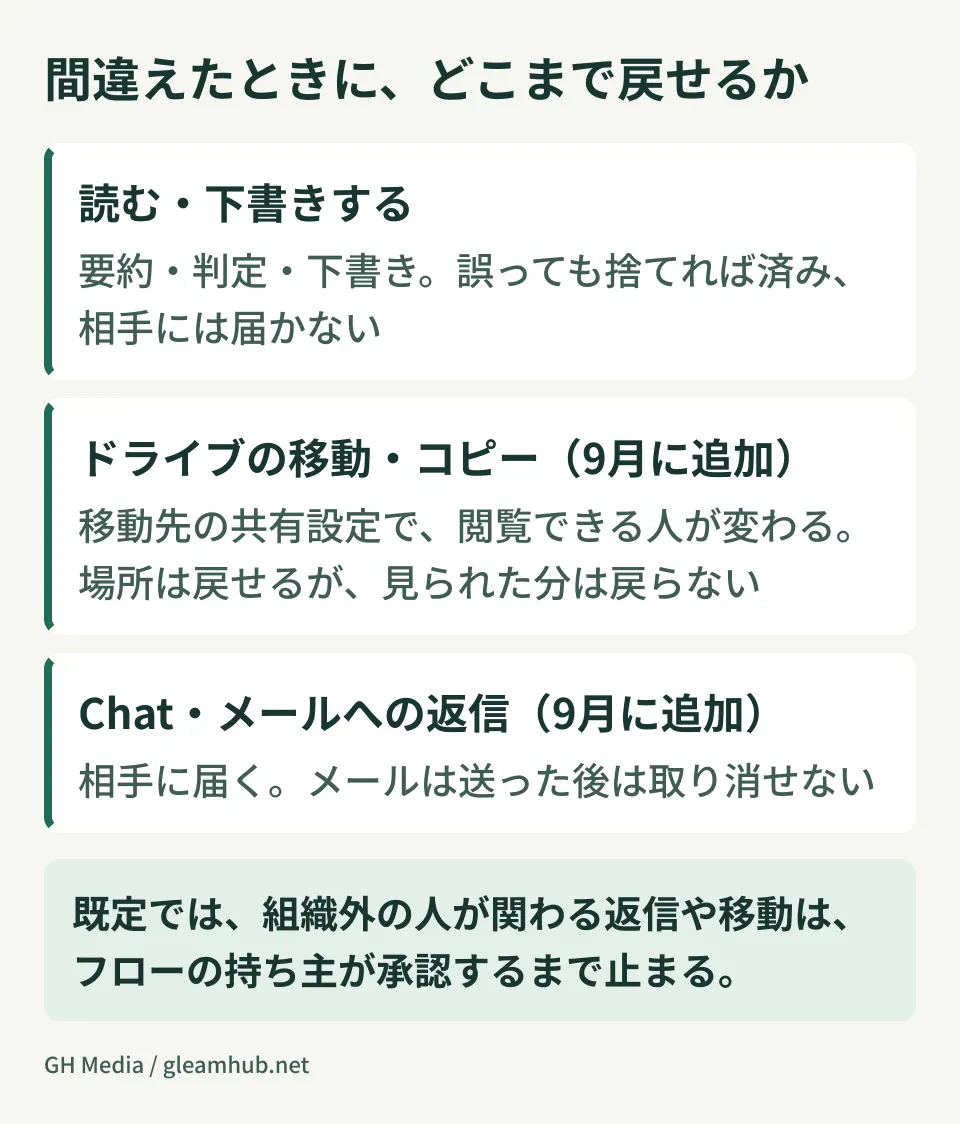
What sets the four September steps apart is that they act on things that already exist. They move files that are already in Drive and reply directly within email and Chat conversations started by others. What happens when something goes wrong, and how far it can be undone, differs from step to step.
| Step | What happens when a mistake occurs | Can it be undone later? |
|---|---|---|
| Drive move and copy | The sharing settings of the destination folder apply, changing who can see the file | The location can be restored, but anything viewed in the meantime can't be undone |
| Chat reply | The wrong message reaches the members of the space or thread | Whether it can be deleted depends on role and subscription. What has been read can't be undone |
| Email reply | It lands in the recipient's inbox | Can't be taken back once sent |
If a read or draft output is wrong, a person can simply discard it. With actions that change where something is stored or that reach another person, a mistake remains as something that actually happened. The way requirements change between letting AI read and letting it write follows the same structure as permission design when connecting AI directly to a CRM.
Two settings for administrators to decide
The announcement lists two things: administrators can turn off individual steps, and they can require user approval for actions that may share data with people outside the organization. Both work through the same mechanisms as the admin settings introduced in May (allowing or blocking individual steps) and in August (approval for actions involving people outside the organization). Because we have not checked the Japanese labels in the Admin console, the setting names below are given as they appear in the English Help Center.
Turning off individual steps
With the admin settings introduced in May 2026, steps and starters can be turned off by app or individually, per domain, organizational unit or group. They are on by default. You edit them app by app under "Steps & features" in the Workspace Studio settings in the Admin console. For example, you can "allow moving and copying in Drive but turn off only email replies." The steps also depend on access to the underlying service: if Chat is turned off for your organization, Chat steps can't be used.
Steps you turn off appear as disabled on users' screens, and existing flows that include those steps stop running and users see an error. Now that the rollout is complete, you need to check which flows use a step, and who owns them, before turning it off. In the audit and investigation tool, the Workspace Studio log (Rule log events) can be filtered by step name.
Requiring approval for runs involving people outside the organization
Under "Approvals" on the same settings page, you choose how to handle steps that share data externally ("Sensitive steps" in the Help Center).
| Setting | Behavior |
|---|---|
| Always | The owner approves manually every time |
| Let user decide (default) | Currently behaves the same as Always. A change is planned that will let users choose auto-approval |
| Never | Runs automatically without asking for approval |
The person who approves is the flow owner themselves. Requests do not go to a manager or an administrator. When a flow reaches a step that requires approval, it pauses before that step, and the owner is notified in Workspace Studio, through a Chat message named after the flow, and in the Gmail and Chat side panels. If the owner approves, the step runs; if they reject it, the step is skipped. The list of approval requests also has an expired status, so while the owner is away, a reply could stay on hold until the request expires. When someone else copies and uses a shared flow, approval requests go to the person who made the copy.
With the default settings, in runs that include people outside the organization, replies and moves don't happen until the owner approves them. If your policy is to keep requiring approval every time, it is safest to explicitly choose "Always" rather than rely on the default, "Let user decide," because the planned change affects how "Let user decide" behaves. Conversely, if you choose "Never," runs involving people outside the organization proceed without approval.
Webhooks also follow this "Sensitive steps" approval setting (September 17 announcement). If you are considering switching to "Never," make that decision together with the points in what to decide before permitting Workspace Studio webhooks.
Whose permissions a flow runs with, and whose name it arrives under
A flow runs on behalf of the user who owns it. According to the admin Help Center, newly created flows run by default with the same data access privileges as the user who created them. A shared flow works by having the recipient make a copy from a link; the recipient can't access the original owner's emails or files and uses the copy within what they themselves can access. What determines the permissions is not "the person who built it or the person who ran it," but the owner of that flow.
With Drive moves, the thing to watch is who can see a file after it is moved. Files in Drive inherit the sharing settings of their parent folder, so who can see a file changes with the destination. Colleagues who could see it through the original folder may lose access, and people outside the company who have access to the destination folder may become able to see it. Decide the sharing scope of the folders you will use as destinations before you build the flow.
If the owner can no longer use Workspace Studio, their flows stop. Google says that when an administrator turns off Workspace Studio for a user, any active flows that user owns stop immediately. To prepare for transfers and departures, you need to keep a record of who owns the flows used in your operations. We cover stopping individual flows and telling people and flows apart in audit logs in audit logs and per-flow permissions.
Here is what the official Help Center says about who a reply appears to come from, as seen by the recipient.
- In Chat, messages sent by a flow show a chip next to the sender's name indicating that they were sent by a Studio flow (admin Help Center).
- The "Studio flow attribution visibility" setting (beta) in the Admin console lets you choose whether a flow's actions are shown as the flow or as its owner. It is on by default, and actions are shown to people inside and outside the organization under the flow's identity, which includes the flow name, the owner's name, an avatar, a badge and an icon. In apps that don't support the setting, actions are always shown as the owner. According to the August announcement, it applies to newly created flows.
- The user Help Center says that emails and Chat posts sent by an approved step identify the flow as the sender, as in "[Name of your flow] for [Your Name]". The admin Help Center, on the other hand, says that actions the owner reviewed manually may be attributed to the owner regardless of this setting.
The official Help Center pages do not agree on how approved replies are displayed. Nor could we confirm from the Help Center whether a Gmail reply is shown as the flow or as the owner. If you are going to reply automatically to people outside the company, send a test to an external test address and check how it appears before you start.
If the display leads recipients to assume that a staff member read their message and replied, failing to reply as quickly to their next inquiry can leave a worse impression. Operations are more stable if you lean one way or the other: state in the message that it was sent automatically, or limit automatic replies to acknowledgments of receipt.
Which replies to delegate
Approval is triggered by "whether people outside the organization are included," but it doesn't decide which replies can be automated. The criterion is not speed but whether you can undo it when you make a mistake.
| Type of reply | Automatic sending | Rationale |
|---|---|---|
| Acknowledgment of receipt (template text that doesn't touch on the content) | OK to delegate | The wording doesn't depend on what the other person wrote |
| Answers to information requests (stock, business hours, location) | Conditional | Everything depends on whether the referenced values are correct |
| Replies involving judgment or apologies | Written by humans | A single wrong email can't be taken back |
A reply in internal Chat can be corrected within the company as soon as you notice the error. An email sent outside the company cannot be taken back. Even though both are automatic replies, it is safer to judge the two by different standards.
When combining these steps with repetition, you also need to watch the scope of impact. Once a loop extends the target to hundreds of items, a mistake you would catch in a single item has already run on all of them by the time you notice it. For flows that place moves, copies or replies inside a loop, set a cap on the number of items first. As an example of detecting loops and excessive runs, the admin guide gives an alert rule that emails all administrators when more than 100 runs start within an hour.
Note that, by default, starters ignore messages sent by flows. This setting keeps a flow that replies in Chat from being triggered again by its own reply. If you check "Include messages sent by flows" in a starter, make sure flows won't set each other off in a chain.
Reply handling you built in Apps Script
Processes you used to write in Google Apps Script, such as "reply with template text to emails that meet certain conditions," can now be replaced with combinations of steps in more cases. Once replaced, even people who can't read code can follow the process on screen.
However, you can't always move them over as they are. The starter that runs when an email arrives can only use Gmail's default labels in its conditions, and it evaluates messages before labels are applied by personal filters. Scripts that sorted messages with custom labels before replying need their conditions rebuilt. And because a flow stops when its owner can no longer use Workspace Studio, decide separately how to prepare for the owner's transfer or departure.
Scripts with dozens of lines of conditional branches, or that build message text from values fetched from external APIs, become harder to read if you force them into no-code. The test for moving something over is not "can it be written briefly?" but "can a successor fix it?" We cover how to rebuild systems that only their author can read in handling inherited Google Apps Script.
What to do now
- In the Workspace Studio settings in the Admin console, record the current state as it is: whether each of the four steps is on or off, and what the "Approvals" setting is.
- If there is a step you want to turn off, first check which flows use it and who owns them. Turning it off stops the flows that include the step from running, and users see an error.
- Decide your approval policy. It helps to list, one by one, the Chat spaces that include external people and your email exchanges with business partners, and to ask the people in charge, "Would an automatic reply here cause problems?" If you want to keep approving every time, choose "Always".
- If you try automatic replies, start with a single flow that acknowledges receipt. Use an external test address to check the approval process, how the sender appears and how long delivery takes, and then decide the next scope.
We checked the Google Workspace Updates announcements (dated May 27, August 17, September 2 and September 17, 2026), the Workspace Studio Help Center for administrators and for users, and the Google Drive and Google Chat Help Centers by opening the pages directly on September 28, 2026. Creating and running flows in Workspace Studio, approval operations, changing settings and the Japanese screen labels in the Admin console, and how sent emails and Chat posts are displayed have not been verified.
For decisions about how much of your business workflows to leave to automation and how to design approval for actions that go outside the organization, please consult GleamHub.
Sources
- Automate Drive, Gmail, and Google Chat actions with new steps in Workspace Studio — Google Workspace Updates
- New enterprise security controls for Workspace Studio enable expanded collaboration use cases — Google Workspace Updates
- More granular admin controls for Workspace Studio steps and starters — Google Workspace Updates
- Automate workflows with custom starters and steps, third-party integrations, and webhooks in Workspace Studio — Google Workspace Updates
- Guide to Starters & Steps in Workspace Studio — Workspace Studio Help
- Manage flow approval requests — Workspace Studio Help
- Troubleshoot issues with flows — Workspace Studio Help
- Require approval for flows — Google Workspace Help
- Allow or block Workspace service-specific steps — Google Workspace Help
- Manage Workspace Studio flows access to Google data — Google Workspace Help
- Manage flow attribution visibility (beta) — Google Workspace Help
- Get started: Workspace Studio set up guide for admins — Google Workspace Help
- Turn Google Workspace Studio on or off for your organization — Google Workspace Help
- Stop a Workspace Studio flow as an admin — Google Workspace Help
- Share folders in Google Drive — Google Drive Help
- Learn about your role as a space owner or manager — Google Chat Help