"We mandate 2-step verification for all employees, so we consider our security solid"—this is a sentiment frequently heard from IT staff at SMBs. 2-step verification is indeed powerful, offering far greater safety than companies without it. Yet one fundamental question is overlooked: should anyone possessing a valid ID, password, and 2-step verification token be allowed access from anywhere and on any device?
A departing employee accessing company Drive from a personal PC or a shared terminal on a business trip via an overseas network: currently, as long as authentication credentials match, all of this passes as a legitimate login. While 2-step verification confirms user identity, it does not evaluate location or device context. Context-Aware Access fills this gap. However, it must be understood alongside the reality that not every organization has access to this feature.
Context-Aware Access Restricts Entry by Circumstance
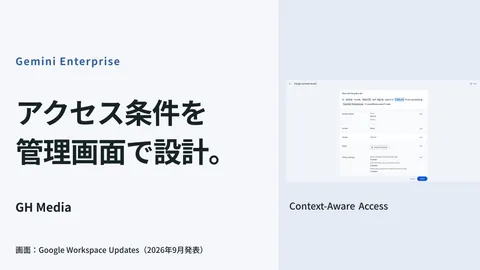
Context-Aware Access determines whether to permit login not solely by user identity (authentication), but also by situational parameters (context). Specifically, access permission can be granularly defined based on conditions such as:
- Whether access originates from an IP address range permitted by the company
- Whether the device is encrypted, password-locked, or managed by the company
- The originating country or region
For example, you can enforce rules by application or department, such as requiring Gmail to be opened only from corporate networks or encrypted, company-managed devices, or restricting specific accounting tools to domestic access within Japan. Even if authentication passes, sessions failing these conditions are blocked at the perimeter. This enables systematic rejection of access from former employees' personal PCs or unvetted foreign devices.
Note that Context-Aware Access controls access to designated Google services and does not uniformly safeguard unspecified or third-party services. The architectural scope of what you include directly determines your defensive perimeter.
Where Many SMBs Stumble: The Plan Barrier
To those reading this and thinking, "We need to implement this," here is a blunt reality upfront: Context-Aware Access is not available on Business Standard or Business Plus. It is restricted to higher-tier editions such as Enterprise Standard / Plus, Frontline, higher Education tiers, Enterprise Essentials Plus, and Cloud Identity Premium. For the majority of SMBs subscribed to Business-tier plans, this feature is excluded.
This detail is frequently overlooked; assuming it can be configured simply because Google Workspace is in place, administrators search the admin console only to find the menu absent. In custom development projects, discussions often stall here with, "Then it's impossible for us." Before giving up, however, several alternatives should be sorted out.
| Plan Tier | Context-Aware Access | Pragmatic Measures Available |
|---|---|---|
| Business Standard / Plus | Unavailable | Mandatory 2-step verification, immediate suspension of departures, external sharing controls |
| Enterprise / Frontline / Higher Education tiers | Available | Conditional access policies based on IP, device, and geographic region |
How Far You Can Tighten Security on Business Plans
Assuming nothing can be done without upgrading to an enterprise plan is premature. Even on Business plans, perimeter defenses can be strengthened considerably.
First is making 2-step verification mandatory. Rather than leaving it optional, enforce it organization-wide. Furthermore, adopting security keys or passkeys significantly mitigates credential harvesting via phishing. Concrete details on this path are discussed in our article on transitioning to passkeys.
Second is establishing a structured workflow for immediate suspension upon employee departure or reassignment. Denying ex-employee personal devices via Context-Aware Access largely shares the same objective as shutting the entry point entirely by suspending the account the moment they leave. If your organization can suspend accounts on the same day, access cannot occur regardless of personal device considerations. Offboarding architecture is detailed in our article on offboarding departing employee accounts.
Third is narrowing the scope of external sharing. If controlling the accessing user is difficult, tighten the sharing permissions on the accessed data. By restricting external domain sharing by default and keeping shared drive privileges to the bare minimum, the potential blast radius of an unauthorized login remains constrained.
Criteria for Deciding Whether to Upgrade Plans
Should you upgrade to Enterprise solely for Context-Aware Access? This comes down to balancing costs against assets requiring protection, with no universal right answer. When consulted during custom development engagements, we evaluate in the following order.
If data sensitivity is high (personal information, customer confidential records, regulatory compliance) and clear justification exists for restricting access origins, device and IP controls in higher tiers justify the investment. Conversely, if your primary concerns are departures and lost devices, enforcing 2-step verification and immediate suspension under Business plans delivers far superior cost efficiency. Before upgrading, verify whether you have maximized your current plan's capabilities.
At a company of roughly twenty employees supported by our team, the initial inquiry requested Context-Aware Access implementation. Reviewing actual usage revealed external access was minimal, and true concerns centered on departing staff and personal devices. Putting plan changes on hold, we prioritized mandatory 2-step verification, immediate departure suspensions, and disabling external sharing by default, which resolved almost all initial anxieties. An upgrade was retained merely as an option should future gaps arise.
What to verify first
Check your admin console to identify your current plan and whether 2-step verification is optional or mandatory. Many organizations have yet to master baseline practices like mandatory enforcement and swift departure offboarding before considering advanced features. Only once those foundations are solid does debating a plan upgrade for Context-Aware Access make practical sense.
Source: Protect your business with Context-Aware Access (Google Workspace Help) / About Context-Aware Access (Google Workspace Help)