Once teams inside a company start using AI notebook tools, there is a question that invariably reaches the IT team: "Wait, are they uploading our quotes and contracts into that, too?"
The recipient is put in a tough spot. They know it is being used. It hasn't been banned. However, there is no way to check who uploaded which files or who those notebooks were shared with. All they can say is "it's probably fine," and once "probably" is no longer acceptable, they end up scrambling to issue a suspension notice.
For Gemini Notebook, the materials needed to answer this question with facts have now been provided in the admin console.
What has become visible
On September 3, 2026, Google began rolling out Gemini Notebook audit logs in the Workspace admin console. This is a gradual rollout that may take up to 15 days for features to appear.
What is recorded is a series of actions performed on notebooks: who created a notebook, which resources were added, and who it was shared with. These can be tracked across dimensions such as user identity, IP address, target resource details, and notebook sharing scope. These are accessed via the Security Investigation Tool and the Audit and Investigation Tool in the admin console.
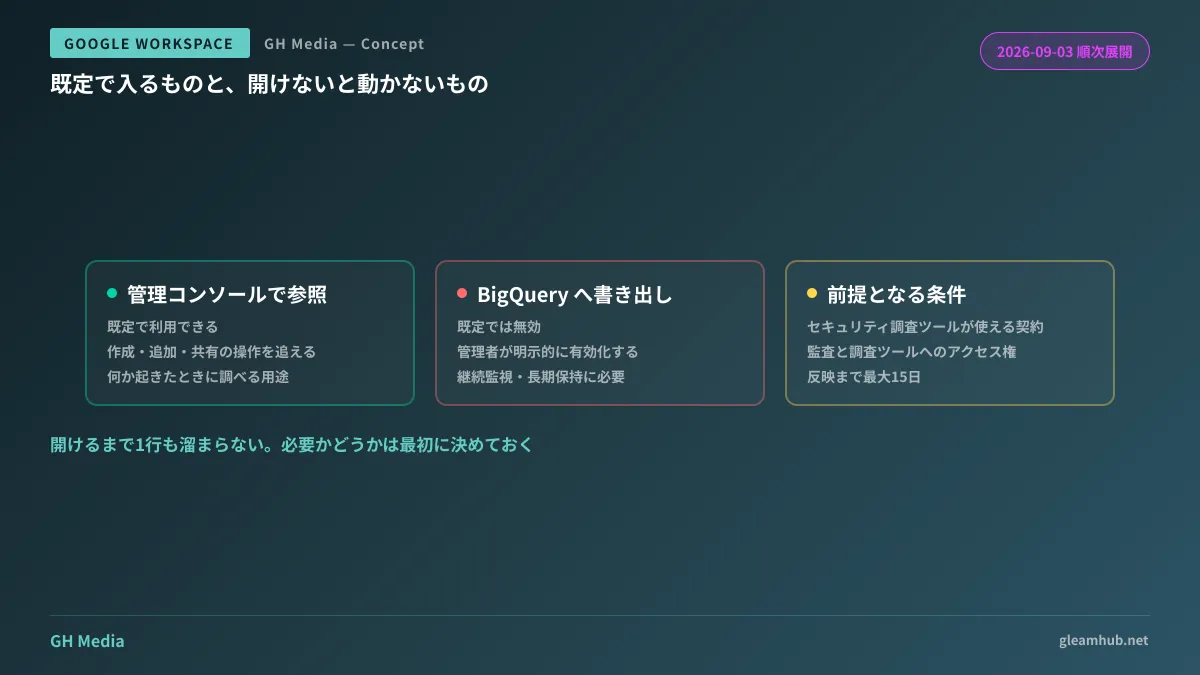
This applies to Google Workspace subscriptions for editions that have access to the Security Investigation Tool and the Audit and Investigation Tool. Because it is not available equally across all plans, first verify whether these tools are available under your company's subscription edition. This serves as the prerequisite.
What is included by default vs. what requires manual activation to work
What is practically most important in this update is that the default status is split into two parts.
Viewing audit logs within the admin console is available by default. On the other hand, the pipeline for exporting audit logs to BigQuery is disabled by default. If you want to use it, an administrator must explicitly enable it.
This difference has real consequences in day-to-day operations.
Viewing logs via the admin console is well-suited for investigating after something happens. It is sufficient for tracing back "what was added to that notebook last month." On the other hand, if you want to monitor continuously, cross-reference with other logs, or define your own retention periods, exporting to BigQuery is required, and not a single row will accumulate there until you enable it yourself.
In other words, if you rest easy just reading the news that "audit logs have been provided," you may face a situation six months later where, upon trying to trace back over a long period, no data exists for that timeframe. It is the kind of setting where you must decide up front whether it is necessary.
What to monitor once visibility is established
Being able to collect logs is merely a starting point. If you have not decided what decisions to make using the collected logs, it will simply end with an added menu item in the admin console.
In practice, the first two perspectives that prove effective are as follows:
Identify notebooks with broad sharing scopes. Because notebook sharing permissions are captured in the logs, you can surface notebooks shared across the entire organization or shared externally. A situation where a notebook created from confidential documents is widely shared can occur even when the source files themselves have strict sharing settings. That is because even if Google Drive sharing settings are tightened, notebooks created from those files operate through a distinct path.
Track the fact that specific materials were imported. Because resource information is logged, you can trace from the direction of "which notebook did this contract end up in?" When a business partner asks whether their documents have been ingested into AI, whether you can verify and answer makes a tremendous difference.
For companies that have already configured alerting workflows, this involves adding the new log type to their audit log-driven detection architecture. If building from scratch, starting with an audit of widely shared notebooks is the most practical first step.
Creating an accountable state rather than imposing a ban
Responses to AI notebook tools tend to fall into a binary choice between banning them or leaving them unregulated. Banning them leads to employees using personal accounts, rendering usage completely invisible, while leaving them unregulated leaves you unable to answer the opening question.
A realistic landing spot is having them use company accounts, but with records maintained in exchange. This update provides the component that establishes that "records are maintained" side. If you establish the positioning and use cases of AI notebooks within Workspace and define usage rules alongside logging architecture as a pair, the friction will be minimal if you later need to restrict usage.
What to do next
Opening the admin console, the order of verification is clear.
- Check whether your company's edition can use the Security Investigation Tool and the Audit and Investigation Tool
- Verify whether the Gemini Notebook log type is visible (rollout takes up to 15 days)
- Decide whether BigQuery export is required, and enable it if needed
If you postpone step 3, the historical range you can inspect later will be tied to the retention period of the admin console. Deciding whether you need long-term records cannot wait until the need actually arises.
Designing records for internal AI usage, managing Google Workspace audit logs, and cross-referencing with existing log infrastructure are available through GleamHub's free IT and Google Workspace consultations. Because viable architectures depend on your subscription edition and current logging practices, please consult with us individually via our contact form.