"I had Gemini draft the meeting minutes, so I'm sending the link." When this message appears in an internal chat, does the person who sent it actually know who can open that link?
In most cases, they do not. That is because the sharing scope is determined not by the sender, but by the organization's Drive sharing policy. And that policy was usually set years ago with the mindset of "well, we work with external parties" and has not been touched since.
A feature has been introduced allowing chats, canvases, and generated media created in the Gemini app to be shared via Drive (Share chats, canvases, and generated media from the Gemini app securely via Google Drive — Google Workspace Updates). The mechanism is straightforward, reusing the existing Drive sharing UI. However, it is enabled by default, and the sharing scope follows existing Drive policies. This is the critical point for administrators.
What can now be shared
The target assets are artifacts created with the Gemini app (web), categorized into the following three types:
- Chats: Snapshots of interactions with Gemini
- Canvases: Workspaces for documents, code, and other items created on Gemini
- Generated media: Images and videos generated by Gemini
These can be shared with internal and external parties using the exact same dialog used for sharing Docs or Sheets. A new corresponding setting is provided in the Admin Console, allowing permissions to be toggled per organizational unit (OU) or configuration group. The setting began rolling out to the Admin Console on May 28, 2026, and reached end users in early June.
While it might seem like a simple matter of "convenient sharing," in practice, it impacts operations one step further.
Sharing scope is not determined by AI settings
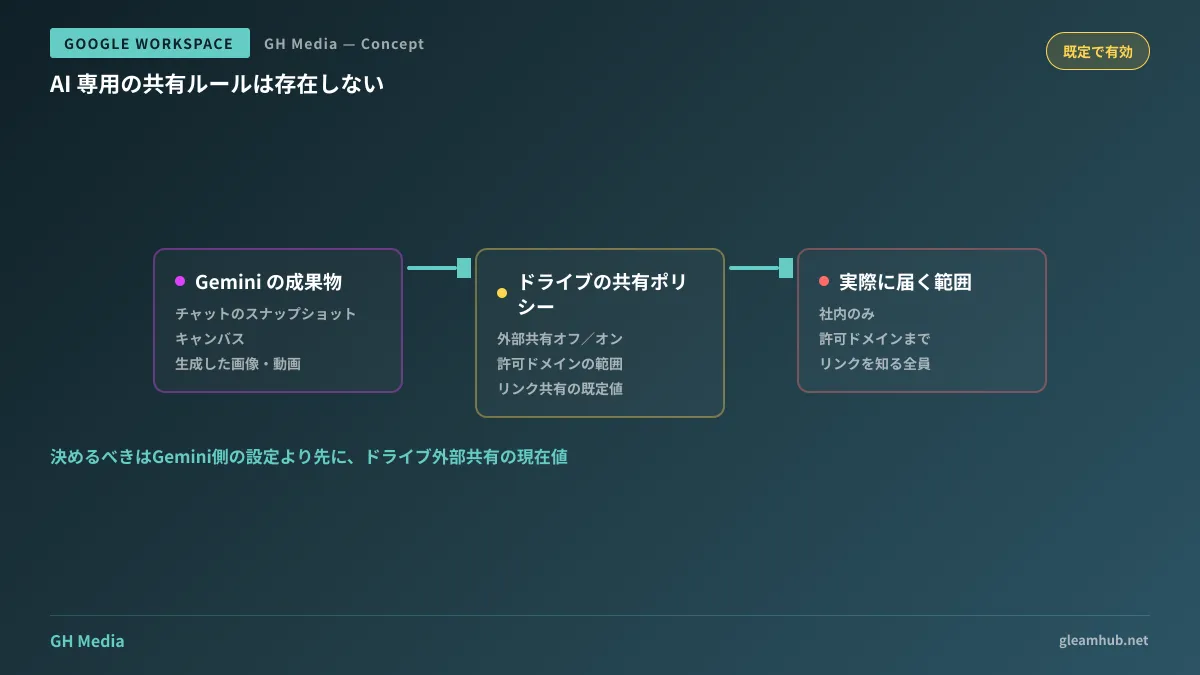
There is one key characteristic to keep in mind regarding this feature: sharing adheres to your organization's existing Drive sharing policies.
In other words, if Drive content is configured so that it can be shared outside the organization, Gemini artifacts can likewise be shared externally. No independent sharing rules were created specifically for AI.
| Current setting in Drive | Treatment of Gemini conversations and canvases |
|---|---|
| External sharing off | Internal only. Cannot be shared externally |
| External sharing on (allowed domains only) | Can be shared with allowed domains |
| External sharing on + "Anyone with the link" by default | Anyone with the link can open it |
The status in the third row is not uncommon in organizations that have relaxed link sharing by default. In this scenario, an employee simply performing standard operations can leave interactions with AI open to the general public.
Furthermore, conversations with Gemini tend to contain far rawer information than formal documents. Consultations such as "help me outline how much we can concede in terms negotiations with this client" may not remain in polished minutes, but they stay intact in the chat history.
Three things administrators should decide beforehand
Because this feature is enabled by default, choosing to do nothing is itself a decision to "operate with it enabled." To make conscious decisions, reviewing the following items in order will help streamline your preparations.
- Re-examine your organization's Drive external sharing settings based on actual values. Do not settle for "we probably restricted it." Check the current values in the Admin Console.
- Decide whether to separate Gemini sharing settings by OU. Decide whether to allow it across the entire company or restrict it solely to development or IT departments. Disabling it only for executive or HR OUs is another viable option.
- If external sharing is allowed, adjust default link sharing toward "Restricted." This improvement benefits all of Drive, not just Gemini, and serves the same purpose as auditing accumulated shared links.
To elaborate on the second point, operational decisions to separate settings by department are more sustainable when based on "whether sharing partners are external" rather than information sensitivity. This is because the necessary degree of flexibility differs between departments that routinely share screens with external partners, like creative production or development, and departments that operate entirely internally.
Examine the relationship with "what was supposedly deleted"
There is another easily overlooked point: shared snapshots persist as separate objects from the original conversation.
Even if Gemini conversation history is deleted, shared items exported to Drive do not necessarily disappear automatically. While the relationship between deleting conversation histories and organizational retention (Vault) is covered in Are AI Conversations Deleted by Employees Really Gone?, this sharing feature adds another pathway to that dynamic. Keeping in mind that the places you need to track down upon receiving a deletion request have increased will prevent panic later.
Additionally, if you run into earlier configuration hurdles where the Gemini side panel does not appear for certain users in the first place, "smart features and personalization" may be the cause.
What to do first
In the Admin Console, verify the current values of Drive's external sharing settings. Taking this step beforehand equips you with the necessary inputs to decide how to handle Gemini sharing. Conversely, modifying Gemini settings without checking this will not change the effective sharing scope.
Planning how closely internal AI usage should align with sharing policies, or how to divide them across departments, depends on your organization's structure. GleamHub addresses these questions through free IT and Google Workspace consultations, so please reach out via our Contact Us page.
Sources
- Share chats, canvases, and generated media from the Gemini app securely via Google Drive — Google Workspace Updates
- Workspace admins can allow Gemini app conversation sharing for their organizations — Google Workspace Updates
- Google is making it easier to share Gemini chats, media, and more with your team — Android Authority
- Set Drive users’ sharing permissions — Google Workspace Admin Help