Next month, an employee sitting right next to you might start searching aloud: "Where was that invoice email from last week?"
When inquiries come to the IT team, the first reaction is rarely "that looks convenient." Instead, it is: "Will that be enabled automatically under our contract?" Next comes: "Are the queries and answers recorded anywhere?" If deployment proceeds without answering these two questions, you risk having to issue an abrupt usage suspension notice later.
Let us first examine the facts before outlining what needs to be decided.
What has launched
On September 3, 2026 (local time), Google announced the rollout of voice AI features for Gmail, Google Docs, and Google Keep: "Gmail Live," "Docs Live," and "Keep Live." Powered by Gemini Audio models, these features were previously announced at Google I/O in May 2026 and initially slated for a summer release. A phased rollout begins this week.
While the three share similar names, what they do differs.
| Features | Permissions | Referenced scope |
|---|---|---|
| Gmail Live | Searches the inbox by voice, reads email content, and answers | User's own mailbox |
| Docs Live | Organizes structure and creates drafts through conversation | Subject to permission: Gmail, Chat, Drive, and web search |
| Keep Live | Converts spoken content into organized notes | Spoken utterances in the moment |
From an administrative perspective, Docs Live is the most fundamentally distinct. To assist in writing documents, it pulls information across email, chat, Drive, and web search. The question of "how far it was allowed to read to generate this document" becomes far more ambiguous than it was with text operations.
What changes when input becomes voice
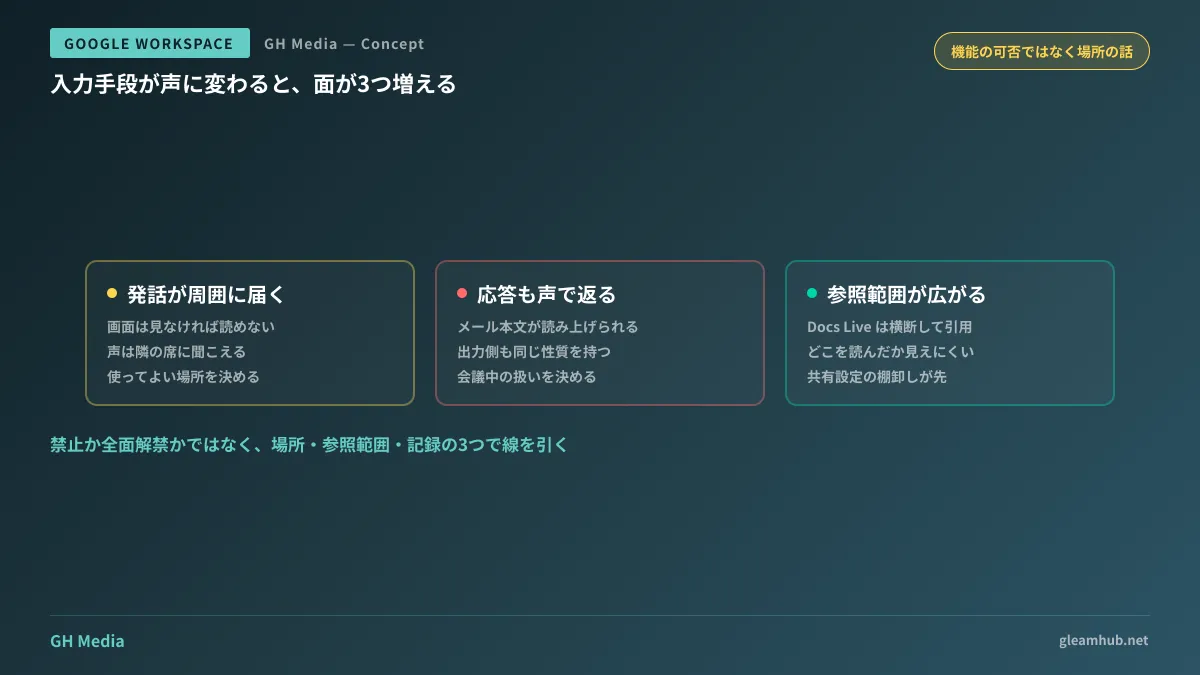
Setting aside whether the feature is good or bad, new aspects arise simply because the input medium has changed. There are three key factors.
First, spoken words reach those nearby. Text cannot be read without looking at a screen. Voice can be heard. In open offices, shared meeting spaces, moving transit, or home offices with family present, saying "Find the quote email for Company A" immediately reveals to bystanders that you do business with Company A.
Second, responses are also returned aloud. If you treat this purely as an input matter, you will overlook this aspect. Spoken output reaches others besides the user. Having inbox search results read aloud means the body of an email is broadcast into the room.
Third, the referenced scope tends to expand more easily than with text operations. When searching with a keyboard, you choose the search target yourself. When asking to "summarize this" by voice, you cannot tell from the response alone what sources were read.
Three boundaries to establish first
Define permitted locations
Decide not by "whether the feature may be used," but by "where it may be used." Framing it as a binary choice between outright prohibition and blanket approval usually renders the rule ineffective.
A realistic boundary defines granular rules such as private booths, desk use with headsets, and prohibited during transit. These can be written using the same standards as other audio uses (speaking in web conferences, phone calls). Rather than drafting new rules from scratch, explicitly amending existing provisions on "not discussing business outside the office" to include voice AI ensures faster company-wide communication.
Define permitted scope of reference
Docs Live pulls information from Gmail, Chat, Drive, and web search only after obtaining permission. Determine who grants this permission and at what organizational unit before rollout begins.
The basis for this decision is whether your internal Drive currently ensures that only authorized personnel can view files. If not, auditing shared links must take precedence over granting reading permissions to AI. Connecting AI to an overly broad access environment will cause documents that were previously unseen simply because "no one searched for them" to surface in summaries.
Define verification methods for audit records
Whether you can later explain "who asked what" varies by feature. We previously outlined how to prepare for this question in Audit logs for Gemini Notebook added to Admin Console. The structural reality that features are split between "what is recorded by default" and "what is recorded only after enabling it yourself" is common across AI features.
Before permitting usage, verify what is visible in the Admin Console for that feature. Skipping this means having to answer "we have no logs" after an incident occurs.
Steps to take before enabling
- Check contract editions and eligibility. Due to phased rollouts, features may not be immediately available in all tenants on announcement day. The display in your Admin Console is the definitive source of truth.
- Verify release tracks. When new features reach your organization depends on whether you are on Rapid Release or Scheduled Release. Considerations for securing testing time are summarized in How to choose a release track.
- Check default states. If you decide "not to permit" a feature that is enabled by default, you must configure it before the rollout reaches your tenant. If you wait until it arrives, you will have to ask active users to stop using it.
- Select one department for a pilot. Having about 10 people use it for two weeks clarifies the specific granularity of rules needed far better than opening it company-wide and discovering issues later.
Common pitfalls
Do not communicate voice input and voice AI as the same thing. Traditional voice typing was simply a feature that converted spoken words into text. This new feature accesses emails and files based on what was spoken. Announcing internally that "voice typing has become more convenient" fails to convey this distinction.
Communicate the premise that extracted results should not be trusted blindly. When input is ambiguous, speech-processing AI can invent plausible details to fill the gaps. This shares the same nature as nonexistent remarks appearing during silent intervals in automated meeting transcripts. Avoid workflows that transcribe amounts or dates directly after checking them by voice.
Consider usage during meetings alongside audio recording policies. Handing spoken words to an automated system without participant consent requires the same considerations as taking in-person meeting minutes.
What to do next
Open your Admin Console and inspect each Gemini-related feature to see its current status. The moment you discover an unreviewed setting, that becomes your first priority.
Next, re-read your internal regulations regarding audio usage. If there are existing clauses covering web conferences or telephone calls, adding a single line to include voice AI is all it takes. There is no need to draft policies from scratch.
GleamHub offers free IT and Google Workspace consultations on how far to open Google Workspace AI features, how to set usage rules by department, and the sequence for organizing shared Drive permissions. Because viable configurations depend on your contract edition and current operations, please reach out via our contact form.
Sources
- Google begins rollout of Gmail Live, Docs Live, and Keep Live this week — HelenTech
- Conversational voice controls introduced to Gmail and Google Docs — Mado no Mori
- Google Workspace adds "Gemini by Voice", rolls out new features across Gmail, Docs, and Keep — Business + IT
- Three voice AI features in Google Workspace: Conversational inbox search and document creation — Zaikei Shimbun