"I pasted confidential materials into the AI, please delete the history"—this is among the types of inquiries that have surged dramatically for IT teams over the past two years. And it is difficult to answer immediately. Can it actually be deleted, will it merely feel deleted, and can someone verify its deletion? That difficulty stems from these three questions becoming conflated.
In the Gemini app, settings relating to this question exist across three layers. On top of that sits Google Vault, an entirely separate mechanism. If you tweak settings individually without understanding this order, you end up in an inexplicable state where "it remains even though deletion was allowed" or "it disappeared even though deletion was disallowed."
Three layers operating independently
First, let us examine separately the elements that determine whether conversations are retained around the Gemini app.
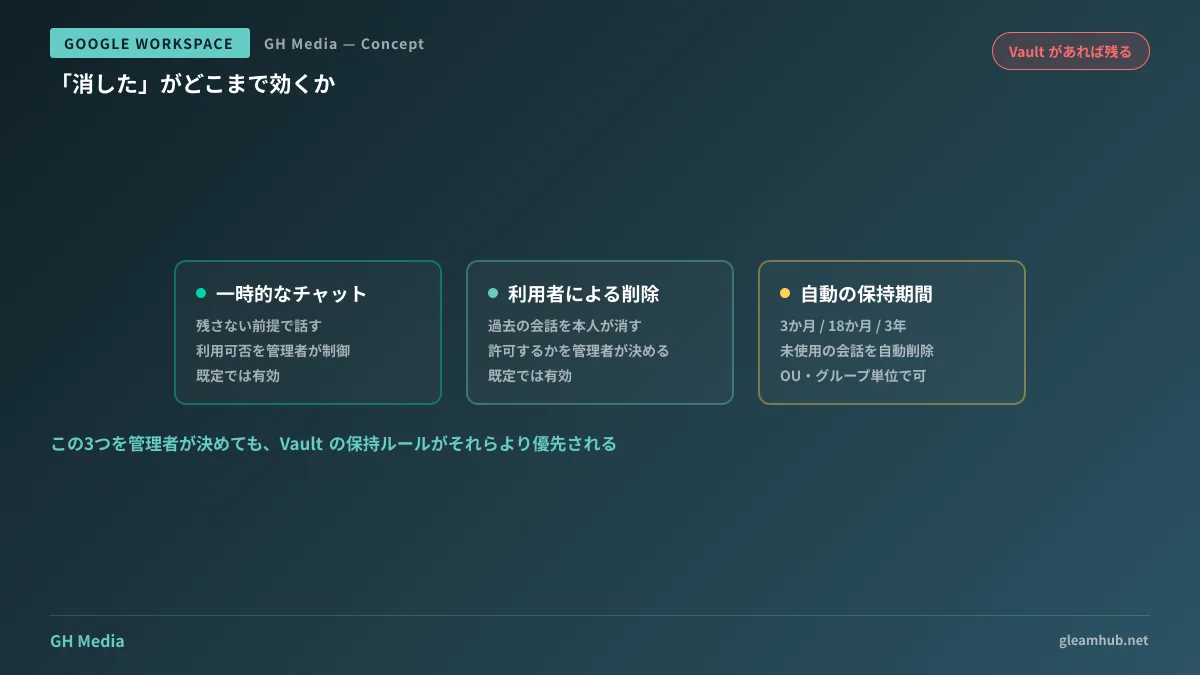
The first layer is temporary chat. This is a mode for starting conversations under the premise that they will not be kept in your history, and administrators can determine whether users are allowed to use it. When enabled, users can choose for themselves not to retain a conversation.
The second layer is history deletion by users themselves. This controls whether users can manually delete past conversations. Administrators can manage this aspect as well.
The third layer is the automated retention period. Administrators can choose an automated deletion setting for inactive conversations at 3 months, 18 months, or 3 years. This mechanism purges data over time without requiring user action.
These became available as administrative controls in June 2026, and all are enabled by default (Control whether your users can have temporary chats and delete conversations in the Gemini app — Google Workspace Updates). They can be segmented not only by domain, but also by organizational unit (OU) and group.
Once Vault enters the picture, things change
This is the point where practical operations stumble most often.
If retention rules are configured in Google Vault, Vault's retention takes precedence even when a user deletes a conversation. It disappears from the user's screen. Yet it remains as a record.
This is not a bug; it is by design. Considering Vault's role in preserving evidence for litigation and audits, it would be meaningless if user actions could delete records. However, this clashes with end users' understanding. It creates a situation where the person who reported "I deleted it" does not realize it has not actually been purged.
Therefore, what administrators must verify first is not the Gemini-side settings, but whether your company's Vault has a retention rule covering Gemini conversations. Deciding whether or not to allow user deletion without knowing this will not determine the actual behavior.
Whether to allow deletion or not
The setting itself can be changed in minutes. The difficult part is deciding which way to lean. The trade-offs can be summarized as follows:
| Discussion point | When deletion is allowed | When deletion is not allowed |
|---|---|---|
| Incident response | Users can immediately delete information pasted by mistake | Requires reporting to administrators, slowing down response |
| Audits and investigations | What was entered may not be traceable later | Records remain, withstanding investigations |
| User sentiment | Lowers the barrier to trying the tool | Perceived as "everything is being watched," hindering adoption |
For many SMBs, the sweet spot is to allow deletion while securing organizational records through Vault retention rules. From the user's perspective, their screen is tidied up, while records are preserved for the organization. However, if you choose this configuration, you must inform users in advance that "records remain in organizational logs even after deletion." Operating without communicating this leads to later distrust in the form of "I thought it was deleted."
Conversely, prohibiting deletion in an organization that does not use Vault means records only last as long as the Gemini retention period, while merely restricting user autonomy. It is a configuration that yields few benefits.
Temporary chats are a design component, not a loophole
Viewing temporary chats as "a loophole to avoid keeping records" makes one want to ban them. Yet in practice, there are definitely situations where having this option is precisely what allows people to consult AI.
For example, bouncing ideas around for an unshared draft concept, or polishing personal writing. A certain number of people dislike having an endless history preserved for such uses and end up abandoning the tool altogether. This is one reason why adopted tools go unused.
In practical terms, it is more realistic to monitor whether interactions related to business decisions are escaping into temporary chats. If that becomes an issue, clarifying what use cases are expected to be kept is more effective than an outright ban. Handling data when having AI read internal documents is discussed in Selecting data storage regions for Gemini in Workspace, while the conditions determining whether Gemini appears in side panels are outlined in Smart features and personalization.
The sequence for decision-making
Touching settings in the wrong order makes them impossible to explain, so following this sequence is the safest approach:
- Verify whether Vault has a retention rule covering Gemini conversations (this is the prerequisite for everything)
- Determine the automated retention period (decide whether 3 months, 18 months, or 3 years fits company operations)
- Decide whether to permit user deletion
- Decide whether to permit temporary chats
- Communicate the decisions to end users (especially if records are preserved for the organization even after deletion)
Skipping the fifth step causes operations to fail even if the technical configuration is correct. The audit log side of tracking what actually occurred after the fact was covered in Two new columns added to audit logs.
What to do next
Being able to verify what employees have input into AI is the kind of question business partners and auditors will eventually ask. If you cannot answer it today, simply starting by opening your company's Vault retention rules to confirm whether Gemini conversations are included is plenty.
Once that is understood, whether to allow deletion resolves itself naturally. Tweaking settings without understanding this is the riskiest way forward.
If you want to translate AI usage policies into Admin Console settings or balance audit readiness with workplace usability, GleamHub offers free IT and Google Workspace consultations. Because the optimal setup varies depending on requirements, we provide customized quotes. Please reach out via Contact Us.
Sources
- Control whether your users can have temporary chats and delete conversations in the Gemini app — Google Workspace Updates
- Control temporary chats and chat deletion in the Gemini App — Google Workspace Admin Help
- Manage Gemini in Workspace conversation history settings — Google Workspace Help
- Google just made it harder to ditch the Gemini paper trail at work — Android Authority