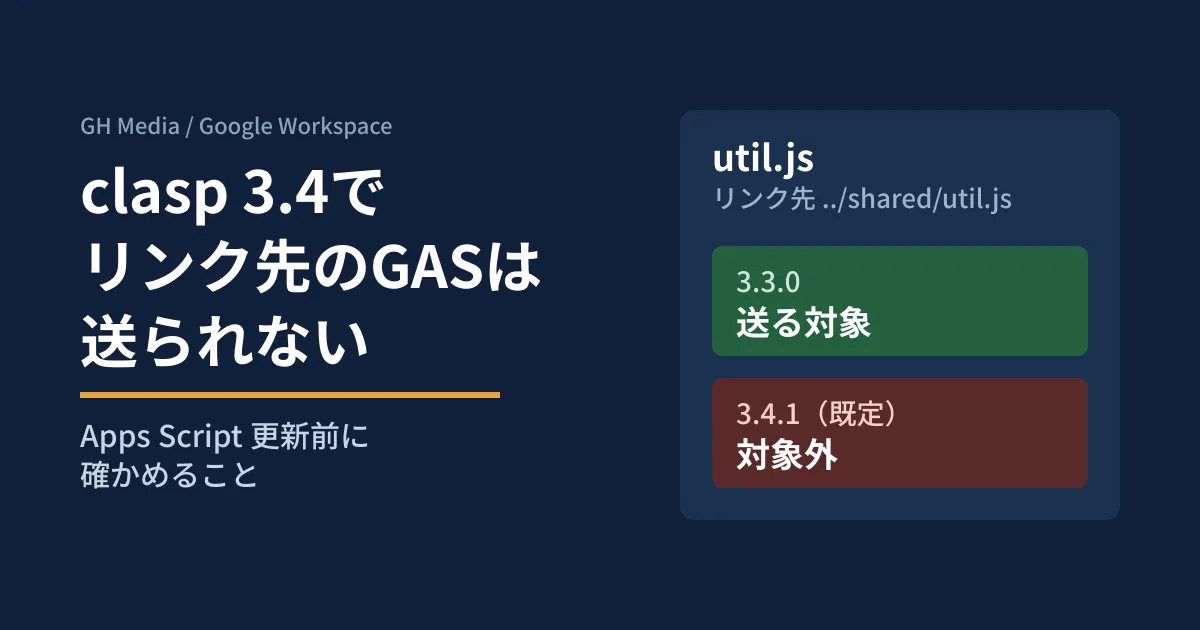
Suppose you have several Apps Script projects attached to spreadsheets and forms, keep shared functions in a single folder, reference them from each project through symbolic links, and run clasp push. If you upgrade clasp to 3.4.x with this setup unchanged, the linked files are excluded from what gets pushed. In the editorial team's testing, clasp status moved those files to "Untracked files" without showing any warning, still returning exit code 0.
clasp 3.4.0 (released August 21, 2026) and 3.4.1 (released August 28) include many security fixes, such as OAuth PKCE support and a path traversal fix. These are updates you should apply, but behavior may change depending on where you place shared folders and credential files. Based on the CHANGELOG and source code, and on running 3.3.0 and 3.4.1 against the same test project, we lay out what to check before updating.
What changed in clasp 3.4.0 and 3.4.1
clasp is the command-line tool for Apps Script published by Google. According to the npm registry, 3.4.0 was published on August 21 and 3.4.1 on August 28 (UTC), and as of October 2, latest is 3.4.1. We picked out the CHANGELOG entries that affect day-to-day operations.
| Change | CHANGELOG entry | What to watch in operations |
|---|---|---|
| OAuth hardening | PKCE implementation, and a fix for CSRF caused by a missing state parameter | The clasp login steps are unchanged |
| Path traversal fixes | Validation of srcDir in .clasp.json and of projectDir and sourceDir in MCP | Settings that point outside the project now cause an error |
| Symbolic links | Added a global --allow-symlinks for shared links | Linked files are not pushed by default |
| Credential file | Symlink protection and permission settings when writing | Writing stops if ~/.clasprc.json is a link |
| Deletion boundaries | Warnings for files that were not pushed, and a stricter deletion scope | An error occurs if pull --deleteUnusedFiles tries to delete outside its scope |
| 3.4.1 | Fix for a bug where rootDir was applied twice in pull, clone and create | If you installed 3.4.0, move to 3.4.1 |
For Node.js, the README says "NodeJS version >= 22.0.0". This statement was also in the 3.3.0 README, so it is not a new requirement in 3.4 (engines in package.json remains >=20.0.0). 3.4.0 also fixed compatibility issues with Node 22 and later and with Node 25 and later through dependency updates.
Comparing the "files to push" in 3.3.0 and 3.4.1
clasp show-file-status (alias status) is a command that lists the files push will target. If .clasp.json contains scriptId, it runs locally without logging in. In the editorial team's test environment (Linux, Node v22.22.0, npm 10.9.4), we used the following project containing a dummy scriptId. We did not connect to Google's servers.
shared/util.js, shared/lib/a.js     共通の関数(実ファイル)
proj/.clasp.json                    {"scriptId": "dummy-script-id-for-local-test"}
proj/appsscript.json, proj/main.js
proj/util.js -> ../shared/util.js   ファイルへのリンク
proj/lib     -> ../shared/lib       フォルダへのリンク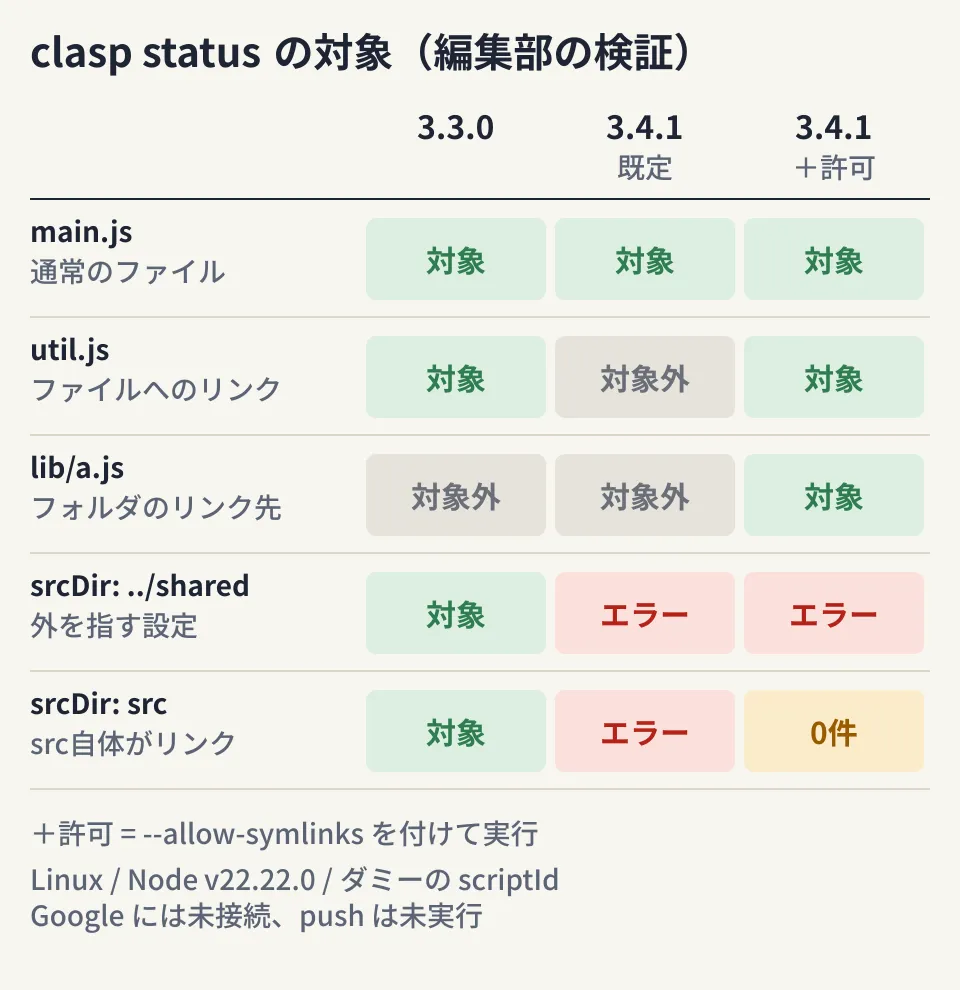
There are three points to note in the diagram.
- File links (
util.js) are excluded by default in 3.4.1.statusshows no warning. According to the source code, push is designed to skip them with the warning "Security Warning: Skipping symbolic link … Symbolic links are not supported." (we did not run push) - Adding
--allow-symlinkscan push more files than 3.3.0 did. 3.3.0 did not target files reached through folder links (lib/a.js), but 3.4.1 with the option did - Configurations where
srcDirpoints outside the project or to a link no longer work."srcDir": "../shared"worked in 3.3.0, but 3.4.1 exited with code 1 and "Security Error: srcDir ”../shared” escapes project root." The result was the same with the option, and writing"rootDir": "../shared"produced the same error. WhensrcDiritself was a link, adding the option cleared the error, but 0 files were targeted
The source code also reads "allowSymlinks": true in .clasp.json as the same setting, and in our test util.js was targeted again. However, this is not documented in the README, so the editorial team assumes it should not be relied on.
The credential file also rejects links
~/.clasprc.json stores clasp's OAuth token. We placed a link to a file containing a dummy token, triggered a write with clasp logout, and compared the results.
- 3.4.1: Exit code 1 with "Security Error: Credential file is a symlink." The file is unchanged
- 3.4.1 with
--allow-symlinks: Writes to the link target, and the permissions changed to 600 (read and write for the owner only) - 3.3.0: Writes to the link target, and the permissions stay at 644
According to the source code, --allow-symlinks applies to both project files and the credential file. If you add it for a shared folder, you also loosen the protection of your credentials at the same time.
Steps to check before updating (editorial proposal)
- Inventory links and settings that point outside the project. Run
find . -type lin each project and check whethersrcDirorrootDirin.clasp.jsoncontains... Also usels -lto check whether~/.clasprc.jsonis a link - Compare the target lists before and after upgrading.
statusshows no warning, so look at the differences
npx clasp status --json > before.json   # 3.3.0のまま
npm install --save-dev @google/clasp@3.4.1
npx clasp --version                      # 3.4.1 を確認
npx clasp status --json > after.json
diff before.json after.json- Provide shared code as real files. Copy it into the project at build time, or combine it into a single file with a bundler. If you use
--allow-symlinks, limit it to the commands that need it, and only after checking the list of added files - Restore the credential file as a real file and confirm that its permissions are 600
- Pin the version per project. Add it to
devDependenciesand call it withnpx claspto eliminate version drift between team members
We also covered taking over old Apps Script projects and reorganizing their structure in our article on rebuilding a predecessor's GAS.
Before using clasp mcp from an AI agent
clasp includes clasp mcp, which lets coding agents such as Claude Code use it as an MCP server (for how MCP works, see our complete guide to MCP). The README labels it "EXPERIMENTAL" and explains that it should be configured as a local STDIO tool, that clasp login is required first because it uses the same credentials as the CLI, that the project folder is specified on each tool call, and that switching credentials requires a restart.
In the editorial team's environment, we started clasp mcp in 3.4.1, ran initialization, and retrieved the tool list. There are five tools: push_files, pull_files, create_project, clone_project and list_projects. Passing /etc as projectDir to push_files was rejected with "Security Error: projectDir must be within the user home directory or current working directory." We were not logged in and made no calls that reached Google.
In other words, what is allowed is "anything under the home directory or the folder it was started from"; it is not a mechanism that limits access to the target project alone. Also, according to the source code, push_files pushes without going through the confirmation that the CLI's clasp push shows before overwriting the manifest (appsscript.json).
Settings to separate permissions (editorial proposal)
- Use your own OAuth client. The README recommends using your own project rather than the default client. Create an OAuth client of type "Desktop Application" in Google Cloud and pass it with
--creds. For organizations that restrict third-party app authorization, it also describes adding clasp's client ID to an allowlist and using an internal-only project - Give the agent's credentials a name and pin the version. Use the global
--userto keep them separate from people'sdefault. The README example'snpx -y @google/clasp mcpfetches the latest version on every start, so specify the version as well
clasp login --user agent --creds client_secret.json
claude mcp add clasp -- npx -y @google/clasp@3.4.1 --user agent mcp
clasp show-authorized-user --user agent --json   # clientType が user-provided か
We confirmed that it can be started in the form clasp --user agent mcp (behavior after login is untested). When we tried clasp logout --user agent with a dummy token, only agent was removed and default remained.
- Have a person review manifest changes. Scopes are written in
appsscript.json. Set up your workflow so that the diff is checked withgit diffbefore the agent pushes. Whose permissions it runs under and where a person approves are the same questions as in approval settings for Claude's Gmail and Drive integrations
Pitfall
- Missing the change because
statusshows no warning. Linked files are simply moved to "Untracked files" - Always adding
--allow-symlinks. Files reached through folder links get pushed too, and the protection of the credential file is loosened - Assuming the MCP server's allowed scope is per project. What we confirmed in testing only goes as far as rejecting paths outside the home directory
On October 2, 2026, we directly opened and cross-checked google/clasp's CHANGELOG, README and
package.json(commit e9441e5, matching npm's record for 3.4.1, accessed via raw.githubusercontent.com), the v3.3.0 README, the source code at the v3.4.1 tag (src/core/clasp.ts,src/core/files.ts,src/auth/file_credential_store.ts,src/auth/auth_code_flow.ts,src/mcp/server.ts,src/commands/program.ts,src/commands/pull.ts), and the npm registry entry. The file list, credential file and MCP tests were each run once in the editorial team's test environment (Linux, Node v22.22.0, npm 10.9.4) using clasp 3.3.0 and 3.4.1 with a dummyscriptIdand token. We have not verified logging in with a Google account, actual push or pull, operations on Apps Script from the MCP tools, or behavior on Windows or macOS.
For help organizing your Apps Script development environment or designing the permissions you give AI agents, please contact us through IT and Google Workspace consultations.
Sources
- google/clasp — CHANGELOG.md
- google/clasp — README.md
- google/clasp — README.md (v3.3.0)
- google/clasp — package.json
- google/clasp — src/core/clasp.ts (v3.4.1)
- google/clasp — src/core/files.ts (v3.4.1)
- google/clasp — src/auth/file_credential_store.ts (v3.4.1)
- google/clasp — src/auth/auth_code_flow.ts (v3.4.1)
- google/clasp — src/mcp/server.ts (v3.4.1)
- google/clasp — src/commands/program.ts (v3.4.1)
- google/clasp — src/commands/pull.ts (v3.4.1)
- @google/clasp — npm registry