A company-wide broadcast email went out: "An emergency patch has been released for Chrome. Please update immediately." The Sent folder shows 40 recipients.
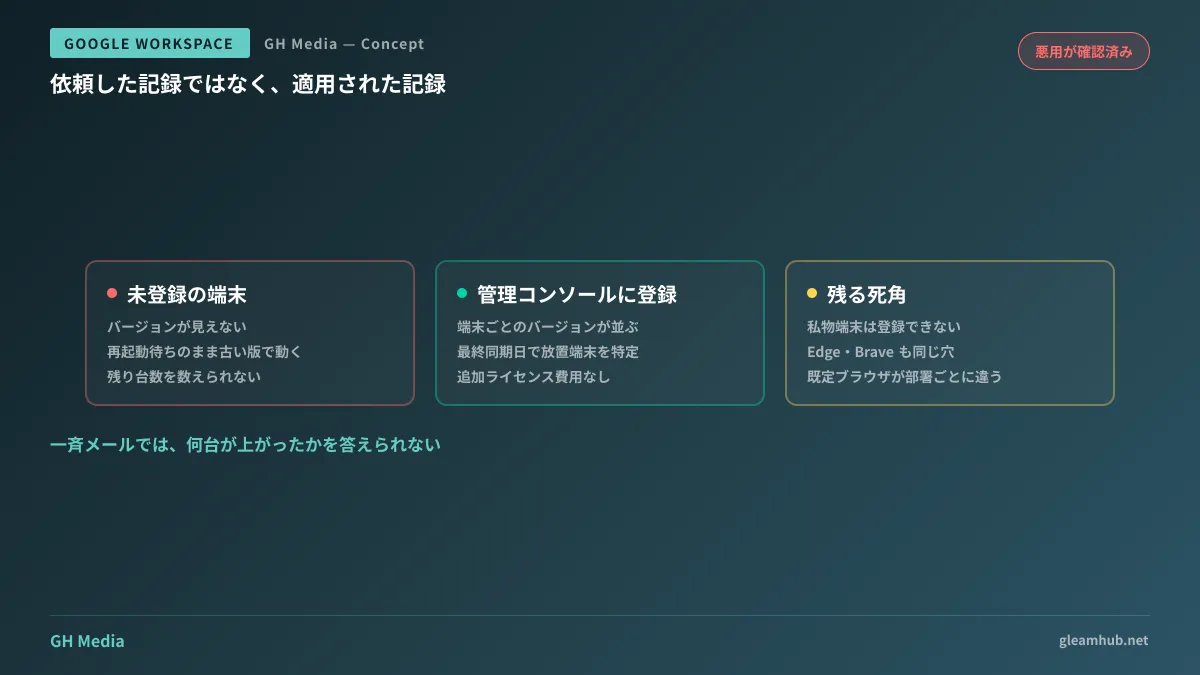
So, how many machines are patched right now, and how many are still outdated? Few companies can answer this question. Records of the request exist, but no records of application do. When an incident occurs, audits scrutinize the latter, not the former.
CVE-2026-85046, for which Google issued an emergency patch on September 4, 2026, was precisely the type of vulnerability that exposes this discrepancy.
Why this fix cannot wait until tomorrow
CVE-2026-85046 is a type confusion bug in Chrome's JavaScript engine, V8. With a High severity rating and a CVSS score of 8.8, Google has explicitly stated that active exploitation has been detected in the wild. Simply opening a specially crafted HTML page could allow arbitrary code execution inside Chrome's sandbox.
At the same time, there is no need for excessive panic. This bug alone does not take over the entire OS; seizing the device itself requires chaining it with another vulnerability that escapes the sandbox. Even so, because it can trigger on a page opened via an ad clicked from search results by someone in the company, it cannot be safely ignored for long.
The patched version is 152.0.7977.82 or later. This marks the sixth actively exploited Chrome vulnerability in 2026, and building operations around the premise that they arrive at this frequency is far more effective than reacting to individual CVEs.
Downloaded, but unapplied updates
This is what gets overlooked most in day-to-day operations. Chrome downloads new versions in the background, but it continues running on the old version until the browser is restarted.
And many employees never restart Chrome. Laptops are simply closed, 30 tabs remain open indefinitely, and no one remembers when it was last shut down. Devices in this state remain vulnerable for days even after receiving the update files. Emails asking them to "please update" do not change this reality.
From the admin console, you can eliminate this with a two-pronged approach:
- Configure notifications prompting a restart after a set period rather than waiting indefinitely for update application
- Enforce a mandatory restart on devices that exceed the grace period
Putting this policy in place completely removes the manual labor of sending reminders every time an emergency fix drops. Response time the next time this happens drops from hours to virtually zero.
Enabling fleet-wide device counting
To answer "how many are left," internal Chrome installations must be visible from the admin console. That is where Chrome Enterprise Core comes in.
Companies using Google Workspace can use it at no additional license cost. Applying an enrollment token generated in the admin console to a device's Chrome registers it as a company device in the inventory, providing visibility into versions, last sync dates, and extension statuses. There is no need to make users sign in with personal Google accounts.
Once enrolled, you will be able to answer the opening question.
| Visibility Gained | Use Case During Incidents |
|---|---|
| Chrome version per device | Count how many unpatched devices remain |
| Last sync date | Identify devices that have been offline long-term |
| Installed extensions | Isolate devices containing dangerous extensions |
Designing extension governance is covered in How Far Should the Admin Console Manage Extensions? For emergency response like this, simply enrolling devices for the sole purpose of making versions visible is more than enough.
Personal devices and non-Chrome browsers
Only company-issued devices can be enrolled. If employees access business systems from personal PCs, their browser versions cannot be tracked. Because this touches device management architecture itself, it must be decided alongside policies on to what extent personal devices are permitted for work.
Another easily overlooked area is non-Chrome browsers. Because V8 is part of Chromium, Microsoft Edge, Brave, Opera, and Vivaldi share the exact same flaw. If any department uses Edge as their default browser, its update status must be verified separately. Ending your response with "we updated Chrome" often leaves accounting stranded on Edge.
What to do next
First, check whether your company's Chrome instances are enrolled in the admin console. If devices do not appear in the admin console's Chrome browser list, they are not enrolled. If you are unsure where things are in the admin console, starting by checking that is perfectly fine.
If they are not enrolled, the cycle of "we sent the request, but don't know if it was applied" will repeat with every emergency patch. Getting your fleet into a countable state before the next incident arrives is far more effective than chasing individual CVEs.
GleamHub offers free IT and Google Workspace consultations to help assess where to start organizing internal device management and Google Workspace configurations, as well as identify gaps in current operations. Please reach out via Inquiries.
Sources
- Google Releases Chrome Update to Patch Actively Exploited V8 Zero-Day — The Hacker News
- Google Update For Actively Exploited Chrome Security Flaw Confirmed — Forbes
- Manage Chrome updates (Chrome Enterprise Core) — Chrome Enterprise and Education Help
- Chrome Enterprise Core — Chrome Enterprise and Education Help