You use Apps Script or a Google Calendar integration to automatically create weekly recurring meetings and calls with business partners. But co-hosts can only be added by hand after the meeting starts, so when the host is late, the meeting stalls on admitting participants and granting screen-sharing permission. The general availability release (v2) of the Google Meet REST API is starting to offer an answer to this problem of "not being able to decide co-hosts in advance."
On October 4, 2026, we directly retrieved and read the Meet API Discovery document (v2, revision 20260928) and the API definition files Google publishes (googleapis/googleapis). On October 5, we also checked the Meet API release notes and the developer guide for managing members. Six methods for handling meeting space members have been added to v2, and you can specify co-host (COHOST) as a role. However, the materials we checked do not say which editions it is available in, or whether it can be used as-is with meetings created in Calendar. This article is based on research of the documentation and proposals from the editorial team; because we had no credentials, we did not actually call the API.
The six methods added in v2 and their limits
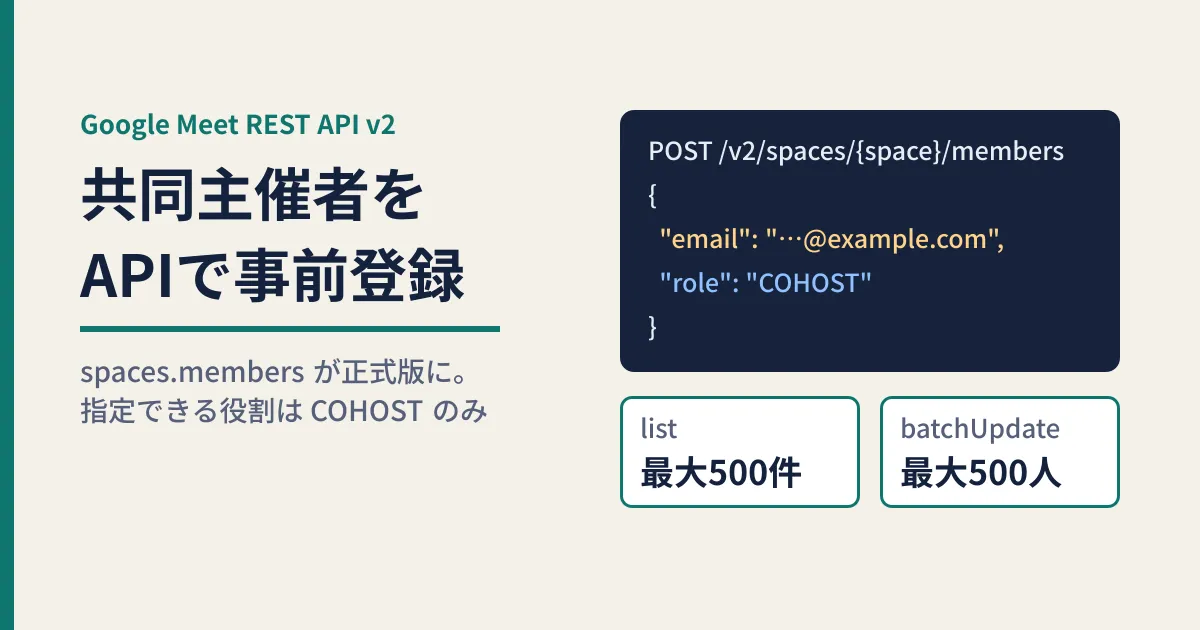
spaces.members in the Discovery document contains the following six methods. The required OAuth scope is meetings.space.created, and only get and list can also be called with meetings.space.readonly.
| Method | Application | Scope | Limits and defaults in the original text |
|---|---|---|---|
create | Add one member | created | email is required on creation |
get | Get one member | created / readonly | — |
list | List members | created / readonly | Default 250, maximum 500 |
patch | Change one member's role | created | Specify fields with updateMask |
batchUpdate | Change multiple members in the same space at once | created | Up to 500 members per call |
delete | Delete a registration | created | — |
For pageSize in list, values above 500 are coerced to 500, and the text also notes that the limit may change: "Maximum might change in the future."
Previously a v2beta Developer Preview
According to the history of googleapis/googleapis, member management was added to the "Meet v2 GA API" in a commit on September 9, 2026 (62cbe96). In the v2beta definitions just before this commit, the four methods create, get, list and delete were labeled "[Developer Preview]." The same commit removed that label from v2beta, added modify (patch) and batch modify (batchUpdate), and changed the default page size for list from 25 to 250.
The Meet API release notes state, under September 11, 2026, that "the spaces.members resource is now Generally Available." They explain that you can manage members and assign co-hosts both before and during a meeting. In Google's Go client (google-api-go-client), an auto-generated commit on September 16 also bumped the meet/v2 revision from 20260421 to 20260910 and added members.
The only role you can assign is "co-host"
The Member resource has three fields: name (the resource name), email and role. role has only two values.
COHOST: The Discovery document describes it in a single line, "Co-host role." The developer guide says co-hosts can help manage the meeting while it is in progress, but cannot change the settings for automatic artifacts (such as recording and transcription) or the host's moderation settingsROLE_UNSPECIFIED: No role is specified. According to the description, when the person joins, they become either a "contributor" or a "viewer" (view only), depending on the meeting settings
In other words, the only thing you can decide in advance through the API is whether someone is a co-host. v2 has no value for individually designating view-only participants.
Another important point is the sentence "These users can join the space without knocking." in the description of Member. People registered as members can join without knocking (sending a request to join). As the editorial team reads it, registration is both "designating a co-host" and "pre-approving entry." We cover how to design admission approval in our article on Google Meet's participant approval features.
The definition files also describe the relationship between roles and meeting management features. The description of Moderation (moderation by the host) in SpaceConfig says that turning moderation on enables features such as co-host management. In addition, the setting that makes people join as viewers by default (defaultJoinAsViewerType) carries a note that people whose role is explicitly set in Member join with that role.
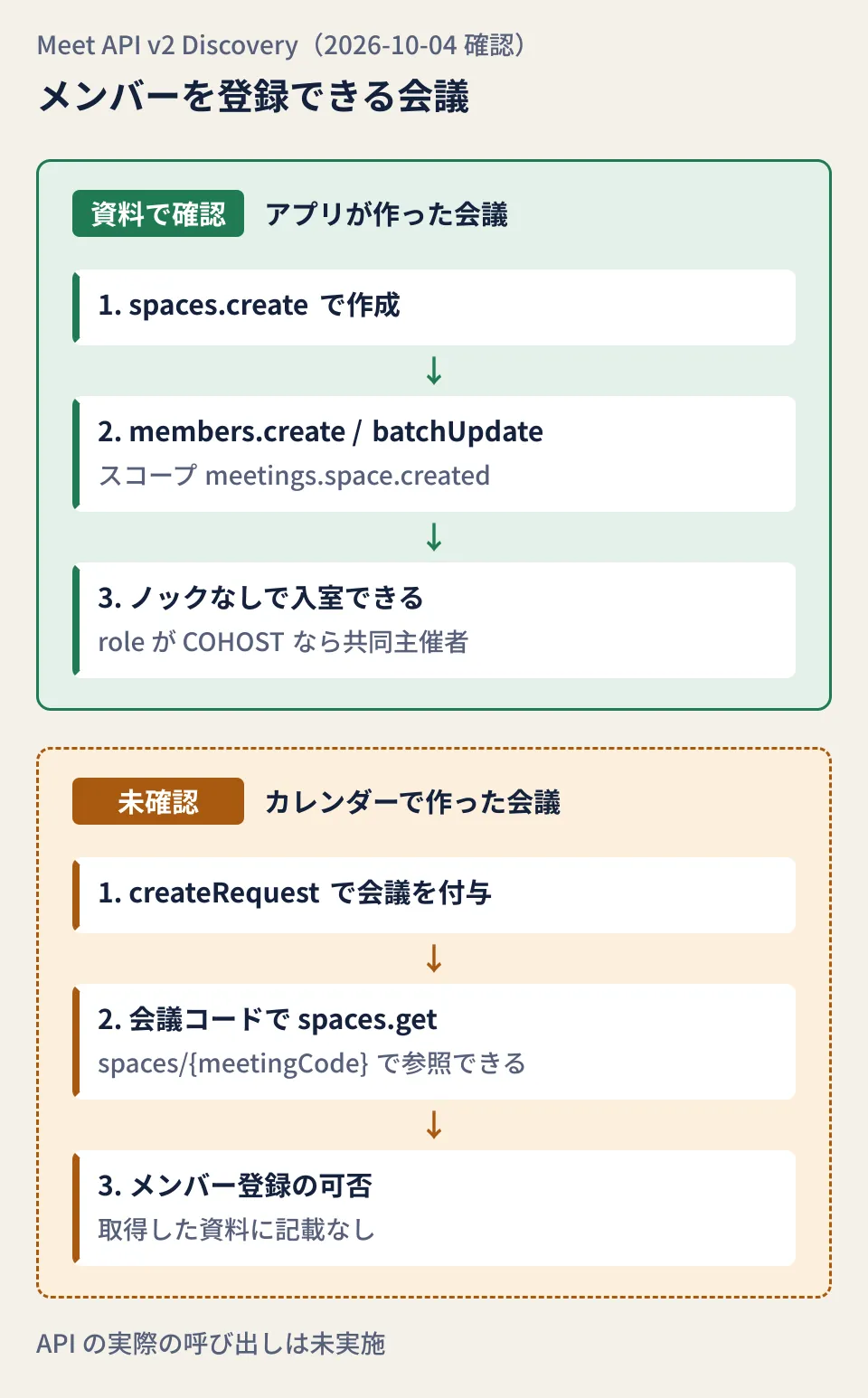
Does it work for meetings created with Calendar or Apps Script?
This is the most important point to check for anyone automating recurring meetings. The scope required by the methods that add, modify and delete members is meetings.space.created, and its description reads "...your Google Meet conferences created by the app." In other words, it covers "meetings created by that app."
When you attach a meeting to an event with the Google Calendar API, you create the meeting with conferenceData.createRequest. According to the Calendar API's Discovery document, conferenceId of the created meeting is the meeting code (for example, aaa-bbbb-ccc). The Meet API's spaces.get can look up a space from a meeting code in the form spaces/{meetingCode}. However, the materials we could retrieve do not say whether meetings created through Calendar count as "meetings created by the app" and can have members registered. That is why the lower row of the diagram is marked "unconfirmed."
| Development approach | Member registration | Important precautions |
|---|---|---|
Create with the Meet API's spaces.create and put the URL in the event | Covered, according to the scope description | Link and manage the event and the meeting yourself |
Create with Calendar's createRequest | Unconfirmed | Do not store meeting codes long term |
| Meetings created manually from Calendar | Unconfirmed | Not a meeting created by the app |
The description of spaces.get says not to store meeting codes long term. They generally expire 365 days after last use and may be reused for another meeting, so store the resource name in the form spaces/{space} in your records. The Calendar API also warns that reusing the same conference data across multiple events may expose meeting details to unintended people, and asks you to create a new meeting with createRequest for each event.
Steps for building it in (editorial proposal)
What follows is the editorial team's proposal based on the Discovery document. Because we did not actually call the API, we have not checked error details or how long changes take to apply.
- Decide how meetings are created. Spaces your own app creates with
spaces.createare definitely covered. If you continue creating meetings in Calendar, try registration with a test account before rolling it out - Keep the resource name in your records. Store
name(spaces/...) from thespaces.createresponse together with the event ID - Register co-hosts.
emailis required on creation
POST https://meet.googleapis.com/v2/spaces/{space}/members
Content-Type: application/json

{
  "email": "cohost@example.com",
  "role": "COHOST"
}- Apply changes of the people in charge in a batch.
batchUpdatehandles up to 500 members in the same space. If you specifyrolein the top-levelupdateMask, onlyrolein each request is updated - Reconcile the registrations.
listreturns 250 items at a time by default, so keep fetching until there is nonextPageToken, then compare the results with your records
If you are building this into existing automation, you can adapt the setup in the basics of automation with GAS, which uses a spreadsheet as the record. The developer guide includes client library examples for Java, Node.js and Python, as well as an example that calls REST directly with Apps Script's UrlFetchApp. We have not checked whether it is available in Apps Script's advanced services.
Pitfalls to know before building it in
- Specifying
*forupdateMask. According to the original description,*becomes a full update, and any fields you did not send are deleted - Making the levels of
batchUpdateinconsistent. If you omit the top level and addupdateMaskonly to individual requests, you get an error because it is not supported. If you set it on both, use the same value. If you omit both, all fields are updated, including deletion of fields you did not send - Relying on the
userfield. In v2beta,Memberstill has auserfield for specifying by user ID, marked "[Developer Preview]," but it is not in v2'sMember. In v2, you specifyemail. Note also that the v2 Discovery document and the developer guide list "name,email,role,user" as the default returned fields, which conflicts with "name,email,role" in the definition file (v2). Check whetheruseris included in the response by actually calling the API - Making assumptions about editions or external users. None of the Discovery document, the definition files or the developer guide state which editions can assign co-hosts, whether addresses outside your organization can be made co-hosts, or the total number of people who can be registered at once
- Also configuring automatic notes and recording for the same meeting. The same v2 update added settings to
SpaceConfigfor automatically starting recording, transcription and automatic notes. Co-hosts cannot change these settings, so decide them on the host side. The default for automatic notes also depends on organization settings, so check it together with our article on the change to Meet's automatic notes default
First, check whether the meetings you currently create automatically are "meetings created by the app." If you create them through Calendar, the safe approach is to call members.create once with a test account, see whether it succeeds, and then decide whether to change how you create meetings.
On October 4, 2026, we directly retrieved and cross-checked the Meet API Discovery document (v2, revision 20260928), the Meet definition files in googleapis/googleapis (v2 and v2beta, commit 62cbe96 and the commit just before it), the history of google-api-go-client, and the Google Calendar API Discovery document. On October 5, we checked the Meet API release notes (general availability on September 11) and the developer guides for member management and authentication (documentation research). The steps and pitfalls are the editorial team's proposals. Because we had no credentials, we did not call the API, and the supported editions, applicability to meetings created in Calendar, and support in Apps Script's advanced services are unconfirmed.
For help with automating meeting creation or reviewing permission design in Google Workspace, GleamHub offers free IT and Google Workspace consultations. The right approach depends on how you create meetings and how much you work with external parties, so please reach out via Contact Us.
References
- Google Meet REST API release notes
- Manage meeting space members (Google Meet REST API guide)
- Google Meet API Discovery document (v2)
- googleapis/googleapis — google/apps/meet/v2/resource.proto
- googleapis/googleapis — google/apps/meet/v2/service.proto
- googleapis/googleapis — google/apps/meet/v2/meet_v2.yaml
- googleapis/googleapis - commit 62cbe96 (adds Member to Meet v2 GA)
- googleapis/googleapis — google/apps/meet/v2beta/resource.proto
- googleapis/google-api-go-client — meet/v2/meet-api.json
- Google Calendar API Discovery document (v3)