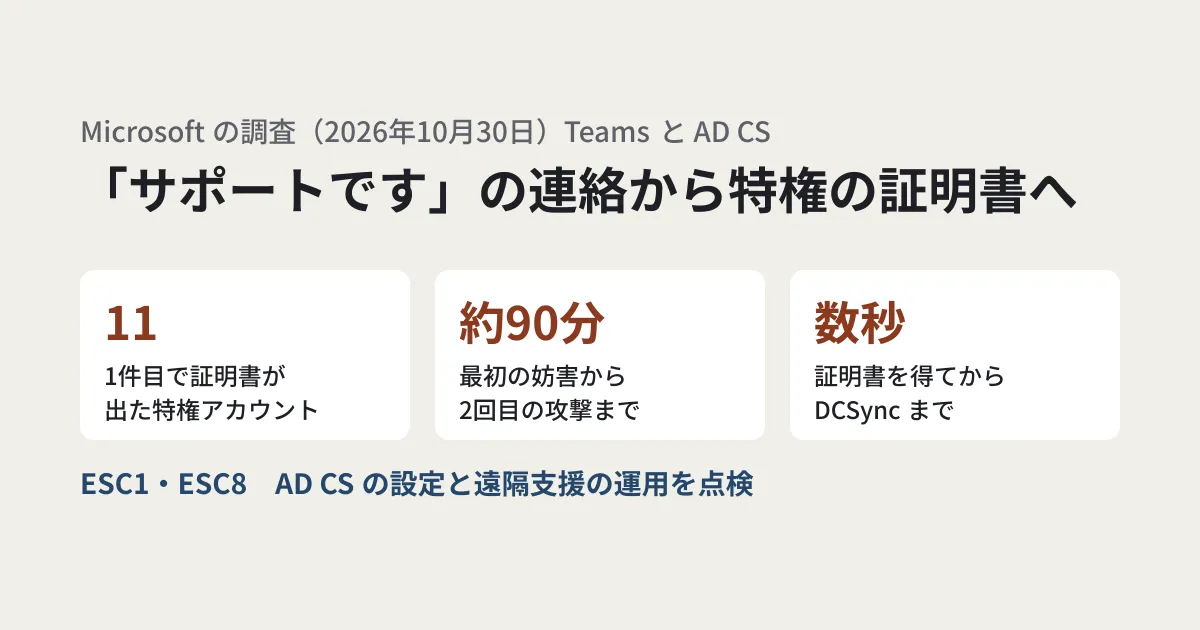
For example, someone outside the company contacts you on Teams and says, "This is IT support. Please share your screen so we can check an issue." If an employee responds and allows remote control, the attacker can use the company's internal certificate system from that one machine and advance to the point of authenticating with an administrator account. The research Microsoft published on October 30, 2026 traces two intrusions that happened in this way.
According to the research, no Teams vulnerability was used, and the attacks relied on social engineering and on insecure or overly permissive settings in Active Directory Certificate Services (AD CS). Companies that have Active Directory in-house and issue certificates with AD CS need to check their on-premises settings along with their Microsoft 365 settings.
What happened in the two intrusions
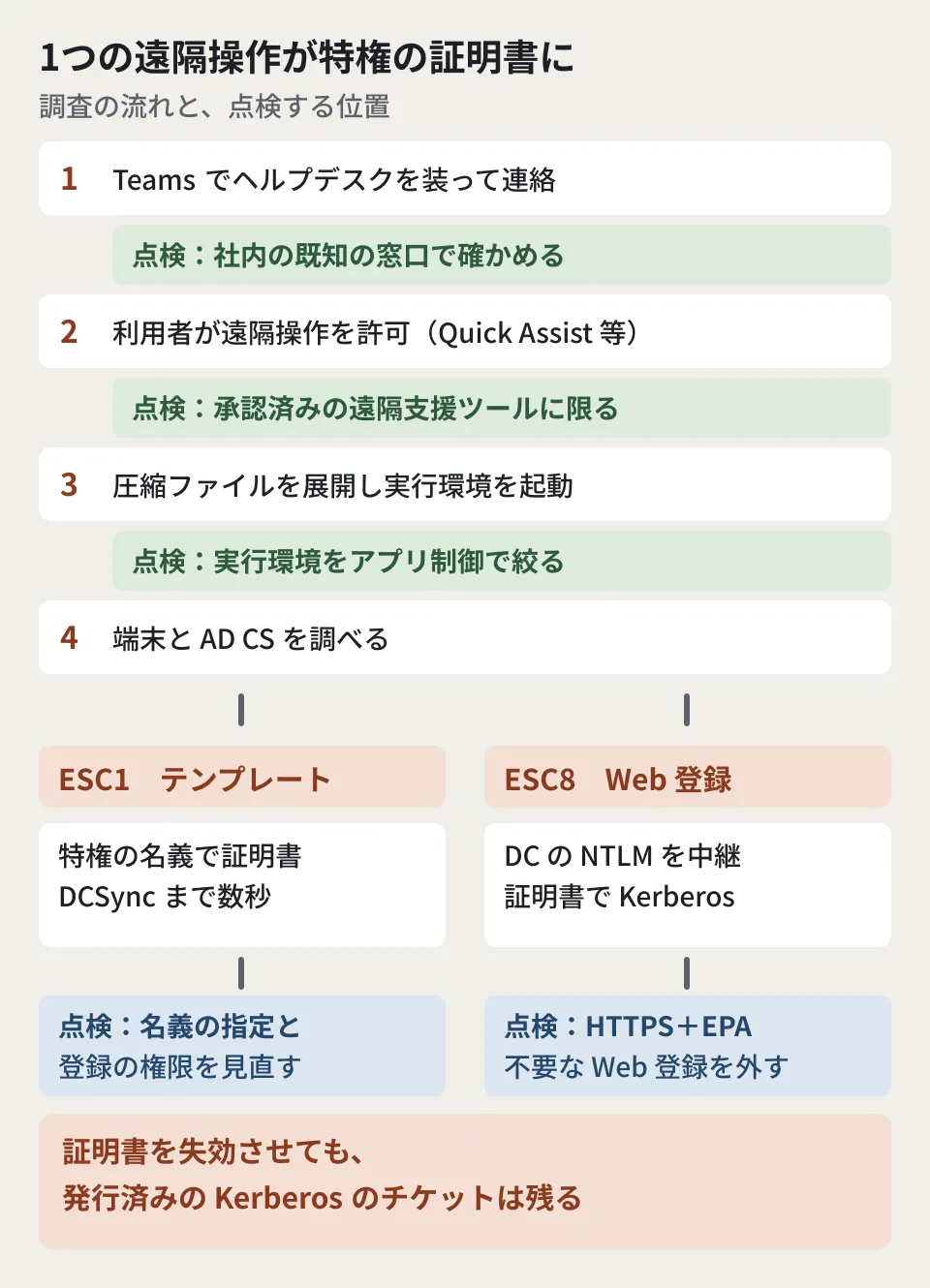
According to the research, both cases started the same way. The attackers posed as a help desk on Teams and, through sessions the users allowed, such as Quick Assist (Windows remote assistance), placed and extracted compressed archives, ran portable runtimes, and investigated the devices and AD CS. The attackers have not been identified.
First case (ESC1): The initial Teams phishing targeted three people, and one device was taken over. The attacker exploited a weakness in a certificate template (ESC1) and obtained certificates for three highly privileged accounts. About 90 minutes after the first session was disrupted, a second round of phishing targeting 16 people took over another device, and certificates were issued for eight more privileged accounts. Microsoft Defender's automatic containment stopped more than 1,000 subsequent SMB file accesses, among other activity. Even so, within seconds of obtaining the privileged certificates, the attacker authenticated to a domain controller and carried out DCSync (a technique that extracts password information by posing as directory replication).
In addition, one privileged account that had been excluded from automatic containment remained and was used to connect to a file server and take data out. Using Rclone (a file transfer tool) renamed to SearchApp.exe, the attacker copied selected files from within the last three years from the file server's shared folders to an external SFTP destination, with 20 parallel transfers.
Second case (ESC8): The attacker used PetitPotam (a technique that makes a Windows server authenticate to the attacker's machine) to relay a domain controller's NTLM authentication to AD CS Web Enrollment (ESC8). The attacker obtained a certificate using the domain controller template and used it for certificate-based Kerberos authentication (PKINIT). In this case, the research says that after an alert related to ESC8 was raised, the organization concerned isolated the device and no further progress was seen.
The entry point: external contact on Teams and permission for remote assistance
According to the research, the attackers used onmicrosoft.com tenant names resembling the organization's name, along with display names suggesting support, to make contact from outside the company seem familiar. Right after being allowed to take control through Quick Assist, the attacker placed a compressed archive in the Downloads folder, created a folder beginning with "KB" under the user's profile, and extracted the archive there.
From there, the attacker ran scripts using portable Python, the JavaScript runtime Bun, and Java. The research points out that the renamed runtimes kept their legitimate file information while running from user-writable locations. It also says that by getting users to allow remote control, the attackers could operate the devices directly without typical malware attachments.
What is weak in ESC1 and ESC8
Weak AD CS settings are classified with numbers prefixed by "ESC," and the two cases here are ESC1 and ESC8. The table below summarizes the research's explanation.
| Category | Weak setting | What happens |
|---|---|---|
| ESC1 (template abuse) | In a certificate template usable for authentication, the requester can specify the name (subject) themselves, the range of people who can enroll is broad, and the issuance conditions are weak | A low-privileged account obtains a certificate in the name of a privileged account |
| ESC8 (NTLM relay to Web Enrollment) | The AD CS Web Enrollment page has no mechanism to prevent authentication relay | Certificates can be requested in the name of the relayed user or machine |
In both cases, once a certificate is obtained, the attacker can authenticate under that name. The research says this technique has a large impact because a single remote session allowed by a user can turn into certificate-based access to privileged accounts and the domain infrastructure.
The order to check things in
From the research's recommendations, we have listed the items that IT staff at small and medium-sized businesses should check, in order starting from the entry point. Items 1 to 6 are the research's recommendations, and the order they are listed in is the editorial team's own arrangement.
- Verify unsolicited support contact through known internal contacts before responding: The research recommends asking users to confirm that the contact is genuine through a known internal channel before joining a call, sharing their screen or starting remote control. It also lists telling users to pay attention to the warnings displayed when impersonation is detected
- Review your Teams external access and federation policies: The research recommends limiting the external domains you communicate with to those your business needs and investigating contact from tenants that resemble your organization's name or a help desk. According to Microsoft Learn, Teams external access allows all external domains by default. In the Teams admin center, under "Users" > "External access," you can specify only the domains you allow
- Limit remote assistance tools to approved ones: The research lists limiting the products, the operators and the procedures to approved ones, and raising an alert if an approved tool extracts a compressed archive or launches a script from a user-writable location
- Restrict portable runtimes: Use application control such as App Control for Business to restrict unapproved runtimes and script execution from user-writable locations. The research asks that decisions be based on the signer, original file name, location, parent process and behavior rather than the file name
- Review your certificate templates: Among templates usable for authentication, identify those where the requester can specify the name (the setting is called "Supply in the request"), those with a broad enrollment scope, those with weak issuance conditions, and those with overly broad purposes. Remove unnecessary enrollment permissions and, where needed, require approval for issuance
- Take inventory of Web Enrollment endpoints: List the Web Enrollment (
/certsrv) and certificate enrollment web service endpoints, and remove them if they are not needed. If you keep them, require HTTPS and Extended Protection for Authentication (EPA). The research says that HTTPS protects the confidentiality of communications, but that withstanding relay requires EPA's channel binding. Where possible, disable NTLM on enrollment services, after first confirming that authentication works with Kerberos alone. The research asks you to follow Microsoft's KB5005413 (mitigating NTLM relay to AD CS)
The research also recommends enabling detailed auditing of certificate services (success and failure for the Certification Services subcategory) and recording requests and issuance with the certification authority's audit filter. It says that if you use Defender for Identity, the AD CS security assessments can find templates that fall under ESC1 and Web Enrollment endpoints that fall under ESC8. Microsoft Learn labels the ESC1 assessment as preview and says the ESC8 assessment is available only to organizations that have installed the sensor on their AD CS servers.
When you find a fraudulent certificate
If you find a fraudulently issued certificate, identify its serial number and thumbprint, revoke it, publish the revocation information, and confirm that the parties validating certificates can receive the update.
However, the research cautions that revoking a certificate does not retroactively invalidate Kerberos tickets that have already been issued (TGTs and service tickets). Valid tickets need to be checked separately.
The fact that, in the first case, one privileged account excluded from automatic containment was used to take data out is also cited as a lesson for response. The research asks that exclusions from containment be treated as an incident response decision, and that accounts and devices that cannot be contained automatically be assigned manual alternative measures, with their completion confirmed.
If you do not know whether you use AD CS
From here on, this is the editorial team's proposal. AD CS is a system that may be installed for internal wireless LAN and VPN authentication and for HTTPS certificates on internal systems. If you outsourced your Active Directory build, it is also possible that no record of the configuration remains in-house. First, check with the company responsible for maintenance whether there is a certification authority server, whether Web Enrollment is enabled, and which templates can be used by whom. That will let you move on to checks 5 and 6 above.
How to read the logs for incidents in which integration app credentials were abused on the Microsoft 365 side is covered in Abuse of ConnectWise integration apps: logs to check in Microsoft 365. For the idea of not concentrating administrator privileges in one person, how to split things up when super admin privileges are concentrated in the CEO alone is a useful reference, although it uses Google Workspace as its example.
Scope of verification
On October 31, 2026, we directly retrieved the Microsoft Security Blog research "From help desk impersonation to AD CS abuse: Investigating ESC1 and ESC8 intrusion paths" (October 30, 2026) and checked the figures and recommendations in the text against the original (document research). On November 6, 2026, we reopened the same research and confirmed that the figures in the text had not changed, and we also opened and checked Microsoft's documentation on KB5005413, Teams external access, Defender for Identity assessments, and certificate services auditing. We have not verified the licensing requirements. We have not performed any checks in real AD CS, Teams or Defender environments. "If you do not know whether you use AD CS" is the editorial team's proposal.
For reviews of internal Active Directory and Microsoft 365 permissions or of how you run remote assistance, please contact us through our free IT & Google Workspace consultation.
References
- From help desk impersonation to AD CS abuse: Investigating ESC1 and ESC8 intrusion paths(Microsoft Security Blog、2026-10-30)
- KB5005413: Mitigating NTLM Relay Attacks on Active Directory Certificate Services (AD CS)(Microsoft Support)
- Security assessment: Certificates(Microsoft Defender for Identity、Microsoft Learn)
- Manage external meetings and chat with people and organizations using Microsoft identities(Microsoft Teams、Microsoft Learn)