When your company's Microsoft 365 is hijacked, the damage is not limited to your email and files being read. The hijacked environment itself can circulate among other criminals as "merchandise." In other words, your company's SharePoint or OneDrive can be used, without your knowledge, as a place to host phishing.
On October 14, 2026, Microsoft's threat intelligence team and Digital Crimes Unit (DCU) published research on a Chinese-language criminal ecosystem. It traces the connections between a black market selling hijacked cloud environments, the developers of the phishing kits sold there, and the attackers who buy and use them. Japan is among the targets. This article summarizes what the research contains and the settings Microsoft 365 administrators should review.
What the research found
According to Microsoft's research, what was sold in this ecosystem was phishing kits, along with hijacked or fraudulently obtained Microsoft and Google cloud environments and their credentials. Attackers who bought these targeted healthcare, finance, wholesale, and IT organizations in Japan, the United States, Australia, and India. Microsoft's DCU says it worked with law enforcement agencies in various countries and others to support the disruption of the main developers and infrastructure.
Japanese institutions also took part in this response. According to a National Police Agency press document, since October 2025 the Cyber Special Investigation Department of the Kanto Regional Police Bureau, Microsoft, and the Japan Cybercrime Control Center (JC3) investigated phishing targeting Japan and identified the criminal infrastructure. Microsoft and others filed suit in a US court on October 6, 2026, and took down (stopped and seized) the infrastructure based on an order issued on the 8th. According to a JC3 notice, Microsoft and Health-ISAC (an international nonprofit in the healthcare sector) seized the YAM Store, CoGUI, and Iron Man infrastructure under an order from the US District Court for the Southern District of Florida. Microsoft is reported to have disabled more than 20,000 related accounts and blocked more than 100,000 domains. The JC3 notice also says these services were used in crimes targeting more than 150 countries, including Japan, and caused tens of millions of dollars in damage.
The main names involved are as follows.
- YAM Store (called Storm-3119 by Microsoft): a black market. An intermediary (initial access broker) that sells hijacked environments as "initial access." It sells them by categories such as the age of the environment, the type of subscription, and whether it belongs to an educational institution (.edu) or a nonprofit (.org)
- Three phishing kits (their developers are collectively called Storm-2990): CoGUI (also known as NX and FA), Haozi (also known as Phoenix), and Iron Man System. They were sold on YAM Store, and Iron Man System was listed from June 2026
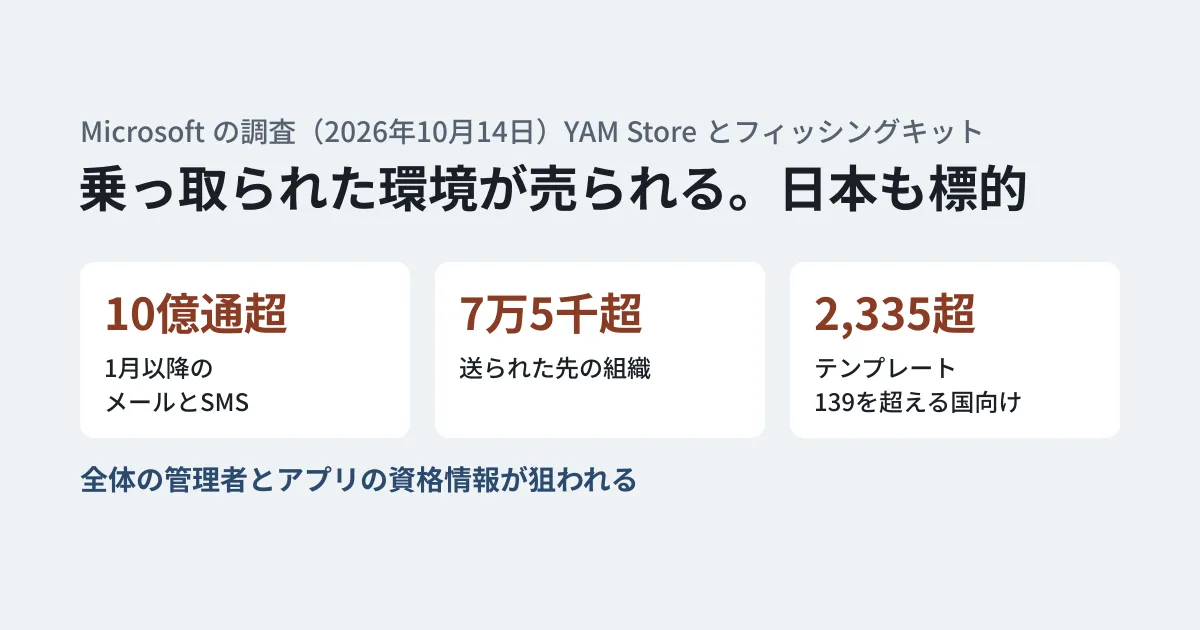
The research says that since January 2026, more than 1 billion phishing emails and SMS messages have been sent using these kits to more than 75,000 organizations worldwide. Iron Man System has more than 2,335 templates for more than 139 countries, including Japan. The research includes an example of an email impersonating a Japanese financial service and stating that "re-authentication is required due to a regular security check."
Five stages from hijacking environments to selling them
The research describes in five stages how YAM Store acquires, controls, and sells environments.
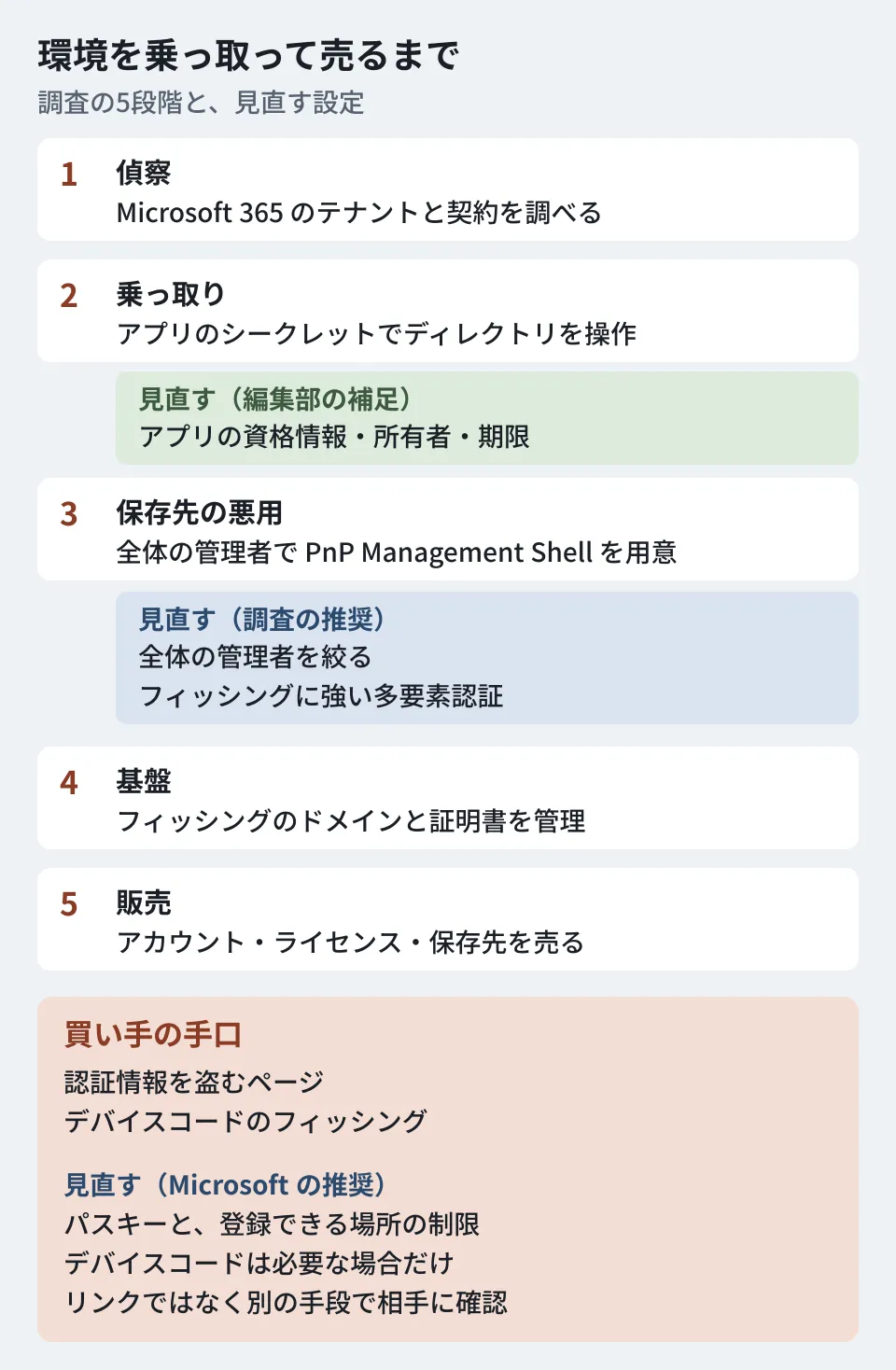
- Reconnaissance: using a tool built with a Python web framework (Flask), it searches for Microsoft 365 tenants and collects subscription and Azure information. This is done anonymously through Tor
- Takeover and the management console: using the app credentials (client secrets) of a hijacked environment, it operates on the entire directory through "app-only" authentication, which involves no user sign-in. It silently changes passwords without requiring a change at next sign-in, assigns education licenses, and grants privileges. Because this is not tied to a user session, the research says it is harder to notice and persists for a long time
- Abuse of storage: it signs in with a stolen global administrator account and provisions a "PnP Management Shell" service principal itself. It grants that service principal Microsoft Graph directory read and write permissions,
AppCatalog.ReadWrite.All, and full permissions to the SharePoint API, turning the tenant's SharePoint and OneDrive into bulk storage to sell - Phishing and DNS infrastructure: it has a system for centrally managing phishing domains, certificates, and forwarding settings with Cloudflare
- Sales: an automated storefront sells stolen accounts, licenses, and storage. Payment is by Alipay, WeChat Pay, and cryptocurrency (USDT)
It is not just a matter of hijacking existing environments. According to the research, YAM Store automatically searched for environments and organization names that had expired or been used previously, and tried to evade detection by using the legitimate customer information tied to them. The research also includes an example of creating a fictitious nonprofit with text that appears to be AI-generated and forged documents, and setting up a tenant.
Tactics used by buyers
The research lists the following three tactics used by attackers who bought the kits.
- Stealing credentials: pages impersonating legitimate services get victims to enter their IDs, passwords, and other information
- Device code phishing: abusing the device code authentication flow, attackers get victims to authenticate to a legitimate app and obtain tokens
- Financial fraud: using stolen payment information to buy high-value goods and to make transactions on financial services
The kits include a mechanism that allows access only from designated countries (geofencing), fake CAPTCHAs that block researchers' automated browsing, and IP address allow and deny lists, and a notification reaches Telegram immediately when a victim enters information. The research says attackers can watch the victim's progress and manually control which screen to show next.
The research names healthcare, finance, and IT among the affected organizations, while saying the tactics used are commonplace and could happen to any organization. It also assesses that this ecosystem is not limited to abuse of Microsoft services and extends to other providers.
Settings Microsoft 365 administrators should review
Based on the countermeasures the research recommends, here are the settings to review in Microsoft 365 at small and medium-sized businesses. Items 1 to 4 are the research's recommendations, and items 5 and 6 are editorial additions.
- Limit global administrators and use phishing-resistant multi-factor authentication: noting that Storm-3119 had obtained global administrator privileges, the research recommends tightening the global administrator role and who can access what, following least privilege and zero trust principles. It also cites requiring phishing-resistant multi-factor authentication for privileged accounts through conditional access
- Use passkeys and limit where they can be registered: it recommends rolling out passwordless methods (passkeys) and multi-factor authentication across the organization, and limiting their registration to trusted locations and devices
- Check the recommended email protection settings: it cites reviewing the recommended settings for Exchange Online Protection and Microsoft Defender for Office 365, and applying Safe Links policies to internal recipients as well
- Tell users how to verify: it says urgent wording and an official-looking appearance were common to nearly all cases. It recommends telling users to verify with the other party through a separate channel rather than through links in emails
- Check app credentials and unfamiliar service principals: the second and third stages in the research use app client secrets and service principals provisioned by the attacker. Checking your list of registered apps, the expiration dates and owners of secrets, and whether apps your company should not be using, such as "PnP Management Shell," have appeared in Enterprise applications can give you clues for noticing these traces
- Limit device code authentication to the situations that need it: the research lists device code phishing among buyers' tactics. In separate research on October 29 (on North Korean attackers' use of AI), Microsoft recommends limiting the device code flow to cases where it is needed and blocking it wherever possible, and says to configure it with conditional access where it is needed. The conditional access explanation on Microsoft Learn takes the same approach, recommending that you audit current usage and confirm whether it is still needed
Using conditional access requires a Microsoft Entra ID P1 license or Microsoft 365 Business Premium (Microsoft Learn). Before proceeding with items 1 and 6, please confirm whether it is included in your subscription.
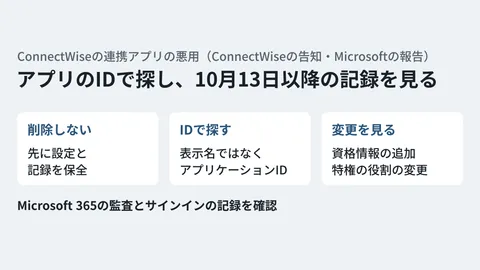
For a separate incident involving abuse of integration app credentials, we set out which logs to check and in what order in Abuse of ConnectWise integration apps: logs to check in Microsoft 365. Moving to passkeys is covered in Authentication modernization in the passkey era.
Cleaning up environments you no longer use
What follows is the editorial team's suggestion. The research says YAM Store looked for expired environments and previously used organization names. According to a separate Microsoft explanation quoted by Infosecurity Magazine, attackers acquired domains that legitimate organizations had let lapse, rebuilt the websites to look like active organizations, and fraudulently obtained Microsoft 365 accounts. Cloud environments and domains created in your company's name but left unused are worth including in your inventory.
- Are any Microsoft 365 or Google Workspace tenants created for trials, or old tenants used before a migration, still around?
- If so, what is the status of their administrator accounts and app credentials, and were they closed through the proper procedure?
- Have you simply let custom domains used with those tenants lapse after cancellation?
Google Workspace environments are also among those sold according to the research. For reviewing administrator settings on the Workspace side, see the Google Workspace security settings checklist.
Scope of verification
On October 30, 2026, we checked the research "The hidden network: Inside the phishing infrastructure ecosystem powering global cybercrime" (October 14, 2026) on the Microsoft Security Blog, and "Tracking AI adoption in North Korean threat actor tradecraft" (October 29, 2026; device code recommendation only) on the same blog (document research). Descriptions of the research's content reflect what we checked on that date. On November 6, 2026, we reopened the same research and confirmed that the figures and dates in the text had not changed. We did not open Microsoft's explanatory article. On the same day, we checked the National Police Agency press document, the JC3 notice, Microsoft Learn, and the Infosecurity Magazine article. We did not compare the Infosecurity Magazine quotation against the original text of Microsoft's explanation. We did not perform any operations in the Microsoft 365 admin console, and we did not check where each setting's screen is located or Google's help pages. The research we checked on October 30 does not give the number of affected organizations or the number of Japanese organizations.
For taking inventory of global administrator and integration app permissions, or reviewing email protection settings, please contact us through our Free IT & Google Workspace Consultation.
References
- The hidden network: Inside the phishing infrastructure ecosystem powering global cybercrime(Microsoft Security Blog、2026-10-14)
- Tracking AI adoption in North Korean threat actor tradecraft(Microsoft Security Blog、2026-10-29)
- On the takedown of criminal infrastructure in cooperation with Microsoft and JC3 (National Police Agency, 2026-10)
- Cooperation in the neutralization by Microsoft and others of an ecosystem supporting cybercrime (JC3, 2026-10-14)
- Authentication flows as a condition in Conditional Access policy(Microsoft Learn)
- Block authentication flows with Conditional Access policy(Microsoft Learn)
- Microsoft Entra Conditional Access: Zero Trust Policy Engine(Microsoft Learn)
- Microsoft Disrupts Global Yam Store Network Behind One Billion Phishing Messages(Infosecurity Magazine、2026-10-15)