This applies if you automate pre-release checks of your website with Playwright and pull in dependency updates via automated pull requests. Without changing a single line of test code, TypeError appears in a page object class as soon as you merge the update. This can happen with Playwright 1.65.0 (published to npm on November 5, 2026, UTC).
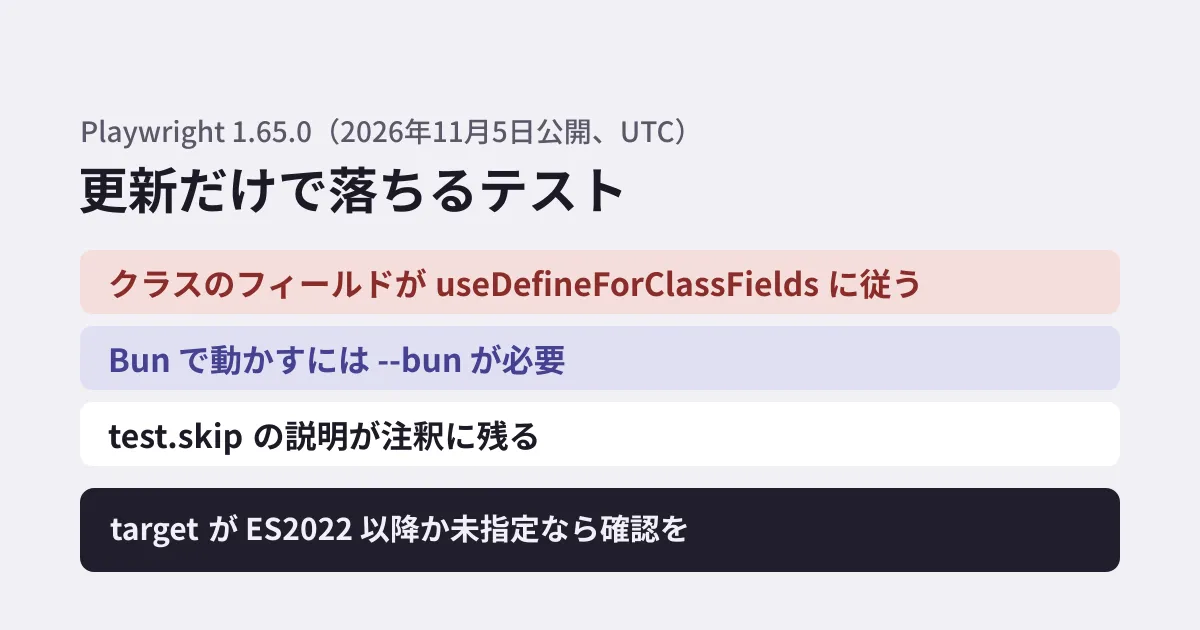
The official release notes list, as a breaking change in 1.65 (under the heading "Breaking Changes" in the repository docs and "Notable Changes" on the GitHub release page), that TypeScript class fields now follow the useDefineForClassFields in tsconfig.json. In this article, we summarize the results of reproducing this by running the same tests on 1.64.1 and 1.65.0, how to fix it, and the results of checking the newly supported Bun execution.
What breaks: classes whose field initializers read constructor arguments
The release notes explain it as follows. useDefineForClassFields is enabled when target is ES2022 or later, or when target is not specified, and is treated the same as tsc. When it is enabled, field initializers run before the constructor, so initializers that read properties declared through constructor arguments (parameter properties) fail.
The example in the release notes is a page object like the following.
class LoginPage {
  // 1.65では、this.page がまだ undefined のまま読まれる
  readonly submit = this.page.getByRole('button', { name: 'Submit' });

  constructor(private readonly page: Page) {}
}
Running the same tests on 1.64.1 and 1.65.0
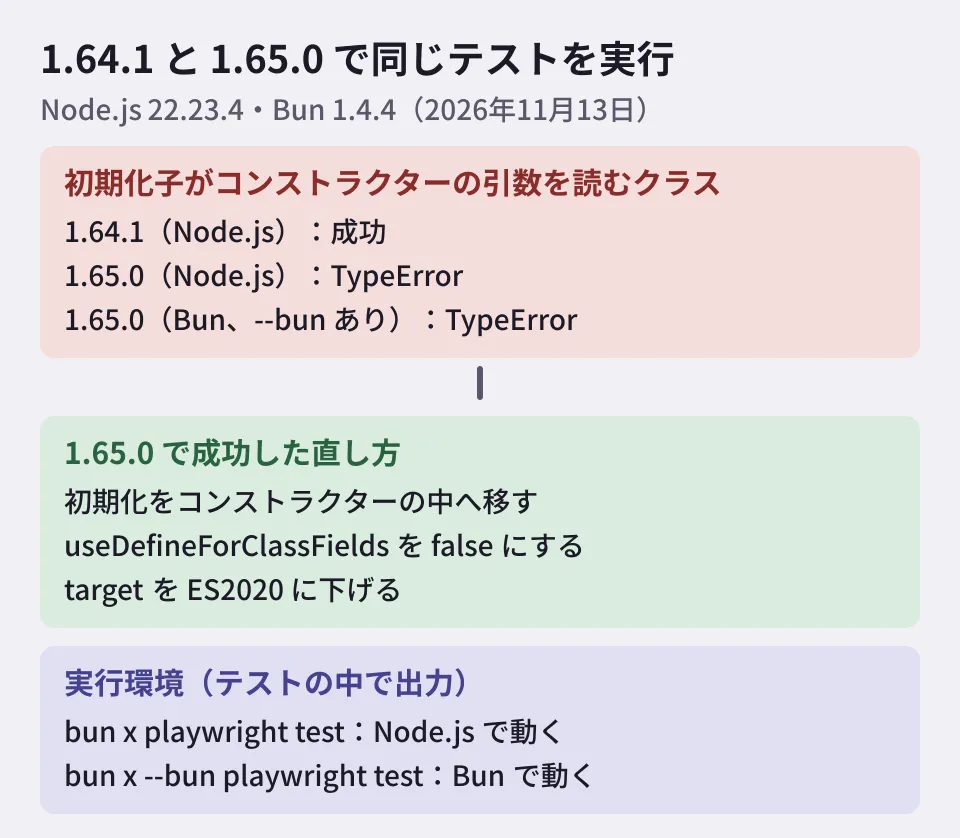
We checked this in a working directory on November 13, 2026. The environment was Ubuntu 24.04.5, Node.js 22.23.4 and TypeScript 5.9.3, with target in tsconfig.json set to ES2022. To avoid launching a browser, we passed a plain object instead of page.
class LoginPage {
  readonly submit = this.dep.label.toUpperCase();
  constructor(private readonly dep: { label: string }) {}
}| Condition | Result |
|---|---|
| 1.64.1(Node.js) | Passed |
| 1.65.0(Node.js) | Failed: TypeError: Cannot read properties of undefined (reading 'label') |
1.65.0 (Bun, with --bun) | Failed: TypeError: undefined is not an object |
1.65.0, "useDefineForClassFields": false in tsconfig.json | Passed (both Node.js and Bun) |
1.65.0, lowering target to ES2020 | Passed |
| 1.65.0, moving initialization into the constructor | Passed |
There are two ways to fix it. If you fix the code, declare only the type for the field and assign the value inside the constructor.
class LoginPage {
  readonly submit: Locator;
  constructor(private readonly page: Page) {
    this.submit = page.getByRole('button', { name: 'Submit' });
  }
}
If you cannot fix it right away, writing "useDefineForClassFields": false in tsconfig.json restores the same behavior as up to 1.64. However, this setting also affects type checking with tsc and the output of other builds. The Playwright docs recommend placing a dedicated tsconfig.json in the test folder. Note that Playwright uses the nearest tsconfig.json for each file it loads, so that folder's settings do not apply to page objects outside the test folder. If you have not separated a test-only tsconfig.json, also check the impact on the application side.
For classes that use decorators, two other bugs have been reported in 1.65.0: classes with static fields fail to load when "useDefineForClassFields": false (#43936), and adding a decorator to a field with ! causes a load failure (#44065). Both are fixed in the development version (main). The fix for #43936 has also been merged into the 1.65 branch, but as of November 13, 2026, 1.65.1 has not been published to npm. If you use decorators, also check that your code loads on 1.65.0.
test.skip descriptions are now recorded
Also starting with 1.65, you can pass just a description to test.skip, test.fixme, test.fail and test.slow, and that description is recorded in the test's annotations.
test('upload a file', async ({ page }) => {
  test.skip('Not implemented yet');
});
Comparing with the JSON reporter, in 1.64.1 the annotation was only {type: 'skip'} and the description was not kept. In 1.65.0, description: 'Not implemented yet' is included. In both versions, the test was treated as skipped. If you aggregate the reasons for skipped tests from reports, this value will be populated from 1.65 onward.
Running with Bun
Starting with 1.65, the test runner can run on Bun. The release notes caution that without --bun, bunx playwright test runs on Node.js. We got the same result locally (Bun 1.4.4) when we printed the runtime from within a test.
npx playwright test                → node v22.23.4
bun x playwright test              → node v22.23.4
bun x --bun playwright test        → bun 1.4.4
The differences on Bun listed in the release notes are as follows. The release notes say Playwright's CI runs the test runner's tests on Bun 1.4.3 on Linux (we used 1.4.4 locally).
- There is no watch mode. UI mode does not rerun on file changes, and
--only-changeddoes not follow imports - Because Bun handles module loading, the JSX settings in
--tsconfigandtsconfig.jsonhave no effect, and custom ESM loaders cannot be used - Stack traces do not include async frames, and API names are not prefixed with the class name (
clickinstead oflocator.click). Step locations, titles and error messages change - Console output from tests is not included in traces or UI mode
Because error messages and step titles change, setups that triage failures by their message, or workflows that look at report diffs separately from screenshot comparisons, may be affected. The safe approach is to try switching to Bun in a separate job while keeping your existing Node.js pipeline. We covered the decision of whether to adopt Bun itself in our article on Bun 1.4.
What to check before updating (editorial proposal)
- Look for class field initializers. In page object and fixture classes, identify any class that has both initializers starting with
= this.and constructor parameter properties. - Check
targetintsconfig.json. If it isES2022or later, or not specified, this change applies. - Run all tests in the pull request that upgrades to 1.65. Before merging the automated update pull request, check whether any failures are caused by field initialization.
- Review how you aggregate reports. The fact that skip reasons are now recorded, as well as the new
failuresreporter and theonlyFailuresoption (which keeps only failed, flaky and interrupted tests), also help make CI logs easier to read.
Changes in the previous version are summarized in our article on Playwright 1.64.
Scope of verification
On November 13, 2026, we reviewed the microsoft/playwright release notes (
docs/src/release-notes-js.md, tag v1.65.0), the GitHub release page, the test API docs (class-test.md), the TypeScript configuration docs (test-typescript-js.md), the npm publication dates and the issues related to 1.65.0 (documentation review). We also installed 1.64.1 and 1.65.0 with the same tests in the environment above and ran them (hands-on verification). We have not checked tests that use a browser, behavior on Windows or macOS, or UI mode.
GleamHub accepts consultations on development, AI and automation, including automating pre-release tests and reviewing tests alongside site updates. Please reach out via our contact form.