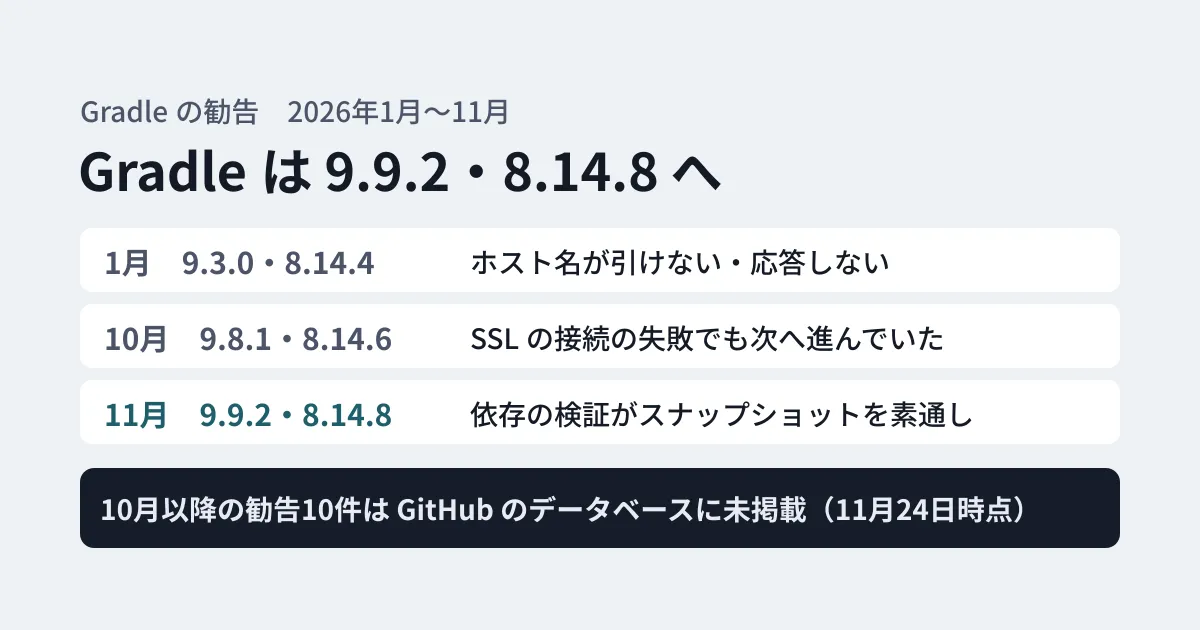
If you use Gradle for Java or Android builds, you need to upgrade to 9.9.2 or 8.14.8 (both released November 19, 2026). The problem of "skipping an unreachable repository and resolving dependencies from the next one", which should have been fixed in January, remained for SSL connection failures, and a third advisory was published on October 7. In addition, on November 19 an advisory was published about a gap in dependency verification, which the advisories list as a workaround.
The 2 advisories from January 16 (CVE-2026-22816 and CVE-2026-22865) were listed in the GitHub Advisory Database on November 23. Meanwhile, as of November 24, the 10 advisories published in Gradle's repository since October (including 1 critical) are not listed in the database. This article covers the advisories and fixed versions, why the January fix was not enough, caveats about dependency verification, and how to fix builds that break after upgrading.
Advisories and fixed versions
Counts and severities are based on the advisory list in the gradle/gradle repository. Dates are when the advisories were published in the repository (UTC). Fixed versions listed are those distributed free of charge.
| Advisory publication date | Count and severity | Key features | Fixed version |
|---|---|---|---|
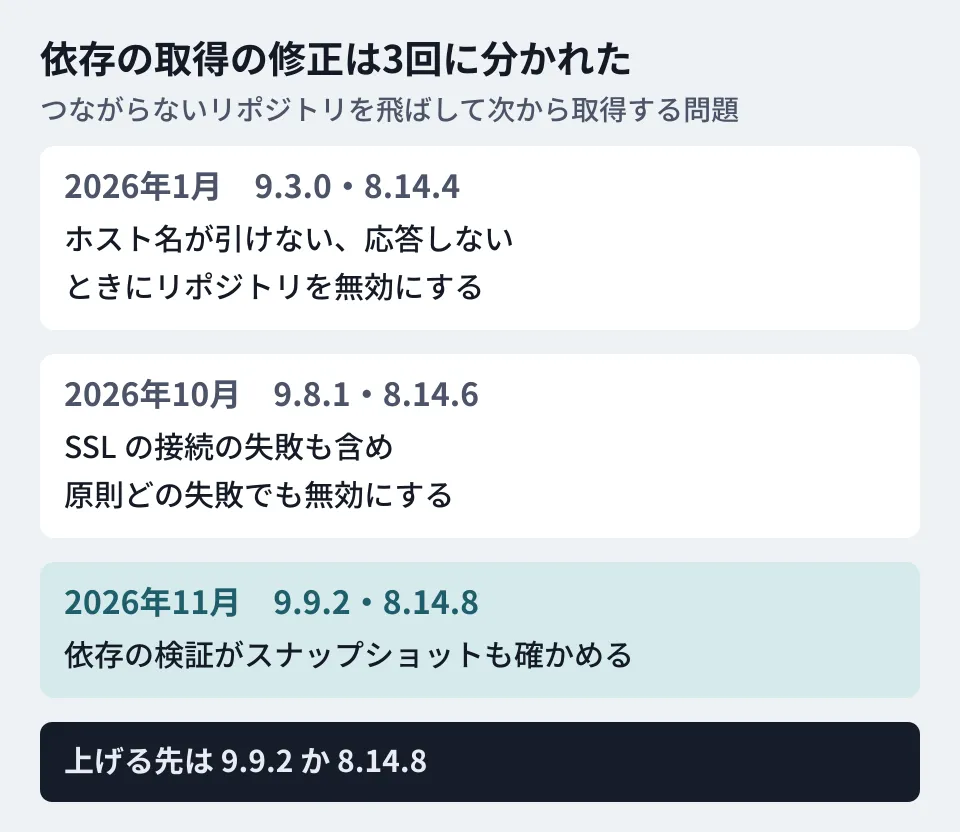
| January 16, 2026 | 2 (2 high) | During dependency resolution, a repository whose host name cannot be resolved or that does not respond is not disabled, and Gradle moves on to the next repository | 9.3.0・8.14.4 |
| October 7, 2026 | 3 (3 high) | The SSL connection failure case of the same problem (GHSA-j5m7-59rp-24f5), and 2 issues with deserialization (rebuilding objects from received data) in communication with the daemon (the Gradle process that keeps running in the background) | 9.8.1・8.14.6 |
| November 10, 2026 | 3 (1 critical, 2 high) | Values in a version catalog (a file that lists dependency versions in one place) are executed as code (GHSA-3cfg-jpcr-gfp3, critical), and 2 issues of trusting daemon registry information too much | 9.9.1・8.14.7 |
| November 19, 2026 | 4 (4 high) | Dependency verification does not verify snapshots pulled in through other dependencies (GHSA-7f7r-77ff-fr6f), host keys of SFTP repositories are not checked, TestKit temporary directories, and daemon registry information is readable right after creation | 9.9.2・8.14.8 |
Judging from the affected version ranges in the advisories, 9.9.2 and 8.14.8 include fixes for all 12 issues above. The advisory tables also list fixed versions for the 9.1 to 9.8 series and the 7.6 series, but those are provided through the subscription-based "Gradle Security Subscription".
According to the advisories, most of the daemon and TestKit issues pose the greatest risk on build machines shared with other users and cannot be exploited over the network. For one of the daemon registry issues (GHSA-gqrr-4j89-5267), users who clone untrusted repositories and run Gradle or open them in an IDE are said to be most at risk. For the version catalog issue, builds that consume catalogs published to repositories are said to be most at risk, and the attacker does not need access to the build machine.
Why the January fix was not enough
Gradle searches repositories in the order they are declared to resolve dependencies. The intended behavior is to disable a repository that hits a connection error and fail dependency resolution. This prevents silently resolving from a different repository, and the advisories describe it as behavior for reproducibility and security.
However, if exceptions that do not disable the repository remain, Gradle moves on to the next repository and may resolve dependencies from there. The scenario common to all 3 advisories is that if an earlier repository can be blocked and a later repository is controlled by an attacker, malicious artifacts can get in.
| Trigger | Advisory | Fixed version |
|---|---|---|
The repository's host name cannot be resolved (UnknownHostException) | GHSA-w78c-w6vf-rw82(CVE-2026-22816) | 9.3.0・8.14.4 |
Transient errors persist up to the retry limit (NoHttpResponseException and others) | GHSA-mqwm-5m85-gmcv(CVE-2026-22865) | 9.3.0・8.14.4 |
Establishing the SSL connection fails (SSLException, SSLHandshakeException) | GHSA-j5m7-59rp-24f5 (no CVE listed) | 9.8.1・8.14.6 |
The January fix added the cases where the host name cannot be resolved and where the retry limit is reached to the list of exceptions that disable a repository. SSL exceptions were classified as neither fatal nor transient errors, so 9.3.0 to 9.8.0 and 8.14.4 to 8.14.5 still moved on to the next repository.
The fixes in 9.8.1 and 8.14.6 (including the commit "Make repository disabling stricter") reverse the approach. The rule is now to disable the repository on any failure, and Gradle continues searching the next repository only in cases such as a file not being found, authentication failing (401), or fetched metadata being unreadable. Errors from S3 and Google Cloud Storage repositories were also brought under the same handling. The integration tests at the 9.9.2 tag include a test confirming that dependency resolution stops for a repository with an untrusted certificate.
For the first issue, the advisory gives "allowing a repository’s domain name registration to lapse or typo-ing the real domain name" as example causes. Regardless of version, it is worth checking whether the build.gradle of older projects still contains shut-down external repositories or mistyped URLs.
Caveats for workarounds that rely on dependency verification
The 3 advisories list repository content filtering and dependency verification as workarounds. Dependency verification records the checksums and signing keys of artifacts that may be resolved in gradle/verification-metadata.xml, and fails the build if the contents differ.
However, according to GHSA-7f7r-77ff-fr6f (high), published November 19, dependency verification before 9.9.2 and 8.14.8 excludes snapshots (dependencies whose contents are expected to change, such as -SNAPSHOT versions) from verification. The same applies to snapshots you did not declare yourself that come in through other dependencies' declarations, and nothing is recorded in verification-metadata.xml. As a result, reviewing changes to the file will not catch them.
According to the advisory, affected builds are those that use dependency verification and declare repositories that serve snapshots (snapshot repositories, JitPack, internal repository managers that proxy them, and so on). Builds that resolve only from Maven Central are said not to be affected.
Dependency verification is still a valid measure. However, you can no longer say "we use dependency verification, so it is fine to stay on an old version."
Dates differ between publication in the repository and listing in the database
Gradle's advisories are first published in the gradle/gradle repository. They are added to GitHub's global advisory database (the GitHub Advisory Database) only after GitHub's review.
| Advisory | Published in the repository | Listing in the GitHub Advisory Database |
|---|---|---|
| 2 from January (CVE-2026-22816 and CVE-2026-22865) | January 16, 2026 | November 23, 2026 |
| 10 since October (no CVE listed) | October 7, November 10, November 19 | Not listed as of November 24 |
The 2 from January were also listed in the database 10 months after publication. Tools that rely on the GitHub Advisory Database (such as Dependabot alerts) may not notify you about the 10 unlisted advisories. In addition, the database covers Maven's org.gradle:gradle-core, and we have not confirmed whether such tools detect the Gradle version specified in the Gradle Wrapper. No notification does not mean you are unaffected, so decide based on the version number.
Builds that break after upgrading
Upgrading to 9.9.2 or 8.14.8 strengthens the protections, so builds that used to pass may break.
- Builds stop if a repository is unreachable. Since 9.3.0 and 8.14.4, unreachable repositories are disabled and dependency resolution fails. Since 9.8.1 and 8.14.6, the kinds of failures that disable a repository have widened further. A comment in the fix commit (4f2e3bb) describes a use case where "the internal Maven Central mirror is unreachable from outside the company network, so in that case we want to continue with Maven Central alone." If builds with the same configuration run on remote developers' PCs or on external CI services, they may break.
- Builds stop if you use dependency verification with snapshots. According to the 9.9.2 migration guide, snapshots are now verified too, so builds fail with "Dependency verification failed" if there are snapshots not recorded in
verification-metadata.xml. The guide lists three fixes: verify with signatures and trust the publisher's key, explicitly mark the artifacts as trusted (for example,.*-SNAPSHOTfor your own group), or re-record checksums with--write-verification-metadata(which needs updating every time a snapshot is published). - SFTP repositories need host keys. According to the 9.9.2 migration guide, builds fail with "Could not verify the identity of SFTP server" if the server's host key is missing from
~/.ssh/known_hostsor similar, or does not match. On CI agents and containers, place the key on the side of the user running the Gradle daemon.
To deal with unreachable repositories, Gradle 9.3.0 added a setting called allowInsecureContinueWhenDisabled (the Javadoc for UrlArtifactRepository says "@since 9.3.0"). The default is false, and a repository set to true lets Gradle move on to the next repository even after it has been disabled.
repositories {
    maven {
        url = uri("https://maven.internal.example.jp/central-mirror/")
        // 社外ではつながらないミラー。無効になっても次へ進むことを明示する
        allowInsecureContinueWhenDisabled = true
    }
    mavenCentral()
}
As the word "Insecure" in its name suggests, this setting deliberately removes the protection described here. The integration tests at the 9.9.2 tag confirm that Gradle moves past a repository that was disabled because of a server error (5xx). We have not confirmed whether it works the same way for SSL connection failures. If you use it, the safer approach is to limit the dependencies taken from that repository with content filtering and combine it with dependency verification on 9.9.2 or 8.14.8.
Steps to check (editorial suggestion)
- Check your current version. Run
./gradlew --versionin the project, or look atdistributionUrlingradle/wrapper/gradle-wrapper.properties. You are affected if you are on 9.x below 9.9.2 or on 8.x below 8.14.8. There is no free fixed release for 7.x or earlier. If you have multiple repositories or modules, list the version of each one. - Decide which version to upgrade to. For 9.x it is 9.9.2, and for 8.x it is 8.14.8. Under Gradle's policy, the free distribution receives fixes only for the latest series and the last series of the previous major version (currently the 8.14 series). The 8.x migration guide states that fixes for 8.x will end when Gradle 10.0.0 is released. Plan when to move from 8.x to 9.x at the same time. We have not checked which Gradle versions the Android Gradle Plugin requires, so please verify the combination for Android projects.
- Update the Wrapper. The procedure in the official documentation is to run
./gradlew :wrapper --gradle-version 9.9.2(8.14.8for 8.x) and then run./gradlew :wrapperonce more. The first run changes onlygradle-wrapper.properties, and the second run also updatesgradlew,gradlew.batand the Wrapper JAR. Check the version with./gradlew --versionand commit the changed files. If you specifydistributionSha256Sumingradle-wrapper.properties, also pass the hash of the new version with--gradle-distribution-sha256-sum. - After upgrading, also build in environments outside the company. On home PCs and CI outside the company, check that builds do not stop for any of the three reasons in the previous section (unreachable repositories, snapshots and SFTP). The advisory (GHSA-35pj-rg5r-8rpv) recommends that, after upgrading, you stop the daemon with
gradle --stopand deleteregistry.binunderdaemon/in the Gradle user home. - Take inventory of the
repositoriesblocks. Look fordependencyResolutionManagementinsettings.gradle(.kts)andbuild.gradle(.kts)in each module. Remove URLs of discontinued services, typos and unused repositories, and use content filtering so that internal packages are fetched only from internal repositories. - Decide on interim measures for while you cannot upgrade right away.The workarounds described in the advisories are as follows. Most advisories give upgrading as the recommended fix, and the workarounds are stopgaps until you upgrade.
- The three dependency resolution issues: repository content filtering and dependency verification. However, as explained in the previous section, verification has a gap if you use a repository that serves snapshots.
- The snapshot issue: in the dependency resolution settings, use
failOnChangingVersions()to reject dependencies whose contents can change, including those on the build script classpath (this cannot be combined with dependency locking in the same configuration). Restrict the repository that serves snapshots with content filtering, and declare the other repositories withmavenContent { releasesOnly() }. - The daemon and TestKit issues: do not build on machines shared with other users. In CI, use runners that are not shared with others and are recreated for every run. Before running Gradle in an untrusted repository, check that
gradle.propertiesdoes not containorg.gradle.daemon.registry.base(for this issue, upgrading reportedly does not make the build safe if that setting is present). - The version catalog issue: check the values of every catalog you import or define. Import published catalogs at a fixed version that you have checked.
We have also covered protecting the paths through which dependencies are fetched in our article on pnpm 11's default of waiting one day after publication and our article on arbitrary code execution in npm install. The language differs, but what they have in common is deciding in configuration where dependencies may be fetched from. The steps for checking versions against advisories for Java libraries are also covered in our article on the AWS JDBC Wrapper.
Scope of verification
On November 24, 2026, we reviewed the list of advisories in the gradle/gradle repository (we retrieved all 28 via the GitHub API and checked the severity, publication date, affected versions, fixed versions and workarounds described for the 2 published on January 16 and the 10 published from October onward), their listing status in the GitHub Advisory Database, the draft release notes for 9.8.1, 8.14.6, 9.9.2 and 8.14.8, the diffs of the commits fixing repository disabling in 9.8.1 and 8.14.6, the integration tests and
UrlArtifactRepository.javaat the 9.9.2 tag, the "Repository disabling" section of the user documentation, the Gradle Wrapper documentation, the 9.x and 8.x migration guides and the release policy on docs.gradle.org, and the version list of the Gradle distribution service (document research). Because of constraints in our working environment, we were not able to actually run builds with Gradle before and after the fixes. TheallowInsecureContinueWhenDisabledconfiguration example is the editorial team's example based on the Javadoc and tests, and we have not verified how it behaves. We have not checked which Gradle versions each Android Gradle Plugin release requires.
GleamHub's development, AI and automation consulting covers reviewing builds for Java business systems and Android apps and setting up CI. Please get in touch through our contact form.
References
- gradle/gradle — Security advisories
- GHSA-j5m7-59rp-24f5: Failure to disable repositories failing to establish an SSL connection can expose builds to malicious artifacts
- GHSA-7f7r-77ff-fr6f: Transitive snapshot dependencies skip dependency verification
- GHSA-3cfg-jpcr-gfp3: Version catalog values run as code in generated accessors
- GitHub Advisory Database — GHSA-w78c-w6vf-rw82(CVE-2026-22816)
- GitHub Advisory Database — GHSA-mqwm-5m85-gmcv(CVE-2026-22865)
- gradle/gradle — commit bfbd14a(Make repository disabling stricter)
- gradle/gradle — commit 4f2e3bb(Disable repository after max retries on transient errors)
- gradle/gradle — Release v9.9.2
- gradle/gradle — Release v8.14.8
- Gradle — Upgrading within Gradle 9.x.y
- Gradle — Gradle Wrapper(Upgrading the Gradle Wrapper)
- Gradle — Release end-of-life Policy
- gradle/gradle — Repository disabling(graph_resolution.adoc、v9.9.2)
- Gradle version list (services.gradle.org)