Have you ever been asked this question during an audit or on a client's security questionnaire: "How many files are shared with external users?"
In most organizations, this question cannot be answered right away. Opening the Admin Console shows only trends in "sharing events" or individual file permissions. Generating an inventory showing how many files across the entire organization are currently exposed externally, and how many of those can be opened by anyone—this has long remained notoriously difficult.
The reason is that files leave the organization through more than one channel. The new fields in the Drive inventory report, rolling out incrementally starting in August 2026, address this exact challenge.
External sharing occurs through three channels
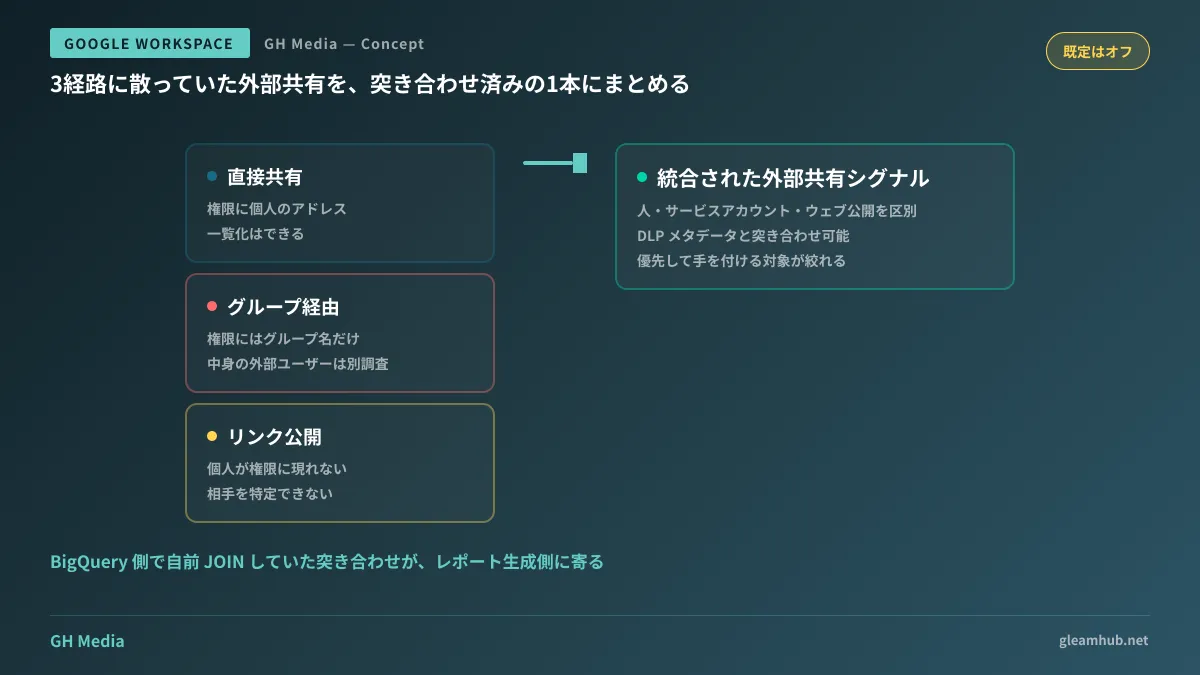
There are three distinct channels through which a file becomes visible to external parties:
| Channel | How it is recorded | Inventory audit challenge |
|---|---|---|
| Direct sharing | Individual email addresses appear in file permissions | Can be compiled into a list, but volume is massive |
| Via groups | Only the group name appears in permissions | Requires separate investigation to check if external users belong to the group |
| Link sharing | Configured as "Anyone with the link" | Individuals do not appear in permission lists |
The middle channel is the most troublesome. Even if only an internal group name is listed on the permissions, if even a single external member belongs to that group, it is effectively an external share. Because group membership changes over time, looking solely at file permissions at a specific point in time cannot provide the answer.
Even for organizations exporting inventory reports to BigQuery, this reconciliation previously required writing custom SQL. When nested groups are involved, that alone turns into a substantial development effort. The procedure for auditing from the shared link side is covered in Auditing and Disabling Drive Sharing Links; however, tackling it from permission lists requires establishing a convergence point across all three channels.
What was added is a "reconciled answer"
What was added this time is a field that automatically consolidates direct permissions, group memberships, and public links to provide a signal indicating external exposure. The task of joining tables for each route on the organization side has shifted to the report generation side.
In addition, it is now possible to distinguish whether the other party is a human user, a service account, or something published on the web. This is extremely effective in actual practice. That is because when you pull a list of external shares, service accounts for integrated tools usually rank at the top by volume, burying the personal accounts of business partners that you actually need to see. If you cross-reference this with existing DLP metadata, you can prioritize and tackle higher-confidentiality data first.
Note that this feature requires exporting to BigQuery. For organizations that do not use the Drive inventory report itself, the process starts with configuring that first. We covered how to make data exported to BigQuery accessible to people outside the IT team in Enabling Self-Service BigQuery Data with Connected Sheets.
Disabled by default: things to decide before enabling
This calculation is turned off by default. You enable it under "External sharing calculations" in the Drive inventory report settings within the Admin console. It has been rolling out gradually since August 14, 2026, and it may take up to around 15 days for the setting to become visible.
Before enabling it, please decide on three things.
- Can report delivery afford to be delayed? In organizations that make heavy use of large Google Groups, processing time increases due to this calculation, affecting the report delivery schedule. If you connect this to another aggregation in a nightly batch, verify dependencies beforehand.
- Who will view this data? A list of external shares effectively serves as a map of which files to target. You need to design viewing permissions on the BigQuery side separately from administrator privileges in the Admin console.
- How will you handle the resulting volume? On the first run, the count will be far higher than expected. Rushing to shut everything down at this stage will disrupt business operations. Proceed in the order outlined in the next section.
Do not delete items from the generated list starting from the top
The most common failure in an audit is being startled by the high volume and banning external sharing entirely in bulk. Ongoing projects with business partners will grind to a halt, and within a few days, people will escape to personal Drives or free file transfer services. The situation becomes worse than it was before making it visible.
Filtering the resulting list in the following order makes it practical for day-to-day operations.
First, look at items published on the web. The count should be small, but the nature of the risk is different from the rest. Because the counterparty cannot be identified in this category alone, make individual determinations after verifying operational necessity.
Next, look at items with old last-updated dates where only external sharing remains active. This is a typical case where permissions linger even though a project has ended, meaning revoking them will have almost no operational impact. This is the primary battleground of your audit.
Finally, look at external shares that are still being actively updated. Rather than shutting these down, consolidate them into shared drives and manage their permissions using roles. If external shares remain situated in personal My Drives, the same problem will recur when the person in charge departs. We organized the mindset for designing permissions with roles in How to Distribute Permission Roles for Shared Drives.
What to do next
First, check whether your company exports Drive inventory reports to BigQuery. If you do not, this new field addition starts from the step of making it usable. If you do, check whether "External sharing calculations" appears in the settings screen, and if it does, verify that you have sufficient leeway in your nightly processing window.
On top of that, decide in advance whom you will review the initial list with. If the IT team reviews it alone, they will be unable to judge whether to shut down or retain access, leaving it shelved indefinitely. Involving one person from the relevant department who understands the project's status will dramatically accelerate the initial screening.
GleamHub offers free IT and Google Workspace consultations regarding external sharing audits in Google Workspace, migration to shared drives and permission design, as well as BigQuery integration for inventory reports. Because the approach varies depending on organizational scale and how groups are utilized, please consult with us individually. Reach out via Contact Us.
Sources
- Enhanced external sharing insights now available in Drive Inventory Reporting — Google Workspace Updates
- Google Workspace Weekly Recap — August 21, 2026
- Export your organization’s Drive inventory — Google Workspace Admin Help
- Schema and example queries for Drive inventory exports in BigQuery — Google Workspace Admin Help