Internal IT is effectively handled by a single person, with administrator roles handed out to several others. General affairs adds users, the sales director handles password resets, and accounting oversees billing. It is a common setup.
In this environment, if someone's administrator account password were changed without their knowledge, where is the path to notice it? Nobody knows until that person tries to log in next time and gets rejected. In reality, it is not uncommon for that to be the fastest detection mechanism a company possesses.
From the attacker's viewpoint, resetting a password is not the end goal—it is merely a stepping stone. Once administrator access is secured, simply adding a forwarding rule allows silent, ongoing exfiltration of subsequent emails. That is why detecting that initial reset makes orders of magnitude of difference in the ensuing damage.
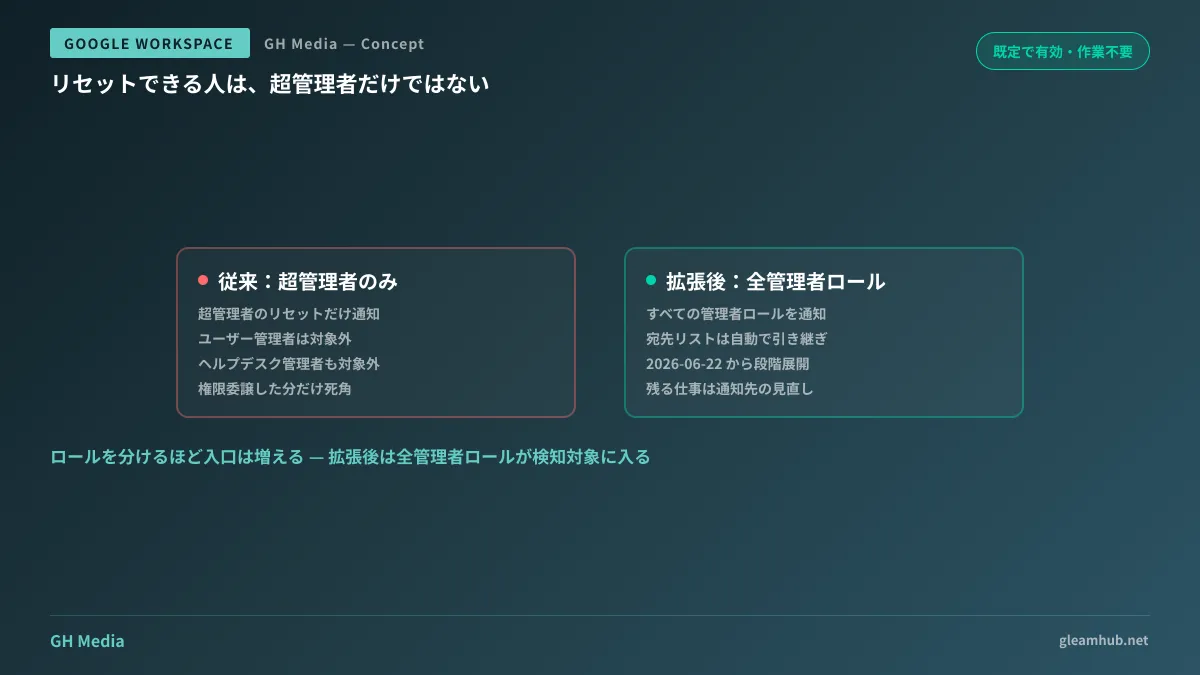
From "super admins only" to "all admin roles"
The "Super admin password reset" alert in Google Workspace Alert Center has been expanded to "Admin password reset" (Enhanced security monitoring with expanded Admin password reset alerts — Google Workspace Updates).
Previously triggered only when a Super Admin's password was reset, the alert now fires for all administrator roles within the organization. Gradual rollout began on June 22, 2026.
Operationally, the welcome aspect is that no action is required from administrators. It is enabled by default, and if you had customized the existing alert with a recipient list, those settings carry over directly to the new rule. Detection coverage expands automatically without any intervention.
Why super admins alone were not enough
You might feel that "since Super Admins are what matters, monitoring only them should be enough." This is where practical misunderstandings often arise.
The authority to reset passwords is not the exclusive domain of Super Admins. Roles intended to have limited scope, such as User Management Admin or Help Desk Admin, also possess the ability to reset other users' passwords. In other words, once these roles are compromised, attackers can progressively unlock standard user accounts across the entire organization.
| Compromised role | Immediate capabilities | Covered by previous alert |
|---|---|---|
| Super Admin | Modify all settings, grant admin privileges to others | Target |
| User Management Admin | Reset standard user passwords, create accounts | Excluded |
| Help Desk Admin | Reset passwords (limited scope) | Excluded |
Privilege delegation is recommended as "good practice to reduce Super Admins," yet dividing roles simultaneously increased the number of doorways needing monitoring. This expansion can be seen as aligning detection capabilities with those widened doorways.
Deciding what to do before the alert rings
Without defined post-alert procedures, alerts get brushed aside as unclear notifications. When an administrator password reset is notified, the general sequence follows four steps:
- Directly confirm with the individual whether the operation was authorized. Verify via an out-of-band channel such as a phone call rather than email or chat, as attackers may already see communications if the account is compromised
- Check audit logs to identify who performed the reset. Cross-reference the actor, timestamp, IP address, and device. Which log fields to inspect is detailed in Two new columns added to audit logs
- If suspicious, immediately revoke all active sessions for the account. Simply changing the password leaves existing active sessions and app authorizations intact
- Inspect email forwarding rules, filters, app passwords, and 2-step verification backup methods. Post-compromise persistence mechanisms concentrate heavily across these four areas
Skipping steps 3 and 4 leads to simply resetting the password and treating the incident as resolved, while exfiltration quietly continues. Adhering to this sequence is well worth the rigor.
Without configured recipients, alerts will not arrive even when triggered
Even with broader detection coverage, the outcome is the same if notifications land in a mailbox nobody reads. In organizations that have not reviewed the Alert Center, the following scenario commonly occurs:
- The notification recipient is set to a single Super Admin account that nobody regularly checks
- The notification destination is a shared address like
info@, where alerts get buried under sales emails. - Only addresses that are checked during weekday business hours are configured, leaving late nights and weekends unmonitored.
The countermeasure is not difficult. Route Alert Center notifications to both an individual address read daily and a team chat channel. Doing just that prevents realizing something happened three days later. For overall planning on whose suspicious actions to detect and how, see Detecting Suspicious Activity with Google Workspace Audit Logs and Alerts; for where to find settings in the Admin Console, see Introduction to the Google Workspace Admin Console.
What you can check this week
Because this change is applied automatically, there is no implementation work required. Instead, here are two points you should check.
First, inventory who has been assigned administrator roles. Check whether roles remain assigned to employees who have left the company or transferred departments, or if any roles remain assigned after being granted "just for now." Expanding detection coverage to all roles also means that the more an organization hands out roles excessively, the more alerts it will receive.
Second, verify whether alert notification destinations are active. Some items allow sending test notifications, so it is best to visually confirm whether they actually arrive.
If organizing administrator roles or designing alert operations proves difficult internally, GleamHub offers free IT and Google Workspace consultations. Because the right breakdown varies depending on your organization's size and structure, please consult with us individually via our Contact Us page.