Open the list of "Trusted Domains" in the Admin Console and check company names from top to bottom. Out of those, how many companies do you actively do business with today?
For this list, the reason for adding an entry is always clear: a request arrives saying "We need to share files with Company A, please add them," and an administrator adds a row. On the other hand, removing domains is nobody's job. Even when projects end, contracts expire, or personnel transfer, domains remain indefinitely. Without anyone realizing it, the external sharing boundary becomes the sum total of every company ever engaged with in the past.
Effective August 19, 2026, the Allowlisted Domains API became generally available, allowing programmatic management of this list. This means the foundation is in place to replace manual audits with automated mechanisms.
Additions are events, but deletions are not
Allowlisted domain management decays not because administrators are negligent, but rather due to an asymmetry: additions have an explicit trigger in the form of requests, whereas deletions have none.
Operational teams almost never reach out to say, "Our business engagement with this company has concluded, so please remove them from allowlisted domains." Neither sales nor legal teams associate contract termination with Admin Console configurations. As a result, audits become sporadic once-a-year exercises, by which time the list has ballooned to dozens of rows, forcing administrators to research row by row what each domain was for.
What makes this even more problematic is that even when domains that should be removed remain on the list, nothing breaks in daily operations. Because no one is inconvenienced to the point of filing a report, the issue stays hidden until a security incident occurs. Only the perimeter of permitted sharing quietly expands.
What the API can do and required privileges
The now-GA Allowlisted Domains API is positioned as a top-level resource under the Cloud Identity API suite. It provides four basic operations:
| Operation | Application |
|---|---|
| List / Get | Retrieve the current list of allowlisted domains in a machine-readable format |
| Create | Add approved business partner domains |
| Delete | Remove domains that are no longer needed |
Invoking the API requires an administrator account with Domain Management or Domain Allowlist Management privileges. Architectural considerations for what administrator privileges to delegate to whom are organized in Admin privilege delegation and least privilege.
Due to a gradual rollout, availability begins sequentially from August 19 across both Rapid Release and Scheduled Release domains, taking up to 15 days for full visibility. Refer to Choosing release tracks for how visibility timing varies depending on your organization's track.
Decide "what serves as the source of truth" first
Even with an API available, automation cannot begin without a synchronization source. If you start writing scripts without deciding this, the "administrator's memory" remains the de facto source of truth, changing nothing from manual operations.
Realistically, viable candidates for the source of truth include the following:
- Contract management ledgers. Treat domain fields for partners with active contracts as the source of truth. Because legal and administrative teams already maintain this information, it creates no new operational overhead.
- Shared drive external member history. Treat domains where external sharing actually occurred within the past six months as the source of truth. In organizations lacking structured ledgers, this often better reflects operational reality.
- Approved records from request forms. If addition requests are captured via forms, use the set of approved records directly as the allowlist. Making the expiration date field mandatory automatically creates a trigger for deletion.
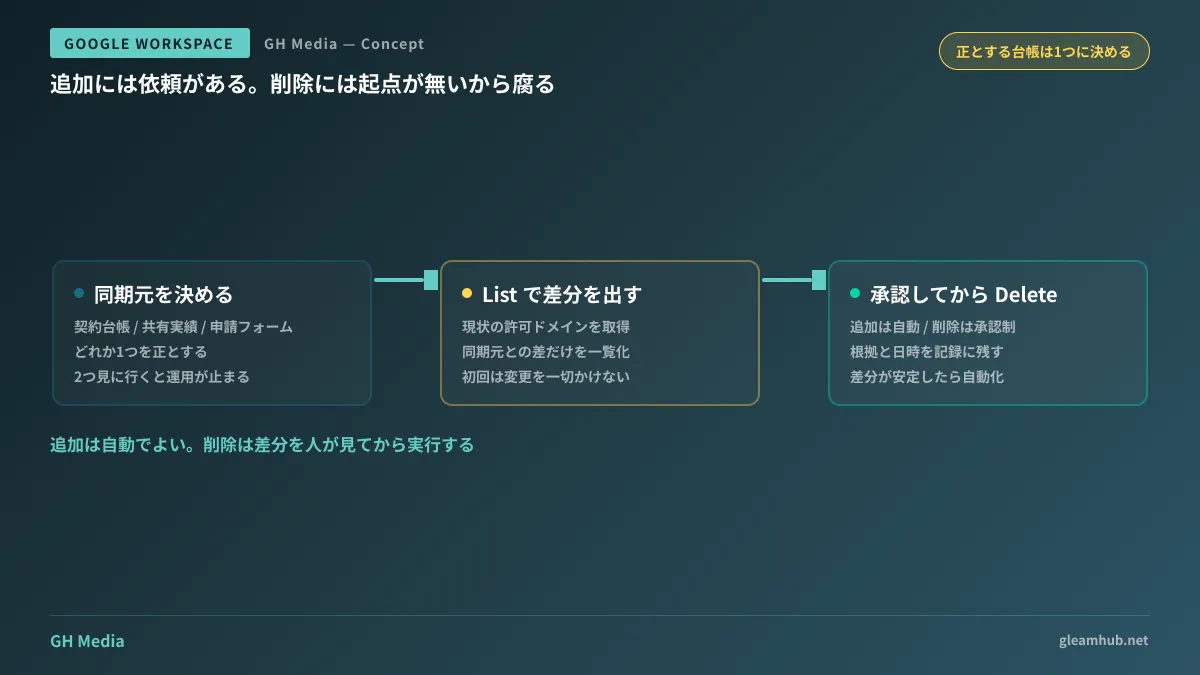
Any of these options is viable, provided you commit to one and rely on no other sources. Designing a system that queries both ledgers and forms leads to operational gridlock whenever discrepancies arise over which to trust.
Have a human review diffs before deleting
The operation most prone to incidents in automation is deletion. If an active partner is dropped due to an omitted ledger update, file sharing with that partner stops immediately, and no one realizes the cause lies in the Admin Console. Troubleshooting when external sharing is abruptly blocked is summarized in Admin-side diagnostics when external sharing is blocked.
Therefore, do not automate everything from the start. Taking staged steps in the following order is safe:
- Retrieve the current state with List and output only diffs against the sync source. Make no modifications at this stage. First runs typically reveal far more diffs than expected, providing data that justifies the need for an audit.
- Automate additions only, while inserting approvals for deletions. Additions do not disrupt business operations and can run automatically. Deletions should be executed only after reviewing the list.
- Record execution results of deletions. Keeping records of when, which domain, and on what basis it was removed allows you to respond immediately when someone reports that sharing is blocked later.
Once diff patterns stabilize after roughly six months of operation, you can consider automating deletions as well. Conversely, if diffs fluctuate wildly every time, it is evidence that the synchronization source is failing to reflect reality.
What to do next
First, open the list of allowlisted domains in the Admin Console and count the number of rows. Then, cross-reference that against external members on shared drives to see how many of those companies actually had sharing activity over the past year. The difference between these two numbers represents the exact scope you can address through automation today.
Next, decide on a single ledger to serve as your source of truth. Connecting the API is simple once decided, but if left unresolved, operations will break down after integration.
Designing external sharing policies, auditing allowlisted domains, and automating Google Workspace administrative operations are handled through GleamHub's free IT and Google Workspace consultations. Because approaches vary based on organization size and actual sharing practices, please consult with us individually. Feel free to reach out via Contact Us.