After a sales pitch, an email arrives from the other party saying, "Sharing the meeting minutes with you." The contents are accurate and helpful, yet you recall that no one seemed to be taking notes during that meeting—a situation you might have experienced yourself. AI notetaking tools can record the contents of a meeting without ever showing up on the attendee list.
In August 2026, it was publicly disclosed regarding the AI notetaking service tl;dv that meeting information spanning 181,874 meetings, 84,312 users, and 35,003 domains was accessible to any general user of the service. The cause was not functional design, but rather the total absence of access control rules configured on the backend database (Cloud Firestore). In other words, tenant isolation was completely ineffective—a breakdown in the most fundamental requirement of SaaS.
The exposed information included the meeting creator's email address, the conferencing service used (Google Meet or Microsoft Teams), the date and time, whether a recording existed, and the meeting ID itself. Knowing the meeting ID means an outsider could potentially join an ongoing meeting. Researchers reported this issue in January 2026, and it was reported to have remained unpatched and neglected for more than six months.
"We don't have a contract" is no answer
In an incident of this nature, the first thing administrators must verify is not whether a contract exists. Even if your company has no corporate contract, if individual employees are using a free plan, internal meetings are being recorded.
Furthermore, adopting AI notetaking tools involves remarkably low friction. Most offer free tiers, require only signing in with a Google account to get started, and begin working simply by feeding them a meeting URL or installing an extension. Because neither internal approval nor budget is required, the IT team has no opportunity to find out.
Even more troublesome is the scenario where an external participant introduces the tool. When the other party brings an AI notetaking tool into your meeting, certain tools cannot be blocked by your own administrative settings. Your internal information gets recorded in SaaS software your organization never chose. What the tl;dv incident demonstrated was that the security of information stored there is not even under the control of the company that initiated the recording.
Two entry paths with different visibility
When conducting an audit, it is crucial to recognize that AI notetaking tools operate through two fundamentally different mechanisms. If you search without distinguishing between them, you will overlook one side.
Bot-participant types enter the meeting as an actual "attendee." Because a non-human participant name appears in the Google Meet attendee list, you can notice it during the call. From the administrative side, you can also trace its presence via meeting attendance logs.
Browser-extension types do not join the meeting. They capture video and audio directly inside the employee's browser tab. Nothing appears on the attendee list. From the perspective of everyone in the meeting, there is no way to know it is being recorded. From an administrator's standpoint, no matter how much you examine the meeting logs, nothing will show up.
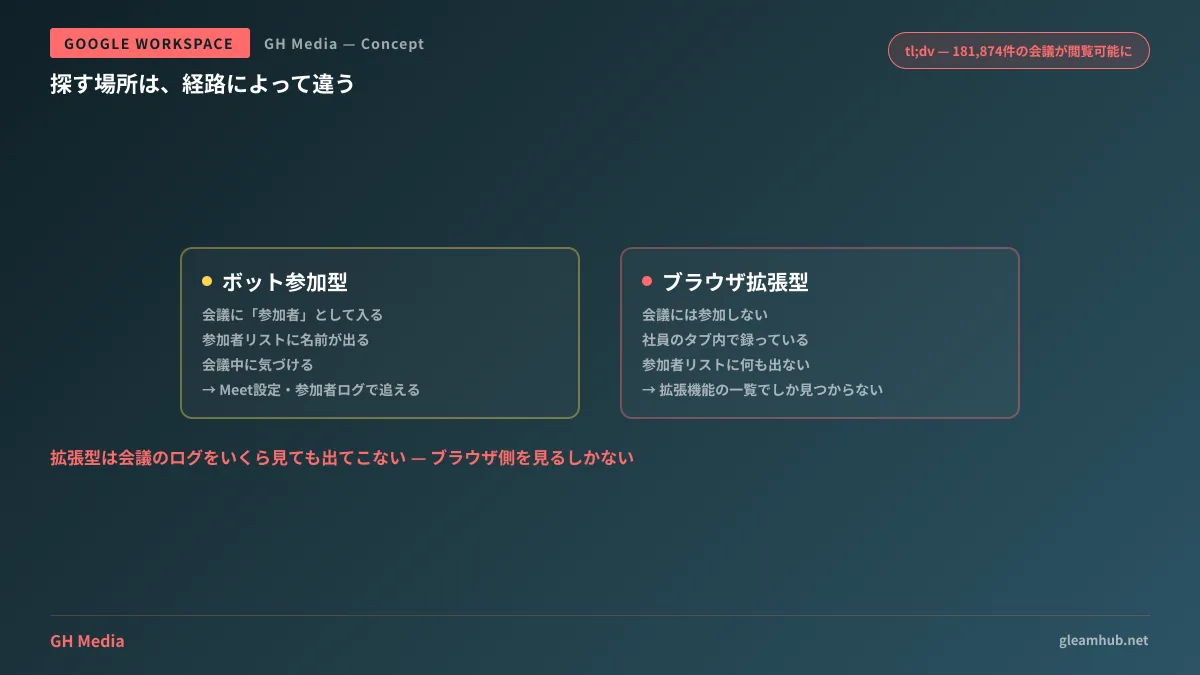
This distinction determines where you must look. Bot-participant types can be traced through meeting logs and Meet-side settings. Browser-extension types will never be found by inspecting the meeting side; your only option is to examine the browser's extension list.
Three places to look
The first is the list of OAuth-authorized apps. In the admin console under "Security → Access and data control → API controls," third-party apps actually authorized by employees appear under "Connected apps." Tools requesting access to Google Calendar will show up here, making this an effective place to catch many AI notetakers. Due to their design of reading meeting schedules to join automatically, very few tools refrain from requesting calendar permissions.
The second is the Google Meet settings. Recording permissions, handling of external participants, and host management features can be governed from the admin console. For default values and sharing scopes of Google's native AI notetaking feature itself, see How to configure Meet's automatic notes as organizational defaults; for recording data storage locations and governance, see Automatic Drive storage and organizational management of Meet recordings. Tightening controls only on third-party tools while native features remain ungoverned leaves loopholes wide open.
The third is the browser extension list. As mentioned, extension-based tools can only be uncovered here. Unless you establish a setup that lets you inventory everything installed across internal Chrome installations, this channel is fundamentally impossible to track.
Checkpoints when you are the one selecting a tool
An audit may very well lead to the conclusion that "since this is necessary for operations, our company should adopt it officially." When that happens, the tl;dv incident points directly to the items you must verify.
- How tenant isolation is implemented. Saying "we use encryption" is no answer. In this incident, communications were encrypted as well. The real issue was access control that allowed data from other tenants to be read.
- Vulnerability reporting channels and response track record. In this instance, the report went unaddressed for over six months. Rather than merely confirming a contact channel exists, you will get closer to reality by asking how many days it took to fix issues after receiving past reports.
- Storage location, retention period, and deletion methods for meeting data. What gets deleted when an account is closed, and how you can verify that it was deleted.
- Whether administrator-oriented features exist. Can you track participants under an organizational account and revoke access? A tool that only offers individual contracts cannot be controlled at the company level.
This is less about suspecting the other party and more about determining whether the vendor can provide concrete answers when explanations are requested. The failure to receive an answer is itself valuable decision-making criteria.
What to do next
Start by opening "Connected apps" in the admin console. The more a company assumed "we shouldn't have anything" before checking the list, the more shocked they are by the sheer volume of unfamiliar apps. This serves as the starting point for assessing your current state.
From there, map out which workflows within the company genuinely require meeting records. Simply announcing a blanket ban will only prompt those who need the capability to seek alternative workarounds. First defining the approved scope before tightening restrictions yields far more effective control in the end.
If you would like to consult on auditing actual usage or crafting internal rules that cover meeting data handling, we assist through GleamHub's Free IT & Google Workspace Consultation. Where lines should be drawn depends on the nature of your meetings and client relationships, so please consult with us individually. Reach out via Contact Us.
Sources
- tl;dv (Too Lazy; Didn’t Validate): 181,874 Meetings Left Wide Open — bobdahacker
- Inside the tl;dv Flaw That Exposed Live Government and Corporate Meetings — Netizen Blog
- AI Notetaker Exposes Government, Corporate Video Calls — OffSeq Threat Radar
- Control which third-party & internal apps access Google Workspace data — Google Workspace Admin Help
- Allow or block apps and extensions — Chrome Enterprise and Education Help