An aggregation script that ran every morning at 7:00 AM started stopping halfway through around last month. Checking the logs reveals "Exceeded maximum execution time." Not a single line of code was changed. The only thing that changed was the volume of data being handled.
When consulted at this stage, two misconceptions usually surface as a pair: "Paid Workspace plans surely extend the limit," and "Making the processing faster will fix it." Neither holds true today.
The 6-minute limit cannot be extended
First, let us establish the baseline. The execution time limit per script run is 6 minutes, and it is identical for free personal accounts and Google Workspace. While there was a time when Workspace-tier accounts had a 30-minute allocation, that has been deprecated. Upgrading your plan or scouring the Admin console will not budge this 6 minutes.
Understanding related quotas together will also speed up later decision-making.
| Item | Personal account | Google Workspace |
|---|---|---|
| Execution time per script run | 6 minutes | 6 minutes |
| Total trigger execution time per day | 90 minutes | 6 hours |
| Concurrent executions | 30 | 30 |
| UrlFetch calls per day | 20,000 | 100,000 |
| Time-driven triggers per script | 20 | 20 |
The second row is easily overlooked. Even if each run fits within 6 minutes, if the total execution time driven by triggers exhausts the daily quota, the script will not run for the remainder of the day. Because this manifests not as "running halfway and halting" but as "failing to trigger at all," the symptoms differ from execution timeouts. When nothing is recorded in the logs, suspect this first.
Often, it is not the computation that is stalled
The reason "making the processing faster will fix it" fails is that what consumes the 6 minutes is usually not computation.
The overwhelming cause of Apps Script slowdowns is back-and-forth round trips with spreadsheets. Calling getValue() or setValue() cell by cell inside a loop incurs network communication across service boundaries each time. If row counts grow from 1,000 to 10,000, round trips also multiply tenfold. While the logic itself finishes in an instant, only the waiting time stacks up.
// 往復が行数ぶん発生する
for (let i = 2; i <= lastRow; i++) {
  const v = sheet.getRange(i, 3).getValue();
  sheet.getRange(i, 4).setValue(v * 1.1);
}

// 往復は2回で済む
const values = sheet.getRange(2, 3, lastRow - 1, 1).getValues();
const result = values.map(([v]) => [v * 1.1]);
sheet.getRange(2, 4, result.length, 1).setValues(result);
The same dynamic applies when calling external APIs. If you are calling UrlFetchApp.fetch() one item at a time, first check whether they can be batched using fetchAll().
Simply fixing this often brings the runtime under 6 minutes. Building an execution splitting mechanism comes only after optimizing to bulk reads and bulk writes. Reversing the order leaves you with a slow, complex system that merely splits an already slow process.
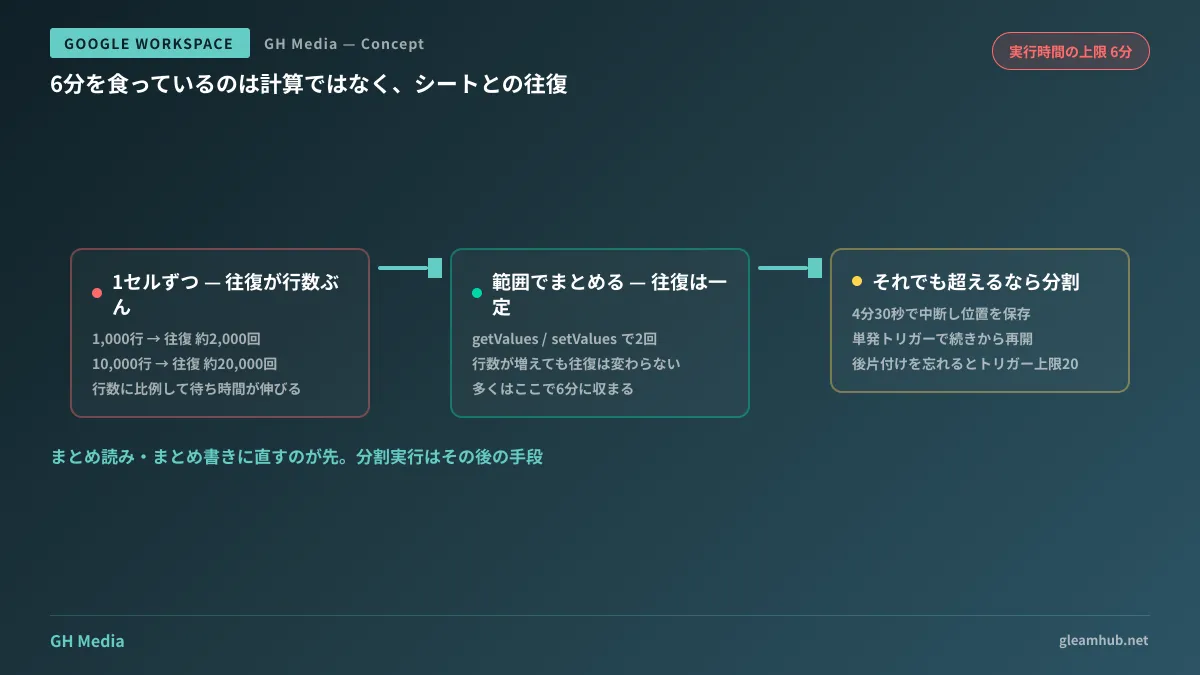
Patterns for persevering with execution splitting
If runtime still exceeds 6 minutes even after refactoring to bulk reads and bulk writes, proceed to execution splitting. The concept is simple: structure it so that progress is recorded externally, allowing the next execution to resume where it left off.
- Record the start time, and exit the loop once elapsed time exceeds roughly 4 minutes 30 seconds (do not stretch right up to 6 minutes)
- Save the interruption offset in
PropertiesService - If unprocessed items remain, schedule a one-off trigger a few minutes later using
ScriptApp.newTrigger()and terminate the current run - The next execution resumes from the saved offset
- Once all items are completed, clear the record and delete the created triggers as cleanup
Forgetting the fifth step causes you to quietly hit the quota of 20 triggers per script. Because it manifests as suddenly being unable to create triggers after running smoothly for a while, it belongs to the class of bugs that take time to diagnose.
This pattern is suited for situations where processing is row-independent, leaving no halfway state if interrupted. Row-by-row independent transcription and aggregation fall under this category.
When persevering is meaningless
Conversely, there are scenarios where implementing execution splitting solves nothing. The evaluation criteria are not processing times, but the following three points:
Processes where business logic cannot tolerate interruptions. Workflows where partial application causes actual damage—such as inventory allocation or invoice data finalization—must never be split. Because Apps Script lacks a transaction mechanism to roll back multiple operations collectively, failures require manual cleanup.
Processes predicated on endlessly growing data volumes. Even if you survive the 6-minute barrier by splitting now, the number of chunks will double in six months. Splitting merely buys time; it does not halt growth itself. Estimate volumes one year out and verify if it remains feasible. If not, it is time to architect a transition to storage outside spreadsheets.
Processes that nobody other than the author can maintain. Introducing execution splitting makes code noticeably complex. Scripts that were already difficult to hand over become entirely untouchable. How scripts neglected in this state turn into operational issues is covered in When Apps Script stops being maintained.
If any of the three applies, changing where you invest your effort is faster. The decision criteria for whether to keep using spreadsheets as calculating sheets or overhaul where data resides altogether are compiled in When to switch from Excel operations to system development. For an inspection before adding scripts that call external APIs, refer to Auditing external communications in Apps Script.
What to do next
If you have a script that is stalling, first check whether getValue() and setValue() are located inside a loop. If they are, that is very likely the cause, and there are steps to take before considering splitting the execution.
If operations still do not fit after moving calls outside loops, verify whether the script meets the three conditions above. If it does not, execution splitting will hold up for several years. If it does, redirecting the person-hours needed to cling on toward rebuilding will ultimately prove less expensive.
At GleamHub, our free IT and Google Workspace consultations cover inventorying existing scripts and distinguishing what to maintain in Apps Script versus what to migrate to a dedicated architecture. Because conclusions vary based on data growth rates and business dependencies, please consult us individually. Reach out through Contact Us.