
When we receive inquiries stating that "a nightly batch that ran without issue until last month started stopping mid-run this week," the cause is hardest to spot when neither the processing logic nor the data volume has changed. The logs are filled with 403 errors, but rerunning after a short wait succeeds. The workload hasn't increased, either.
In times like this, what you should suspect is not the quota value, but how the quota is counted. For custom tools and backup routines integrated with Google Drive, that counting method itself switched in 2026. Even with the exact same process, the ceiling you encounter differs depending on which project it runs under.
Counting by "weight" instead of request count
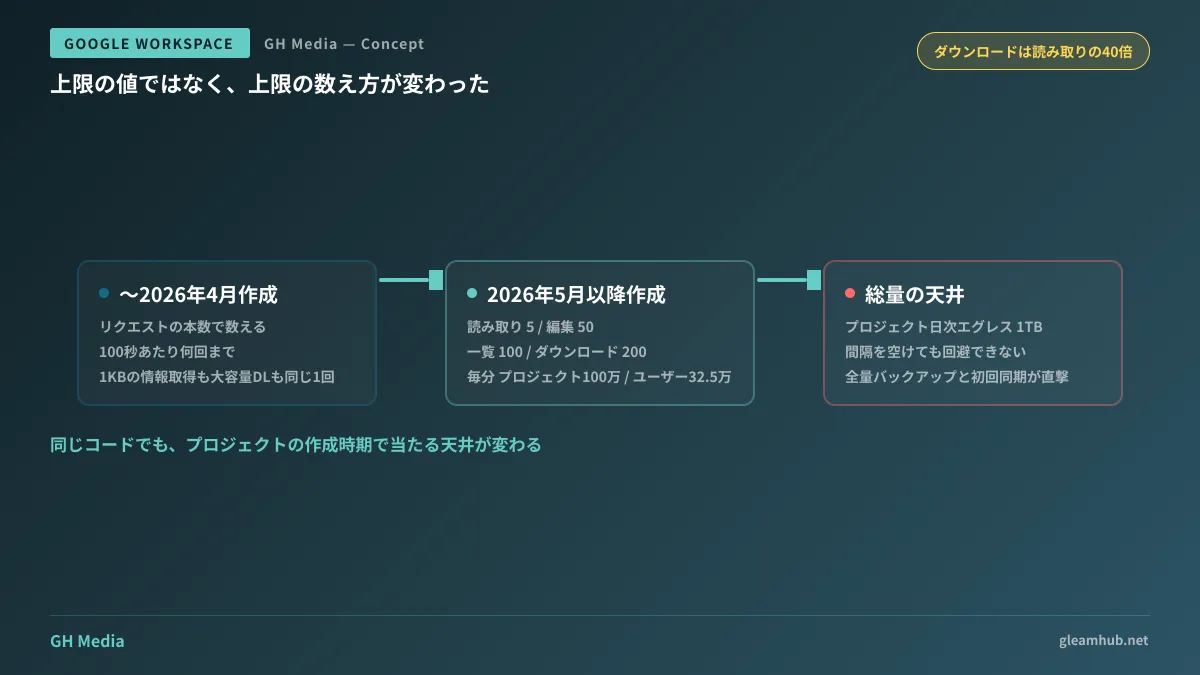
Previously, Drive API limits were determined by the number of requests. It was a straightforward count: up to a certain number per 100 seconds. Under this method, fetching 1 KB of file metadata and downloading a 500 MB file both counted as the same "one request."
Under the new model, each request type is assigned a weight. The published unit costs are as follows:
| Operation type | Quota units consumed |
|---|---|
| Basic read | 5 |
| Edit | 50 |
| List retrieval (list) | 100 |
| Download | 200 |
Downloads consume 40 times more than basic reads, and listing consumes 20 times more. This has the greatest impact in practice, because workflows that enumerate files and download them sequentially are composed entirely of just these two operations.
The limits are shown as benchmarks of 1,000,000 units per minute per project and 325,000 units per minute per user, with 400,000,000 units daily.
With a simple calculation, continuing only downloads hits the ceiling at 5,000 files per minute across an entire project, or 1,625 files per minute when run under a single user's credentials. The intuitive sense that "a few thousand requests per minute was fine" no longer holds for download-heavy operations.
Which model your environment is on
The tricky part is that this changeover did not happen all at once.
It applies to Google Cloud projects newly created on or after May 1, 2026. Projects that were using the Drive API prior to that date continue to operate under the traditional request-count-based limits for now. A gradual transition is expected to proceed within 2026.
This asymmetry makes troubleshooting difficult. A common point of failure follows this pattern:
- Production runs in a project from several years ago and remains stable under the traditional model.
- A new project is created for testing, and only the test side fails despite identical code.
- Because both code and data are identical, teams waste time suspecting code bugs rather than environment differences.
The first thing you should check is the creation date of the Google Cloud project used by that tool. If it was created in May or later, you must review it under the assumption that the counting method is different.
A ceiling from another angle: 1 TB per day
Aside from units, there is another limitation that comes into play: a daily project egress (outbound data transfer) limit of 1 TB.
This differs in nature from request-rate limits. Quota units limit things being "too fast," which can be circumvented by spacing out requests. Egress is a total volume, so even if you run jobs slowly, you will hit it if you exceed 1 TB on the same day. Implementations that insert wait intervals cannot avoid it.
Workflows most prone to being directly hit by this include:
- Full backups that replicate the entirety of Drive to another storage service.
- Initial bulk syncs that pull down all data during migrations to other services.
- Periodic synchronizations in operations handling large individual files, such as video or CAD data.
All of these are "one-off or low-frequency, but with massive volume per run" operations. They also share the tendency of being tested on small folders during development, only to hit the limit for the first time against full company data in production.
For operations where the total volume is predictable, the most reliable approach is calculating the total size of target data before getting started. If it exceeds 1 TB, design multi-day batching from the outset. If execution halts midway, you will have to start by reconciling what has already been transferred.
What companies with integration tools should look at now
Mechanisms connecting Google Drive to external destinations exist in virtually every company, regardless of size: aggregation written in Apps Script, saving attachments from business applications, offboarding data retrieval for departing employees, and automated backups via SaaS.
While you do not need to inspect every single one right now, it is worthwhile to audit the following two points:
Whether there are processes that repeatedly list and download files. These are the two heaviest types. As file counts rise, you will hit quotas long before you hit processing time limits.
Whose permissions and which project the process runs under. Per-user limits are counted for each credential owner. Consolidating all integration workflows into a single service account means even small tasks can collectively reach the limit.
For tools built by outside vendors, asking how many times and at what intervals retries are implemented upon errors will speed up future troubleshooting. A 403 error from hitting quotas is inherently solvable by retrying after a pause. Implementations that retry immediately and repeatedly consume further quota and delay recovery.
This topic also overlaps with Apps Script limits, so if you have encountered execution time issues, reading The Turning Point When Apps Script Halts at 6 Minutes will help you identify which ceiling you are hitting. For auditing integration communications, see our discussion in Auditing GAS External Communications via URL Allowlisting.
What to do next
Pick one process in your company that accesses Google Drive via API and check the creation date of the Google Cloud project it uses. If it was created in May or later, estimate the number of downloads and list operations per minute.
If you are planning full migrations or company-wide backups, calculate the total size of the target data beforehand. If it exceeds 1 TB, simply switching to a design split across multiple days will completely avoid the work of recovering from mid-process interruptions.
GleamHub offers free IT and Google Workspace consultations regarding Google Workspace integration with business systems, as well as designing and reviewing Drive-based automations. Please reach out via Contact Us.