
"We want to switch from Microsoft 365 to Google Workspace. We calculate that licensing differences would save us about 100,000 yen per month, but our migration estimate came in at 3 million yen, stalling the project." We often hear this concern from IT personnel in the manufacturing sector. The common conclusion is that recovering the cost difference would take 30 months, making it easier to maintain the status quo.
Examining the details of such estimates reveals that costs usually inflate for identical reasons: licenses for dedicated migration tools, the servers or cloud environments required to run them, and the labor costs of the migration work itself. Of these three, the assumptions behind the first two fundamentally shifted in 2026.
No longer assuming separate migration tools must be purchased
Google has embedded a migration service called Data Import directly into the Workspace Admin console. It requires no additional tooling fees, no installation, and no cloud environment provisioning for migration. Everything is completed inside the Admin console.
This is impactful because tooling and infrastructure setup previously acted as fixed costs in migration estimates. For smaller businesses with fewer users, these fixed costs drove up the per-user price significantly. Whether a company had 50 or 300 employees, migration tool licenses and environment provisioning were still required, resulting in line items showing substantial costs per person.
Currently, Data Import supports Microsoft Exchange Online, covering email, calendars, and contacts. While support for OneDrive, SharePoint Online, and Teams has been announced, it remains in phased rollout as of August 2026. Plans must be formed on the premise that emails can be migrated, but files cannot yet.
There are two migration methods.
| Approach | API quota used | Users supported simultaneously |
|---|---|---|
| Default Data Import | Google shared quota | Up to 1,000 users |
| Advanced Data Import | Organization dedicated quota | Free from shared quota constraints |
For typical small and medium-sized businesses, the default method is sufficient. Because the shared quota is split across other organizations, processing speeds can be harder to predict; however, since up to 1,000 users can be queued at once, organizations with dozens to hundreds of users rarely need to deliberate over which method to choose.
Estimating completion times in advance
A leading cause of conflict in migration projects is mismatched timeframe expectations. Scenarios where projects kick off under the premise of "finishing over a two-day weekend" only to end up half-done by Monday morning are not uncommon.
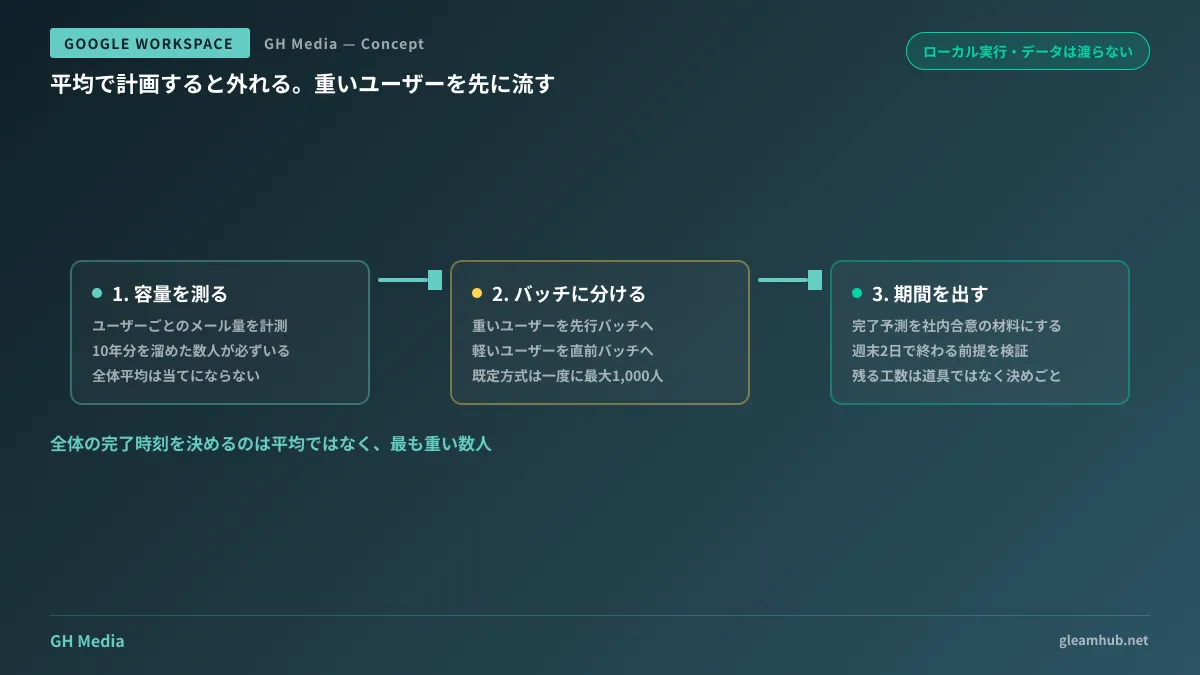
Data Import includes a migration planning utility. It inspects user data volumes, splits them into batches, and estimates required migration times in advance. This utility runs locally, designed so Google cannot see your data until you explicitly choose to start the migration. Because it does not require internal approval to hand data over for estimation purposes, it is easy to run during the initial evaluation phase.
In practice, you run this tool before seeking company-wide approval for the migration. Mailbox capacities are heavily skewed; planning around company-wide averages inevitably fails. A few executives carrying ten years of archived email can dictate the entire project schedule. Pre-batching data allows you to process heavy mailboxes early while handling lighter users right before the transition.
Tool costs disappeared, not labor hours
So far, this covers the areas where costs decreased. However, that initial 3-million-yen estimate does not automatically shrink to a few hundred thousand yen. The core cost of a migration lies not in the tools, but in the organizational decisions.
Once you actively proceed with migration, four specific topics almost invariably stall progress.
First is the design of email addresses and groups. Distribution groups, shared mailboxes, and aliases often multiply over years inside Microsoft 365. Mapping these to Workspace groups and aliases cannot be decided mechanically. While shared mailboxes correspond roughly to Collaborative Inboxes in Workspace, differences in permission granularity prevent direct one-to-one transfers. This requires careful auditing and decision-making.
Second is file storage architecture. Setting aside that OneDrive and SharePoint are not yet supported by Data Import, even if they were, whether department-shared files stored in personal OneDrive accounts should simply be copied to personal My Drives is a separate question. If you adopt shared drives in Workspace, that becomes a architectural redesign rather than a simple migration. Principles for structuring shared drives and permissions are covered in Auditing Share Links and Tightening Permissions.
Third is Outlook rules and folder management. Although Data Import can handle metadata like Outlook rules and calendar settings, whether they function identically in the target environment is a different story. Folder-based organization converts into labels in Workspace. Even if migrating the data is technically possible, humans must verify whether the resulting setup is usable. A realistic approach involves designating one testing lead per department and running a week-long parallel transition period post-migration.
Fourth is external sharing. SharePoint links and Teams guest accounts shared with external business partners will break after migration. Informing partners beforehand shifts work outside your company onto your clients, requiring alignment with sales teams. If you proceed without this alignment, sales reps will face a wave of client complaints about inaccessible files the week after migration completes.
Decision criteria for whether to migrate
If you are still wondering whether you should migrate at all, cost should not be your primary decision axis. First examine functional differences and how well each platform fits your internal workflows. Points of comparison are outlined in Comparing Google Workspace and Microsoft 365.
Beyond that, organizations in the following situations can more readily commit to a migration:
- Operations rely minimally on Excel macros or Microsoft Access
- File sharing already happens primarily in Google Drive or alternative cloud storage
- Teams is used exclusively as a meeting tool, with channel posts not functioning as core operational assets
Conversely, for organizations where years of operational discussions have accumulated in Teams channels and serve as institutional reference records, Teams becomes the primary migration hurdle rather than email. Unless you decide upfront whether to wait for Teams support in Data Import or preserve existing Teams data in a read-only state, discussions will grind to a halt midway through the project.
What to do next
Start by running only the migration planning utility. Because it operates locally without transmitting data, internal approval hurdles are low, yet it delivers the exact figure you need most: how many days your migration will take. Comparing that timeline with the complexity of the four decisions outlined above lets you isolate tooling costs from decision-making labor in your estimates.
If you plan through post-migration license management, deciding upfront how to handle accounts for departed or transferred employees will prevent costly rework. That approach is outlined in Managing Archived Users and Licenses.
If you want guidance on evaluating migration feasibility or designing groups and shared drives, GleamHub offers free consultations for IT and Google Workspace. Because implementation approaches depend on your current usage and external sharing requirements, please reach out for personalized advice via our contact form.
Sources
- Introducing data import: An easier, faster, and higher-fidelity migration to Google Workspace at no additional tool cost — Google Workspace Updates
- About the data import tool — Google Workspace Admin Help
- Use the default data import method for Exchange Online — Google Workspace Admin Help
- What’s imported from Exchange Online? — Google Workspace Admin Help
- Simplify your move to Google Workspace — Google Workspace Blog