You set up a meeting with a business partner in Google Calendar. The meeting is on Teams. You sent the invitation. Even so, five minutes before the start, you get a phone call asking, "Where do I join from?" This is because external attendees cannot tell where the meeting URL is within the description field.
In meetings completed entirely internally, this problem does not occur. For Google Meet events, a join button appears on the calendar. Difficulties arise only in the combination where "the counterparty uses Outlook or Apple Calendar, and the meeting is something other than Google Meet." And in sales meetings at small and medium-sized businesses, this combination is the most frequent.
Why only other companies' web meetings were hard to join
Google Calendar has long given special treatment only to Google Meet meeting details. Meet links enter structured event fields, and clients read them to render join buttons.
Meanwhile, Teams and Zoom URLs are placed in the description field as plain body text in many cases. While humans can read and understand them, from the calendar app's perspective, they are nothing more than "long strings of text written in the event description." Consequently, no join button appears, and external attendees must scroll through the description field searching for the URL.
When invitation forwarding or conversion between email clients is added to this, links can wrap onto new lines or blend into footnote text. The situation where "the URL is written, but nobody can find it" stemmed not from carelessness on the sender's part, but from field design.
What changed starting August 27, 2026
Google announced on August 27, 2026, that Google Calendar now automatically recognizes Microsoft Teams, Zoom, and Cisco Webex meeting URLs. There are two changes.
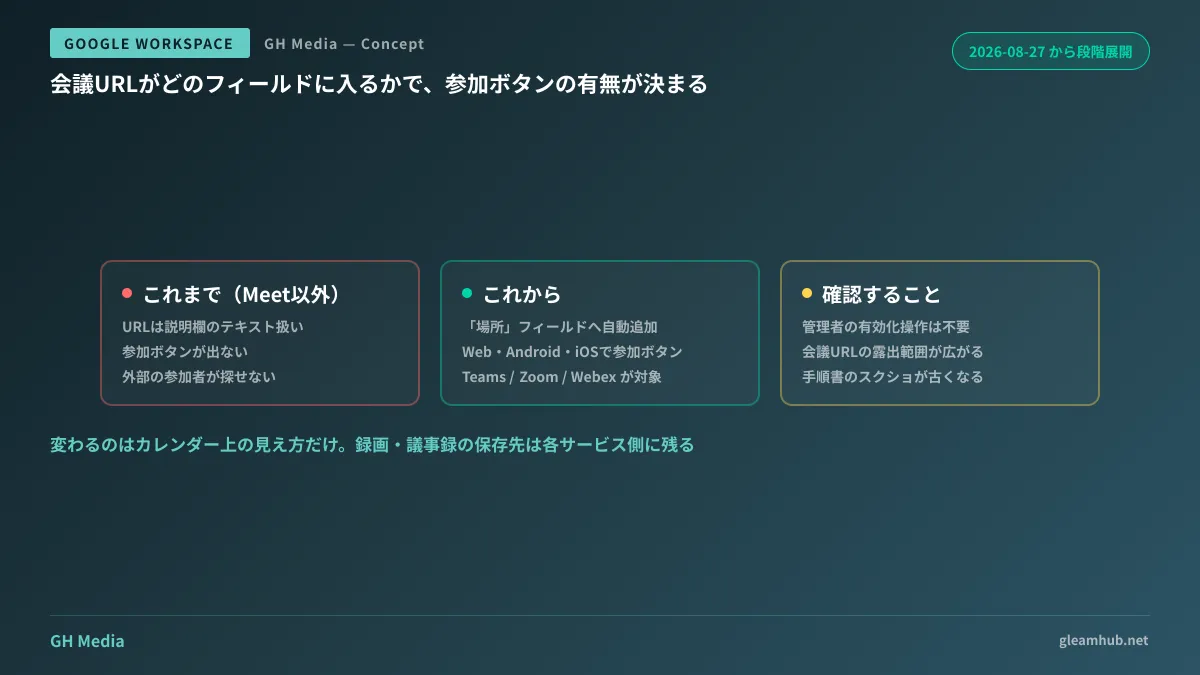
First, when sending invitations to external recipients, third-party video conferencing links are automatically added to the event's "Location" field. Even for recipients who receive invites in non-Google clients such as Outlook or Apple Calendar, the URL appears in a designated place.
Second, a "Join video call" button appears on events within Google Calendar (Web, Android, and iOS versions). Even for non-Meet meetings, your company's employees can join with a single tap from the calendar.
Rollout began on August 27, 2026, progressing gradually over 15 or more days across both Rapid Release and Scheduled Release domains. It targets all Google Workspace users, as well as Workspace Individual users and personal Google account users. Because this is not a setting enabled by administrators, it arrives in a way where "the display changed before anyone realized it."
Only the "entrance" is automated
Misunderstanding this will lead to giving improper guidance internally. What changed this time is how meeting links look on the calendar, not how the meetings themselves are operated.
| What changes | What hasn't changed |
|---|---|
| Automatic addition of URL to Location field | Accounts and licenses for respective services |
| Display of join button on calendar | Storage locations and permissions for recordings and transcripts |
| Link discoverability in external clients | Joining operations from meeting room hardware |
Recordings and meeting minutes remain on Microsoft's side for meetings hosted on Teams, and on Zoom's side for Zoom. Even if you can join from Google Calendar, records do not aggregate into Google Drive. The organization of where meeting records should reside retains the exact points discussed in Storage Locations for Meeting Recordings and Minutes.
The same applies to meeting room hardware. Reserving equipment or the physical room itself and joining another company's service meeting from hardware in that room are separate matters, requiring verification alongside third-party booking settings.
Side effects of entering the "Location" field
There is another point administrators will want to keep in mind. When meeting URLs move to the Location field from the description field, the targets reading that URL expand.
An event's location is a field treated more lightly than the description. It easily becomes a sync target for notifications, mobile widgets, and external integration tools, meaning that exposure increases. If you use meeting URLs containing passcodes for events placed on externally shared calendars, reviewing the visibility scope of those events is well worth doing.
Designing the visibility scope of calendars themselves is organized in Private Event Settings and Delegation. While this change does not introduce new loopholes, if URLs were previously handled under the assumption that "they are virtually invisible because they are buried deep in the description," that premise disappears.
What you can check today
First, verify how your company's events actually appear. Send one Teams or Zoom meeting invite to an external free webmail address, and view the recipient's screen. Because it is mid-rollout, you can tell right away whether it has reached your company's domain.
Next, decide whether to prepare an internal announcement. Changes requiring no activation action will alter displays without prior notice. While it is merely a matter of "a join button was added," in organizations distributing paper guides on how to join meetings, manual screenshots will begin diverging from the actual interface.
From there, consider whether it is time to redefine how far third-party meeting services should be incorporated into your company's operations. The easier the entry point becomes, the more noticeable the issue of fragmented records across vendors becomes.
At GleamHub, we accept consultations regarding calendar and meeting operational design in environments where Google Workspace and third-party tools coexist, as well as organizing recording storage locations, through our free IT and Google Workspace consultations. Because approaches vary depending on the combination of services in use, please consult individually. Reach out via Contact Us.