"Our Calendar interface changed this morning—did you do something?" IT staff receive inquiries like this several times a month without having touched a single setting.
Google Workspace adds features almost every week. There is no administrative approval workflow; once an account falls into a rollout wave, the UI changes automatically. While there is no way to prevent updates entirely, Google provides built-in settings to delay when they arrive. That setting is the release track in the Admin Console.
Many organizations leave this on default for years, but reviewing this single configuration noticeably changes how support inquiries arise.
A look at what rolled out in August 2026
To ground this in reality, here are concrete examples from the past month alone. All of them rolled out without any administrator intervention.
| Timeframe | What has changed | Changes seen by users |
|---|---|---|
| From August 10 | Sheets canvas in Google Sheets | An unfamiliar button appears |
| August 14 | Import support for Excel tables and pivot tables | Import results differ from before |
| August 14 | New admin settings to control Calendar invitation handling | New configuration options appear in the Admin Console |
To end users, every one of these represents an unfamiliar interface. AI-related capabilities like Sheets canvas, in particular, appear on user screens before internal policies have been established. We covered its capabilities in What you can build with Sheets canvas and what carries over during migrations in Moving Excel tables and pivots to Google Sheets. However, if a feature arrives before explanations are prepared, documentation serves only as reactive cleanup.
The difference: A grace period of at least one week
Google Workspace offers two tracks for controlling when new features arrive.
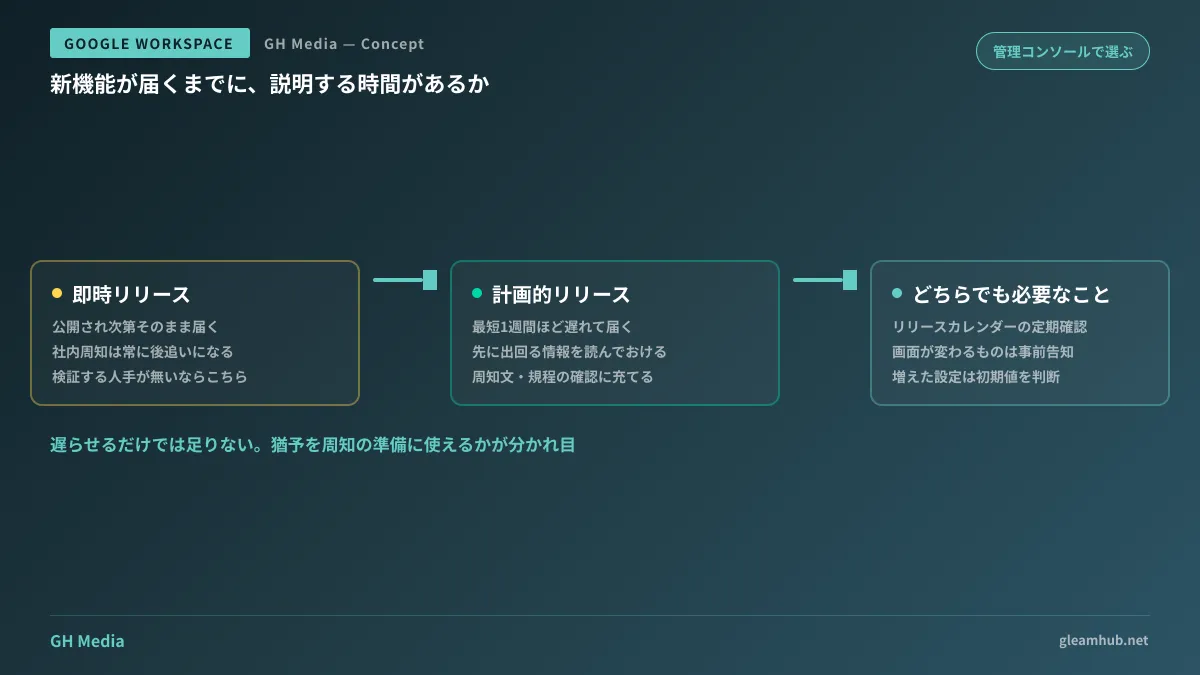
Rapid Release rolls out features as soon as they are launched. While users get early access to the latest capabilities, internal announcements always lag behind.
Scheduled Release delivers features with a delay of at least one week after appearing on Rapid Release domains. Depending on the feature, rollout may take several weeks, while certain changes may arrive simultaneously across both tracks.
This gap may look minor, but it makes a major difference in operations. Because information surfaces first on the Rapid Release track, organizations on Scheduled Release can review upcoming features before they hit internal accounts. Preparing staff announcements, checking compliance policies, anticipating user inquiries—having that one week shifts the IT team from reactive firefighting to proactive preparation.
To configure this, open the Admin Console and navigate to Account > Account settings > Preferences > New features. The change takes just a few clicks. Because the ability to set release tracks by organizational unit varies depending on your subscription tier and current interface state, check your own Admin Console for available options. We cover navigation details in Google Workspace Admin Console fundamentals.
The selection criterion: Who handles explanations
Neither track is inherently superior. The deciding factor is not how exciting the features are, but whether your organization has someone dedicated to explaining changes internally.
If you have dedicated IT staff who can evaluate new features before rolling them out, Scheduled Release is the better fit. It is designed specifically to carve out time for preparation. Conversely, if your team lacks the bandwidth to test features and simply learns by using them, delaying updates will not result in anyone preparing anyway. In that case, staying on Rapid Release and establishing a lightweight routine for communicating rapid changes is more practical.
When deciding, evaluate these three questions:
- Who handles user inquiries? If general affairs staff handle support alongside other duties, a buffer significantly lowers their burden
- Do workflows depend strictly on UI steps? Workflows with rigid manuals and training materials are hit hardest by interface updates
- Do you collaborate externally? If you share drives or calendars with clients, having your UI change ahead of theirs requires explanation
In regulated industries where updating standard operating procedures requires formal approval, this buffer directly dictates operational costs.
Delaying releases alone will not keep communications up to date
Switching to Scheduled Release often brings a false sense of security, but delaying updates without tracking what is coming simply postpones the surprise. To take advantage of the grace period, you must establish an intake channel for updates.
The Admin Console includes a release calendar where you can check scheduled rollouts. Additionally, Google Workspace updates are shared via blogs and RSS feeds. Designating an owner and scheduling monthly time to review them makes the process sustainable. Assuming someone will read them during spare moments almost never works.
After reviewing updates, you do not need to broadcast everything internally. In practice, only two types of changes require action:
- Changes to UI or workflows — Notify users in advance
- New administrative settings — Decide whether default values are acceptable
The second category is especially easy to overlook. New settings frequently arrive enabled with default values. If security-sensitive controls—like August's Calendar invitation policies—are left untouched, months can pass without anyone realizing they could be configured. Remembering that new settings are often more critical to inspect than new user features prevents important gaps.
What to do next
Open your Admin Console today and verify which release track your organization is using. Deliberately choosing to stay on default is entirely different from remaining there unaware, and it directly shapes your response the next time a user inquiry lands.
Next, block out just 15 minutes once a month on the responsible person's calendar to review product updates. This routine delivers far more lasting value than the initial configuration change alone.
For help designing Google Workspace operations or building rollout processes for new features, GleamHub offers free IT and Google Workspace consultations. Because optimal strategies depend on team size and IT structure, please reach out for tailored support. You can reach us anytime via Contact Us.
Sources
- Choose when users get new features — Google Workspace Admin Help
- Review new releases — Google Workspace Admin Help
- What are Rapid Release and Scheduled Release in Google Workspace? — Cloud Concierge
- How to get early access to new Google Workspace features — G-gen Tech Blog
- Google Calendar Adds New Setting for Admins to Control How Invitations Are Added — HelenTech
- Google announces Sheets canvas, enabling mini-app creation in Google Sheets with Gemini — HelenTech