
After a meeting, there is a moment when you freeze while reviewing an automatically generated transcript. Attributed to a speaker's name, a sentence that nobody could have said is wedged into the text. It is natural enough to miss if skimmed, but if retained in the minutes, it becomes an established fact.
Many people interpret this as "AI accuracy is still low." In reality, it is a systemic quirk that occurs with high reproducibility under specific conditions. Since it is a quirk, it can be avoided through operational rules.
Provide Silence, and the Exact Same Sentence Comes Back
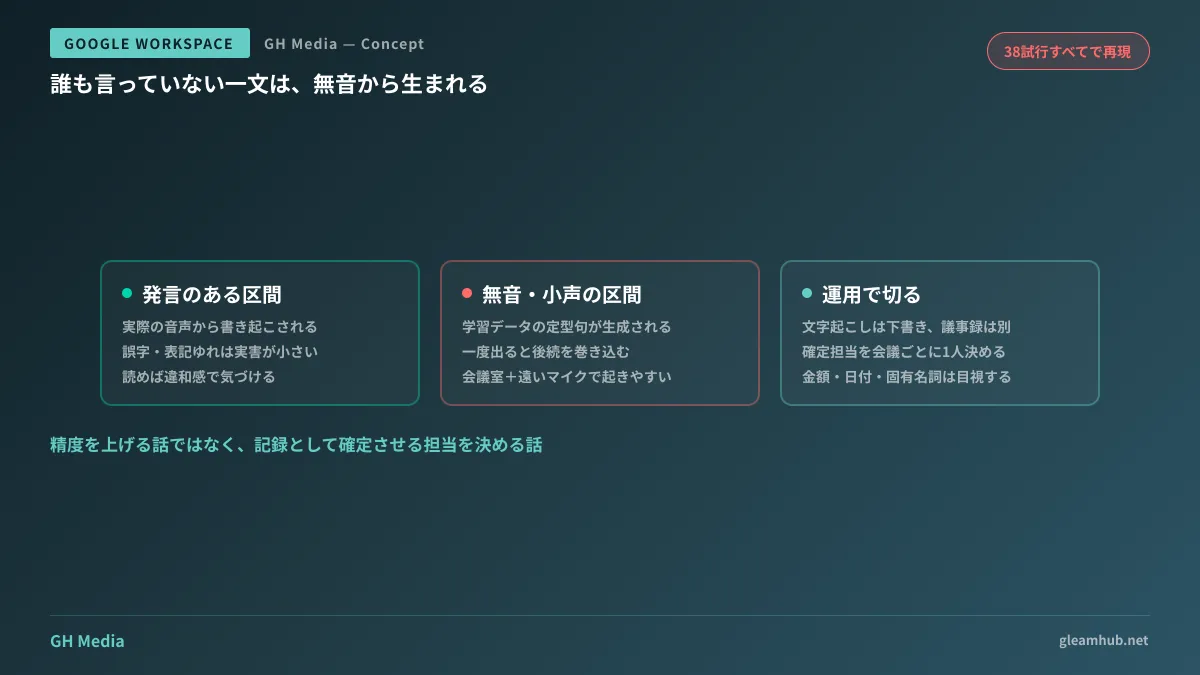
There is an experiment where absolute silence was fed into a speech recognition model. When non-speech input (silence, noise floor, white noise, electrical hum) was fed with Japanese language settings, the exact same sentence—"Thank you for watching"—was returned in all 38 trials. Changing the noise type did not alter the result.
The cause lies in bias within the training data. This class of models is trained on weakly supervised datasets containing large volumes of video subtitles. Japanese video content frequently includes appreciation subtitles during silent segments at the end. As a result, the model learned that the correct answer for silent input is "Thank you for watching."
The trouble is that once a hallucination appears, it loops and drags subsequent output down with it. A sentence born from a period of silence acts as context, corrupting even genuine statements that follow. The error does not stop at a single line.
The conditions that trigger this are notoriously incompatible with business meetings:
- Meetings where speakers are far from the microphone, leaving long intervals of ambient noise alone
- Short audio recordings of about 2 to 3 seconds or near-silent fragments
- Low-bitrate audio uploaded from mobile devices
In other words, the most common scenario—several people gathering in a meeting room, with one person picking up audio through a laptop microphone—matches these triggering conditions best.
Why Higher Accuracy Will Not Solve the Problem
Transcripts in Google Meet and automated notes by Gemini share this exact nature. Google itself states that transcription accuracy in languages other than English does not match that of English, establishing the premise that generated output requires human verification.
What must be understood here is that even if accuracy exceeds 90%, its handling as a business record does not change. Minutes that are 90% accurate are also minutes where you do not know where the 10% errors lie. The impact when a single line concerning amounts, delivery dates, or names of assignees is swapped cannot be expressed by average accuracy figures.
That is why the countermeasure is not "using a better model," but determining in advance how it is positioned as a record. This philosophy mirrors the approach to handling AI meeting minutes tools from a legal risk perspective.
Four Things to Establish Operationally
What proved effective on the ground was documenting the following four points. These are internal company commitments, not technical configurations.
Differentiate at the naming stage: automated transcripts are "drafts," not meeting minutes. Separating file names and Drive folders is the quickest method, creating an environment where only human-verified documents enter the "Meeting Minutes" folder.
Designate one person per meeting responsible for finalizing them. Operations relying on everyone reviewing never function. Simply deciding at the end of the meeting "who finalizes today's notes" drastically cuts down on abandoned drafts.
Always visually inspect amounts, dates, and proper nouns before finalizing. These are the three categories that prove most costly when errors slip in. Conversely, as long as these three are verified, minor phrasing discrepancies cause no real damage.
Change how audio is captured for meetings with extended silence. For formats where participants remain silent for long stretches (working sessions, meetings with waiting time), choosing not to run automated note-taking in the first place is a viable decision. Meet provides settings to restrict the conditions under which automated notes start, making operational management much easier when criteria are set rather than applying it uniformly to all meetings.
Decide Storage Destinations and Access Permissions at the Same Time
Another topic frequently deferred when starting with transcription is storage. Gemini's automated notes presuppose saving to Google Drive. Depending on the partner, company policies may prohibit saving meeting recordings or transcripts to the cloud altogether.
Because it is easy to start using them in internal meetings and then drift into using them in business negotiations, it is safer to decide in advance how to handle meetings with external participants. At the same time, checking administrator settings on whether to include screen captures in automated notes during the same review avoids duplicating effort later.
What to do next
Select one automated transcript from a meeting with five or more participants from the past month and read through it. Look not for typos, but for "a sentence nobody said." Whether you find one will tell you how closely your company's meeting environment matches the conditions.
If you find one, trace where that meeting's minutes are stored within the company and who can read them. Until that is determined, discussing accuracy serves no purpose.
GleamHub offers guidance on designing operational rules for meeting records, Google Meet and Gemini administrator configurations, and organizing storage locations and access permissions through our free IT and Google Workspace consultations. Feasible measures vary depending on your current operations, so please contact us individually via our inquiry form.
Sources
- Investigating why transcribing silence produces "Thank you for watching" — Zenn
- Bug: Japanese phrases hallucinated during silence (Whisper hallucination) — GitHub Issue
- How we completely resolved whisper-1's hallucination nightmare using gpt-4o-transcribe — Zenn
- Testing Google Meet transcription accuracy using Gemini Live — SoftBank Cloud Technology Blog
- How to automatically generate Google Meet minutes — ailead Blog




