"We hold online meetings with our overseas suppliers several times a quarter, but every time, scheduling is a headache because we either have to hire an interpreter or tie down our one English-speaking employee." We received this consultation from a wholesale company with around thirty employees. They had tried opening translation tools in a browser to type things out manually, but it couldn't keep pace with natural conversation, leaving them to scrape by with broken English and hand gestures.
Google stepped into this common challenge of skyrocketing meeting costs due to language barriers with a speech translation model called Gemini 3.5 Live Translate. While someone is speaking, it generates translated audio with just a few seconds of delay, striving to preserve the speaker's cadence, pauses, and voice tone. However, jumping to the conclusion that "interpreters are no longer needed" based solely on news headlines will lead to stumbling blocks during adoption. That is because what Japanese-speaking companies can actually use in Google Meet right now is, in most cases, still "translated captions" rather than "speech translation." In this article, we clarify what is usable and what is still on hold, breaking down where you can realistically cut back on interpreters.
Treat "speech translation" and "translated captions" as different tools
The starting point is to avoid confusing these two features. While their names sound similar, their supported languages and eligible licenses differ.
| Features | Description | Japanese Status as of Mid-2026 | Primary Use Cases |
|---|---|---|---|
| Real-time speech translation | Reads out spoken content using translated audio | Not yet included in generally available supported languages | Business negotiations and interviews between English and major European languages |
| Translated captions (caption translation) | Displays spoken statements as captions in another language | Broad language support, ready for practical work | Understanding discussions and preventing missed points |
According to reporting by TechCrunch and Slator's summary, the general availability rollout of speech translation in Google Meet initially covers bidirectional translation between English and Spanish, French, German, Portuguese, and Italian. While the model claims support for over 70 languages, Japanese speech translation is still in the pipeline as a generally available feature in Meet.
On the other hand, the feature that translates and displays captions in another language has long supported a wide range of languages. A setup where Japanese speakers follow English speakers via Japanese subtitles can be practically used today. If your goal is simply to eliminate the struggle of not understanding what is being said in overseas meetings, translated captions provide substantial results right away.
Who can use it: Licenses and host requirements
Next, you must verify that this translation functionality is a paid, premium feature. It is not automatically available to everyone.
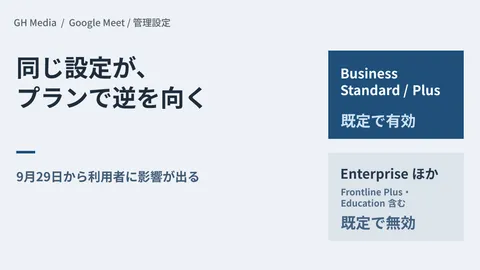
According to Google's guidance, Meet Live Translation is available to Google AI Pro / Ultra subscribers, users on Google Workspace Business Standard / Plus, Enterprise Standard / Plus, Frontline Plus, or those with Gemini business add-ons. What makes this practical is that not every participant needs an eligible license; as long as a single host (usually the meeting organizer) holds an eligible subscription, the feature can be used across the entire meeting.
This means SMBs do not face a decision to upgrade all employees to higher-tier plans; you can start small by upgrading only the staff members who host overseas meetings or designated meeting room accounts. To check which plan your company currently uses, review the contract details in your Admin Console, using the plan structures discussed in Basic Settings for Google Workspace Deployment as a reference point.
What administrators need to do and communicate to the team
Before rolling out the feature, deciding two things on the administrative side and one on the operational side will prevent confusion.
- Enable the feature in the Admin Console. As with other Gemini-related features, it can be toggled on or off by organizational unit (OU). Rather than rolling it out company-wide all at once, it is safer to distribute it first only to departments handling overseas projects. You can apply the exact same principles found in Basic Admin Console Operations to control deployment by OU.
- Confirm in advance which language pairs will actually be used. As mentioned earlier, since Japanese speech translation is still coming, establish which feature to use based on meeting counterparts—such as using translated captions for meetings with English speakers and testing speech translation for meetings within European language zones.
- Instruct participants to speak under the assumption of a few seconds' translation delay. Because there is a slight pause before the AI finishes translating, avoiding rushed overlapping speech and pausing between points improves both translation accuracy and the overall meeting experience.
Meetings where interpreters can be reduced vs. meetings where they cannot
Finally, here is the most commonly misunderstood boundary. AI translation excels in meetings focused on understanding information, but is ill-suited for meetings where the precise weight of words decides the outcome.
Where you can cut back are situations where slight translation nuances are not fatal, such as regular progress updates, specification alignments, or casual internal chats with multinational team members. Here, interpreter scheduling costs and hours can be reduced directly. On the other hand, in settings where the interpretation of a single word directly impacts financial liability or legal accountability—such as final contract agreements, complaint handling, or legal negotiations—AI translation should be kept strictly as a supplementary aid, with key points handled by human interpreters or confirmed in writing. Determining who bears responsibility when translation delays or misunderstandings occur is a shared concern whenever integrating AI into business, matching the principles discussed in Establishing AI Usage Rules for SMBs regarding where it is acceptable to rely on AI.
What to verify before implementation
For companies that have had to arrange an interpreter for every overseas meeting, Meet's translation features offer clear cost reductions. However, assuming that Japanese speech translation is fully functional will lead to disappointment. Keep in mind the current reality: translated captions work effectively today, while speech translation starts with English and European languages. From there, begin by checking the organizer account's plan and supported languages.
If you are unsure which translation features are available under your current plan, want to roll them out securely only to departments handling international business, or need help categorizing which meetings still require human interpreters, feel free to contact GleamHub for a Free IT & Google Workspace Consultation. We will assist you from plan architecture and Admin Console configuration to end-user guidance, tailored to your actual meeting requirements.