Returning to your desk after a quarterly evaluation interview, you notice a new meeting notes document in the shared drive. Opening it, you find a summary of the discussion. To make matters worse, sensitive details regarding a subordinate's compensation are clearly spelled out.
Automated note-taking features do not review meeting content to judge whether it is safe to record. All-hands meetings, candidate interviews, and resignation discussions undergo the exact same processing. Because both convenience and risk emerge from the same mechanism, framing the decision as a binary choice between using it or not usually leads to "shut it all down out of fear," ending the discussion right there.
In August 2026, a third option was added to Google Meet's auto-notes feature, introducing the concept of filtering by attendee headcount.
Two-person meetings are precisely where notes should not remain
Thinking back to situations where you would want to disable automated notes, most involve small groups.
Manager-subordinate 1-on-1s, performance feedback, resignation discussions, initial job interviews, and contract negotiations. All of these involve two or three attendees, and their content falls into the narrowest sharing boundaries within an organization. Conversely, for ten-person regular meetings or project kickoffs, having recorded notes is far more helpful than not.
In other words, the issue is not "that auto-notes runs," but "that it runs identically even in meetings with few participants." Previous settings only offered an on/off toggle across the entire organization or per organizational unit, making this distinction impossible. Turning it on recorded sensitive interviews, while turning it off reverted weekly meeting notes to manual labor. Both options left users dissatisfied.
Regarding storage locations and sharing scopes for the notes themselves, as mentioned in Projected Slides Remaining as Images in Meet Notes, generated documents are saved to the host's Google Drive and follow its sharing permissions. Unless generation itself is halted, managing sharing scopes is the only remaining safeguard.
Three selectable states now available
Under Google Meet settings in the Admin console, three behaviors for auto-notes are now displayed:
- Automatically create for all meetings
- Automatically create only for meetings with 3 or more guests (newly added option)
- Do not create automatically (does not prevent starting manually during a meeting)
The middle option is the new addition. This setting was announced for rollout across both Rapid Release and Scheduled Release domains, with completion expected by August 3, 2026. If opening your Admin console reveals all three options, the update has already reached your domain.
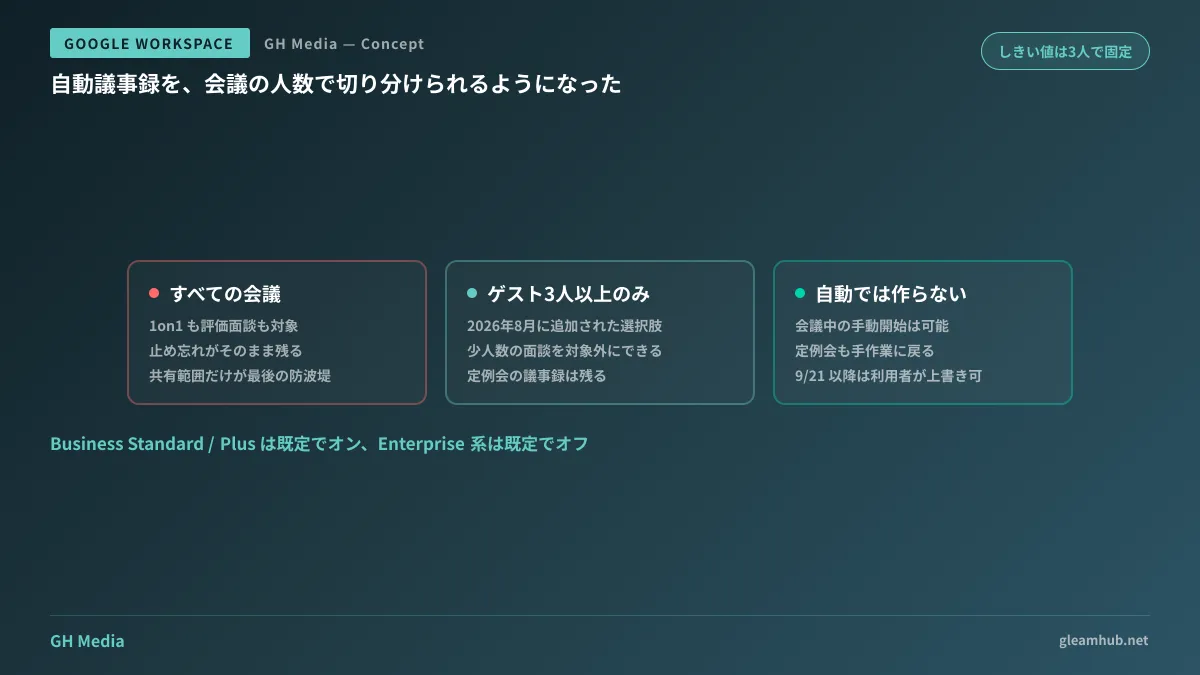
The headcount threshold itself cannot be modified. The "3 or more" boundary is fixed and cannot be adjusted to fit company-specific requirements, a factor that must be factored in when designing operational workflows.
Default values invert depending on your plan
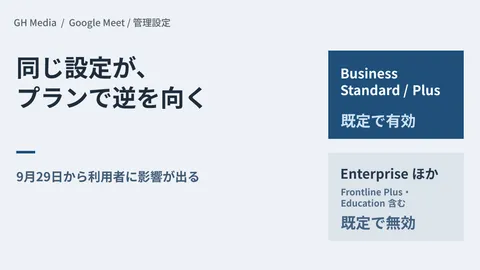
This is the most easily overlooked aspect: the default value for this setting flips depending on your subscription edition.
| Edition | Auto-notes default value |
|---|---|
| Business Standard / Business Plus | Enabled for meetings with 3+ participants (On) |
| Enterprise Standard / Enterprise Plus / Frontline Plus | Disabled (Off) |
For Business Standard and Business Plus, commonly chosen by small and medium-sized enterprises, the setting defaults to enabled if the administrator takes no action. Conversely, Enterprise editions start disabled. Because identical features have opposing initial states, copying policies directly from other companies can yield unintended outcomes.
The assumption that "we haven't touched any settings, so it shouldn't be running" does not hold true on Business Standard. An unreviewed configuration is not off—it is on.
Users will be able to change settings themselves starting September 21
There is another date-sensitive change to keep track of.
An option for "all meetings I host with 3 or more guests" is scheduled to roll out gradually to user-side Meet settings starting September 21, 2026. Once available, users will be able to override administrator defaults for their own meetings.
In sequence, administrators are given a window to define defaults first, after which discretion expands to users. Organizations using Business Standard and Business Plus are explicitly advised to review their defaults before this date. Approaching September 21 with defaults untouched means individual user configurations will accumulate without a clear company-wide policy.
If your organization does not have a clear view of which accounts hold which licenses, reviewing subscription statuses using the steps in Archived Users and License Auditing will provide the necessary foundation for this decision.
When you need to separate by meeting nature rather than headcount
While the "3 or more" line is convenient, it does not fully align with organizational risk. A three-person disciplinary interview should not be recorded, whereas notes from a two-person technical sync are valuable to preserve.
Because the headcount threshold cannot be changed, operational rules must bridge the gap. In practice, establishing rules in the following order prevents breakdowns:
- Explicitly list meeting types where notes must never remain (performance reviews, hiring interviews, exit interviews, labor consultations, disciplinary meetings, etc.)
- Establish a procedure where the meeting organizer manually disables auto-notes during these sessions
- Set default sharing permissions on generated documents strictly to the organizer to mitigate missed manual disablements
- If organizational units exist, customize defaults per unit, such as disabling auto-notes exclusively for the HR department
The third point serves as a practical safety net. Operate on the premise that people will inevitably forget to disable it, ensuring that unstopped notes remain hidden from view. Preventing generation and containing distribution are distinct safeguards, and the latter depends far less on human vigilance.
Note that this setting has zero effect if external AI note-taking tools that do not appear in the participant list are present. Auditing those tools requires the procedures covered in Auditing AI Meeting Notetakers.
What to do next
Open your Admin console and check the current state of Google Meet's auto-notes setting. Three options will appear with one selected; if no one recalls selecting that value, it is the default. On Business Standard and Business Plus, that default is "Enabled."
From there, reflect on any two-person meetings held internally over the past month, and consider whether having written summaries of those discussions stored in Drive would cause issues. If even a single meeting poses a concern, you have decisions to finalize before September 21.
GleamHub provides guidance on designing meeting record defaults, configuring organizational unit policies, and establishing workflows to exclude HR meetings through our free IT and Google Workspace consultations. Available approaches vary based on your subscribed edition and organizational structure, so please reach out individually. Get in touch via Contact Us.