Working hours in Google Calendar is a setting that tells people sending a meeting invitation when the time is outside the invitee's working hours, and that serves as a guide when looking for free time. However, the place Google's Help points to for this setting is the user's own computer screen. The calendar resource in the Calendar API also had no working hours field until now. So even when a new hire's hours were left unset, or old hours remained after a switch to reduced hours, there was no way to fix them through this resource.
The November 3, 2026 Calendar API release notes announced that workingHours, a new field on the calendar resource (Calendar), is Generally Available. Based on what we confirmed in the release notes, reference, API definition (Discovery document), and Help on November 6, 2026, this article covers how to write the request and points to watch when integrating with HR data.
What the release notes and reference say
The November 3, 2026 entry in the release notes says that, for the primary calendars of Google Workspace users, you can read and update working hours through workingHours, a new property of the Calendars resource. The release stage is "Generally Available."
The Calendars reference (last updated November 3, 2026) also lists this field, and it matches the description in the Discovery document (revision 20261102) retrieved on November 6, 2026. In the history of definitions auto-generated by Google's official client (google-api-go-client), a commit on November 5, 2026 raised the revision from 20260925 to 20261030, and workingHours was added at that point.
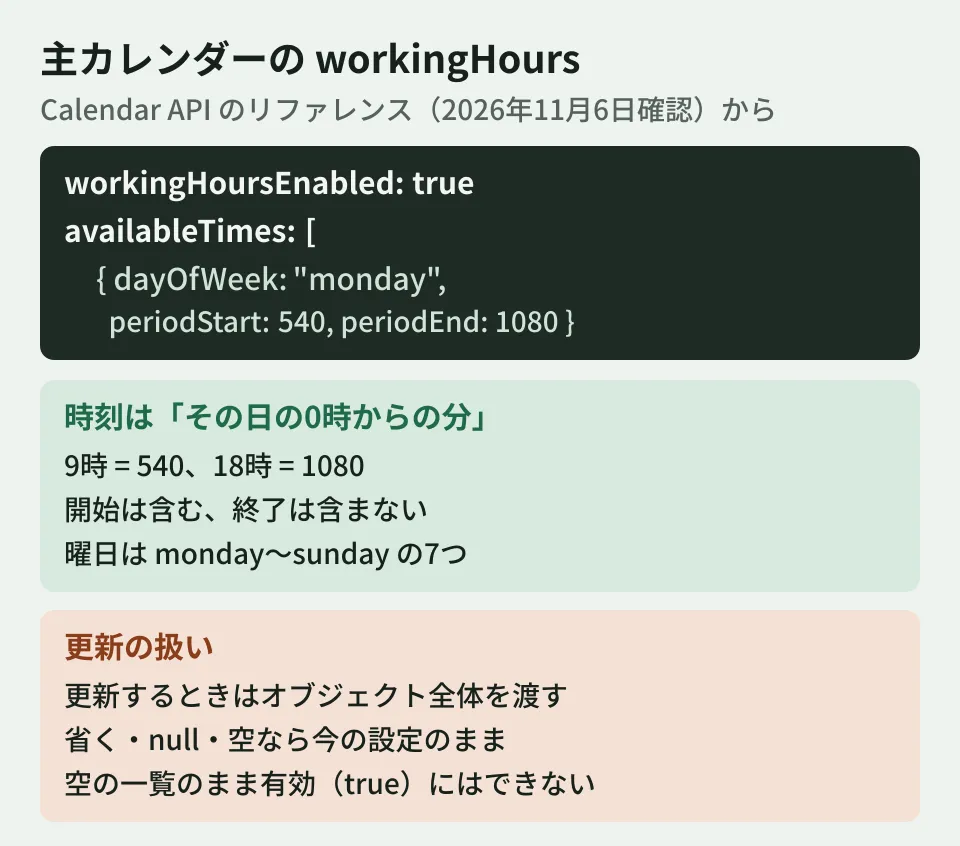
The reference's description can be summarized as follows.
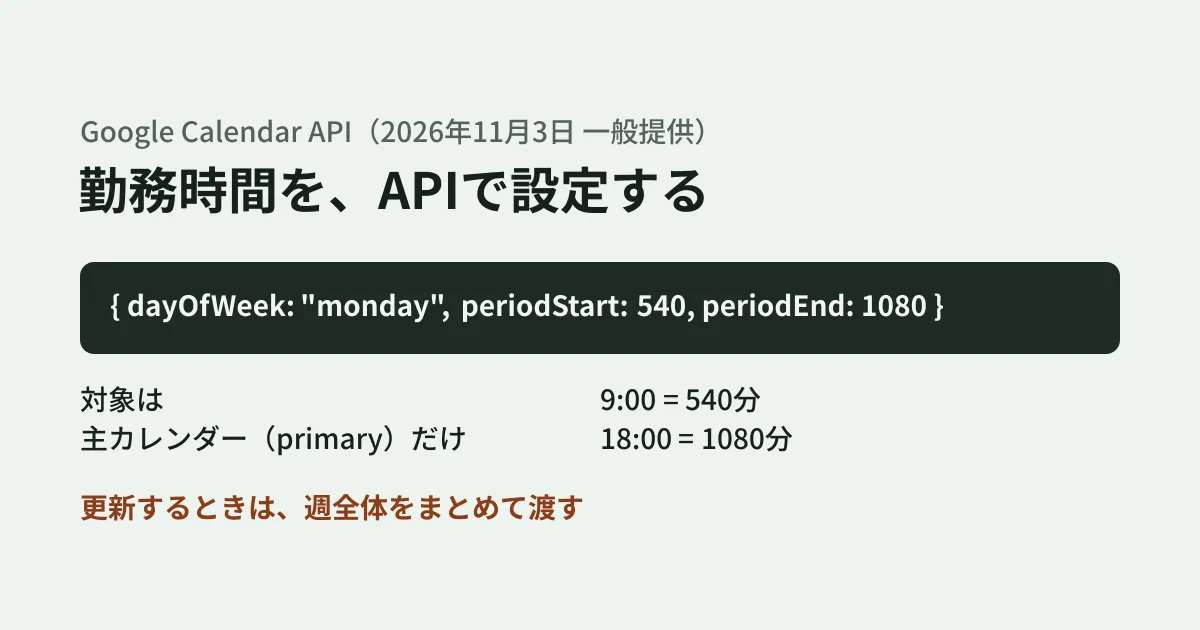
- Primary calendars only. Available only on the primary calendar (primary) of Google Workspace users
- It contains two things. Whether working hours are enabled (
workingHoursEnabled) and a list of time ranges for each day of the week (availableTimes) - Time ranges are "minutes from midnight that day."
periodStartis inclusive andperiodEndis exclusive. 9:00 is 540 and 18:00 is 1080 - Days of the week are lowercase English. The seven values from
mondaytosunday - Updates send the whole value. Partial updates that send only some days of the week are not possible
How to write it: convert days and times into "minutes" and send them
Convert working hours from HR data, such as "weekdays 9:00 to 18:00," into the API's format and send them with a primary calendar update (calendars.patch). The following code is an example using the standard fetch in Node.js 22.
const DAYS = ['monday', 'tuesday', 'wednesday', 'thursday', 'friday', 'saturday', 'sunday'];
const toMinutes = (hhmm) => {
  const [h, m] = hhmm.split(':').map(Number);
  return h * 60 + m;
};

// 例: { monday: [['09:00', '18:00']], ... } を workingHours に変換する
export function buildWorkingHours(schedule) {
  const availableTimes = [];
  for (const [day, blocks] of Object.entries(schedule)) {
    if (!DAYS.includes(day)) throw new Error(`unknown day: ${day}`);
    for (const [start, end] of blocks) {
      const periodStart = toMinutes(start);
      const periodEnd = toMinutes(end); // 終了は「含まない」
      if (periodEnd <= periodStart) throw new Error(`${day} ${start}-${end}`);
      availableTimes.push({ dayOfWeek: day, periodStart, periodEnd });
    }
  }
  // 空のまま有効にはできない(API の定義)
  return { workingHoursEnabled: availableTimes.length > 0, availableTimes };
}

export async function setWorkingHours(accessToken, workingHours) {
  // 主カレンダー(primary)だけが対象。オブジェクト全体を渡す
  const res = await fetch('https://www.googleapis.com/calendar/v3/calendars/primary', {
    method: 'PATCH',
    headers: { Authorization: `Bearer ${accessToken}`, 'Content-Type': 'application/json' },
    body: JSON.stringify({ workingHours }),
  });
  if (!res.ok) throw new Error(`${res.status} ${await res.text()}`);
  return (await res.json()).workingHours;
}
On November 6, 2026, we ran this code on Node.js 22.23.4 (macOS) and checked the body produced by buildWorkingHours against the definitions in the Discovery document (revision 20261102). The field names, day values, and integer types match. Because we have no credentials, we have not confirmed updates on an actual account or the display on the calendar screen.
The calendars.patch reference also says that a patch call uses 3 quota units per call, and so recommends using update after get. If you are pushing changes to many employees in bulk, take this into account in your design as well.
According to Help, the settings screen lets you add multiple time ranges per day. However, the API reference does not explicitly state that multiple time ranges per day (for example, split by a lunch break) can be sent. availableTimes is a list, so you can write it in that form, but confirm with a test account whether it is accepted before using it.
What happens with updates that "send the whole value"
The reference describes in detail how updates are handled. When building an integration, check this first.
- What you send replaces what is there. The
calendars.patchreference says that specifying an array overwrites the existing array and that the previous elements are discarded. If you send only Wednesday's entry intending to "shorten only Wednesday," it appears the time ranges for the other days will be removed. Always build the full week before sending - If you do not send it, nothing changes. If you omit
workingHoursor send null or an empty object, the current working hours stay as they are. It appears that existing processes that update only a calendar's name or description will not erase working hours - To turn it off, set
workingHoursEnabledto false. To remove working hours, omitavailableTimesor send an empty list, and setworkingHoursEnabledto false - It cannot be enabled with an empty list. The reference says that
workingHoursEnabledcannot be set to true whenavailableTimesis empty
The code above sets workingHoursEnabled to false when there are no time ranges in order to satisfy the fourth constraint.
What to decide when integrating with HR data (editorial team's suggestion)
From here on are the editorial team's suggestions, based on characteristics that can be read from the official materials.
Decide whether it is acceptable to overwrite working hours set by the employee. Sending the whole value through the API replaces anything the employee adjusted on screen. Decide in advance whether HR data is the source of truth, or whether you will enter default values only for people who have not set their hours. In the latter case, you can build it to read the current workingHours with calendars.get and write only when it is disabled or empty.
For temporary reduced hours, update at both the start and the end. According to Help, working hours can be set only as a weekly repeating pattern, and a temporary change is handled by editing the normal working hours and restoring them when it ends. The API field is also organized by day of the week, so include both the day hours are shortened and the day they are restored in the integration process.
Confirm which time zone the times are interpreted in. The reference says only "minutes from midnight that day" and does not state which time zone's midnight. Help says that with business travel, work location settings, or time zone changes, working hours are automatically adjusted to the local time of the work location. The calendar's own time zone (timeZone) is thought to be the basis, but companies with employees at overseas sites should confirm the display with a test account before rolling this out. We also covered time zone display in our article on the third time zone.
Decide whose authority to write under. According to the reference, the scopes available for calendars.patch are the three calendar, calendar.calendars, and calendar.app.created. The official description of calendar.app.created is creating secondary calendars and working with their events, so writing to an employee's primary calendar likely requires one of the first two. The description of calendar.calendars is viewing and changing calendar properties and creating secondary calendars, which is narrower in range than calendar. To set hours for all employees at once, one candidate is a configuration that writes as each employee through service account domain-wide delegation, but this means granting a powerful scope across the whole organization, so design it with the target departments and scopes narrowed down. APIs operated with administrator privileges, such as transferring calendar ownership, are covered in our article on transferring secondary calendars.
Treat work location settings separately. In the Calendar API, work locations such as the office or home are handled as a type of event, which is a separate mechanism from this workingHours. Avoid confusing the two when deciding the scope of the integration.
What we checked and what is still unknown
On November 6, 2026, we reviewed the Calendar API release notes (the November 3, 2026 entry), the
Calendarsandcalendars.patchreferences, the page describing scopes, the Discovery document (revision 20261102), a commit in the googleapis/google-api-go-client repository (4b9955f, November 5, 2026), and Google Calendar Help (document research). For the code example, we only compared the body it produces with the fields and types in the definitions. We have not confirmed updates on an actual account or the on-screen display. We also could not confirm from the official materials the list of eligible editions, whether multiple time ranges can be sent per day, or the time zone used as the basis for the times. Help says the setting may not appear unless an administrator has turned on working hours, but whether the API can write in such organizations is also unconfirmed. Before use, please verify with a test account.
GleamHub's free IT and Google Workspace consultation can help with systems that connect onboarding and transfer procedures to Google Workspace settings. The setup depends on how you hold HR data and the range of permissions, so please contact us for a consultation.
References
- Google Calendar API release notes
- Google Calendar API reference — Calendars
- Google Calendar API reference — Calendars: patch
- Choose Google Calendar API scopes
- Manage focus time, out of office, and working location events
- Google Calendar Help — Set your working hours
- Google Calendar API Discovery document(calendar v3)
- googleapis/google-api-go-client — calendar/v3/calendar-api.json