An employee back from an outside meeting puts the meeting audio recorded on their smartphone straight into a notebook and asks it for the key points. For the employee, the chore of writing minutes has simply disappeared. From the administrator's side, recordings of conversations with customers have started to accumulate in a place that meeting-app controls do not reach.
A recording feature and real-time voice conversations are gradually being added to the Gemini Notebook mobile app. According to Google, a gradual rollout on Android and iOS began on September 15, 2026, and it may take 15 days or more for the features to appear. They are available to all Google Workspace customers and to personal Google accounts. Even organizations that do not have them yet have things to decide internally before touching any settings.
What piles up is not "meeting minutes" but material the AI cites
There are two main additions. One is a feature for talking by voice based on the materials added to a notebook: users aged 18 and over can use it in nearly 100 languages and can interrupt an explanation to ask questions. The other is the recording feature: what you record on the spot stays in the notebook alongside the sources, and you can cite it later in chat.
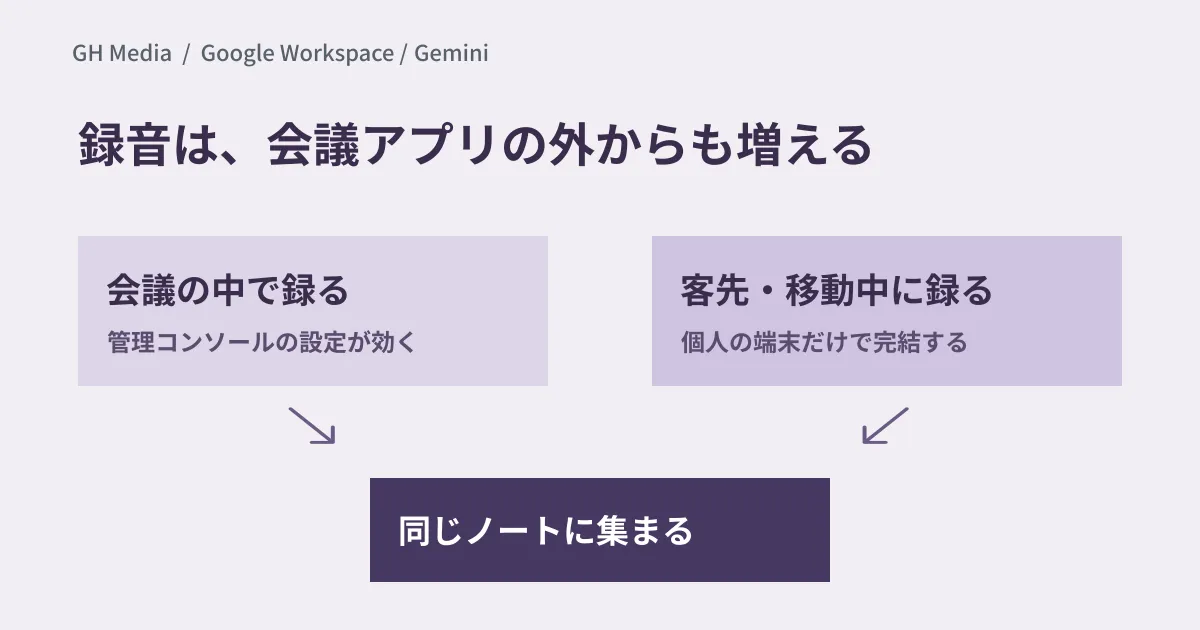
The distinction to keep in mind is that this is a separate entry point from Google Meet recordings or automatic meeting notes. What happens in Meet happens inside a meeting, so Admin console settings correspond to the meeting records. These recordings, by contrast, can be made entirely on an individual's device outside the meeting room, for example in a client's reception room or in a car on the move. Even if you have internal rules on recording meetings, if their wording covers only "Meet recordings", this route slips straight past them.
Three things to decide first
If you wait until the feature arrives to think about it, you will be sorting things out after audio has already piled up in notebooks. It is quicker to settle the following three points first.
| Decision Item | What to check specifically |
|---|---|
| When recording is allowed | Whether this includes sales meetings with customers, job interviews and performance reviews. Who decides how to inform the other party |
| Where recordings are kept | The sharing scope of notebooks containing recordings. Whether any are still shareable outside the company |
| Records visible afterward | Which actions can be checked in the Admin console audit logs |
The first point in particular is a business rule, not an admin setting. Recording itself was presumably always possible on each person's device, but once the recorded audio is expected to be summarized, searched and cited by AI, the other party may see it differently. Even just standardizing, within the sales department, the one line used to let the other party know will reduce disputes later.
As for sharing scope, external sharing in Gemini Notebook is now divided into four levels of granular control that can be set at the domain, organizational unit or group level. External sharing is off by default, but if you have opened it for some departments or groups, review the scope using the four levels of external sharing before recordings start coming in. Checking the records is covered in audit logs for Gemini Notebook.
Decide the scope before looking for a setting to turn it off
Requests such as "we only want to ban recording" will probably come up too. However, the only admin control described in Google's announcement is that users in groups or organizational units with Gemini Notebook turned on can use these features. It does not mention any setting that turns off recording alone, and it says there are no user-side settings either. If you build your operations on the assumption that a dedicated setting exists, you will be back to having nothing decided when things turn out differently.
The realistic approach is to limit who can use Gemini Notebook at all by organizational unit or group, and to expand access step by step, starting with departments that handle less sensitive information. If you are also sorting out how far voice can be used to operate business apps, see what administrators should decide first when using Gemini by voice.
Start trials in less sensitive departments
The best first candidates are departments that run internal study sessions or maintain manuals. If what gets recorded is internal explanations, consent is less of an issue, and you can evaluate just the accuracy of the summaries and the usability.
Starting with recordings of internal explanations also tells you, within the same period, whether the summaries are accurate enough to actually use. If they are not, you can decide to hold off before moving on to the consent discussion.
Then, after about two weeks of use, list "which notebooks received audio" and "who those notebooks are shared with". If this turns up unexpected sharing, you can conclude that reviewing the sharing settings must come before expanding to sales or HR.
We rechecked the content of Google's official announcements (Google Workspace Updates and the official Google blog) through web searches on September 24, 2026. We have not verified hands-on the Admin console settings screens, whether a setting exists that controls only the recording feature, or how recording-related actions are recorded in audit logs. This article organizes the items to decide internally before the features reach everyone.
For Google Workspace admin settings or the scope of generative AI use, please consult GleamHub.