"Can we create a single chat containing five people: two representatives from our client, plus our sales lead, our designer, and myself?" We frequently hear this request from organizations managing project coordination through Google Chat. Until recently, the answer was frustrating. You could message external contacts one-on-one via direct message, or create a Space (formerly Room) and invite them. What was missing was the middle ground: pulling several people together casually, just like adding CCs to an email.
The July 2026 update bridged this gap. Google Chat group conversations (direct messages among three or more people) now allow external users. While end users have eagerly awaited this functionality, administrators must recognize that it adds a new channel where external conversations can multiply without administrative approval. Here is what administrators must establish before enabling access.
What Changed with External Group Conversations in Google Chat
Previously, there were only two ways to communicate with external parties in Google Chat: 1-on-1 direct messages or inviting them to an external-enabled Space. The former could not accommodate additional members, while the latter carried the friction of creating a dedicated Space along with the mental hurdle of choosing a name and defining its purpose. In practice, teams frequently defaulted back to email whenever three or more people needed to collaborate externally.
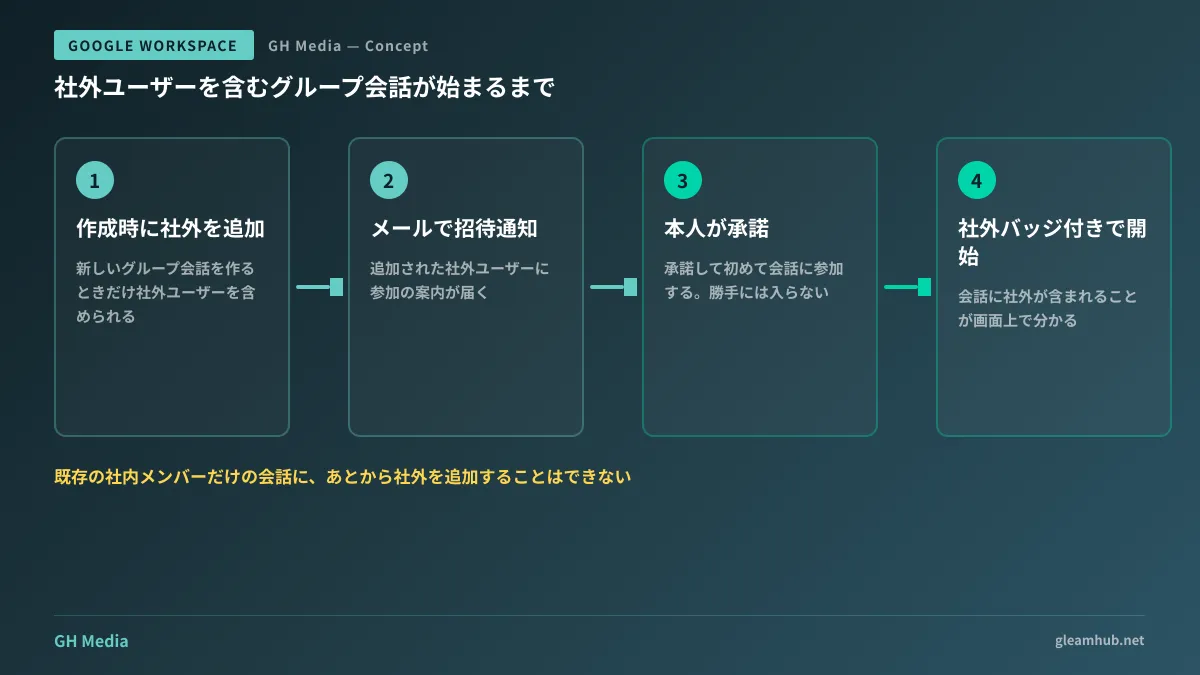
The update introduces group conversations to bridge that divide. When initiating a new group direct message, external participants can now be included. Invited external users receive an email notification, and can join the conversation only after actively accepting the invite. External contacts cannot be added without their consent (Google Workspace Updates).
On the other hand, what has not changed is even more critical for day-to-day operations: you cannot add external participants to an existing internal-only group conversation after it has started. If external members need to participate, the conversation must be created with external access from the very beginning. Because you cannot bring a client in midway through an internal chat, teams must build the habit of deciding whether a thread requires external members at kickoff; otherwise, they will face the friction of starting over from scratch.
Conversations that include external members display an external badge in the Chat UI. Having a visual design that makes it immediately clear to anyone that "this conversation is open to external parties" is a welcome feature for operational governance.
The Single External Setting Administrators Need to Verify
This feature does not introduce a brand-new configuration setting. External group direct messages follow the exact same administrative policy as external Spaces. If the setting corresponding to "External spaces and group direct messages" is enabled under Google Chat settings in the admin console, the feature is active; if disabled, it cannot be used.
Conversely, in organizations where external Spaces were already permitted, external group conversations have become available without requiring any action from administrators. This is the most crucial takeaway: if your organization previously decided to allow external Spaces, that decision has automatically expanded to allow staff to initiate external group chats freely. It is worth reevaluating whether that past decision remains appropriate today.
Conversely, for organizations with policies mandating email for all external communication, disabling external Spaces ensures this new feature remains blocked as well. No settings need to be modified; administrators simply need to explain to inquiring staff that this restriction is deliberate.
Start by checking your organization's current external settings in Google Chat. Adding external Chat access as an audit item in your Google Workspace Security Configuration Checklist will ensure it is reviewed consistently going forward.
Clearly Define When to Use Guest Accounts Versus Group Chats
Google Workspace offers multiple ways to involve external collaborators: these new group conversations, external Spaces, and guest accounts where external partners are provisioned dedicated Google accounts. Establishing concise guidance on when to use each option prevents team confusion and stabilizes operations.
| Approach | Best-Suited Scenarios | Persistent assets |
|---|---|---|
| External group conversation | Short-term coordination and progress updates among a few people | Chat logs only |
| External Space | Ongoing collaboration organized by project or client engagement | Dedicated repository preserving conversations, files, and tasks |
| Guest account | External collaborators requiring continuous access to Google Drive assets | Permission-managed shared drive assets |
The decision criteria are straightforward: "Will anyone need to reference this conversation after it concludes?" If the thread needs to be referenced later, it belongs in a persistent Space or shared drive. If it is simply temporary operational coordination that requires no long-term record, a group conversation is sufficient. Setting this single rule prevents threads and files from being lost.
If your internal communications are currently fragmented across LINE, email, and Slack, focus on internal channel consolidation before tackling external policies. We cover this sequence in our article on deciding whether to consolidate internal communication on Google Chat.
Establish Exit Protocols Before Opening Access to Teams
The more convenient a tool is, the more teams neglect its offboarding lifecycle. The greatest vulnerability with external chats is conversations remaining active long after an engagement ends. Even when staff are reassigned or client relationships conclude, threads linger in chat lists. Accidents where an employee accidentally messages an external client by dredging up an old conversation six months later stem from this exact neglect.
The solution is straightforward: add a single check item to your project wrap-up checklist: "Leave conversations containing external members." Additionally, some organizations restrict the permission to create external chats to project leads rather than all sales and production staff. Because policies can be applied by Organizational Unit (OU), you can easily permit external group creation only for client-facing departments.
It is equally vital to establish explicit rules prohibiting confidential information in chats with external members. While external badges indicate non-company participants, individuals overlook badges when rushing. Concrete guardrails—such as "never post cost breakdowns or pricing rationales in Chat"—are far more effective in practice.
A 30-Minute Checklist Before Launch
This feature is already active in organizations that have permitted external Spaces, without requiring admin setup. Therefore, before employees discover and adopt it organically, take a pragmatic approach: check your Chat external settings in the admin console, and establish just two rules—who is authorized to create external conversations, and mandatory exit upon project completion. This review takes no more than 30 minutes.
If you are unsure how widely to open external collaboration in Google Workspace, or need help designing guidelines for Chat, Spaces, and guest accounts, consult GleamHub's free IT and Google Workspace advisory service. We help design sustainable rules even for teams operating without full-time IT staff. Reach out to us via Contact Us.
Sources
- Now available: group conversations with external collaborators in Google Chat — Google Workspace Updates
- Control External Chat & Spaces Chat Options — Google Workspace Admin Help
- Chatting with external users & guest accounts — Google Workspace Help
- You can finally create Google Chat group convos with external guests — Android Authority