Google Meet's AI note-taking feature, "Take notes for me," supported section-by-section toggle customization starting April 30, 2026. Previously limited to outputting only "one long, all-inclusive summary," the feature has evolved into a flexible specification that outputs only the necessary sections depending on the nature of the meeting. Furthermore, the newly added "Decisions" section allows agreed-upon points and pending issues to be identified at a glance.
This marks a major step toward resolving persistent pain points in small and medium-sized business meetings—namely that "formatting meeting notes takes too much time" and "key decisions get buried"—by structuring content on the AI side. From a Google Workspace administrator's perspective, this article breaks down the new features, eligible plans, use cases, and how to position the tool alongside specialized alternatives like Otter and tldv.
What has changed — 4-section structure and customization
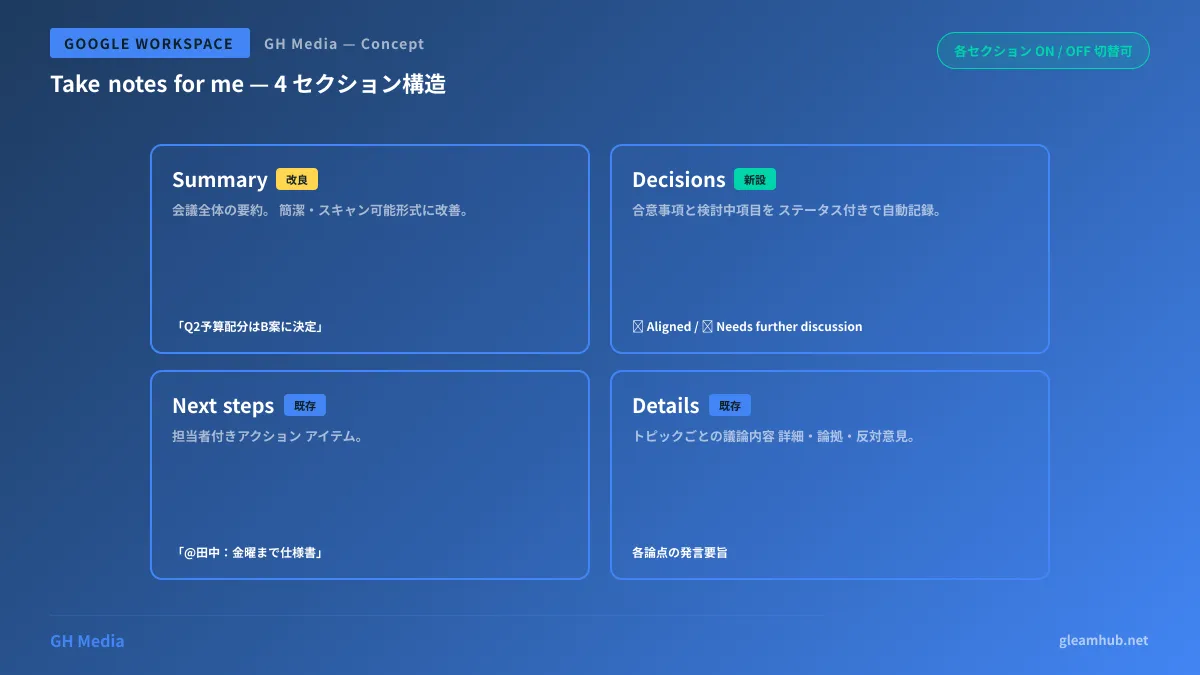
Previously, "Take notes for me" used a fixed format consisting of a single long-form summary plus action items. With this update, notes are broken down into four distinct sections, each of which can be toggled on or off.
The new 4 sections
| Section | Role | Sample output |
|---|---|---|
| Summary (existing, improved) | An overall summary of the meeting, refined in this update to be even more concise and scannable | "Discussed Q2 marketing budget allocation; decided on Plan B among three proposals" |
| Decisions (new) | Records agreed-upon items and topics under review, complete with statuses | ✅ Aligned / ⏸ Needs further discussion |
| Next steps (existing) | Action items with assignees | "@Tanaka: Prepare detailed specification document for Plan B by next Friday" |
| Details (existing) | Detailed discussions categorized by topic | Summary of points, rationale, and opposing views for each topic |
Different types of meetings require different sections. For example:
- Decision-making meetings → Enable only Decisions + Next steps
- Brainstorming sessions → Enable only Summary + Details (no decisions)
- Status update meetings → Next steps + Details
- Kickoff meetings → Enable all sections
Frustrations with AI note-taking tools had accumulated around notes being "too long to read" or "burying critical decisions," but users now have an official option to structure output as needed.
The brilliant design of the "Decisions" section
The key highlight of the new Decisions section is that it does not simply list agreed-upon points; Gemini automatically assigns statuses to them.
| Status | Meaning | Expected scenario |
|---|---|---|
| ✅ Aligned | Unanimously agreed upon and entering the execution phase | "Everyone agrees, let's move forward"; "No objections" |
| ⏸ Needs further discussion | Under discussion / ongoing review | "Prepare materials for re-discussion next time"; "Pending Person A's feedback" |
Discerning agreement versus deferral from the nuances of spoken remarks during meetings previously required focused human effort from the note-taker. Having Gemini handle this automatically allows teams to distinguish at a glance between "what was decided" and "what was carried over" when looking back later.
This serves as an extension of the Google Workspace Admin Console Guide and aligns with Google's broader strategy of "making meeting productivity visible." Beyond simply generating notes with AI, it is notable for bringing transparency to the decision-making process.
Supported plans and eligibility
| Plan | Status |
|---|---|
| Business Standard / Plus | ✅ |
| Enterprise Standard / Plus | ✅ |
| Frontline Plus | ✅ |
| Google AI Pro for Education | ✅ |
| Google AI Pro / Ultra (consumer) | ✅ |
| Business Starter | ❌ |
| Education Fundamentals | ❌ |
Requires Business Standard or higher. While small and medium-sized businesses on Starter plans will need to evaluate an upgrade, the labor savings from the AI note-taking feature alone can provide a compelling return on investment.
The rollout is gradual starting April 30, 2026 (up to 15 days). Rapid Release domains receive it first, followed shortly by Scheduled Release domains.
By use case — how to choose sections
1. One-on-ones and coaching sessions
- Should enable: Next steps (agreed-upon actions)
- Recommended to keep off: Details (keeping detailed records down to individual statements makes participants hesitant to speak)
In one-on-ones covering sensitive topics, designing the notes to record only "what to do next" rather than discussion details is preferable.
2. Regular client meetings
- Recommended to turn on: Decisions (clearly specify agreed items) + Next steps (division of responsibility)
- Optional :Summary + Details
From the perspective of preventing issues, an approach where you always keep Decisions to eliminate "he said, she said" disputes is safe.
3. Internal brainstorming
- Recommended to turn on: Summary + Details (record the expansion of ideas)
- Off: Decisions (the purpose is not to make decisions)
Having Gemini evaluate "Aligned vs Needs further discussion" during brainstorming forces the meeting into a forced convergence mode, so the Decisions section is deliberately left out.
4. Project kickoffs
- All on: Record comprehensively using all four sections
Multilingual support — quality of Gemini Japanese notes
As of 2026, Take notes for me supports seven languages including Japanese (English, French, German, Italian, Japanese, Korean, Portuguese, and Spanish). Japanese meeting notes quality has improved substantially compared to early 2025, handling honorifics, technical terminology, and katakana transcriptions with virtually no awkwardness.
However, the following caveats remain:
- Multi-speaker voice attribution: Speakers with similar vocal ranges may occasionally be confused
- Technical abbreviations: Widely used abbreviations such as "DX" and "KPI" work well, but internal company-specific abbreviations tend to be spelled out in the output
- Dialects: Because processing is based on standard Japanese, regional dialects like Kansai dialect are standardized into standard Japanese during the summarization stage
This functions effectively even in meetings that include external participants, such as those using the Google Workspace guest account feature.
Comparison with competing AI meeting notes tools
While the calculus changes for Google Workspace users who can roll out "Take notes for me" across the entire company at no additional cost, specialized tools remain worth considering alongside it if deeper customization is required.
| Tool | Strengths | Differences from Take notes for me |
|---|---|---|
| Take notes for me (covered in this article) | Workspace standard, on/off toggles for 4 sections, automated Decisions evaluation | No template functionality |
| Otter | True templates (sales, interviews, recruiting, etc.), CRM integrations | Separate contract required |
| tldv | Video clip extraction, playback timestamp links | Separate contract required |
| Grain | Custom templates, Salesforce integration | Separate contract required |
| Fellow | Specialized for one-on-ones, feedback loops | Separate contract required |
Conclusion: For standard internal meetings and regular client syncs, Take notes for me is sufficient on its own. If you need sales-specific scenario-based meeting notes (extracting objections, deep-diving into customer needs, etc.), using a specialized tool alongside it is the practical answer.
Impact seen from usage statistics
At Google Cloud Next 2026, figures were disclosed showing that "Take notes for me" was used 110 million times in the past month, growing at a rate of 8.5x year-over-year. This indicates that AI meeting notes have moved past the "experimental stage" and have been embedded into standard business habits.
Even in SMB workplaces, the long-standing, unproductive debate over "who takes the notes" is naturally fading away thanks to AI. As made clear in the announcement, Google is redesigning the very architecture of meetings around an AI-first assumption.
Summary — practical business impact of the April 30 release
To summarize this update in three lines:
- You can now toggle meeting note sections on and off (four-section structure)
- The newly added "Decisions" section provides an at-a-glance view of agreed items ✅ / items under consideration ⏸
- Available across all Google Workspace plans from Business Standard and above
Effects on SMB meeting operations:
| Benefit | Details |
|---|---|
| Reduction in meeting notes creation time | Formatting work for a 90-minute meeting: 30 minutes → 0 minutes |
| Traceability of decisions | Gemini automatically determines "decided vs. undecided" |
| Improvement in meeting quality | "Empty Decisions = inability to make decisions" is visualized, driving improvements for subsequent meetings |
Alongside the latest resource booking features for Outlook users, this can be considered an emblematic update showing that Google Workspace is shifting toward structurally resolving meeting challenges for hybrid organizations.
Sources
- Google Workspace Updates: New ways to customize AI-generated meeting notes
- Take notes for me in Google Meet (Official Help)
- Android Authority — Google Meet now lets you choose what’s included in your meeting notes
- 9to5Google — Google Meet adding in-person ‘Take Notes for me’ and Drive ‘projects’
- Android Police — Google Meet is finally giving users more control over ‘Take notes for me’